Here’s a number that should make you pause: a solo developer spending $80/month on Claude API calls could break even on a local GPU setup in just 7 months—and then run inference for free for years. In 2026, with RTX 5090s shipping and open-source models rivaling GPT-4o, the math on local vs cloud LLMs has shifted dramatically.
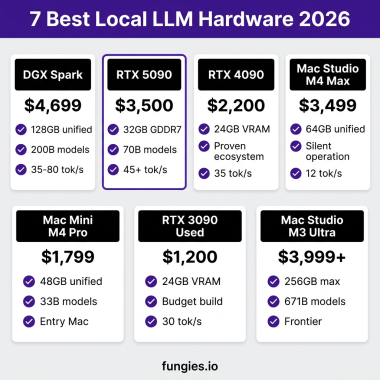
The NVIDIA DGX Spark—a $4,699 desktop supercomputer with 128GB unified memory—delivers 35-80+ tokens per second on 200B parameter models. But it’s not the only option. From $800 used RTX 3090s to $7,349 MacBook Pros, the local AI hardware landscape has exploded with choices.
What Is Local LLM Inference?
Local LLM inference means running large language models on your own hardware—your laptop, desktop, or workstation—instead of paying per-token for cloud APIs. The benefits are clear:
- Complete data privacy—your prompts never leave your machine
- No subscription costs—buy once, run forever
- Offline functionality—works without internet
- Zero rate limits—run as many requests as you want
In 2026, open-source models like Llama 4, Qwen 3.6, and DeepSeek V3.2 run at speeds that make local inference genuinely practical for daily development work.
Why VRAM Is the Only Spec That Matters
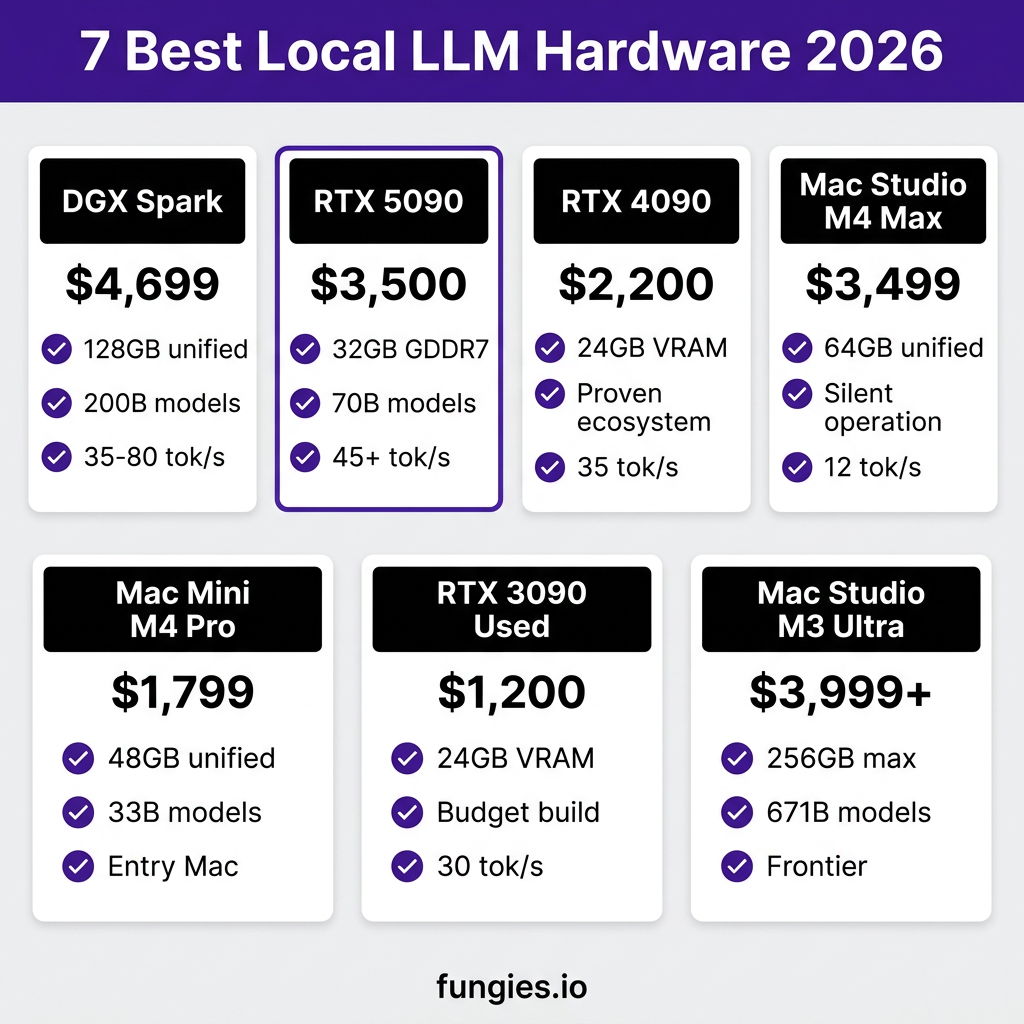
Here’s the thing nobody says clearly enough: for local AI inference, VRAM (or unified memory on Apple Silicon) is the single constraint that determines what you can run. The single biggest performance cliff in local LLM inference is the moment your model spills from GPU to CPU—size your model to fit.
Here’s what you need to know about VRAM requirements in 2026:
| Model Size | VRAM (Q4_K_M) | VRAM (Q8) | Hardware Needed |
|---|---|---|---|
| 7B | 4-5 GB | 8-9 GB | RTX 5060 Ti, Mac M2 |
| 14B | ~9 GB | ~16 GB | RTX 4070, Mac M3 |
| 24B | ~16 GB | ~28 GB | RTX 4080, Mac M3 Pro |
| 32B | ~24 GB | ~40 GB | RTX 4090/3090 |
| 70B | ~40 GB | ~80 GB | Dual GPU or Mac Studio |
| 200B | ~128 GB | ~256 GB | DGX Spark or multi-node |
1. NVIDIA DGX Spark — $4,699 (Best Overall for Serious Local AI)
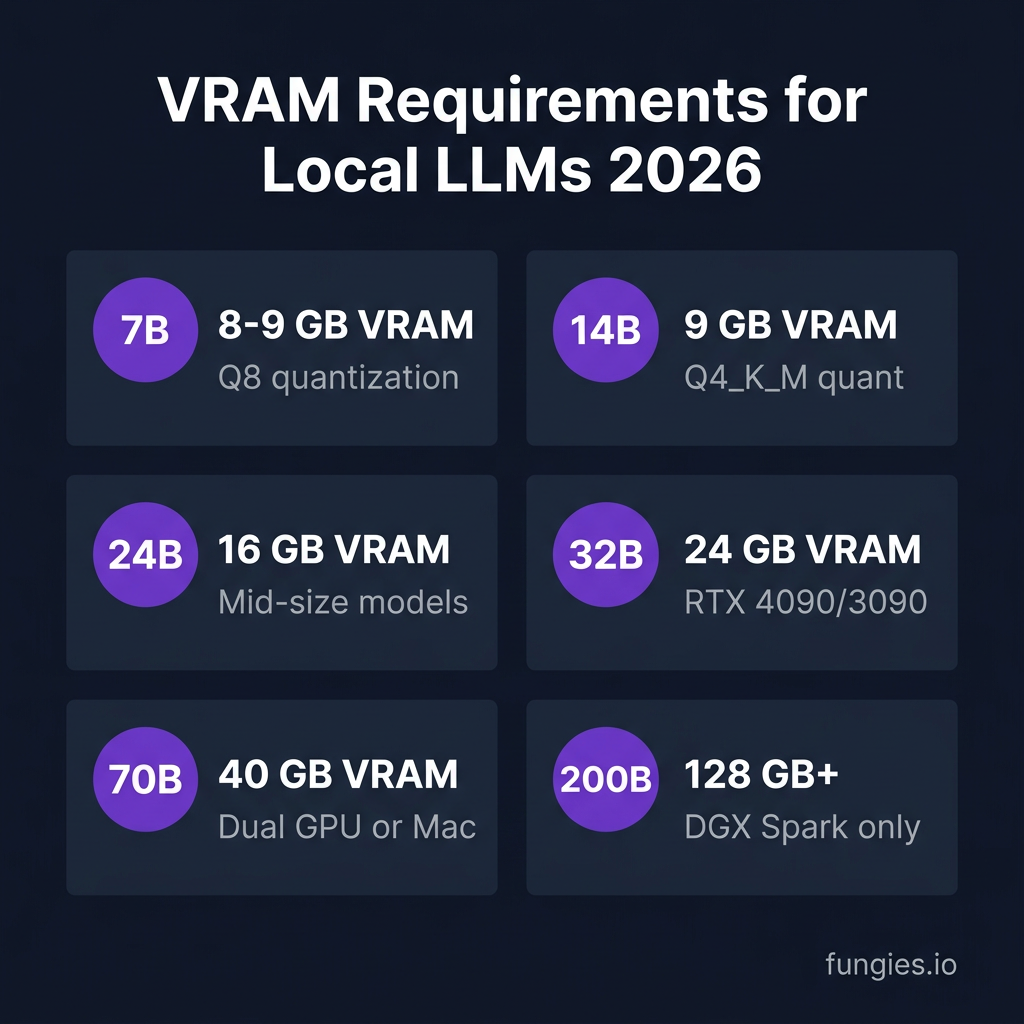
The NVIDIA DGX Spark is the hardware that changed everything. Built around the GB10 Grace Blackwell Superchip, this compact desktop supercomputer puts a genuine petaflop of FP4 AI performance and 128 GB of unified LPDDR5x memory on a device smaller than a shoebox.
- Price: $4,699 (revised from $3,999 due to memory supply constraints)
- Memory: 128GB unified LPDDR5x
- AI Performance: 1 petaFLOP FP4
- Storage: 4TB NVMe M.2 with self-encryption
- Size: 150×150×50.5mm, 1.2kg
Performance: The DGX Spark runs 200B parameter models locally at 35-80+ tokens per second. Scale to a quad-node configuration—four units interconnected through a high-performance 200 GbE RoCE switch—and you unlock 512 GB of unified memory and roughly 4 petaflops of aggregate FP4 compute.
Best for: AI researchers, startups running large models, and developers who need frontier-class inference without cloud dependencies.
2. RTX 5090 Desktop Build — ~$3,500 (Best Performance per Dollar)
The RTX 5090 is NVIDIA’s fastest consumer GPU as of 2026, and on paper it demolishes the RTX 4090 across every AI-relevant spec. With 32GB GDDR7 at 1,792 GB/s, it handles 32B models at Q4 on a single card and 70B models at Q4 across two cards.
- VRAM: 32GB GDDR7
- Memory Bandwidth: 1,792 GB/s
- Architecture: Blackwell with native FP4 support
- Tokens/sec (70B): 45+
Native FP4 on Blackwell, plus Q4 GGUF and AWQ tooling that ships with vLLM and llama.cpp out of the box, fits a 70B model in roughly 35 GB of VRAM instead of the 140 GB it needs at FP16.
3. RTX 4090 Desktop Build — ~$2,200 (Best Value for Most Developers)
The RTX 4090 has had three years of ecosystem maturation, a dramatically lower street price, and proven compatibility with every major AI framework. For most developers running local LLMs, fine-tuning smaller models, or building AI-powered applications on a single GPU, the RTX 4090 remains a seriously competitive option.
- VRAM: 24GB GDDR6X
- Street Price: ~$1,600-2,000 (used market even lower)
- Ecosystem: 3+ years of CUDA optimization
- Tokens/sec (70B): 35-40
My take: the RTX 5090 wins on raw capability, the RTX 4090 wins on value—and people who regret their GPU purchase almost always regret buying too little memory.
4. Mac Studio M4 Max (64GB) — $3,499 (Best for Apple Ecosystem)
The Mac Studio M4 Max with 64GB unified memory hits ~12.5 tok/s on Llama 3.1 70B at 546 GB/s bandwidth. It’s not the fastest per token, but Apple Silicon trades raw speed for silence and unified memory flexibility.
- Memory: 64GB unified
- Bandwidth: 546 GB/s
- Tokens/sec (70B): ~12.5
- Best Feature: Silent operation, runs up to 70B models
For macOS developers who want a seamless experience without discrete GPUs, this is the sweet spot.
5. Mac Mini M4 Pro (48GB) — $1,799 (Best Entry-Level Mac)
The Mac Mini M4 Pro with 48GB ($1,799) runs every model up to 33B at full Q4_K_M quality, handles 70B at reduced quality, and undercuts an equivalent NVIDIA PC build.
- Memory: 48GB unified
- Price: $1,799
- Best For: Developers getting started with local AI
- Tokens/sec (33B): ~15-20
This is the best entry point for Apple users who want to experiment with local LLMs without breaking the bank.
6. Used RTX 3090 Build — ~$1,200 (Best Budget Option)
A used RTX 3090 with 24GB costs roughly $700-900, pairs with 64GB of system RAM and a clean Linux install, and serves capable models through an OpenAI-compatible endpoint your existing tools already understand.
- VRAM: 24GB GDDR6X
- Used Price: $700-900
- Total Build Cost: ~$1,200
- Tokens/sec (70B): 30-35
For a 24/7 home AI server, this is the best price-to-VRAM ratio available in 2026.
7. Mac Studio M3 Ultra (128-256GB) — $3,999+ (Best for Frontier Models)
The Mac Studio M3 Ultra with 96-256GB unified memory and 800 GB/s bandwidth is the only consumer machine that can run frontier-size models like the full DeepSeek-R1 671B entirely in memory.
- Memory: 128-256GB unified options
- Bandwidth: 800 GB/s
- Starting Price: $3,999
- Unique Capability: Full 671B models in memory
If you’re pushing the absolute boundaries of what’s possible with local inference, this is your machine.
Hardware Comparison Summary
| Hardware | Price | VRAM/Memory | Best For | Tokens/sec (70B) |
|---|---|---|---|---|
| DGX Spark | $4,699 | 128GB unified | 200B models, research | 35-80 |
| RTX 5090 | ~$3,500 | 32GB GDDR7 | Performance/value | 45+ |
| RTX 4090 | ~$2,200 | 24GB GDDR6X | Proven ecosystem | 35-40 |
| Mac Studio M4 Max | $3,499 | 64GB unified | Silent, Apple devs | ~12.5 |
| Mac Mini M4 Pro | $1,799 | 48GB unified | Entry Mac | ~10 |
| RTX 3090 (used) | ~$1,200 | 24GB GDDR6X | Budget builds | 30-35 |
| Mac Studio M3 Ultra | $3,999+ | 128-256GB | Frontier models | 15-20 |
Key Takeaways
- VRAM is the only spec that matters for local LLMs—everything else is secondary
- The performance cliff happens the moment your model spills from GPU to CPU
- DGX Spark is unmatched for 200B+ models but overkill for most developers
- RTX 4090/5090 offer the best balance of price, performance, and ecosystem maturity
- Apple Silicon trades raw speed for silence and unified memory flexibility
Frequently Asked Questions
How much VRAM do I need for local LLMs in 2026?
For 7B models, you need 8-9GB for Q8 quantization or 4-5GB for Q4. For 70B models—the current sweet spot for quality—you need approximately 40GB VRAM at Q4_K_M quantization. For 200B frontier models, you need 128GB+ unified memory.
Is the DGX Spark worth $4,699?
If you’re running 200B parameter models or need quad-node scalability, yes. For most developers running 7B-70B models, an RTX 4090 or 5090 offers better value. The DGX Spark is specialized hardware for specialized needs.
Can I run 70B models on a single GPU?
Yes, but with quantization. A 70B model at Q4_K_M requires approximately 40GB VRAM. The RTX 5090 (32GB) can handle this with some optimization, or you can use two RTX 4090s (24GB each) in a multi-GPU setup.
Mac or NVIDIA for local AI?
Choose NVIDIA if you want maximum tokens per second and CUDA ecosystem compatibility. Choose Mac if you value silent operation, unified memory flexibility, and seamless macOS integration. For raw inference speed, NVIDIA wins. For convenience and noise levels, Mac wins.
What’s the cheapest way to get started with local LLMs?
A used RTX 3090 (24GB) for $700-900 paired with a modest PC build (~$1,200 total) is the most cost-effective entry point. Alternatively, the Mac Mini M4 Pro (48GB) at $1,799 offers a polished, integrated experience.
Conclusion
The right local LLM hardware depends on your specific use case. For most developers, an RTX 4090 or Mac Mini M4 Pro offers the best starting point. For those pushing boundaries with 200B models, the DGX Spark is unmatched.
Whatever hardware you choose, you’ll need a reliable way to monetize your AI-powered projects. Fungies.io handles payments, tax compliance (VAT, sales tax), and checkout for digital products—so you can focus on building, not billing. Start free today.
References
- NVIDIA DGX Spark: Best Local LLM Hardware in 2026 — explainx.ai
- How to Run Your Own Local LLM — 2026 Edition — HackerNoon
- Local LLM Hardware Guide 2026 — Kunal Ganglani
- Local LLM Hardware Requirements 2026 — PromptQuorum
- Best GPU for LLM Inference and Training 2026 — BIZON
- Best Mac for Local AI 2026 — Local AI Master