AI coding assistants can write complex logic, explain architectures, and catch bugs. But without MCP servers, they cannot actually do anything in the real world. They cannot check your database, scrape a website, run tests, or deploy code.
Model Context Protocol (MCP) changes that. It’s the open standard that gives AI assistants a real set of hands.
Since Anthropic released MCP in November 2024, the ecosystem has exploded to thousands of servers. OpenAI and Google DeepMind adopted it in early 2025. In December 2025, MCP was donated to the Linux Foundation’s Agentic AI Foundation, cementing its status as the universal interface between AI and developer tools.
What Is Model Context Protocol (MCP)?
MCP is an open standard that lets AI assistants connect to external tools, data sources, and services through a single, unified interface. Think of it as USB-C for AI: one standard connector that works everywhere.
Before MCP, connecting an AI assistant to any tool meant building custom integrations. GitHub needed one connector. PostgreSQL needed another. Notion needed yet another. Every AI client had its own plugin format, creating what Anthropic called the “N x M problem” — N tools multiplied by M clients equals an exponentially growing pile of one-off integrations.
MCP solves this with three core primitives:
- Tools: Actions an AI can invoke (run a search, create a file, deploy code)
- Resources: Data sources the AI can read (files, database records, API responses)
- Prompts: Reusable templates the server exposes to the client
The protocol supports two transport types: stdio (runs locally, managed by the AI client) and SSE/HTTP (runs remotely over a network endpoint).
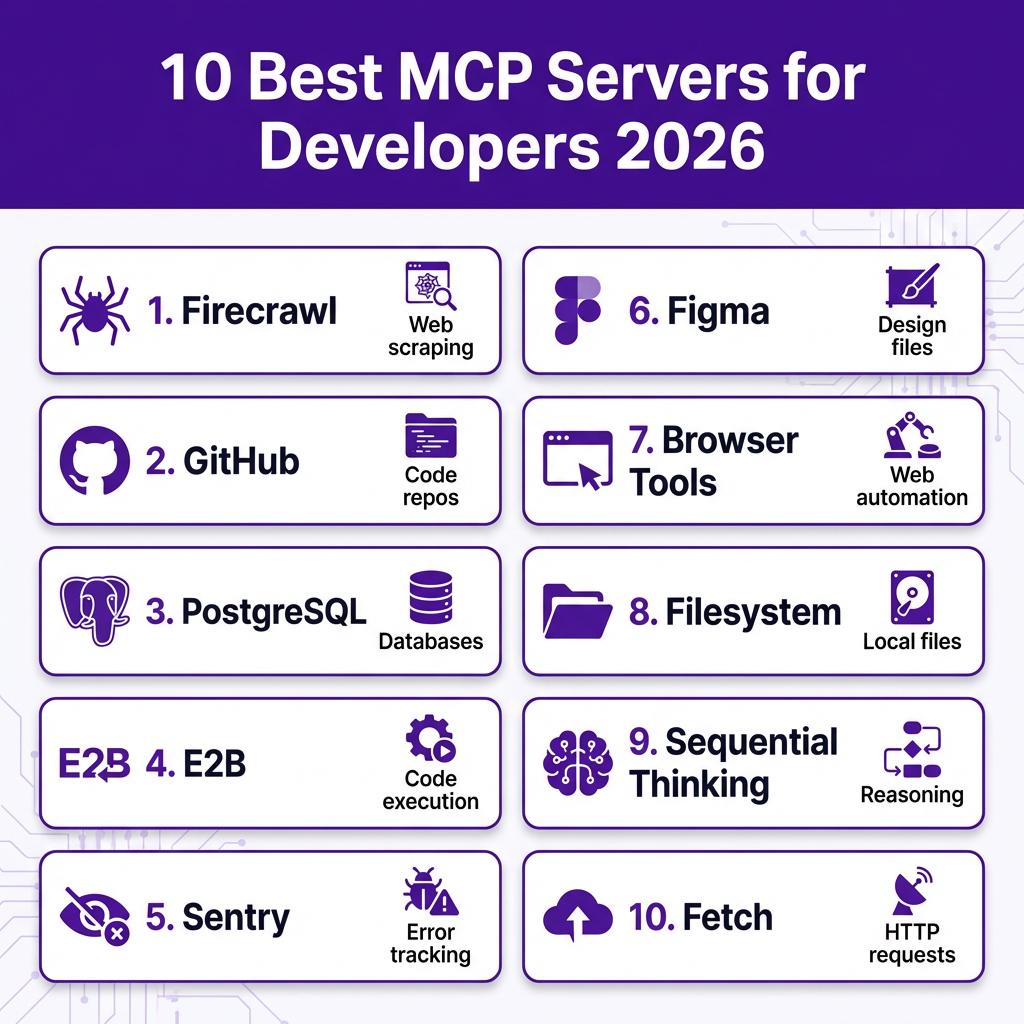
10 Best MCP Servers for Developers in 2026
1. Firecrawl MCP — Best for Web Scraping
Firecrawl turns any website into clean, LLM-ready data. It strips navigation, ads, and markup so your AI can work with actual content. Perfect for researching competitors, extracting documentation, or monitoring pricing pages.
Key features: Markdown extraction, screenshot capture, batch crawling, JavaScript rendering
Best for: Market research, competitive analysis, documentation scraping
2. GitHub MCP — Best for Repository Management
The official GitHub MCP server gives your AI full access to repositories. Create issues, open pull requests, review code, search commits, and manage workflows — all through natural language commands.
Key features: Issue/PR creation, code search, file operations, workflow triggers
Best for: Automated code reviews, issue triage, release management
3. PostgreSQL MCP — Best for Database Access
Connect your AI directly to PostgreSQL databases. Run queries, analyze schemas, generate reports, and optimize performance — without writing SQL by hand. The AI can inspect table structures and suggest indexes.
Key features: Read-only mode, schema introspection, query explanation, result formatting
Best for: Data analysis, schema migrations, performance optimization
4. E2B MCP — Best for Code Execution
E2B provides secure cloud sandboxes where your AI can actually run code, not just write it. Test Python scripts, compile applications, or run unit tests in isolated environments. It’s like having a virtual machine that your AI controls.
Key features: Multi-language support, package installation, file system access, network isolation
Best for: Testing generated code, running data pipelines, sandboxed experiments
5. Sentry MCP — Best for Error Tracking
Integrate error monitoring directly into your AI workflow. The Sentry MCP server lets your AI query error logs, analyze stack traces, and suggest fixes based on real production issues. It can correlate errors with recent deployments.
Key features: Error search, stack trace analysis, release correlation, issue creation
Best for: Debugging production issues, incident response, error trend analysis
6. Figma MCP — Best for Design Integration
Bridge the gap between design and code. The Figma MCP server lets your AI read design files, extract component specifications, and generate code that matches the design. No more guessing at spacing values or color codes.
Key features: Design file access, component inspection, CSS generation, asset export
Best for: Design-to-code workflows, component libraries, style extraction
7. Browser Tools MCP — Best for Web Automation
Give your AI a real browser it can control. Navigate websites, fill forms, click buttons, and extract data from JavaScript-heavy pages. It’s like Selenium or Playwright, but controlled entirely by natural language.
Key features: Page navigation, form interaction, screenshot capture, console access
Best for: End-to-end testing, form automation, visual regression testing
8. Filesystem MCP — Best for Local File Operations
The official Filesystem MCP server gives your AI controlled access to your local file system. Read configs, search codebases, edit files, and manage directories. It’s the foundation that makes local AI coding possible.
Key features: File read/write, directory listing, glob search, permission controls
Best for: Codebase exploration, configuration management, batch file operations
9. Sequential Thinking MCP — Best for Complex Reasoning
This unique MCP server helps AI models break down complex problems into steps. It maintains a chain of thought that the AI can reference and revise. Essential for debugging, architecture decisions, or multi-step planning.
Key features: Thought chaining, step revision, branching logic, persistence
Best for: Debugging complex issues, architectural planning, algorithm design
10. Fetch MCP — Best for HTTP Requests
A simple but essential MCP server that lets your AI make HTTP requests. Test APIs, fetch documentation, download files, or interact with webhooks. It’s the universal connector for anything with a REST API.
Key features: GET/POST/PUT/DELETE, header customization, JSON parsing, error handling
Best for: API testing, webhook integration, data fetching
MCP Server Comparison Table
| Server | Best For | Transport | Official |
|---|---|---|---|
| Firecrawl | Web scraping | SSE/HTTP | Yes |
| GitHub | Repository management | Stdio | Yes |
| PostgreSQL | Database access | Stdio | No |
| E2B | Code execution | SSE/HTTP | Yes |
| Sentry | Error tracking | Stdio | Yes |
| Figma | Design integration | Stdio | No |
| Browser Tools | Web automation | SSE/HTTP | No |
| Filesystem | Local files | Stdio | Yes |
| Sequential Thinking | Complex reasoning | Stdio | Yes |
| Fetch | HTTP requests | Stdio | Yes |
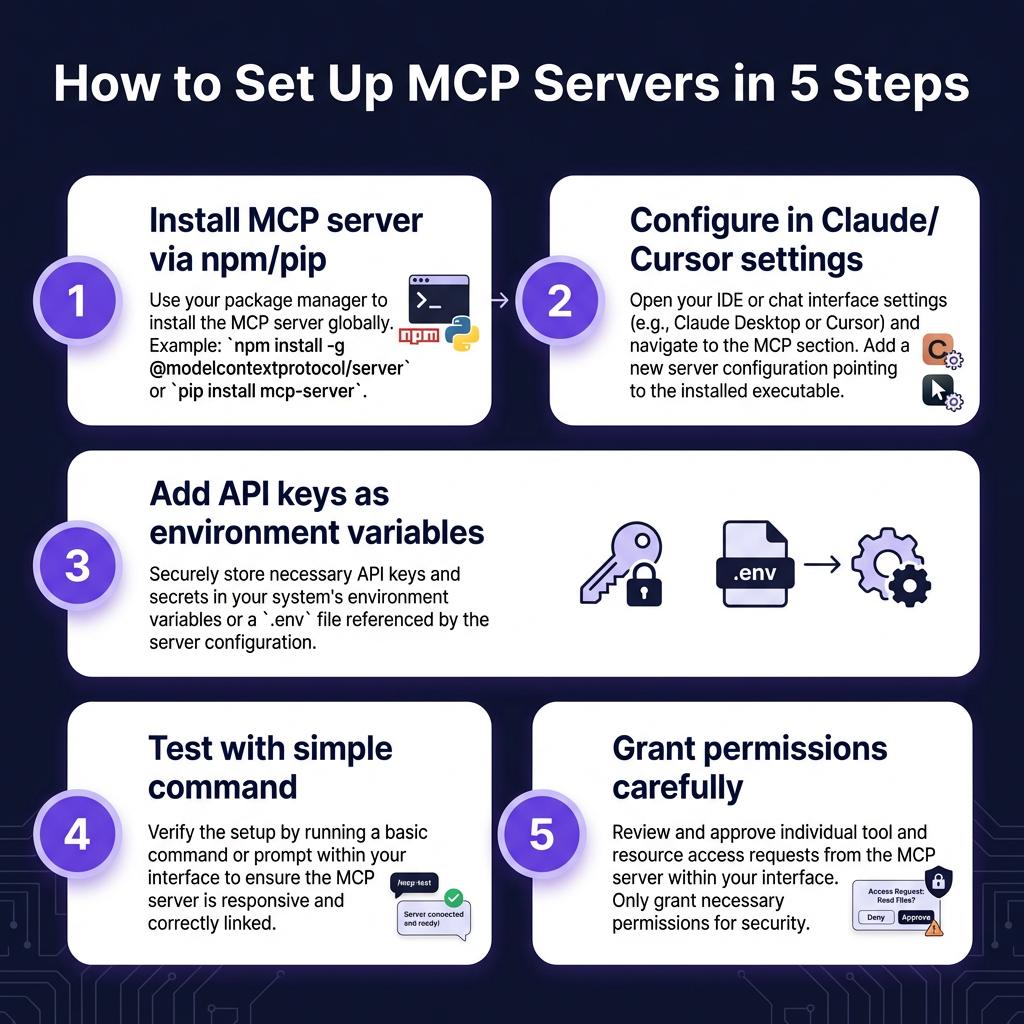
How to Set Up MCP Servers
Setting up MCP servers varies by client, but follows a similar pattern:
- Install the server: Most MCP servers are distributed via npm or pip. For example:
npm install -g @modelcontextprotocol/server-filesystem - Configure your client: Add the server to your AI client’s MCP configuration (Claude Desktop, Cursor, or VS Code).
- Set environment variables: Store API keys as environment variables, never in config files. Use
FIRECRAWL_API_KEY,GITHUB_TOKEN, etc. - Test the connection: Ask your AI to perform a simple task using the server, like “List files in the current directory” for Filesystem MCP.
- Grant permissions carefully: Start with read-only access. Only grant write permissions after you’ve observed how the AI uses the tool.
Security Best Practices
Connecting MCP servers grants real access to your systems. Follow these rules:
- Start read-only: Grant write access only after observing AI behavior
- Scope credentials tightly: Use dedicated API keys with minimum required permissions
- Keep secrets out of configs: Store API keys as environment variables
- Prefer official servers: Use implementations from the service provider
- Watch for prompt injection: MCP servers returning web content can be attack vectors
Key Takeaways
- MCP is the USB-C for AI — one standard that works across all major clients
- The 10 servers above cover 90% of developer use cases: web scraping, databases, code execution, error tracking, and design integration
- Start with Filesystem and GitHub MCP — they’re the foundation for AI-assisted development
- Always follow security best practices: read-only first, scoped credentials, environment variables for secrets
- The MCP ecosystem is growing fast — check awesome-mcp-servers for new tools
FAQ
What is the Model Context Protocol?
MCP is an open standard that lets AI assistants connect to external tools and data sources through a unified interface. It was created by Anthropic in November 2024 and is now maintained by the Linux Foundation.
Which AI clients support MCP servers?
Claude Code, Claude Desktop, Cursor, Windsurf, VS Code (with extensions), and OpenClaw all support MCP servers. The protocol is client-agnostic — one server works everywhere.
Are MCP servers free?
Most MCP servers are open source and free to use. However, some require API keys for the underlying services (like Firecrawl or E2B) which may have usage limits or paid tiers.
Can I build my own MCP server?
Yes. MCP servers are built using the Model Context Protocol SDK, available for TypeScript, Python, and other languages. The protocol is based on JSON-RPC 2.0.
What’s the difference between MCP and plugins?
Plugins are client-specific — a VS Code extension doesn’t work in Cursor. MCP servers are universal — one implementation works across all MCP-compatible clients.
Conclusion
MCP servers transform AI coding assistants from passive chatbots into active development partners. With the right MCP servers installed, your AI can scrape websites, query databases, execute code, track errors, and integrate with your entire development stack.
Start with the essentials — Filesystem, GitHub, and one specialized server for your workflow (Firecrawl for web, PostgreSQL for data, or E2B for execution). As you get comfortable, expand your MCP toolkit to match your development needs.
The future of development is AI-assisted. MCP servers are the bridge that makes it possible.
Ready to streamline your SaaS payments and checkout? Get started with Fungies.io — the merchant of record platform built for developers.