73% of developers now rely on AI-assisted coding tools for daily work. If you’re not using AI coding agents yet, you’re already behind. But here’s the thing: simply having access to Claude Code, Cursor, or GitHub Copilot doesn’t make you more productive. The developers seeing real gains—30-60% time savings on coding tasks—have learned how to integrate these tools into their workflow, not just use them as fancy autocomplete.
This guide breaks down exactly how to use AI coding agents in your development workflow. No fluff. Just practical strategies that work in production environments.

What Are AI Coding Agents (And Why They Matter in 2026)
AI coding agents are tools that go beyond simple code completion. They can understand your entire codebase, execute terminal commands, refactor across multiple files, and even create pull requests from GitHub issues. The market has exploded—reaching $6-12.8 billion in 2026 depending on which analyst you ask—with a projected CAGR of 22% through 2033.
The three dominant tools each take a different approach:
- Claude Code: Terminal-native agent ($20/mo) — best for multi-file reasoning and complex refactoring
- Cursor: AI-native IDE ($20/mo) — best integrated daily development experience
- GitHub Copilot: Multi-IDE extension ($10/mo) — best for teams already on GitHub
Here’s what changed in 2026: agent mode is now standard. These tools don’t just suggest code—they can execute it. Claude Code, Copilot’s coding agent, and Cursor’s cloud agents can run tests, fix bugs, and deploy changes with minimal human oversight.
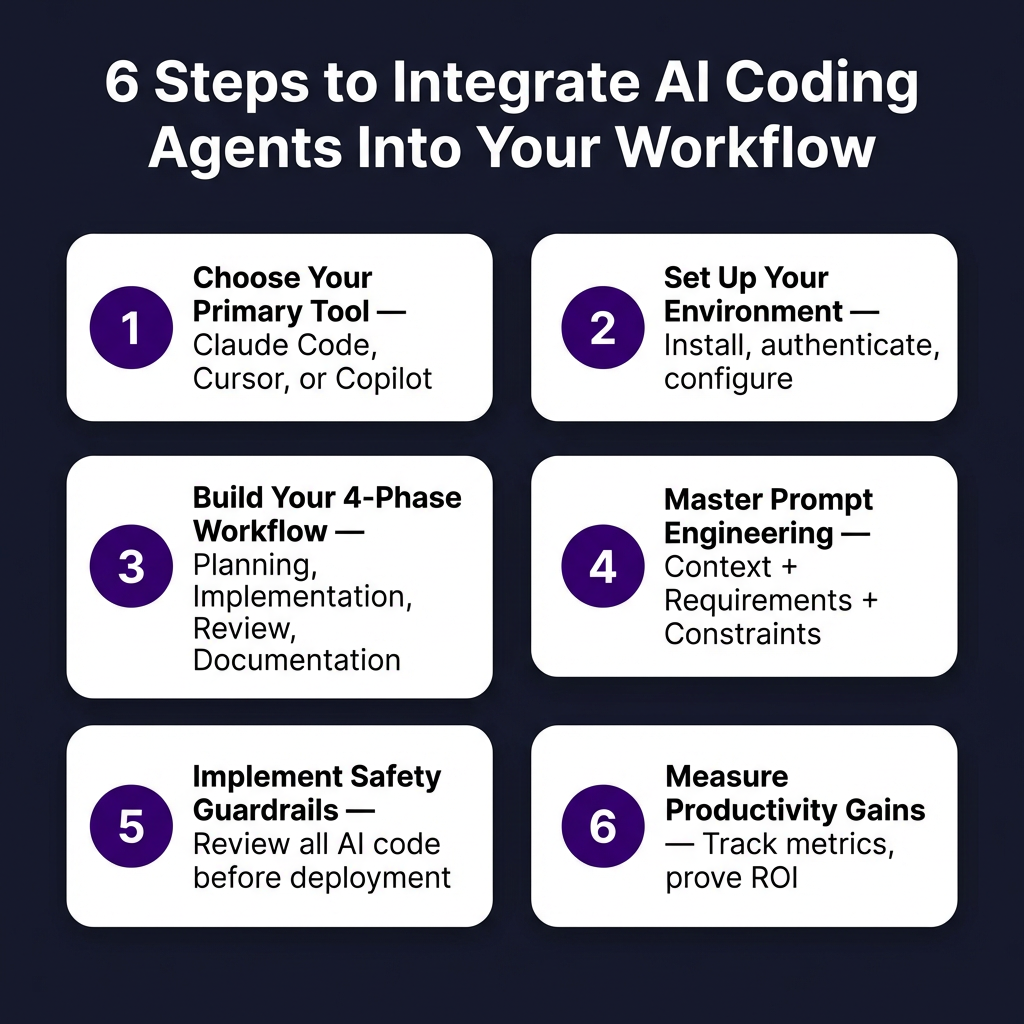
Step 1: Choose Your Primary Tool Based on Workflow
Before you can integrate AI coding agents into your workflow, you need to pick the right tool. Here’s the decision framework that actually works:
| If You… | Choose | Why |
|---|---|---|
| Live in the terminal, prefer CLI workflows | Claude Code | Native terminal integration, best reasoning model (Claude Opus) |
| Want an AI-native IDE experience | Cursor | Subagents, cloud agents, plugin marketplace, multi-model support |
| Use multiple IDEs (JetBrains, Neovim, Xcode) | GitHub Copilot | Only tool with agent mode across all major IDEs |
| Need tight GitHub integration | GitHub Copilot | Issue-to-PR pipeline, native CI integration |
| Work on large, complex codebases | Claude Code | Best multi-file reasoning and refactoring |
| Want the cheapest option that works | GitHub Copilot | $10/mo vs $20/mo for Cursor/Claude Code |
Here’s what experienced developers do: they use more than one tool. Run Claude Code for complex refactoring while using Cursor or Copilot for everyday editing. The “2-3 model rule” applies here—have a primary tool for 80% of tasks, then specialized tools for specific workflows.
Step 2: Set Up Your AI Coding Environment
Once you’ve chosen your tool, proper setup determines 50% of your success. Here’s how to configure each:
Claude Code Setup
- Install:
npm install -g @anthropics/claude-code - Authenticate with your Anthropic API key
- Set up project context: Claude Code reads your entire codebase automatically
- Configure allowed tools: terminal commands, file editing, MCP servers
- Start in your project root:
claude
Cursor Setup
- Download from cursor.com (VS Code fork with AI built-in)
- Sign in and configure your AI model preferences
- Enable “Agent Mode” in settings for autonomous coding
- Set up Cursor Cloud for background agent execution
- Install relevant extensions from the marketplace
GitHub Copilot Setup
- Install the Copilot extension in your IDE
- Sign in with GitHub account
- Enable Copilot Chat and Agent Mode (VS Code: settings)
- Configure MCP servers for tool integration
- Set up Copilot Workspace for multi-file edits
Step 3: Build Your AI-Assisted Development Workflow
Here’s where most developers fail. They treat AI coding agents as smarter autocomplete instead of workflow accelerators. The developers seeing 30-60% productivity gains follow a structured approach:
Phase 1: Planning and Architecture (AI as Consultant)
Before writing code, use your AI agent to:
- Generate architecture options for new features
- Review existing code for refactoring opportunities
- Create implementation plans with step-by-step breakdowns
- Identify potential edge cases and security issues
Prompt template that works: “I’m building [feature]. Here’s the current codebase structure [paste tree]. What are 3 different implementation approaches? Include pros, cons, and estimated complexity for each.”
Phase 2: Implementation (AI as Pair Programmer)
During active development:
- Start with high-level descriptions, let AI generate scaffolding
- Use iterative refinement—don’t expect perfect code on first try
- Review every line. AI-generated code has 2.74x more vulnerabilities than human-written code
- Run tests immediately after AI-generated changes
- Commit frequently—AI can go down wrong paths quickly
Key insight from 2026 data: 78% of agent coding sessions now involve multi-file edits. Don’t constrain AI to single files—let it work across your codebase when appropriate.
Phase 3: Review and Testing (AI as QA Assistant)
72% of QA teams now use AI for test generation. Integrate this into your workflow:
- Generate unit tests for new functions
- Create integration test scenarios
- Review code for security vulnerabilities
- Check for performance bottlenecks
- Verify edge case handling
Phase 4: Documentation (AI as Technical Writer)
Use AI to generate:
- Function and class documentation
- API endpoint descriptions
- README updates
- Changelog entries
- Code comments for complex logic
Step 4: Master Prompt Engineering for Coding Agents
Your results depend entirely on your prompts. Here’s what works in 2026:
| Bad Prompt | Good Prompt | Why It Works |
|---|---|---|
| “Fix this bug” | “This function throws [error] when [condition]. The expected behavior is [X]. Current code: [paste]. Fix the bug and add a test case that would have caught this.” | Context + expected behavior + specific deliverable |
| “Write a login system” | “Create a JWT-based authentication system for a Node.js/Express API. Requirements: password hashing with bcrypt, refresh tokens, rate limiting on login attempts. Follow the existing code style in /src/auth/.” | Specific tech stack + requirements + constraints |
| “Refactor this” | “Refactor this 200-line function into smaller functions. Each should do one thing. Maintain existing behavior. Add JSDoc comments. Target: 5 functions max, each under 40 lines.” | Clear success criteria + constraints + measurable goals |
The uncomfortable truth: model choice is only half your prompt engineering. A well-structured prompt to GPT-4o beats a vague prompt to Claude Opus.
Step 5: Implement Safety Guardrails
AI-generated code requires human oversight. Here’s your safety checklist:
- Never deploy AI-generated code without review — 46% of developers don’t fully trust AI-generated code, and for good reason
- Run security scans — AI code has higher vulnerability rates
- Test edge cases manually — AI optimizes for happy paths
- Version control everything — AI can make sweeping changes quickly
- Set up CI/CD gates — automated tests catch AI mistakes
- Use allowlists for AI actions — restrict which commands AI can run
Smart teams treat AI as a junior developer with infinite stamina but questionable judgment. Review everything.
Step 6: Measure Your Productivity Gains
You can’t improve what you don’t measure. Track these metrics:
| Metric | How to Measure | Target Improvement |
|---|---|---|
| Feature delivery time | Time from ticket creation to production | 30-50% reduction |
| Code review cycles | Number of review rounds per PR | Maintain or improve quality |
| Bug rate | Bugs per 1000 lines of code | No increase (watch for regression) |
| Test coverage | Percentage of code with tests | 10-20% increase |
| Documentation completeness | Percent of public APIs documented | Significant improvement |
Real data from development teams: developers save 30-60% of time on coding, testing, and documentation when using AI tools effectively. But this only happens with intentional workflow integration—not casual usage.
Advanced: Multi-Agent Workflows
57% of organizations now deploy multi-step agent workflows. Here’s how to implement this:
- Specialized agents: Use Claude Code for architecture, Cursor for implementation, Copilot for review
- Sequential workflows: Agent A generates code → Agent B reviews → Agent C tests
- MCP integration: Connect agents to your tools (databases, APIs, deployment platforms)
- Background execution: Let cloud agents work on tasks while you do other work
Multi-agent system inquiries surged 1,445% in 2026. This is where the industry is heading.
Key Takeaways: Your AI Coding Agent Action Plan
- Pick the right tool for your workflow—terminal users choose Claude Code, IDE-focused developers choose Cursor, GitHub-centric teams choose Copilot
- Follow the 4-phase workflow: Planning → Implementation → Review → Documentation
- Master prompt engineering—specific context + clear requirements = better results
- Implement safety guardrails—never deploy AI code without review
- Measure your gains—track metrics to prove ROI
- Consider multi-agent setups for complex projects
The developers thriving in 2026 aren’t just using AI coding agents—they’ve integrated them into every phase of their development workflow. Start with one tool, master the workflow, then expand.
Frequently Asked Questions
How much time can AI coding agents actually save?
Developers report 30-60% time savings on coding, testing, and documentation when using AI tools effectively. However, this requires intentional workflow integration—not just using autocomplete features.
Which AI coding agent is best for beginners?
GitHub Copilot at $10/month is the best starting point. It integrates into familiar IDEs, has the gentlest learning curve, and offers the most documentation and community support. Cursor is also beginner-friendly with its AI-native IDE approach.
Is AI-generated code safe to use in production?
AI-generated code has 2.74x more vulnerabilities than human-written code. Always review AI-generated code before deployment, run security scans, and test edge cases. Treat AI as a junior developer—productive but requiring oversight.
Can I use AI coding agents for free?
Yes. GitHub Copilot Free offers 2,000 completions, Bolt.new provides 1M tokens/month, and Codex CLI is open source. These free tiers are genuinely usable for learning and small projects.
Do AI coding agents work with all programming languages?
The major tools support popular languages best: Python, JavaScript/TypeScript, Java, C/C++, Go, and Rust have excellent support. Niche languages may have limited functionality. Check each tool’s documentation for language-specific capabilities.
Conclusion
AI coding agents have moved from novelty to necessity. With 73% of developers using them daily and the market growing at 22% annually, integrating these tools into your workflow isn’t optional anymore—it’s a competitive requirement.
The key is intentional integration. Choose the right tool for your workflow, follow a structured 4-phase approach, master prompt engineering, and implement proper safety guardrails. Measure your results and iterate.
Ready to streamline more than just your coding workflow? If you’re building a SaaS product or selling digital goods, you need a checkout solution that handles the complexity so you can focus on development. Try Fungies.io—the merchant of record platform that handles payments, tax compliance, and checkout for game developers and SaaS companies.
References
- AI Coding Assistants Market Share 2026 — IdeaPlan
- AI Code Assistant Market Size 2026 — New Market Pitch
- AI in Software Development: 25+ Trends & Statistics (2026) — Modall
- AI-Generated Code Statistics 2026 — Netcorp
- AI Coding Tools Compared (2026) — TLDL
- AI Coding Tools Comparison 2026 — SitePoint
- Cursor vs Claude Code vs GitHub Copilot 2026 — NxCode
- AI Coding Tools Pricing Comparison 2026 — NxCode
- AI Coding Assistant Statistics 2026 — Uvik