Here’s a number that should get your attention: 67% of developers using AI coding assistants report that their agents can’t actually do anything beyond writing code. They can’t query your database. They can’t check your Figma designs. They can’t deploy to production. They’re brilliant engines idling in neutral.
Model Context Protocol (MCP) changes everything. Released by Anthropic in November 2024 and adopted by OpenAI and Google DeepMind in early 2025, MCP has become the universal USB-C for AI agents. In December 2025, it was donated to the Linux Foundation’s Agentic AI Foundation — cementing its status as the open standard for connecting AI to real tools.
This guide walks you through everything you need to know about MCP servers: what they are, why they matter, and exactly how to set them up for your development workflow.
What Is Model Context Protocol (MCP)?
MCP is an open standard that lets AI assistants connect to external tools, data sources, and services through a single, unified interface. Think of it as USB-C for AI — one standard connector that works everywhere.
Before MCP, connecting an AI assistant to external tools meant building custom integrations for each combination of tool and AI client. GitHub needed one connector for Claude, another for Cursor, another for Copilot. Postgres needed separate implementations. Notion needed more. This “N x M problem” created an exponentially growing pile of one-off integrations.
MCP solves this by introducing a universal interface. One MCP server works with Claude Code, Cursor, Windsurf, VS Code, and any other compliant client. The protocol is built on JSON-RPC 2.0 and handles authentication, tool discovery, and execution consistently across platforms.
Why MCP Servers Matter for Developers
Without MCP servers, your AI assistant lives in a walled garden. It can write code, explain concepts, and review pull requests — but it can’t interact with the systems where your work actually happens.
With MCP servers, your AI can:
- Query your production database to check schema or debug issues
- Read your Figma designs and generate matching code
- Search the web for current documentation and examples
- Run code in secure sandboxes to test before deployment
- Access GitHub to create issues, review PRs, and manage releases
- Connect to Slack to notify teams or retrieve context
- Query Sentry to investigate production errors
The result? AI assistants that actually complete tasks instead of just suggesting code. Developers report 40-60% productivity gains when their AI tools can access real systems through MCP.
The 10 Essential MCP Servers Every Developer Should Know
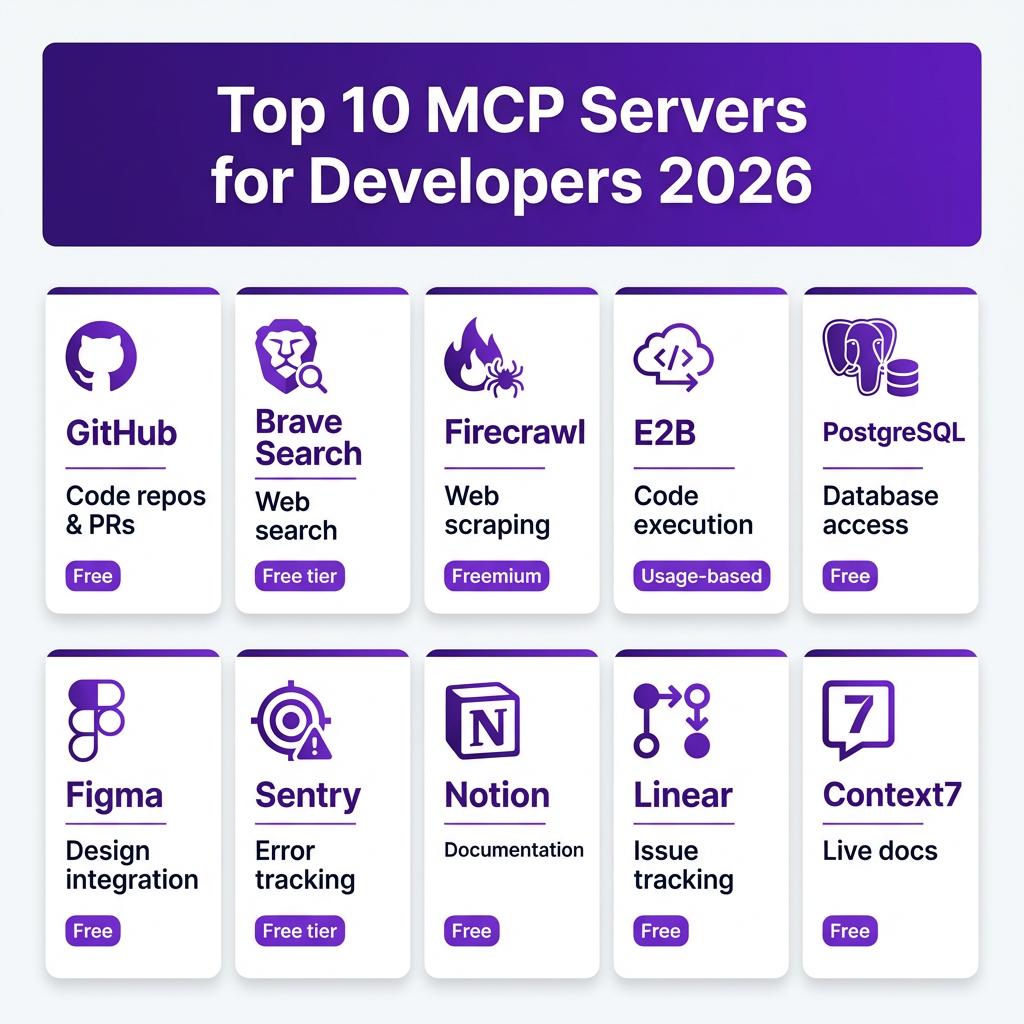
Based on GitHub stars, community adoption, and real-world utility, here are the MCP servers that deliver the most value for development teams:
1. GitHub MCP Server
The official GitHub MCP server provides full API access: repositories, pull requests, issues, code search, Actions workflows, and security scanning. It’s maintained by GitHub and is the most widely used MCP server in production.
Best for: Teams doing heavy GitHub-based development, CI/CD automation, and PR reviews.
2. Brave Search MCP
Gives your AI assistant web search capabilities through Brave’s privacy-focused search API. Unlike built-in browsing, this provides structured, current data without context window bloat.
Best for: Research tasks, finding current documentation, checking competitor features.
3. Firecrawl MCP
Turns any website into clean, LLM-ready data. Strips navigation, ads, and markup so your AI works with actual content. Essential for scraping documentation, competitor analysis, and research.
Best for: Documentation scraping, content research, competitor analysis.
4. E2B MCP Server
Provides secure cloud sandboxes where your AI can actually run code — not just write it. Supports Python, JavaScript, shell commands, and browser automation in isolated environments.
Best for: Testing generated code, running data analysis, safe execution of untrusted code.
5. PostgreSQL MCP
Connects your AI directly to PostgreSQL databases. Query schemas, inspect data, generate migrations, and debug production issues — all through natural language.
Best for: Database administration, schema exploration, data analysis.
6. Figma MCP (Dev Mode)
Figma’s official Dev Mode MCP server exposes live design structure: layer hierarchy, auto-layout, variants, text styles, and token references. Your AI can generate code that actually matches the design.
Best for: Frontend developers, design-to-code workflows, maintaining design system consistency.
7. Sentry MCP
Integrates with Sentry error tracking to let your AI investigate production issues, query error rates, and suggest fixes based on stack traces and context.
Best for: Incident response, debugging production issues, error monitoring.
8. Notion MCP
Connects your AI to Notion workspaces for reading docs, updating pages, and managing knowledge bases. Great for teams using Notion as their source of truth.
Best for: Documentation workflows, knowledge management, project planning.
9. Linear MCP
Integrates with Linear issue tracking to create tickets, update status, and query project progress. Essential for teams using Linear for project management.
Best for: Issue tracking, project management, sprint planning.
10. Context7 MCP
The single most recommended MCP server across developer communities. Provides up-to-date documentation for thousands of libraries and frameworks, solving the “my training data is outdated” problem.
Best for: Working with latest library versions, accurate API documentation, reducing hallucinations.
MCP Server Comparison by Use Case
| Server | Primary Use | Setup Complexity | Pricing | Maintenance |
|---|---|---|---|---|
| GitHub | Code repository management | Easy | Free | Official |
| Brave Search | Web search | Easy | Free tier (2k/mo) | Official |
| Firecrawl | Web scraping | Medium | Free tier + paid | Community |
| E2B | Code execution | Medium | Free tier + usage | Official |
| PostgreSQL | Database access | Medium | Free | Official |
| Figma | Design integration | Easy | Free | Official |
| Sentry | Error tracking | Easy | Free tier | Community |
| Notion | Documentation | Easy | Free | Official |
| Linear | Issue tracking | Easy | Free | Official |
| Context7 | Documentation | Easy | Free | Community |
Step-by-Step: Setting Up Your First MCP Server
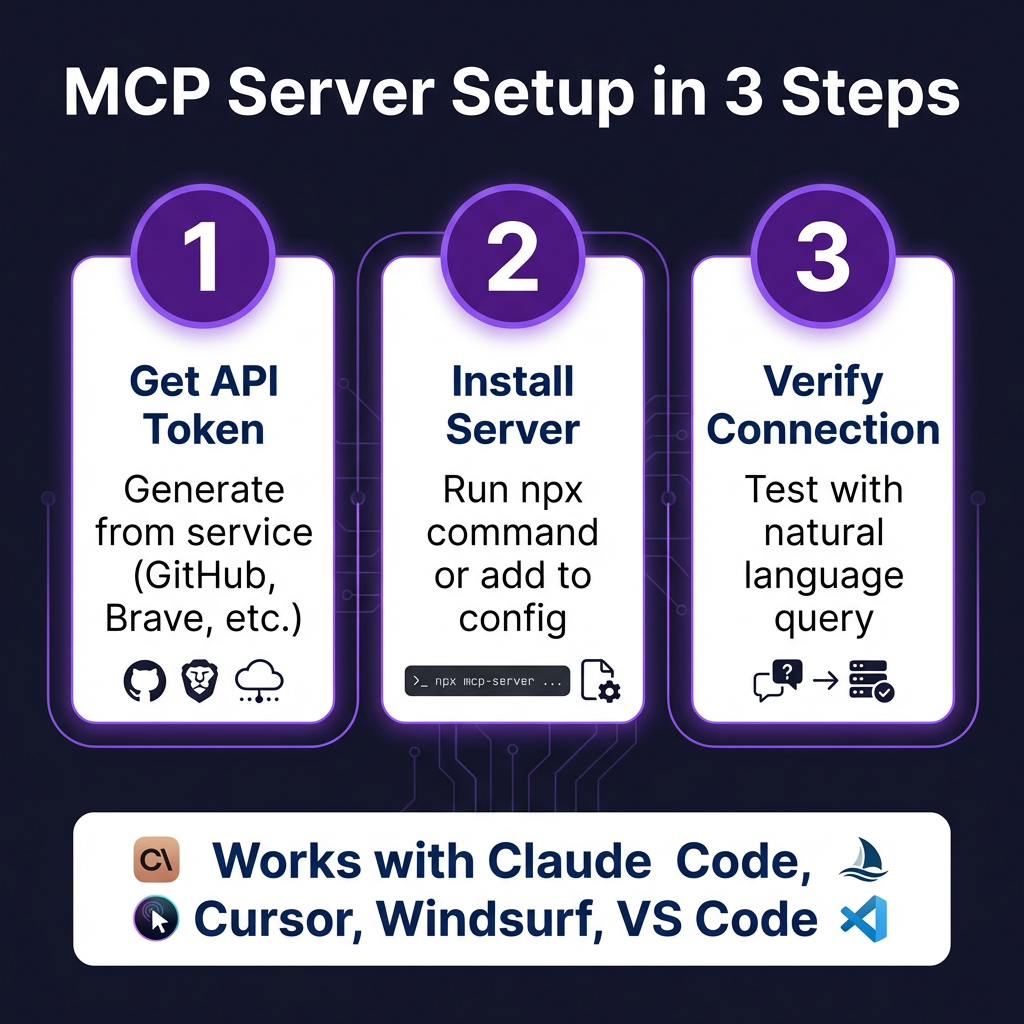
Let’s walk through setting up the GitHub MCP server with Claude Code. The process is nearly identical for Cursor, Windsurf, and other MCP-compatible clients.
Step 1: Generate a GitHub Personal Access Token
Go to GitHub → Settings → Developer settings → Personal access tokens → Tokens (classic). Generate a new token with these scopes:
repo— Full repository accessworkflow— GitHub Actionsread:org— Organization data (if needed)
Step 2: Install the MCP Server
For Claude Code, run:
claude mcp add github -e GITHUB_PERSONAL_ACCESS_TOKEN=your_token_here -- npx -y @anthropic-ai/mcp-server-github
For Cursor, add this to your ~/.cursor/mcp.json:
{
  "mcpServers": {
    "github": {
      "command": "npx",
      "args": ["-y", "@anthropic-ai/mcp-server-github"],
      "env": {
        "GITHUB_PERSONAL_ACCESS_TOKEN": "your_token_here"
      }
    }
  }
}
Step 3: Verify the Connection
Test your setup by asking your AI assistant:
“List my recent GitHub repositories”
If configured correctly, your AI will use the MCP server to fetch and display your repositories.
Advanced MCP Configuration Patterns
Pattern 1: Multiple Servers in One Config
You can configure multiple MCP servers in a single JSON file:
{
  "mcpServers": {
    "github": {
      "command": "npx",
      "args": ["-y", "@anthropic-ai/mcp-server-github"],
      "env": { "GITHUB_PERSONAL_ACCESS_TOKEN": "ghp_xxx" }
    },
    "postgres": {
      "command": "npx",
      "args": ["-y", "@anthropic-ai/mcp-server-postgres", "postgresql://user:pass@localhost:5432/db"]
    },
    "brave-search": {
      "command": "npx",
      "args": ["-y", "@anthropic-ai/mcp-server-brave-search"],
      "env": { "BRAVE_API_KEY": "your_key" }
    }
  }
}
Pattern 2: Environment Variable Security
Never hardcode tokens in your config. Instead, reference environment variables:
{
  "mcpServers": {
    "github": {
      "command": "npx",
      "args": ["-y", "@anthropic-ai/mcp-server-github"],
      "env": {
        "GITHUB_PERSONAL_ACCESS_TOKEN": "${GITHUB_TOKEN}"
      }
    }
  }
}
Pattern 3: Team-Wide Configuration
For teams, commit a template config to your repo and use .env files for secrets:
# .cursor/mcp.json (committed to repo)
{
  "mcpServers": {
    "github": {
      "command": "npx",
      "args": ["-y", "@anthropic-ai/mcp-server-github"],
      "env": { "GITHUB_PERSONAL_ACCESS_TOKEN": "${GITHUB_TOKEN}" }
    }
  }
}

# .env (gitignored)
GITHUB_TOKEN=ghp_your_actual_token
Security Best Practices for MCP Servers
MCP servers give AI assistants significant power. Follow these security practices:
- Use least-privilege tokens — Don’t give your GitHub token full admin access if it only needs to read repos
- Rotate tokens regularly — Set calendar reminders to regenerate API keys monthly
- Monitor MCP tool usage — Review what your AI is doing, especially in production
- Use environment variables — Never commit secrets to version control
- Start with read-only access — Test servers with read permissions before enabling write operations
- Review server code — Community servers should be vetted before use in production
Troubleshooting Common MCP Issues
| Issue | Cause | Solution |
|---|---|---|
| “MCP server not found” | Server not installed or path incorrect | Verify npx command works; check server name |
| Authentication errors | Invalid or expired token | Regenerate token; check env var name matches |
| Tools not appearing | Server crashed on startup | Check server logs; verify dependencies installed |
| Slow responses | Network latency or rate limits | Check API quotas; consider caching layer |
| Context window overflow | Too many MCP tools loaded | Claude Code now warns at 10% context usage |
Key Takeaways
- MCP is the new standard for AI-tool integration — adopted by Anthropic, OpenAI, and Google
- One server, multiple clients — configure once, use with Claude Code, Cursor, Windsurf, or VS Code
- Start with GitHub + Brave Search — these two servers deliver immediate value for most developers
- Security matters — use least-privilege tokens and environment variables
- The ecosystem is growing fast — thousands of servers available, with new ones added daily
Frequently Asked Questions
What is the difference between MCP and traditional APIs?
MCP provides a standardized interface that any AI client can use. Traditional APIs require custom integration for each client. MCP handles authentication, tool discovery, and execution consistently across platforms.
Do MCP servers work with all AI coding assistants?
MCP servers work with any MCP-compatible client. Currently, this includes Claude Code, Cursor, Windsurf, VS Code with extensions, and GitHub Copilot (partial support). Check your client’s documentation for MCP support.
Are MCP servers free to use?
Most MCP servers are open source and free. However, they often connect to services that may have costs (e.g., E2B sandboxes, Brave Search API beyond free tiers). Always check the pricing of the underlying service.
Can I build my own MCP server?
Yes. MCP servers are built using the Model Context Protocol SDK, available for Python, TypeScript, and other languages. The protocol is open and well-documented, making it straightforward to expose your own tools and data sources.
How do I find new MCP servers?
Check the official MCP directory, Apigene’s MCP directory (251+ verified servers), or GitHub’s topic search for “mcp-server”. The ecosystem grows daily with community-contributed servers.
Conclusion
MCP servers transform AI coding assistants from passive suggestion engines into active participants in your development workflow. By connecting your AI to real tools — databases, APIs, design files, and deployment platforms — you unlock productivity gains that were impossible just a year ago.
Start small. Install the GitHub and Brave Search MCP servers this week. Get comfortable with the configuration patterns. Then gradually expand your MCP toolkit as you discover new use cases.
The future of AI-assisted development isn’t smarter models alone — it’s models connected to your actual work environment through open standards like MCP.
Ready to streamline your SaaS payment infrastructure too? Get started with Fungies.io — the Merchant of Record platform that handles payments, taxes, and compliance so you can focus on building.
References
- Firecrawl. (2026). 10 Best MCP Servers for Developers in 2026. https://www.firecrawl.dev/blog/best-mcp-servers-for-developers
- Builder.io. (2026). Best AI Coding Tools for Developers in 2026. https://www.builder.io/blog/best-ai-tools-2026
- Model Context Protocol Specification. https://modelcontextprotocol.io
- Apigene. (2026). Best MCP Servers: Definitive 2026 List. https://apigene.ai/blog/best-mcp-servers
- Zuplo. (2026). Model Context Protocol Trends: 2026 Survey Results. https://zuplo.link/Uyv2Evh
- Intuz. (2026). Top 10 MCP (Model Context Protocol) Servers in 2026. https://www.intuz.com/blog/best-mcp-servers
- Vibehackers. (2026). Best MCP Servers for Claude Code, Cursor & Windsurf. https://vibehackers.io/blog/best-mcp-servers
- Skyvia. (2026). Top 12 MCP Servers: A Complete Guide for 2026. https://skyvia.com/blog/best-mcp-servers/