Here’s the reality: developers are drowning in API integrations. Every new tool means another authentication flow, another SDK to learn, another set of endpoints to memorize. But what if your AI assistant could just use any tool you give it—no custom code required?
That’s exactly what MCP servers deliver. The Model Context Protocol, introduced by Anthropic in late 2024, has exploded in 2026 as the standard way to connect AI agents to external tools. With 251+ vendor-verified servers now available and support across Claude Code, Cursor, Windsurf, and VS Code, MCP is becoming the USB-C port for AI integrations.
In this guide, I’ll show you exactly how MCP servers work, which ones matter most for developers, and how to set them up in your workflow. No fluff—just working configurations you can copy-paste today.
What Is MCP and Why Should You Care?
MCP (Model Context Protocol) is an open standard that lets AI assistants connect to external tools, data sources, and services through a single, unified interface. Think of it as a universal adapter for AI agents.
Before MCP, integrating an AI assistant with a new tool meant writing custom code for each integration. Want your AI to search the web? Build a search integration. Want it to query your database? Another integration. Want it to post to Slack? You guessed it—more custom code.
MCP changes this by standardizing the protocol. A tool vendor writes one MCP server. Any AI client that speaks MCP can use it immediately. No custom integration code required.
The Three Components of MCP
MCP has a simple three-part architecture:
- Host: The AI application you’re using (Claude Code, Cursor, etc.)
- Client: The MCP client built into the host that manages connections
- Server: The MCP server that exposes tools from a specific service
When you ask your AI to “search for recent Python documentation,” the host routes that request through the MCP client to the appropriate server (like Brave Search MCP), which executes the search and returns structured results.
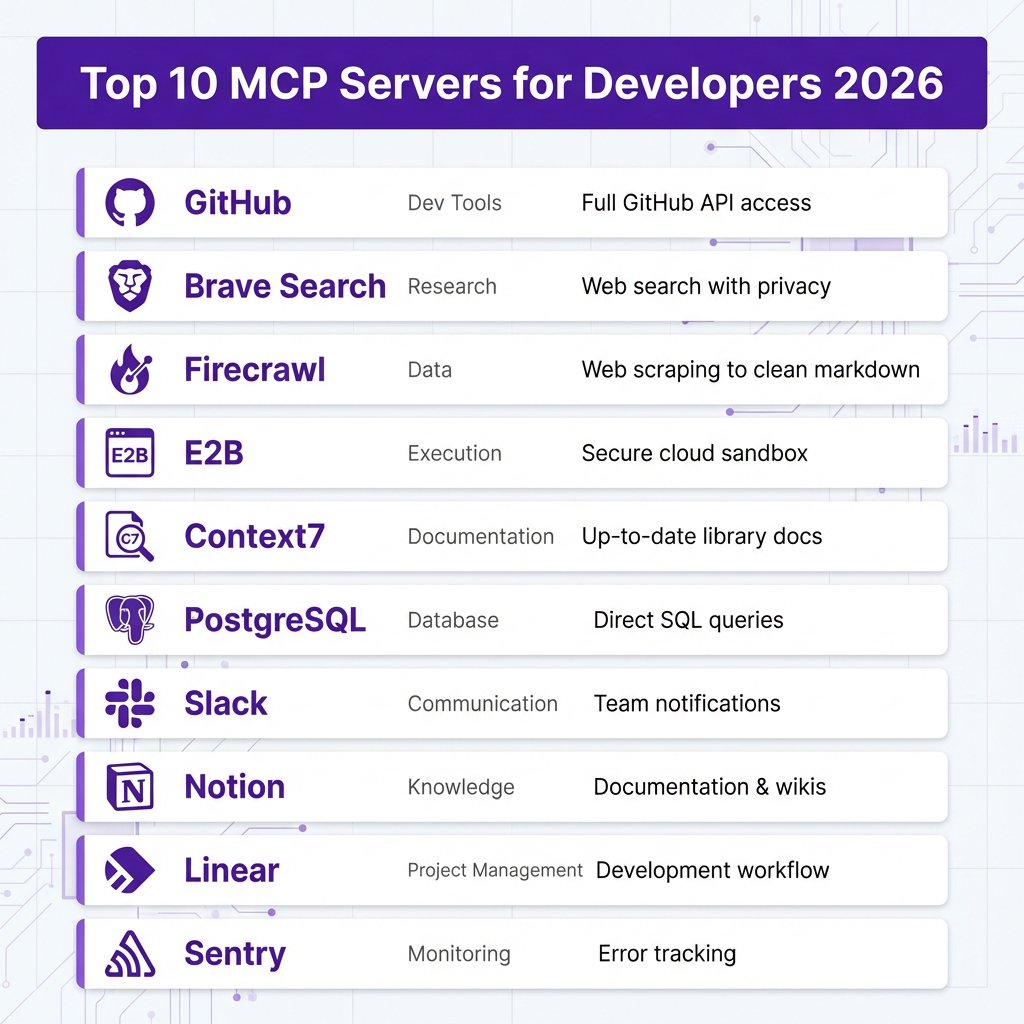
Top 10 MCP Servers Every Developer Should Know
Not all MCP servers are created equal. Based on adoption rates, GitHub stars, and real-world utility, here are the 10 most valuable MCP servers for developers in 2026:
| MCP Server | Category | Key Capability | Best For |
|---|---|---|---|
| GitHub | Dev Tools | Full GitHub API access | Repo management, PRs, issues |
| Brave Search | Research | Web search with privacy | Documentation lookup, research |
| Firecrawl | Data | Web scraping → clean markdown | Content extraction, RAG |
| E2B | Execution | Secure cloud sandbox | Running code safely |
| Context7 | Documentation | Up-to-date library docs | Accurate coding help |
| PostgreSQL | Database | Direct SQL queries | Data analysis, debugging |
| Slack | Communication | Send messages, read channels | Team notifications |
| Notion | Knowledge | Read/write pages, databases | Documentation, wikis |
| Linear | Project Mgmt | Issues, projects, cycles | Development workflow |
| Sentry | Monitoring | Error tracking, issues | Debugging production |
1. GitHub MCP
The GitHub MCP server is consistently ranked as the #1 most-used server across all developer surveys. It gives your AI full access to the GitHub API—create repositories, manage issues, review pull requests, trigger Actions workflows, and more.
Why it matters: Instead of switching between your terminal and GitHub’s web interface, you can say “create a PR that fixes the authentication bug” and your AI will draft it, including a description based on your recent commits.
2. Brave Search MCP
Brave Search MCP gives your AI agent web search capabilities with a privacy-first approach. Unlike some alternatives, Brave doesn’t track your searches or build a profile on you.
Why it matters: Your AI can look up current documentation, check for library updates, or research error messages—all without you leaving your coding environment.
3. Firecrawl MCP
Firecrawl turns any website into clean, LLM-ready data. It strips navigation, ads, and markup so your AI can work with actual content. This is essential for RAG (Retrieval-Augmented Generation) applications.
Why it matters: Need to analyze competitor pricing? Research a technology? Build a knowledge base from documentation? Firecrawl handles the messy extraction so your AI gets clean data.
4. E2B MCP
E2B provides secure cloud sandboxes where your AI can actually run code—not just write it. This is a game-changer for testing, debugging, and autonomous coding workflows.
Why it matters: Your AI can write a script, execute it in an isolated environment, see the output, fix errors, and iterate—all autonomously.
5. Context7 MCP
Context7 is the most recommended MCP server across developer forums. It gives your AI access to up-to-date documentation for thousands of libraries and frameworks.
Why it matters: LLMs have training cutoffs. Context7 ensures your AI knows the latest API changes, new features, and current best practices for any library you use.
How to Set Up MCP Servers: Complete Walkthrough
Setting up MCP servers is straightforward once you understand the configuration format. Here’s how to do it for the two most popular AI coding tools: Claude Code and Cursor.

Setting Up MCP in Claude Code
Claude Code uses a JSON configuration file to manage MCP servers. The file location depends on your operating system:
- macOS:
~/Library/Application Support/Claude/settings.json - Linux:
~/.config/claude/settings.json - Windows:
%APPDATA%/Claude/settings.json
Here’s a complete configuration with the most useful MCP servers:
{
  "mcpServers": {
    "github": {
      "command": "npx",
      "args": ["-y", "@anthropic-ai/mcp-server-github"],
      "env": {
        "GITHUB_TOKEN": "ghp_your_token_here"
      }
    },
    "brave-search": {
      "command": "npx",
      "args": ["-y", "@anthropic-ai/mcp-server-brave-search"],
      "env": {
        "BRAVE_API_KEY": "your-brave-api-key"
      }
    },
    "postgresql": {
      "command": "npx",
      "args": [
        "-y",
        "@anthropic-ai/mcp-server-postgres",
        "postgresql://user:pass@localhost:5432/mydb"
      ]
    },
    "slack": {
      "command": "npx",
      "args": ["-y", "@anthropic-ai/mcp-server-slack"],
      "env": {
        "SLACK_BOT_TOKEN": "xoxb-your-bot-token",
        "SLACK_TEAM_ID": "T01234567"
      }
    },
    "notion": {
      "command": "npx",
      "args": ["-y", "@anthropic-ai/mcp-server-notion"],
      "env": {
        "NOTION_API_KEY": "ntn_your_integration_key"
      }
    }
  }
}
Step-by-step:
- Create or edit your
settings.jsonfile at the appropriate path - Add the MCP server configurations you need
- Replace placeholder values with your actual API keys
- Save the file and restart Claude Code
- Test by asking Claude to use one of the tools (e.g., “search for Python async best practices”)
Setting Up MCP in Cursor
Cursor has built-in MCP support through its settings. Here’s how to configure it:
- Open Cursor Settings (Cmd/Ctrl + ,)
- Navigate to “Features” → “MCP Servers”
- Click “Add New MCP Server”
- Enter the server configuration
Cursor uses the same JSON format as Claude Code. You can use the exact same configuration shown above. Cursor also supports MCP Config Generator tools that build the JSON for you without manual editing.
Getting API Keys
Most MCP servers require API keys. Here’s where to get them:
| Service | API Key Location | Cost |
|---|---|---|
| GitHub | Settings → Developer settings → Personal access tokens | Free |
| Brave Search | brave.com/search/api | Free tier: 2,000 queries/month |
| Notion | notion.so/my-integrations | Free |
| Slack | api.slack.com/apps | Free |
| Firecrawl | firecrawl.dev | Free tier available |
| E2B | e2b.dev | Free tier available |
Real-World MCP Use Cases
Theory is nice, but let’s look at how developers are actually using MCP servers in production:
Use Case 1: Autonomous Debugging Workflow
A developer notices an error in production. With MCP servers configured, they can say:
“Check Sentry for the most frequent error in the last hour, search our Notion runbook for how to fix it, and create a Linear ticket assigned to me with the solution approach.”
The AI queries Sentry MCP to get error details, searches Notion MCP for relevant documentation, then creates a properly formatted Linear ticket with context. What used to involve four different tools and 15 minutes now happens in one sentence.
Use Case 2: Documentation-Driven Development
When starting a new feature, a developer can ask:
“Search Context7 for the latest React Server Components patterns, check our Notion product spec for the requirements, and scaffold a new branch with the component structure.”
The AI pulls current best practices, cross-references with internal requirements, and generates starter code—all before the developer writes a single line.
Use Case 3: Code Review Automation
For pull request reviews, a tech lead can ask:
“Review the open PR #234, check if it references a Linear issue, run the test suite via E2B sandbox, and post a summary to Slack #code-reviews.”
The AI fetches the PR from GitHub, checks Linear for linked issues, spins up an E2B sandbox to run tests safely, and posts a formatted review summary to Slack.
Best Practices and Security Considerations
MCP servers are powerful, but with that power comes responsibility. Here are the key practices to follow:
Context Window Management
Each MCP server you enable adds tool definitions to your agent’s context window. Claude Code now detects when your MCP tools would use more than 10% of context and warns you. Some MCP servers expose 50+ tools, which can quickly eat into your token budget.
Best practice: Only enable the MCP servers you actively use. If you’re not working with Slack today, disable the Slack MCP server to free up context for other tools.
API Key Security
Your MCP configuration contains sensitive API keys. Protect them:
- Never commit
settings.jsonto version control - Add it to your
.gitignorefile - Use environment variables for keys when possible
- Rotate keys regularly
- Use scoped tokens with minimal permissions
Tool Permission Awareness
MCP servers can perform actions on your behalf—creating GitHub issues, posting to Slack, modifying databases. Always review what tools a server exposes before enabling it. Start with read-only permissions when possible, and upgrade to write access only when necessary.
Verified Sources
Not all MCP servers are created equal. Use verified directories like the Apigene MCP directory, which scans servers against OWASP MCP guidelines and surfaces security metadata. Avoid installing MCP servers from unverified sources.
FAQ: MCP Servers
What AI clients support MCP servers?
As of 2026, MCP is supported by Claude Code, Cursor, Windsurf, VS Code (with extensions), and Claude Desktop. More clients are adding support monthly.
Can I build my own MCP server?
Yes. MCP is an open protocol, and Anthropic provides SDKs for building servers in Python and TypeScript. If you have an internal tool or API you want your AI to access, building a custom MCP server is straightforward.
Are MCP servers free?
The MCP protocol and many servers are open source and free. However, the underlying services (like Brave Search, Firecrawl, or E2B) may have their own pricing. Many offer generous free tiers sufficient for individual developers.
How do MCP servers compare to function calling?
MCP is essentially standardized function calling. Instead of each AI provider having their own function calling format, MCP provides a universal standard. A server written for MCP works with any MCP-compatible client.
What’s the difference between MCP and API integrations?
Traditional API integrations require custom code for each tool. MCP provides a standardized layer—write the integration once as an MCP server, and any MCP-compatible AI can use it without additional code.
Key Takeaways
- MCP is the USB-C for AI tools—one standard, universal compatibility
- Start with GitHub, Brave Search, and Context7—these three cover 80% of developer needs
- Watch your context window—each MCP server consumes tokens; only enable what you use
- Secure your API keys—never commit credentials to version control
- Use verified directories—stick to scanned, security-checked servers from reputable sources
MCP servers represent a fundamental shift in how AI agents interact with tools. Instead of custom integrations for every service, we now have a universal protocol. For developers, this means less time wiring up APIs and more time building what matters.
The ecosystem is growing fast—251+ servers and counting. If you haven’t set up MCP servers yet, start with the configuration in this guide. Your AI assistant is about to get a lot more capable.
Build Smarter with Fungies
While you’re automating your development workflow with MCP servers, don’t let payments and tax compliance slow you down. Fungies.io handles global payments, VAT, and sales tax automatically—so you can focus on building.
References
- The Best MCP Servers in 2026: A Complete Directory – Developers Digest
- 10 Best MCP Servers for Developers in 2026 – Firecrawl
- 9 Amazing Model Context Protocol Use Cases in 2026 – Obot AI
- MCP 2026 | Model Context Protocol Complete Guide – Sainam
- Best MCP Servers: Definitive 2026 List – Apigene
- Top 12 MCP Servers: A Complete Guide for 2026 – Skyvia
- 5 real-world Model Context Protocol integration examples – Merge
- Model Context Protocol Explained: Why Every AI Developer Needs to Know MCP in 2026