Deploy a 24/7 AI agent on a VPS, connect it to Telegram, and build real developer workflows in under 20 minutes.
What Is OpenClaw and Why Developers Are Deploying It
OpenClaw is a file-based personal AI agent runtime that runs 24/7 on your own infrastructure. Unlike cloud-based assistants, it gives you complete control over your AI’s personality, tools, memory, and automations.
The numbers tell the story:
- 60% of developers now use AI coding tools daily (2026 State of AI Survey)
- Personal AI agents reduce repetitive task time by 5-8×
- VPS deployment costs: $5-20/month vs $20-50/month for cloud AI subscriptions
- Zero data sharing with third-party AI providers
What makes OpenClaw different from Claude Code, Cursor, or GitHub Copilot? It’s not just a coding assistant — it’s a persistent agent that remembers your projects, monitors your systems, sends proactive notifications, and executes custom workflows while you sleep.
OpenClaw Architecture: How It Actually Works
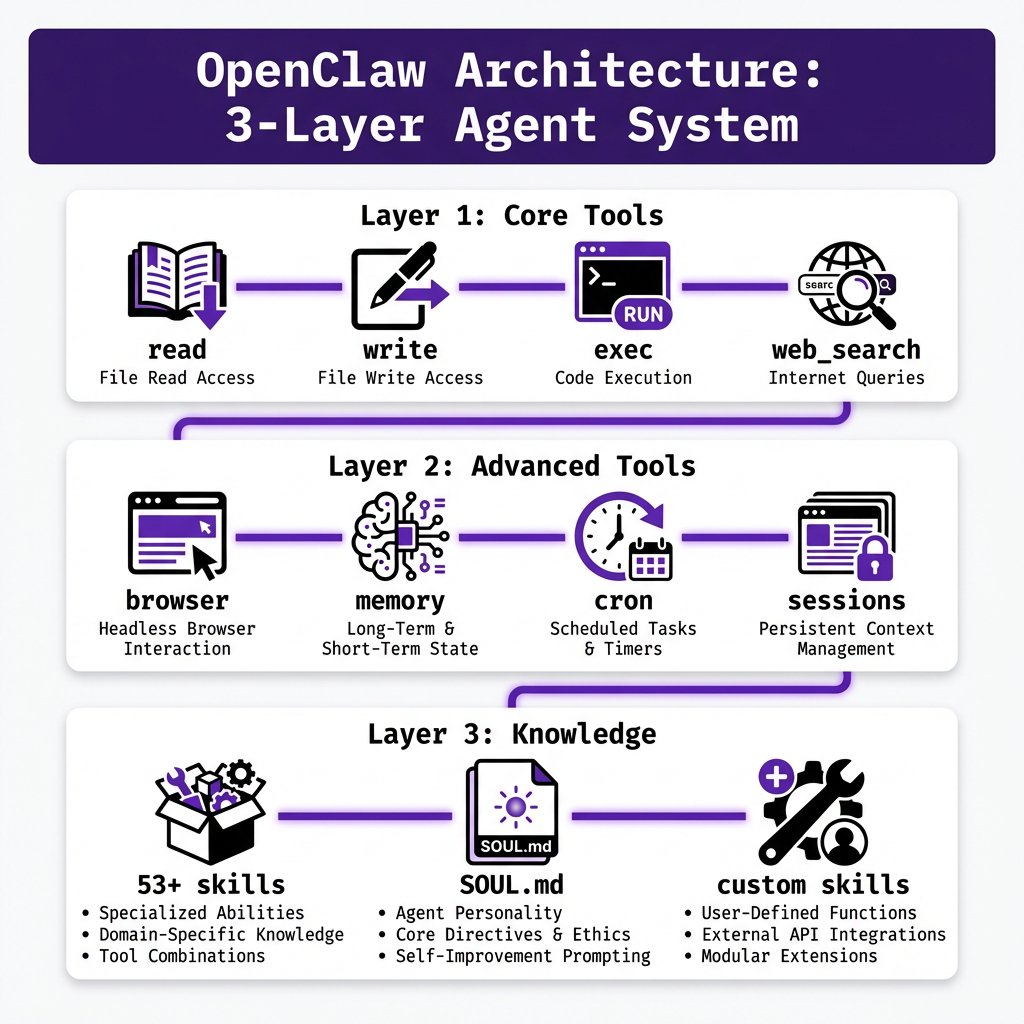
OpenClaw uses a three-layer architecture with a seven-stage agentic loop:
Layer 1: Core Tools
read,write,edit— file operationsexec,process— shell command executionweb_search,web_fetch— web research
Layer 2: Advanced Tools
browser— headless browser automationmemory_search,memory_get— persistent memorysessions_spawn,sessions_send— sub-agent orchestrationcron— scheduled tasks and remindersimage— vision model integration
Layer 3: Knowledge Layer
- 53+ official skills (SEO, GitHub, email, calendar, MCP servers)
- Custom skills you write yourself
- SOUL.md personality system
The agentic loop processes every message through: intake → memory retrieval → tool selection → execution → output → memory storage → delivery.
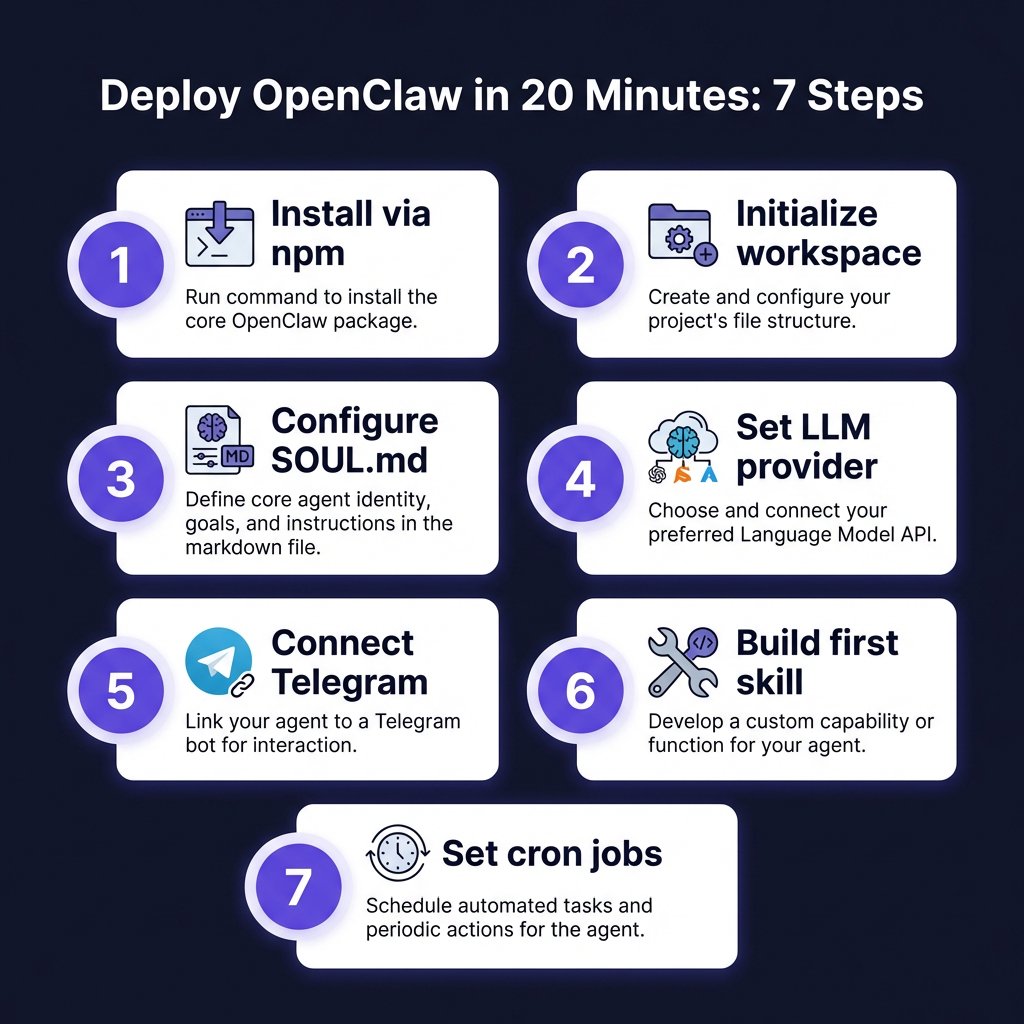
Step-by-Step: Deploy OpenClaw on a VPS in 20 Minutes
Prerequisites
- A VPS (Hetzner, DigitalOcean, Linode) — €5-10/month minimum
- Domain or subdomain for webhook callbacks (optional but recommended)
- Node.js 20+ installed
- API keys for your chosen LLM provider (OpenAI, Anthropic, Alibaba Cloud)
Step 1: Install OpenClaw
Install via npm (recommended):
bash
# Install via npm
npm install -g openclaw
Or use the official installer:
bash
curl -fsSL https://openclaw.ai/install.sh | bash
Verify installation:
bash
openclaw --version
Step 2: Initialize Your Workspace
Create your agent workspace:
bash
mkdir -p ~/openclaw-workspace
cd ~/openclaw-workspace
openclaw init
This creates the directory structure:
~/openclaw-workspace/
├── openclaw.json        # Main configuration
├── credentials/         # OAuth tokens, API keys
├── workspace/
│   ├── SOUL.md         # Agent personality
│   ├── USER.md         # Info about you
│   ├── AGENTS.md       # Operating instructions
│   ├── MEMORY.md       # Long-term memory
│   └── memory/         # Daily memory logs
└── cron/
    └── jobs.json       # Scheduled tasks
Step 3: Configure Your Agent Personality (SOUL.md)
SOUL.md defines your agent’s identity, values, and behavior. Here’s a developer-focused example:
Expertise: Node.js, Python, Go, Kubernetes, Docker, Terraform, CI/CD pipelines, Cloud infrastructure
How You Work: Always check logs before recommendations, provide command examples with explanations, flag security concerns immediately, prefer automation over manual fixes
Step 4: Set Up LLM Provider
Edit openclaw.json with your provider configuration. Here’s the pricing comparison for agent workloads (April 2026):
| Provider | Model | Input/1M | Output/1M | Best For |
|---|---|---|---|---|
| Alibaba Cloud | Qwen3.5-Plus | $1.20 | $6.00 | Long context, coding |
| DeepSeek | V3.2 | $0.14 | $0.28 | Cost-sensitive workloads |
| Anthropic | Claude Sonnet 4 | $3.00 | $15.00 | Complex reasoning |
| OpenAI | GPT-5.4 | $2.50 | $10.00 | General purpose |
| Gemini 2.5 Pro | $1.25 | $10.00 | Multimodal tasks |
For a personal agent running 24/7, expect 50-200K tokens/day = $0.50-3/month depending on model choice.
Step 5: Connect to Telegram (Mobile Gateway)
Get your bot token from @BotFather and configure:
bash
export TELEGRAM_BOT_TOKEN="your_bot_token"
openclaw gateway start
Your agent is now reachable via Telegram. Send messages, get responses, receive proactive notifications.
Step 6: Build Your First Skill
Skills extend your agent’s capabilities. Example: GitHub issue triage skill that monitors issues, categorizes by priority, and sends daily summaries.
Step 7: Set Up Cron Jobs for Automation
OpenClaw’s cron system runs scheduled tasks automatically:
- Daily standup reminder at 9 AM: “What did you do yesterday? What are you doing today? Any blockers?”
- Weekly security check every Monday 8 AM: Run healthcheck for outdated packages, exposed ports, failed logins, SSL cert expiry
Real Developer Workflows: What You Can Actually Build
Workflow 1: Automated Code Review Assistant
Your agent monitors PRs, runs static analysis, and posts contextual comments:
- Fetch PR diff via GitHub API
- Run eslint/prettier checks via exec
- Check for common security issues
- Post summary comment with suggestions
- Tag reviewer if high-risk changes detected
Workflow 2: Infrastructure Monitoring
Agent watches your VPS, containers, and APIs every 15 minutes:
- Check CPU/memory/disk via exec
- Verify all Docker containers running
- Test API endpoints (health checks)
- Alert on Telegram if thresholds exceeded
- Auto-restart failed services (with approval)
Workflow 3: Content Research & Drafting
For developer advocates and technical writers:
- Tavily search for trending angles
- Fetch top 5 competitor articles
- Extract key points and stats
- Generate outline with H2/H3 structure
- Save draft to workspace with sources
Workflow 4: Payment & Revenue Monitoring
For SaaS founders (Fungies.io integration):
- Fetch yesterday’s transactions via API
- Calculate MRR change, churn rate
- Flag unusual patterns (refunds, failures)
- Send summary to Telegram with key metrics
- Update Looker Studio dataset
Security Best Practices: Don’t Skip This
Running an AI agent with shell access requires serious security hygiene:
1. Isolate the Agent
- Run on a dedicated VPS, not your production server
- Use a non-root user with minimal permissions
- Enable firewall (ufw) — allow only necessary ports
2. Approval Workflows
Configure exec and write approvals to prevent dangerous operations:
- Enable exec approvals for docker, git, npm test commands
- Deny write access to /etc/, /root/, .ssh directories
3. Secret Management
- Never commit API keys to git
- Use environment variables or a secrets manager
- Rotate credentials quarterly
4. Audit Logs
- Enable detailed logging:
openclaw config set logging.level debug - Review agent actions weekly for exec and write operations
5. Network Security
- Use Tailscale or WireGuard for remote access
- Disable password authentication (SSH keys only)
- Set up fail2ban for brute force protection
Cost Breakdown: Running OpenClaw vs Cloud Alternatives
| Setup | Monthly Cost | Notes |
|---|---|---|
| OpenClaw (self-hosted) | €6-15/month | VPS €5-10 + LLM API $1-5 |
| Claude Pro | $20/month | Limited usage |
| GitHub Copilot | $10/month | Coding only |
| ChatGPT Plus | $20/month | Limited usage |
| Cloud Total | $50/month | All three subscriptions |
Break-even: 2-3 months. Plus you get: no usage limits, full customization, zero data sharing, and 24/7 availability.
Common Issues and How to Fix Them
Problem: Agent doesn’t respond to Telegram messages
- Check gateway status:
openclaw gateway status - Restart if needed:
openclaw gateway restart - Verify bot token is ~46 characters
Problem: exec commands fail with permission denied
- Run agent as your user, not root
- Check file permissions in workspace directory
Problem: Memory searches return nothing
- Verify memory files exist in workspace/memory/
- Force memory reindex:
openclaw memory rebuild
Problem: Cron jobs don’t run
- List scheduled jobs:
openclaw cron list - Check cron scheduler status:
openclaw cron status - Manually trigger:
openclaw cron run --job-id <job-id>
Advanced: Custom Skills and MCP Integration
OpenClaw supports Model Context Protocol (MCP) servers for extended capabilities:
- filesystem: Browse and edit files with context awareness
- github: Create issues, read PRs, manage repos
- postgres: Query databases and generate reports
The Bottom Line: Should You Deploy OpenClaw?
Yes, if: You want a persistent AI assistant that remembers your work, you’re comfortable with CLI tools and basic Linux administration, you care about data privacy and want full control, you want to build custom automations beyond what cloud tools offer.
No, if: You prefer point-and-click interfaces, you don’t want to manage any infrastructure, you only need occasional AI help (use Claude Code or Cursor instead).
OpenClaw isn’t for everyone. But for developers who want to automate repetitive work, monitor their systems, and have an AI partner that actually knows their codebase — it’s the most powerful option in 2026.
Key Takeaways
- OpenClaw is a file-based AI agent runtime — no vendor lock-in, full customization
- Deploy on a €5-10/month VPS — cheaper than cloud AI subscriptions after 2-3 months
- SOUL.md defines personality — your agent’s behavior is entirely up to you
- Cron jobs enable automation — daily standups, security checks, revenue monitoring
- Security is critical — use approvals, isolate the agent, audit logs regularly
- MCP integration extends capabilities — connect to GitHub, databases, filesystems
- Start simple — deploy, connect Telegram, build one workflow, then expand
FAQ
Q: Can OpenClaw replace Claude Code or Cursor?
A: Not directly — they serve different purposes. Claude Code/Cursor are IDE-focused coding assistants. OpenClaw is a persistent agent that runs 24/7, monitors systems, and executes workflows. Many developers use both: Cursor for daily coding, OpenClaw for automation and monitoring.
Q: What’s the minimum VPS spec for OpenClaw?
A: 1 vCPU, 2GB RAM, 20GB storage. Hetzner CPX11 (€5/month) or DigitalOcean Basic ($6/month) work fine. Scale up if you run heavy browser automation or multiple sub-agents.
Q: Does OpenClaw work offline?
A: Partially. The agent runtime works offline, but LLM inference requires API access. For full offline capability, you’d need to run a local model via Ollama (requires more powerful hardware).
Q: Can I use OpenClaw with multiple LLM providers?
A: Yes. Configure different agents with different providers, or use a routing layer like OpenRouter. Some users run Qwen for general tasks and Claude for complex reasoning.
Q: How do I backup my OpenClaw agent?
A: Backup the entire workspace directory: tar -czf openclaw-backup-$(date +%Y%m%d).tar.gz ~/openclaw-workspace/. Store in cloud storage (Google Drive, S3) or version control (git, excluding credentials/).
Q: Is OpenClaw production-ready?
A: Yes — but treat it like any production system: monitor logs, set up alerts, use approval workflows for dangerous operations, and test automations before deploying.
References
- OpenClaw Official Documentation
- OpenClaw GitHub Repository
- Model Context Protocol (MCP) Spec
- JSMastery: OpenClaw Setup Guide
- freeCodeCamp: Build and Secure Personal AI Agent
- Yu Wenhao: OpenClaw Tools + Skills Tutorial
- LLM API Pricing Comparison (April 2026)
Ready to deploy your own AI agent? Start with the OpenClaw quickstart and join the community Discord for support.
Building a SaaS? Fungies.io handles payments, tax compliance, and checkout so you can focus on building. Get started free.