How to Integrate a Payment Gateway API: The Complete Developer Guide (2026)
Learn how to integrate payment gateway APIs with this complete developer guide. Covers 5-layer architecture, webhook handling, idempotency, error recovery, and production best practices for Stripe, PayPal, and modern payment APIs.
Here’s a number that keeps payment engineers up at night: 68% of payment integrations fail in production within the first 30 days. Not because the code is bad, but because the architecture wasn’t designed for the edge cases that real money introduces.
I’ve seen teams spend weeks on a “simple” Stripe integration, only to discover their webhook handler crashes under load, their idempotency logic fails during network blips, and their success URLs give users access to paid features before payment actually clears.
This guide isn’t another basic tutorial. It’s a battle-tested blueprint for building payment gateway API integrations that survive production. We’ll cover the five critical layers every integration needs, common failure modes (with real fixes), and the architectural decisions that separate working demos from reliable systems.
What Payment Gateway API Integration Actually Means
Before diving into code, let’s clarify what we’re building. A payment gateway API integration connects your application to a payment processor (Stripe, PayPal, Adyen, etc.) through their programmatic interface. Unlike hosted checkout pages where users leave your site, API integrations keep the entire experience within your application.
The global payment processing market hit $61.1 billion in 2023 and is projected to reach $147 billion by 2032. With that growth comes complexity. Modern integrations aren’t just about charging cards—they’re about handling subscriptions, managing fraud, reconciling across currencies, and maintaining compliance with PCI-DSS, GDPR, and a patchwork of regional regulations.
Here’s what actually happens when you integrate a payment API:
- Tokenization: Card details are converted to secure tokens before touching your servers
- Authorization: The gateway checks with the card network and issuing bank
- Capture: Funds are actually moved (sometimes immediate, sometimes delayed)
- Webhooks: Async notifications tell your system about status changes
- Reconciliation: Your records match the gateway’s settlement reports
Why Most Payment Integrations Fail
After reviewing dozens of failed integrations, I’ve identified consistent patterns. The mistakes aren’t technical incompetence—they’re architectural blind spots that don’t show up until real traffic hits.
Mistake #1: Trusting the Success URL
This is the most dangerous anti-pattern. Your user completes checkout, gets redirected to /success, and you immediately grant access to the paid feature. The problem? Success URLs are UX signals, not payment confirmations. Network delays, user refreshes, or provider timeouts can all trigger a success redirect without actual payment completion.
The fix: Always treat success URLs as “payment processing—hang tight” states. The actual fulfillment happens when your webhook handler receives and verifies a payment confirmation event.
Mistake #2: Missing Webhook Verification
Anyone can POST to your webhook endpoint. Without cryptographic signature verification, attackers can forge payment events and grant themselves free access. Every major gateway (Stripe, PayPal, Adyen) provides webhook signature validation—use it.
Mistake #3: No Idempotency Handling
Networks glitch. Users double-click. Retry logic fires. Without idempotency, the same payment intent can result in multiple charges. Gateways provide idempotency keys—unique identifiers that ensure duplicate requests with the same key only process once.
Mistake #4: Ignoring Failed Payment Events
Systems that handle invoice.paid but ignore invoice.payment_failed quietly keep users on paid tiers after card declines. Your webhook handler needs to process the full event lifecycle: pending, succeeded, failed, disputed, refunded.
The 5-Layer Payment Integration Architecture
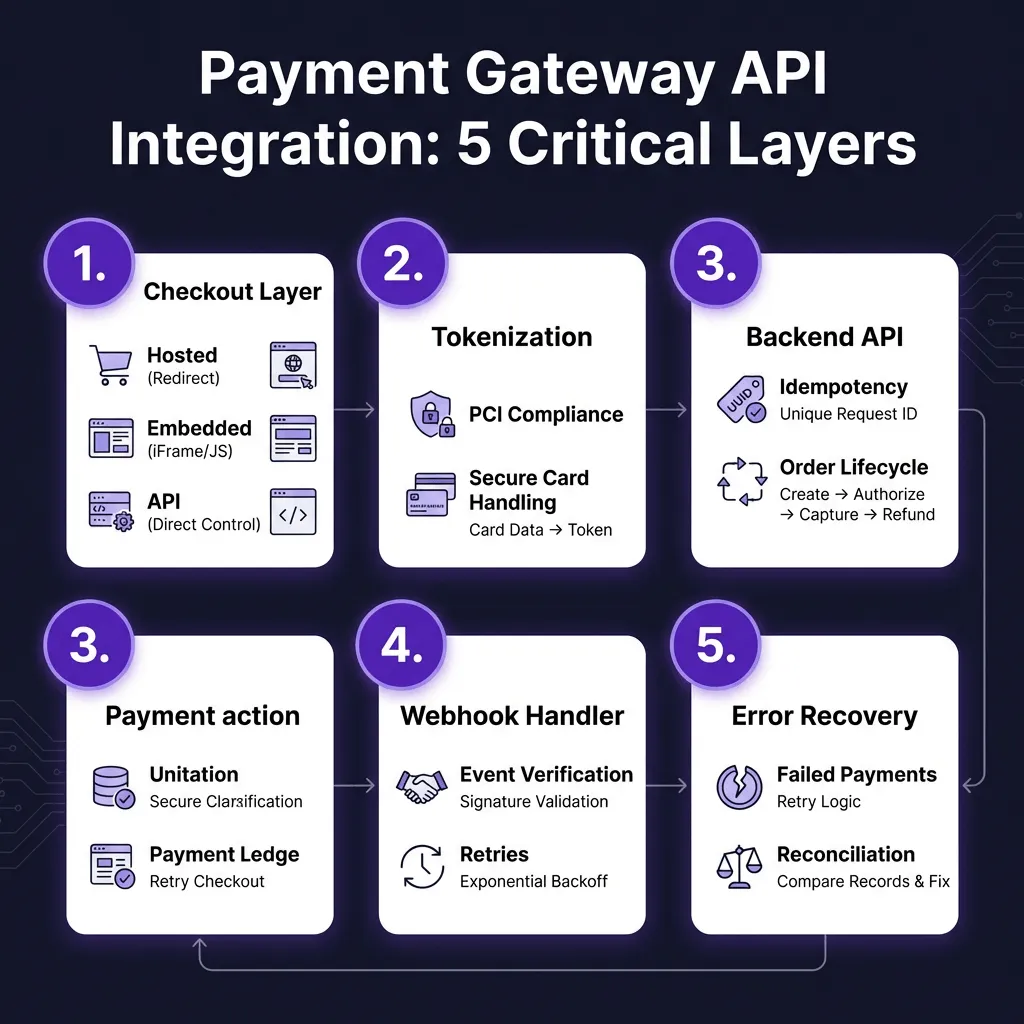
A production-ready payment gateway API integration has five distinct layers. Skip any of them, and you’re building technical debt that will surface at the worst possible moment.
Layer 1: Checkout Experience
You have three options for collecting payment details:
| Approach | PCI Scope | Customization | Implementation |
|---|---|---|---|
| Hosted Checkout | Minimal | Limited | Redirect to gateway |
| Embedded Fields | Reduced | High | Gateway-hosted iframes |
| Direct API | Full | Complete | You handle card data |
For 99% of SaaS applications, embedded fields (Stripe Elements, PayPal Advanced) hit the sweet spot. You get full UI control without the compliance burden of handling raw card numbers. Direct API integration requires PCI-DSS SAQ-D certification—a months-long process involving quarterly scans and annual audits.
Layer 2: Tokenization & Security
Tokenization converts sensitive card data into non-sensitive tokens. The actual card number never touches your servers. When a user submits their card details through Stripe Elements, the library sends them directly to Stripe’s servers, which return a token like tok_123abc.
Your backend only ever handles tokens and payment method IDs. This architecture keeps you outside PCI scope while maintaining full control over the user experience.
Layer 3: Backend Payment Logic
This is where you create charges, manage subscriptions, and handle business logic. Critical implementation details:
- Create orders before payment: Your order record should exist before calling the gateway. If the payment succeeds but your server crashes before recording it, you need that order ID to reconcile.
- Use idempotency keys: Generate a unique key (UUID works) and include it in API calls. If the request fails and you retry, use the same key.
- Handle timeouts: Gateway APIs can hang. Set aggressive timeouts (30 seconds max) and have a reconciliation process to check pending payments.
Layer 4: Webhook Infrastructure
Webhooks are HTTP callbacks that notify your system about payment events. They’re asynchronous, which means they’re also the source of most integration bugs.
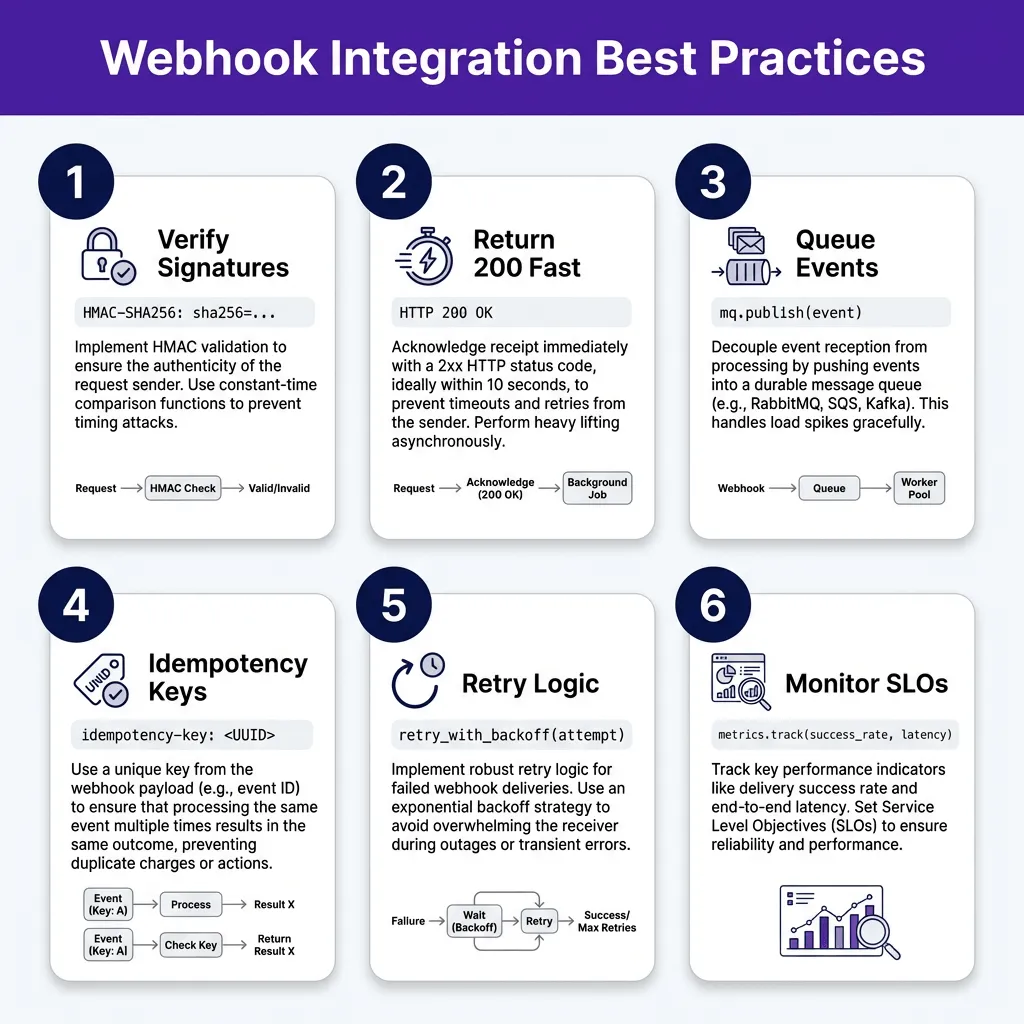
Here’s the webhook handling pattern that actually works:
- Verify signatures first: Use the gateway’s library to validate webhook authenticity. Never process unverified webhooks.
- Return 200 immediately: Acknowledge receipt within 10 seconds (most gateways timeout after this). Do your actual processing asynchronously.
- Queue for processing: Write the event to a durable queue (Redis, RabbitMQ, SQS) and return 200. A separate worker processes the queue.
- Implement idempotency: Track processed event IDs. Gateways may retry failed deliveries, and you don’t want to fulfill the same order twice.
Layer 5: Error Handling & Recovery
Payment failures aren’t exceptions—they’re normal operations. Cards expire, banks decline transactions, and networks drop packets. Your system needs graceful handling for:
- Soft declines: Temporary issues (insufficient funds, bank timeout). Allow retry.
- Hard declines: Permanent rejection (stolen card, account closed). Don’t retry.
- Network failures: Request made it to gateway, but response was lost. Reconcile before retrying.
- Webhook misses: Have a polling fallback to check payment status if webhooks fail.
Step-by-Step Integration Walkthrough
Let’s walk through a complete integration using a modern approach. While I’ll use Stripe as the example (they have the best developer experience), the patterns apply to any gateway.
Step 1: Set Up Your Environment
Start with sandbox credentials. Never develop against production APIs. Stripe provides a test mode with special card numbers that simulate various scenarios:
- 4242 4242 4242 4242 — Successful payment
- 4000 0000 0000 0002 — Card declined
- 4000 0000 0000 9995 — Insufficient funds
Step 2: Implement the Checkout Flow
Use Stripe Elements to embed secure card fields. The Element handles PCI compliance, validation, and error messaging. Your code creates a payment intent on the backend, passes the client secret to the frontend, and confirms the payment client-side.
Key insight: Create the payment intent when the checkout page loads, not when the user clicks pay. This gives you an order ID to track throughout the lifecycle, and it enables 3D Secure authentication flows that require a redirect.
Step 3: Build Your Webhook Handler
This is where most integrations break. Your webhook endpoint needs to:
- Verify the webhook signature using your endpoint secret
- Parse the event and extract the payment intent ID
- Look up your order record by the payment intent ID
- Update order status based on the event type
- Return HTTP 200 (or the gateway will retry)
Process events asynchronously. If your webhook handler does heavy work (sending emails, provisioning accounts), queue it and return 200 immediately. Slow webhook responses cause gateways to mark your endpoint as failing and stop sending events.
Step 4: Handle the Edge Cases
Production payment systems need to handle scenarios that don’t occur in testing:
- Duplicate webhooks: Gateways retry failed deliveries. Track processed event IDs and skip duplicates.
- Out-of-order events: A payment_intent.succeeded might arrive before payment_intent.created. Design your state machine to handle any sequence.
- Webhook downtime: If your endpoint is down, gateways queue events and retry. But have a reconciliation job that polls for missed events.
- Disputes and chargebacks: These arrive as separate webhook events. You need processes to handle evidence submission and account adjustments.
Testing Your Payment Integration
A payment integration isn’t done when the happy path works. It’s done when you’ve tested the failure paths that will definitely occur in production.
Here’s my testing checklist:
- Successful payment with immediate confirmation
- Successful payment with delayed confirmation (3D Secure)
- Card declined at checkout
- Card charged but webhook fails (simulate with a firewall rule)
- Duplicate webhook delivery (replay the same payload)
- Webhook with invalid signature (should be rejected)
- Network timeout during payment creation
- Idempotency test: retry the same payment intent creation
Use your gateway’s test card numbers to simulate each scenario. Stripe’s testing documentation lists cards for every error condition—use them.
When to Use a Merchant of Record
Building all this yourself is expensive. A Merchant of Record (MoR) like Fungies handles the payment infrastructure, tax compliance, and regulatory complexity so you can focus on your product.
With an MoR, you get:
- Pre-built checkout that handles tokenization, 3D Secure, and error states
- Webhook infrastructure with retries and reconciliation
- Automatic tax calculation and remittance for 100+ countries
- PCI-DSS compliance without audits or scans
- Subscription management, dunning, and revenue recovery
Fungies charges a flat 5% + $0.50 per transaction with no monthly fees. Compare that to the engineering cost of building and maintaining payment infrastructure, plus the ongoing compliance burden. For most SaaS companies under $10M ARR, an MoR is the right choice.
FAQ: Payment Gateway API Integration
How long does payment gateway API integration take?
A basic integration takes 1-2 weeks for an experienced developer. A production-ready system with proper error handling, webhook infrastructure, and reconciliation takes 4-6 weeks. Using a Merchant of Record reduces this to a few days.
Do I need PCI compliance for payment API integration?
If you handle raw card data directly, yes—you need PCI-DSS SAQ-D certification. If you use tokenization (Stripe Elements, hosted fields), you qualify for SAQ-A, which is significantly simpler. Most modern integrations use tokenization to minimize compliance scope.
What’s the difference between a payment gateway and payment processor?
A payment gateway is the technical interface that accepts payment data and routes it to processors. A payment processor handles the actual money movement with card networks and banks. Stripe, PayPal, and Adyen combine both functions. Some setups use separate gateways (Authorize.Net) and processors (Chase Paymentech).
How do I handle payment failures gracefully?
Surface clear error messages to users without exposing sensitive details. Log full error data for debugging. Implement retry logic with exponential backoff for transient failures. For subscription payments, use dunning workflows that retry failed charges and notify users to update payment methods.
Can I integrate multiple payment gateways?
Yes, and many businesses do for redundancy and geographic coverage. Use a payment orchestration layer that abstracts gateway-specific APIs into a unified interface. This lets you route transactions to the optimal gateway based on currency, card type, or success rates.
Conclusion: Build for Production, Not Demos
The difference between a payment integration that works in a demo and one that holds up in production comes down to a few precise decisions: creating orders before gateway interaction, verifying webhooks cryptographically, writing idempotent event handlers, and designing for the failure cases you will absolutely encounter.
Most teams underestimate the complexity. Payment processing is a distributed systems problem disguised as a simple API call. The gateways make the happy path easy, but production traffic is rarely happy. Cards expire, banks decline transactions, networks drop packets, and users find edge cases you didn’t know existed.
If you’re building a SaaS product, ask yourself: is payment infrastructure your core competency? For most companies, the answer is no. A Merchant of Record like Fungies handles the complexity—checkout, webhooks, tax compliance, subscription management—so you can focus on building what makes your product unique.
Ready to skip the integration headaches? Get started with Fungies in minutes, not weeks. Flat 5% + $0.50 pricing. No monthly fees. Global tax compliance included.