Notion templates have exploded into a multi-million dollar market. With over 30 million Notion users worldwide, creators are earning anywhere from $500 to $100,000+ per month selling pre-built templates that save people hours of setup time. Whether you’re a productivity expert, a business consultant, or just someone who’s built an efficient system, there’s real money to be made.
In this complete guide, I’ll walk you through exactly how to sell Notion templates online — from validating your idea to choosing the right platform and scaling your income. Let’s dive in.
Why Notion Templates Are a Profitable Digital Product
The numbers don’t lie. The digital product market is projected to hit $500 billion by 2026, and Notion templates are one of the fastest-growing categories. Here’s why they work so well:
- High demand, low competition: While courses and ebooks are saturated, quality Notion templates in specific niches still have room to grow.
- Passive income potential: Create once, sell forever. No inventory, no shipping, no customer support headaches.
- Low barrier to entry: You don’t need design skills or coding knowledge — just expertise in organizing information.
- Recurring revenue: Build a template shop with multiple products and watch your monthly income compound.
Real creators are making serious money. Thomas Frank’s Notion templates have generated over $1M in sales. Smaller creators consistently report $2,000-$10,000/month from template shops. The opportunity is real — if you approach it strategically.
Step 1: Validate Your Template Idea
Before you spend hours building, make sure people actually want what you’re creating. Here’s how to validate:
Research What’s Already Selling
Browse the Notion Marketplace, Gumroad, and Etsy. Look for templates with high review counts and sales numbers. Popular categories include:
- Productivity & Personal Organization: Daily planners, habit trackers, goal-setting systems
- Business & Freelancing: Client management, project tracking, invoice systems
- Content Creation: YouTube planners, blog editorial calendars, social media trackers
- Finance & Budgeting: Expense trackers, investment portfolios, debt payoff planners
- Education & Students: Note-taking systems, study planners, thesis organizers
Find Your Specific Niche
Don’t try to compete with generic “life planner” templates. Instead, go specific. “Notion Template for Freelance Graphic Designers” will outperform “Business Planner” every time. The more specific your audience, the easier it is to market and the more you can charge.
Step 2: Create a Template People Actually Want
Building a great template isn’t just about making it look pretty. It’s about solving a real problem. Here’s the framework:
Start With a Problem
Every successful template solves a specific pain point. “I can’t track my freelance clients” → Client CRM template. “My content calendar is a mess” → Content planning system. The clearer the problem, the easier the sale.
Design for Function First
Aesthetics matter, but functionality wins. Your template should:
- Work immediately after duplication (no setup required)
- Include clear instructions or a getting-started guide
- Use Notion’s native features (databases, relations, rollups) effectively
- Be organized logically with clear navigation
- Include example data so users understand how it works
Test Before You Sell
Give your template to 3-5 people in your target audience. Watch them use it. Where do they get confused? What questions do they ask? Fix those issues before you launch. A template that requires zero support requests is a template that scales.
Step 3: Choose Where to Sell Your Templates
You’ve got options. Each platform has trade-offs. Here’s the breakdown:
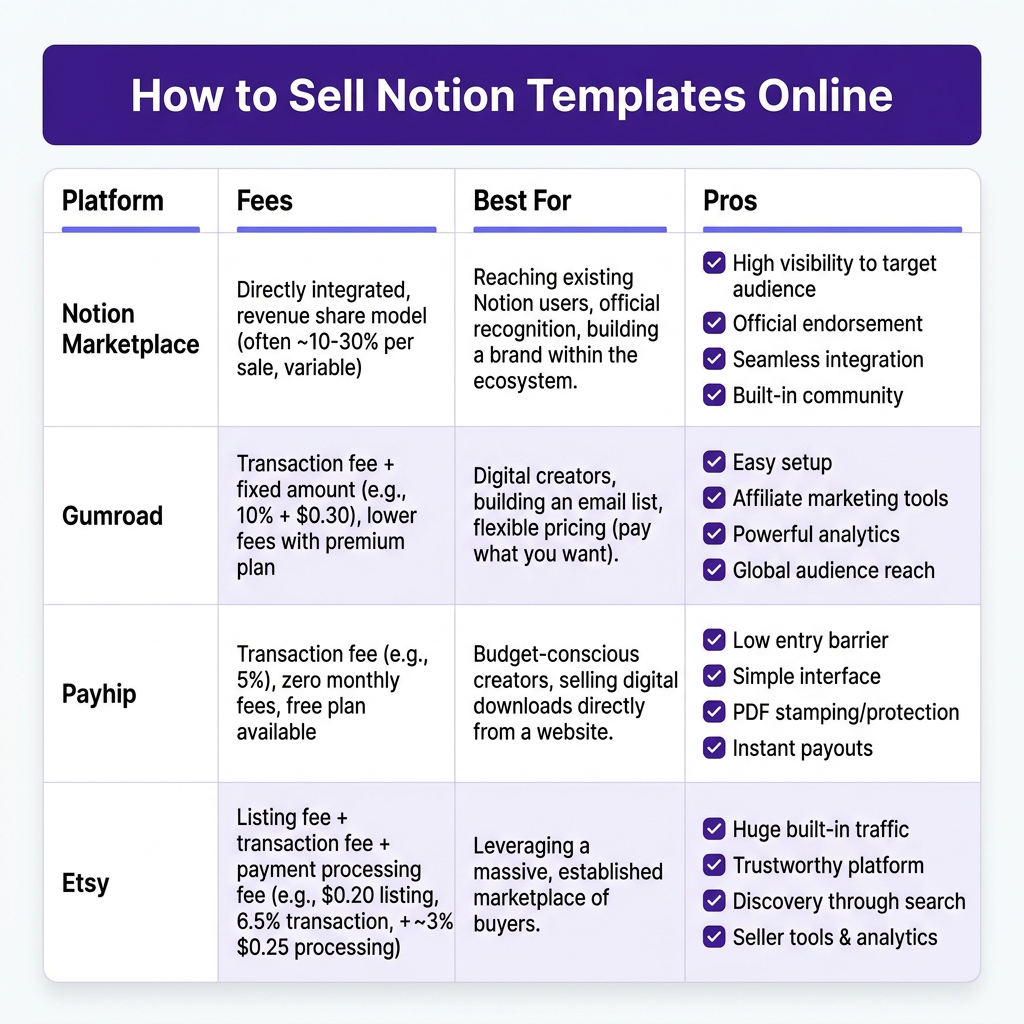
Notion Marketplace (Official)
Best for: Established creators with existing audiences
- Pros: Built-in audience of Notion users, official platform credibility, integrated with Notion app
- Cons: Application required (waitlist), 10% platform fee, limited customization
- Fees: 10% + Stripe processing fees
Gumroad
Best for: Beginners and creators building an email list
- Pros: Free to start, built-in email marketing, simple setup, handles VAT/tax
- Cons: 10% + 30¢ per transaction fee, limited customization
- Fees: 10% + 30¢ + payment processing
Payhip
Best for: Sellers wanting a simple storefront
- Pros: 5% transaction fee (lower than Gumroad), instant delivery, PDF stamping
- Cons: Less brand recognition, basic analytics
- Fees: 5% + payment processing
Etsy
Best for: Template sellers wanting organic discovery
- Pros: Massive built-in traffic, search engine for buyers, established trust
- Cons: $0.20 listing fee per item, 6.5% transaction fee, competitive marketplace
- Fees: $0.20 listing + 6.5% + payment processing
Your Own Website (Fungies, Shopify, etc.)
Best for: Serious sellers building a brand
- Pros: Full control, no platform fees, build your brand, own your customer data
- Cons: Requires marketing to drive traffic, setup time
- Fees: Platform subscription + payment processing only
Ready to Monetize Your Digital Products?
Join hundreds of creators using Fungies.io — automated tax compliance, 50+ payment methods, global Merchant of Record.
Start Free Trial →No credit card required
Step 4: Price Your Templates Strategically
Market Research
Look at similar templates in your niche. What’s the price range? Most Notion templates sell between $5-$49, with premium systems (like complete business operating systems) going up to $99-$199.
Value-Based Pricing
Don’t price based on your time — price based on value. If your template saves someone 10 hours of setup time, and their time is worth $50/hour, that’s $500 in value. Charging $29 is a no-brainer.
Tiered Pricing Strategy
Offer multiple versions:
- Basic ($9-$19): Core template only
- Pro ($29-$49): Template + video tutorial + bonus resources
- Bundle ($79-$149): Multiple related templates + 1-on-1 setup call
This captures different buyer budgets and increases average order value.
Step 5: Market and Sell Your Templates
Building the template is 30% of the work. Marketing is 70%. Here’s your playbook:
Build an Audience First
The most successful template sellers built audiences before they sold. Share free Notion tips on Twitter/X, TikTok, and Instagram. Give away a simple free template to build your email list. When you launch your paid product, you have warm leads ready to buy.
Create Show-Don’t-Tell Content
Don’t just post “Buy my template.” Show it in action:
- Screen recordings of the template being used
- Before/after transformations
- Customer testimonials and case studies
- Behind-the-scenes of your creation process
Leverage Multiple Channels
Don’t rely on one platform:
- Social media: Twitter/X threads, TikTok videos, Instagram carousels
- YouTube: Tutorials and template walkthroughs
- Email marketing: Nurture sequences and launch campaigns
- Partnerships: Collaborate with complementary creators
- SEO: Blog posts targeting “Notion template” keywords
FAQ: Selling Notion Templates
Do I need to be a Notion expert to sell templates?
No, but you need to solve a real problem. You don’t need to know every Notion feature — you need to understand your audience’s pain points and build a system that helps them.
How much can I realistically make selling Notion templates?
Beginners typically earn $200-$1,000 in their first few months. Established sellers with multiple templates and an audience regularly report $5,000-$20,000/month. Top creators like Thomas Frank have made over $1M.
What if someone shares my template for free?
It’s frustrating but inevitable. Focus on providing value that makes the paid version worth it: video tutorials, updates, community access, and support. Most buyers prefer the official version with these benefits.
Do I need to handle taxes when selling templates?
Yes. Digital products are subject to sales tax/VAT in most jurisdictions. Platforms like Gumroad and Fungies handle tax collection and remittance for you. If you sell on your own site, you’ll need a solution like Fungies.io as your Merchant of Record.
How do I deliver templates to buyers?
Most platforms handle this automatically. You provide a “duplicate” link (Notion’s share feature), and buyers get instant access after purchase. Make sure to include clear setup instructions.
Conclusion: Start Selling Notion Templates Today
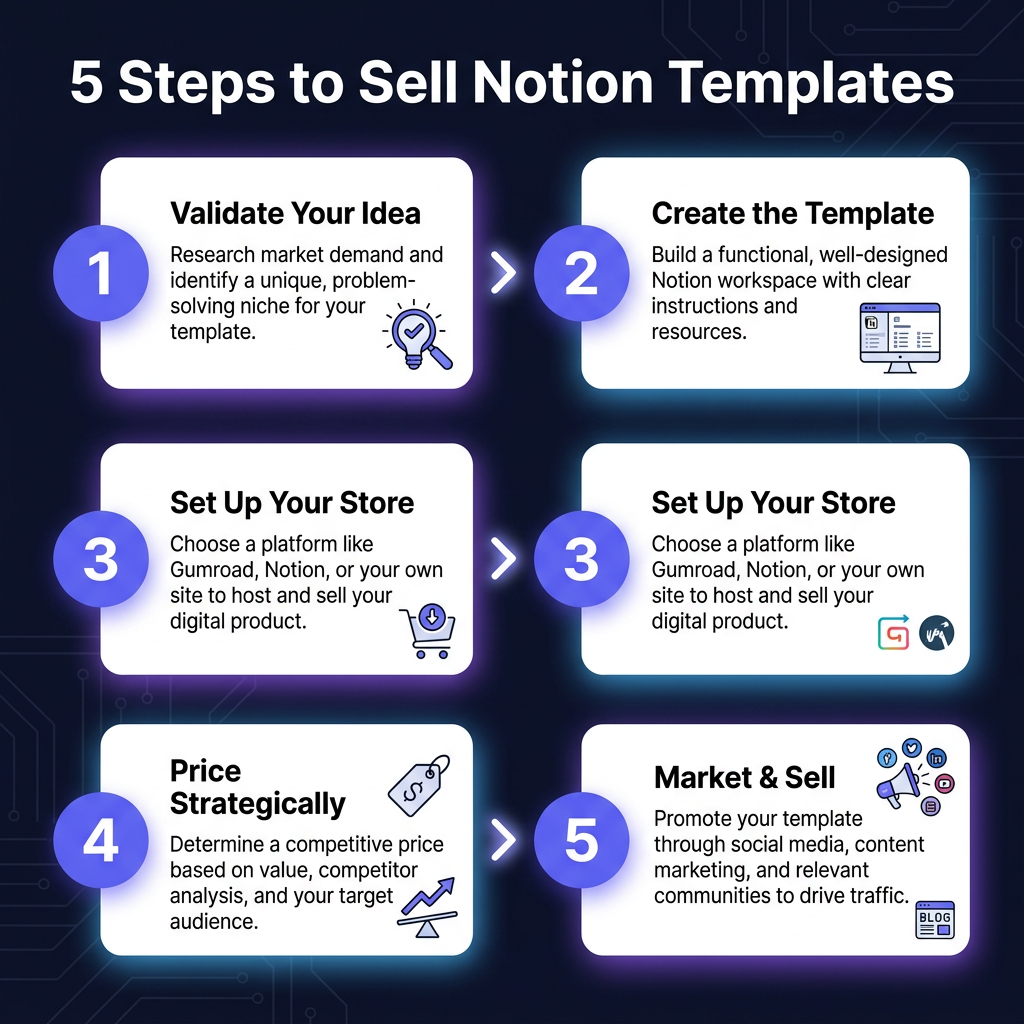
The Notion template market is still growing. There’s room for new creators who can solve specific problems for specific audiences. The formula is simple: validate your idea, build a quality template, choose the right platform, price strategically, and market consistently.
Don’t wait for the perfect template. Start with something simple that solves one problem well. Launch it, learn from feedback, and iterate. Your first template won’t be your best — but it will be the one that gets you started.
Ready to turn your Notion skills into income? Pick a niche, build your first template, and launch within the next 30 days. The opportunity is there — go capture it.