85% of developers now use AI coding tools regularly. But here’s the catch: only 29% actually trust the code these tools generate. That gap between adoption and trust is exactly why choosing the right AI coding agent matters more than ever in 2026.
The market has shifted dramatically. We’re past the autocomplete era. Today’s AI coding agents are autonomous systems that understand entire repositories, execute multi-file changes, run tests, and iterate with minimal human input. The question isn’t whether to use AI coding tools—it’s which one won’t waste your time or budget.
What Changed in AI Coding Agents for 2026
Three major shifts define the 2026 landscape:
- The agentic pivot is complete. Every major player now offers autonomous agent capabilities. GitHub introduced Agent Mode with multi-agent workflows in February 2026. Cursor shipped background agents on isolated VMs. Augment Code launched Intent for multi-agent orchestration.
- Microsoft chose Anthropic over OpenAI. In September 2025, Microsoft made Claude Sonnet 4 the primary model for VS Code’s AI selection—despite owning GitHub and having deep OpenAI ties.
- Revenue signals real demand. Cursor surpassed $2 billion in annualized revenue by March 2026, doubling from $1B in November 2025.
But more capability means more complexity—and more ways to burn through credits on wasted runs. Here’s what actually matters when evaluating these tools.
How We Evaluated These AI Coding Agents
Real developers judge AI coding agents across five dimensions that determine actual usefulness:
| Dimension | What We Measured | Why It Matters |
|---|---|---|
| Token Efficiency & Price | Cost per meaningful output | Wasted runs and hallucinations = wasted money |
| Productivity Impact | Net speed gain including corrections | Tools that need constant fixing cancel their own benefit |
| Code Quality & Trust | First-pass accuracy rates | Wrong code creates maintenance debt |
| Context Understanding | Multi-file and repo-wide comprehension | File-by-file tools break on real codebases |
| Privacy & Security | Data handling, SOC 2, self-hosted options | Privacy concerns block adoption regardless of capability |
Top 8 AI Coding Agents Ranked for 2026
1. Augment Code — Best for Enterprise Monorepos
Augment Code tops our list for one reason: it actually understands large, complex codebases at an architectural level. Its Context Engine provides deep semantic codebase indexing, and the Auggie CLI achieved a 51.80% score on SWE-bench Pro—the top result at time of publication.
Key Features:
- Deep semantic codebase indexing via Context Engine
- Multi-agent orchestration with Intent (launched 2026)
- Architectural reasoning for cross-service changes
- Top-ranked SWE-bench Pro performance
Pricing: Indie plan at $20/month; Standard at $60/user/month; Enterprise custom pricing.
Best For: Engineering teams managing complex distributed codebases, legacy refactoring projects, and cross-service debugging.
Weakness: Initial indexing time (approximately 27 minutes for large repos).
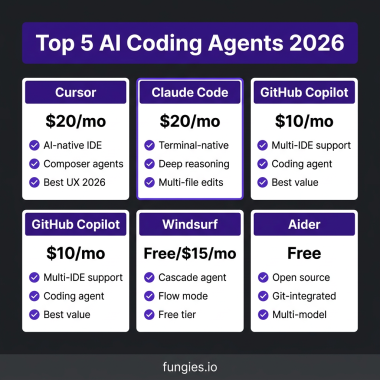
2. Cursor — Best for Solo Developers & Daily IDE Use
Cursor has become the default choice for developers who want AI woven into every keystroke. With $2B+ in annualized revenue and a $29.3B valuation as of March 2026, the market has spoken. Cursor’s multi-model orchestration gives consistent results without breaking workflow flow.
Key Features:
- AI-native IDE built from the ground up
- Background agents running on isolated VMs
- Multi-model orchestration (Claude, GPT, Gemini)
- Tab-based predictions and inline edits
Pricing: Pro at $20/month; Pro+ at $60/month; Ultra at $200/month; Team at $40/user/month.
Best For: Individual developers and small teams wanting IDE-first AI with minimal context switching.
Weakness: Costs escalate quickly with premium features; Ultra tier at $200/month is only justified for heavy daily users.
3. Claude Code — Best for Terminal-First Developers
Anthropic’s Claude Code is the tool of choice for developers who live in the terminal. It offers deep agentic workflows that can run commands, edit multiple files autonomously, and leverage Claude Opus—the best reasoning model available for coding tasks.
Key Features:
- Terminal-native agentic coding
- Access to Claude Opus 4.5 and Sonnet 4.5 models
- Natural language command interface
- Git workflow integration
Pricing: Pro at $20/month; Max 5x at $100/month; Max 20x at $200/month; Team at $30/user/month. API pay-as-you-go from $3/million input tokens.
Best For: Developers who prefer terminal workflows, need complex multi-file reasoning, or want the best available reasoning model.
Weakness: Rate limits introduced in 2025 frustrated power users; sits alongside your editor rather than inside it.
4. GitHub Copilot — Best for GitHub-Native Teams
GitHub Copilot remains the best value at $10/month—no other paid plan comes close on a per-dollar basis. With Agent Mode introduced in February 2026, Copilot now offers multi-agent workflows and can turn GitHub issues into PR-ready changes with summaries and reviewable diffs.
Key Features:
- 300 premium requests per month (Pro tier)
- Agent Mode with multi-agent workflows
- Issue-to-PR pipeline with GitHub integration
- Multi-IDE support (VS Code, JetBrains, Vim, Neovim)
- Includes Claude Opus 4.6 access
Pricing: Free tier (2,000 completions); Pro at $10/month; Pro+ at $20/month; Business at $19/user/month; Enterprise at $39/user/month.
Best For: Teams already standardized on GitHub, developers wanting IDE breadth, and budget-conscious users.
Weakness: Less autonomous than dedicated agent tools; works best as an assistant rather than a full coding agent.
5. Windsurf — Best Budget AI IDE
Windsurf (formerly Codeium) offers a genuinely usable free tier and aggressive pricing that undercuts most competitors. It’s a desktop coding IDE with agent workflow for multi-file changes—perfect for developers who want AI assistance without subscription fatigue.
Key Features:
- Free tier with 25 credits/month
- Agent workflow for multi-file changes
- Full IDE replacement (not just an extension)
- Cascade agent for autonomous coding
Pricing: Free (25 credits); Pro at $15/month; Teams at $30/user/month; Max at $200/month; Enterprise custom.
Best For: Budget-conscious developers, students, and those wanting to try AI coding without financial commitment.
Weakness: Credit system can be confusing; premium model access requires higher tiers.
6. Cline — Best Open-Source Option
Cline is a VS Code extension that gives developers full control over their AI coding experience. It’s open source and BYO-keys, meaning you bring your own API credentials and pay only for what you use—no subscription required.
Key Features:
- Open source and free to use
- Bring-your-own API keys (BYO)
- VS Code native integration
- Full control over model selection and costs
Pricing: Free (open source); Teams at $20/user/month; Enterprise custom. API costs vary based on usage.
Best For: Developers who want full control, privacy-conscious teams, and those with existing API credits.
Weakness: Requires technical setup; cost predictability depends on your API usage patterns.
7. JetBrains Junie — Best for JetBrains IDE Users
JetBrains Junie brings agentic coding to IntelliJ IDEA, PyCharm, WebStorm, and the entire JetBrains suite. It’s the native choice for developers already invested in JetBrains’ ecosystem, offering deep IDE integration that external tools can’t match.
Key Features:
- Native JetBrains IDE integration
- AI Ultimate tier with Junie agent
- Language-specific optimizations
- Seamless refactoring and code generation
Pricing: AI Assistant Pro at €10/month; AI Ultimate at €30/month personal / €60/month commercial.
Best For: Developers using IntelliJ IDEA, PyCharm, or other JetBrains IDEs who want native AI integration.
Weakness: Still catching up to dedicated AI coding tools in agent capabilities; ecosystem lock-in.
8. OpenAI Codex — Best for OpenAI Ecosystem
OpenAI’s Codex represents the company’s push into dedicated coding agents. Available via VS Code extension, CLI, or cloud, Codex integrates deeply with OpenAI’s model ecosystem and offers strong performance on refactoring and code explanation tasks.
Key Features:
- Multiple access methods (VS Code, CLI, cloud)
- GPT-5.3 Codex model optimized for code
- Strong refactoring capabilities
- OpenAI ecosystem integration
Pricing: Free tier available; Plus at $20/month; Pro at $200/month; Team and Enterprise custom.
Best For: Developers already using ChatGPT Plus/Pro, teams invested in OpenAI’s ecosystem.
Weakness: Late to the dedicated coding agent market; faces strong competition from Cursor and Claude Code.
AI Coding Agents Comparison Table
| Tool | Best For | Starting Price | Premium Tier | Key Strength |
|---|---|---|---|---|
| Augment Code | Enterprise monorepos | $20/mo | Custom | Architectural reasoning |
| Cursor | Solo developers | $20/mo | $200/mo | IDE-native experience |
| Claude Code | Terminal users | $20/mo | $200/mo | Best reasoning model |
| GitHub Copilot | GitHub teams | $10/mo | $39/mo | Best value per dollar |
| Windsurf | Budget users | Free | $200/mo | Usable free tier |
| Cline | Control seekers | Free | $20/mo | Open source, BYO keys |
| JetBrains Junie | JetBrains users | €10/mo | €60/mo | Native IDE integration |
| OpenAI Codex | OpenAI ecosystem | Free | $200/mo | Refactoring capabilities |
LLM API Pricing Behind the Tools
Understanding the underlying model costs helps explain why these tools are priced the way they are. Here’s what the major models cost when accessed directly via API:
| Model | Input (per 1M tokens) | Output (per 1M tokens) | Context Window |
|---|---|---|---|
| GPT-5 nano | $0.05 | $0.20 | 128K |
| Gemini 3.1 Flash-Lite | $0.10 | $0.40 | 1M |
| DeepSeek V3 | $0.27 | $1.10 | 64K |
| Claude Haiku 4.5 | $0.25 | $1.25 | 200K |
| GPT-5.1 | $1.50 | $6.00 | 256K |
| Gemini 3.1 Pro | $1.25 | $5.00 | 1M |
| Claude Sonnet 4.6 | $3.00 | $15.00 | 200K |
| Claude Opus 4.6 | $5.00 | $25.00 | 200K |
| GPT-5.4 Pro | $30.00 | $180.00 | 128K |
The gap between GPT-5 nano at $0.05 and GPT-5.4 Pro at $30 is 600x. This is why tool selection matters: you’re not just choosing features, you’re choosing which cost structure you’ll live with.
Key Takeaways: Which AI Coding Agent Should You Choose?
There’s no single best tool—only the best tool for your specific situation:
- Choose Augment Code if you’re working with complex enterprise codebases and need architectural reasoning that spans multiple services.
- Choose Cursor if you want AI woven into every keystroke and prefer an AI-native IDE experience.
- Choose Claude Code if you live in the terminal, need the best reasoning model available, or want autonomous agent workflows.
- Choose GitHub Copilot if you’re budget-conscious, use GitHub heavily, or want the best value per dollar spent.
- Choose Windsurf if you want to try AI coding without financial commitment or need a budget-friendly full IDE.
- Choose Cline if you want full control, are privacy-conscious, or already have API credits to use.
- Choose JetBrains Junie if you’re invested in the JetBrains ecosystem and want native integration.
- Choose OpenAI Codex if you’re already using ChatGPT Plus/Pro and want to stay in the OpenAI ecosystem.
Frequently Asked Questions
What is the best AI coding agent in 2026?
There is no single best AI coding agent—it depends on your workflow. Augment Code leads for enterprise monorepos, Cursor for daily IDE use, Claude Code for terminal-first developers, and GitHub Copilot for the best value. Many developers use multiple tools: Claude Code for complex refactoring, Cursor or Copilot for everyday editing.
Can I use AI coding agents for free?
Yes. Windsurf offers a genuinely usable free tier with 25 credits/month. GitHub Copilot Free provides 2,000 completions. Cline is open source and free (you pay only for API usage). Bolt.new offers 1M tokens/month free. These free tiers are sufficient for light usage and evaluation.
How much do AI coding agents cost per month?
Entry-level paid plans range from $10-20/month (GitHub Copilot Pro at $10, most others at $20). Premium tiers for heavy users run $100-200/month. Enterprise pricing is typically custom. The average developer using Claude Code spends about $6/day according to Anthropic’s data.
Are AI coding agents secure?
Security varies by tool. Enterprise-focused tools like Augment Code and GitHub Copilot offer SOC 2 compliance and data handling agreements. Cline lets you use your own API keys for maximum control. Always review data handling policies—especially for proprietary codebases. Self-hosted options provide the highest security for sensitive projects.
Will AI coding agents replace developers?
No. The 2026 data shows developers with 10+ years experience have the highest distrust rates of AI output (around 20% trust). The role is shifting from writing every line to reviewing, architecting, and managing AI-generated code. Developers who master AI tools will replace those who don’t—but AI won’t replace developers who adapt.
Conclusion
The AI coding agent market in 2026 is mature, competitive, and full of genuinely useful tools. The gap between the best and worst options has narrowed—but the gap between a tool that fits your workflow and one that doesn’t remains wide.
Start with your workflow, not the marketing. Terminal-first developers should try Claude Code. IDE-centric developers should evaluate Cursor or Windsurf. GitHub-native teams should leverage Copilot. Enterprise teams with complex codebases should evaluate Augment Code.
And remember: the developers who thrive in 2026 won’t be those who use the most AI—they’ll be those who use AI most effectively.
Ready to streamline your SaaS development workflow? Get started with Fungies.io—the Merchant of Record platform that handles payments, tax compliance, and checkout so you can focus on building with AI.
References
- JetBrains State of Developer Ecosystem 2025 – https://devecosystem-2025.jetbrains.com/artificial-intelligence
- Stack Overflow Developer Survey 2026 – https://survey.stackoverflow.co/2025/
- TechCrunch: Cursor $2B Revenue – https://techcrunch.com/2026/03/02/cursor-has-reportedly-surpassed-2b-in-annualized-revenue/
- The Verge: Microsoft Claude Partnership – https://www.theverge.com/report/778641/microsoft-visual-studio-code-anthropic-claude-4
- Faros AI: Best AI Coding Agents 2026 – https://www.faros.ai/blog/best-ai-coding-agents-2026
- Augment Code: 8 Best AI Coding Assistants – https://www.augmentcode.com/tools/8-top-ai-coding-assistants-and-their-best-use-cases
- SitePoint: AI Coding Tools Comparison 2026 – https://www.sitepoint.com/ai-coding-tools-comparison-2026/
- Cloudidr: LLM API Pricing 2026 – https://www.cloudidr.com/llm-pricing
- BenchLM: LLM Pricing Comparison 2026 – https://benchlm.ai/blog/posts/llm-pricing-2026