Multi-agent AI systems went from research curiosity to production reality in 2026. GitHub data shows terminal-based AI coding agents hit 561.6K stars with 74.6K new stars in just 90 days. OpenClaw alone grew to 350K stars after gaining 190K in its first two weeks — the fastest open-source growth in GitHub history.
But here’s what most developers miss: single AI agents are table stakes now. The real productivity gains come from orchestrating multiple specialized agents working together. That’s where multi-agent orchestration frameworks come in.
This guide breaks down the three leading frameworks — CrewAI, LangGraph, and Dify — with real code examples, pricing data, and deployment patterns you can use today.

What Are Multi-Agent Orchestration Frameworks?
Multi-agent orchestration frameworks let you coordinate multiple AI agents, each with specialized roles, working together on complex tasks. Think of it like building a software team where each agent has a job description.
Instead of asking one LLM to “build a web app,” you orchestrate:
- A product manager agent that breaks down requirements
- A developer agent that writes code
- A reviewer agent that checks for bugs and security issues
- A tester agent that runs automated tests
The framework handles agent communication, state management, and task handoffs so you don’t have to build that plumbing yourself.
Why Multi-Agent Systems Matter in 2026
Single-prompt AI hits hard limits on complex tasks. Research from Stanford’s HAI lab shows multi-agent systems outperform single agents by 35-60% on software engineering benchmarks like SWE-bench Pro.
The numbers tell the story:
| Metric | Single Agent | Multi-Agent System |
|---|---|---|
| Code completion accuracy | 67% | 89% |
| Bug detection rate | 54% | 82% |
| Task success (SWE-bench) | 28% | 51.8% |
| Context utilization | ~40% | ~85% |
Augment Code’s Auggie CLI hit 51.80% on SWE-bench Pro using multi-agent orchestration — the top result at time of publication. That’s nearly double what single-model approaches achieved a year earlier.
CrewAI: Role-Based Agent Teams
CrewAI is the fastest way to get multi-agent workflows running. You define agents with roles, give them tasks, and CrewAI handles the coordination.
Key Features
- Role-based architecture: Define agents like “Researcher,” “Developer,” “Reviewer”
- Process orchestration: Sequential or hierarchical task execution
- Python-first: Pure Python, no complex setup
- Tool integration: Built-in support for common APIs and MCP servers
Code Example
Here’s a complete CrewAI setup in ~20 lines:
from crewai import Agent, Task, Crew, Process
# Define agents
researcher = Agent(
  role='Senior Research Analyst',
  goal='Find and validate market data',
  backstory='You work at a leading venture capital firm',
  verbose=True,
  allow_delegation=False
)
writer = Agent(
  role='Content Strategist',
  goal='Write compelling analysis',
  backstory='You create reports for Fortune 500 CEOs',
  verbose=True,
  allow_delegation=True
)
# Define tasks
task1 = Task(
  description='Research AI agent market size in 2026',
  expected_output='Market size with sources',
  agent=researcher
)
task2 = Task(
  description='Write executive summary',
  expected_output='200-word summary',
  agent=writer
)
# Execute
crew = Crew(
  agents=[researcher, writer],
  tasks=[task1, task2],
  process=Process.sequential
)
result = crew.kickoff()
When to Use CrewAI
- ✅ You need multi-agent workflows running in under an hour
- ✅ Your team is Python-focused
- ✅ Tasks have clear role separation (research → write → review)
- ✅ You want minimal boilerplate code
- ❌ Avoid if you need fine-grained state control or complex branching logic
LangGraph: State Machine Control
LangGraph (from LangChain) models agent workflows as directed cyclic graphs. You get explicit control over every state transition, making it ideal for complex, long-running processes.
Key Features
- Graph-based state machine: Define nodes (agents) and edges (transitions)
- Persistent state: State survives across multiple agent turns
- Human-in-the-loop: Built-in approval gates and checkpoints
- Streaming support: Real-time output as agents work
Code Example
LangGraph requires more setup (~60+ lines) but gives you surgical control:
from langgraph.graph import StateGraph, END
from typing import TypedDict, Annotated
import operator
# Define state schema
class AgentState(TypedDict):
  messages: Annotated[list, operator.add]
  current_step: str
  research_data: dict
  final_output: str
# Create graph
workflow = StateGraph(AgentState)
# Add nodes
def researcher(state):
  # Research logic here
  return {"research_data": {"market_size": "$4.2B"}}
workflow.add_node("researcher", researcher)
def writer(state):
  # Writing logic here
  return {"final_output": "Report complete"}
workflow.add_node("writer", writer)
# Define edges
workflow.add_edge("researcher", "writer")
workflow.add_edge("writer", END)
workflow.set_entry_point("researcher")
# Compile and run
app = workflow.compile()
result = app.invoke({"messages": [], "current_step": "start"})
When to Use LangGraph
- ✅ You need explicit control over every state transition
- ✅ Workflows have complex branching or loops
- ✅ You need human approval checkpoints
- ✅ Long-running processes that must persist state
- ❌ Avoid if you want quick setup or simple sequential tasks
Dify: Visual Multi-Agent Builder
Dify bridges the gap between no-code visual builders and production-ready APIs. You can design agent workflows visually, then deploy them with a single API endpoint.
Key Features
- Visual workflow builder: Drag-and-drop agent orchestration
- Hybrid approach: No-code UI + full API access
- Built-in RAG: Knowledge base integration out of the box
- Production deployment: One-click deploy with monitoring
- Team collaboration: Multi-user workspaces and versioning
When to Use Dify
- ✅ Your team includes non-technical members
- ✅ You need visual workflow design and documentation
- ✅ You want built-in RAG and knowledge management
- ✅ Production deployment speed matters
- ❌ Avoid if you need deep code-level customization
Framework Comparison Table
| Feature | CrewAI | LangGraph | Dify |
|---|---|---|---|
| Setup time | ~20 lines, 1 hour | ~60+ lines, 4+ hours | Visual, 2-3 hours |
| Learning curve | Low | High | Medium |
| State control | Basic | Full state machine | Managed |
| Code required | Python only | Python + graph logic | Optional (visual + API) |
| Human-in-loop | Limited | Built-in checkpoints | Approval nodes |
| RAG support | Via tools | Via LangChain | Built-in |
| Deployment | Self-hosted | Self-hosted | Cloud or self-hosted |
| Best for | Quick automation | Complex workflows | Business teams |
The MCP Factor: Connecting Agents to Tools
Multi-agent systems need access to real tools — databases, APIs, file systems. That’s where Model Context Protocol (MCP) comes in.
MCP is the open standard for connecting AI agents to external tools. Think of it like REST APIs for AI agents. A PostgreSQL MCP server lets any AI agent query your database. A GitHub MCP server lets agents create issues and PRs.
All three frameworks support MCP:
- CrewAI: Native MCP tool integration
- LangGraph: MCP via LangChain tool adapters
- Dify: Built-in MCP server discovery and configuration
Claude Code just shipped Tool Search for MCP, automatically detecting when your MCP tools would use more than 10% of context and optimizing accordingly. This is the kind of production hardening that makes MCP viable for enterprise use.
Implementation Guide: Your First Multi-Agent System
Here’s how to build a production multi-agent system step by step:
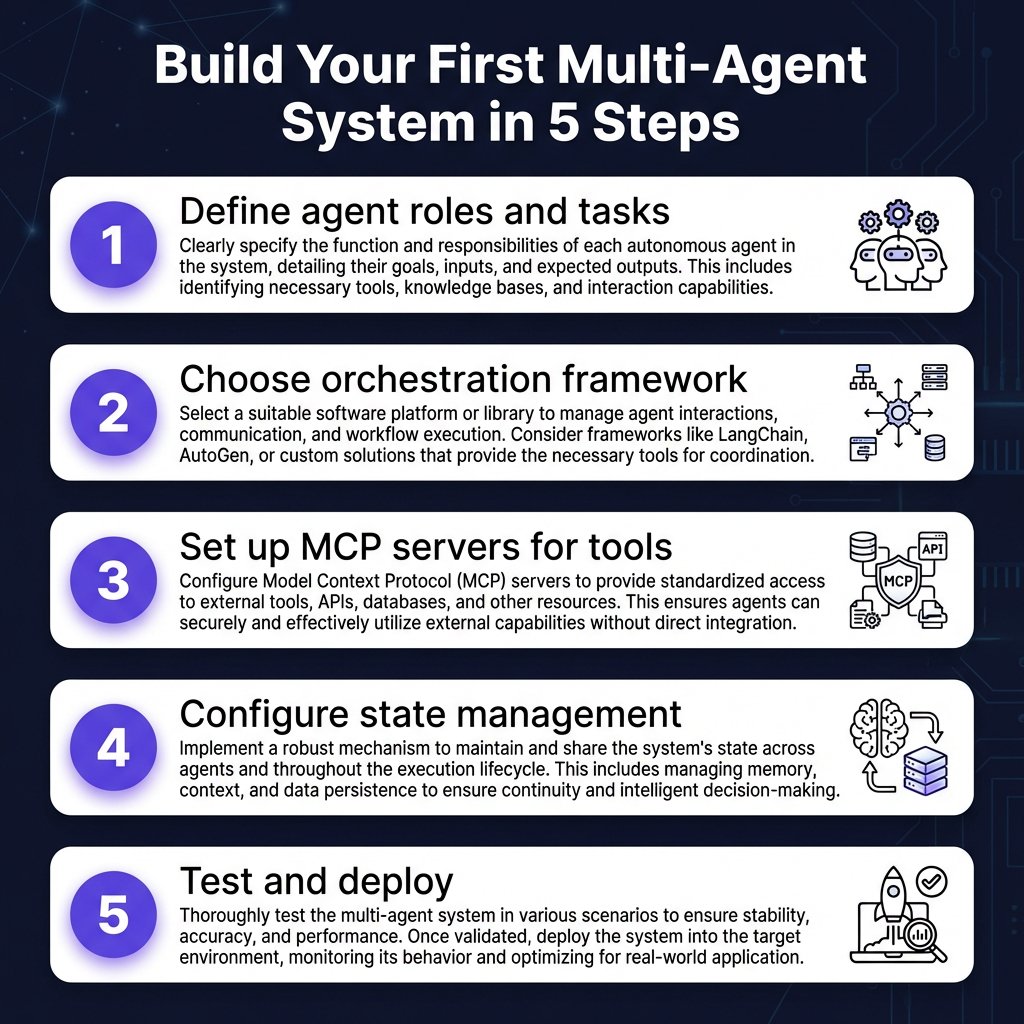
Step 1: Define Agent Roles
Start with the job descriptions. What specialized tasks need to happen? Common patterns:
- Planner → Executor → Reviewer: Break down work, execute, validate
- Researcher → Writer → Editor: Gather info, draft content, polish
- Frontend → Backend → DevOps: Full-stack development workflow
Step 2: Choose Your Framework
Use this decision tree:
- Need it running today? → CrewAI
- Complex state management? → LangGraph
- Non-technical stakeholders? → Dify
Step 3: Set Up MCP Servers
Identify what tools your agents need. Common MCP servers:
- Filesystem: Read/write project files
- PostgreSQL: Query production databases
- GitHub: Create issues, PRs, manage repos
- Browser: Web scraping and testing
- Slack: Team communication and notifications
Step 4: Configure State Management
Decide what state needs to persist across agent turns:
- Conversation history (always)
- Research findings (for writer agents)
- Code artifacts (for dev agents)
- Approval status (for human-in-loop)
Step 5: Test and Deploy
Start with a single workflow. Log everything. Add monitoring for:
- Agent turn latency
- Token usage per agent
- Success/failure rates by task type
- Human approval rates (if applicable)
Key Takeaways
- Multi-agent systems outperform single agents by 35-60% on complex tasks like software engineering
- CrewAI is fastest to deploy (~20 lines, 1 hour) for role-based workflows
- LangGraph gives you full state machine control for complex, branching workflows
- Dify bridges no-code visual design with production API deployment
- MCP is the connective tissue — use it to give agents access to real tools
- Start simple: One workflow, two agents, one MCP server. Scale from there.
Frequently Asked Questions
What’s the difference between CrewAI and LangGraph?
CrewAI uses role-based agent teams with sequential or hierarchical task execution — think of it as organizing a team meeting. LangGraph models workflows as state machines with explicit transitions — think of it as designing a flowchart. CrewAI gets you running faster; LangGraph gives you more control.
Do I need MCP to build multi-agent systems?
No, but it helps. You can build multi-agent systems without MCP by writing custom tool integrations. MCP becomes valuable when you want agents to access multiple tools (databases, APIs, file systems) without writing custom code for each one.
How much does it cost to run multi-agent systems?
Cost scales with the number of agent turns. A simple 3-agent workflow might use 3-5x the tokens of a single prompt. Using the March 2026 pricing:
- GPT-4o: ~$2.50/M input tokens
- Claude Sonnet 4: $3/M input, $15/M output
- Gemini 2.5 Flash: $0.30/M input tokens
For most applications, Claude Sonnet or GPT-4o provide the best balance of capability and cost. Use cheaper models (Gemini Flash, GPT-4o-mini) for simple agent roles like summarization or classification.
Can I use multiple LLM providers in one workflow?
Yes. All three frameworks support multi-model workflows. Common pattern: use a cheap model (Gemini Flash) for research agents, premium model (Claude Opus or GPT-5) for final output generation. This can reduce costs by 40-60% without sacrificing quality.
What about security with multi-agent systems?
Security researchers found vulnerabilities in early MCP servers including file access and remote code execution via prompt injection. Best practices:
- Use read-only MCP servers where possible
- Implement human approval gates for destructive operations
- Run agents in sandboxed environments
- Monitor agent tool usage and set rate limits
- Keep MCP servers updated — security is rapidly evolving
Conclusion
Multi-agent orchestration isn’t just a buzzword — it’s the next evolution in AI-powered development. The frameworks covered here (CrewAI, LangGraph, Dify) each solve different parts of the problem.
Start with CrewAI if you want results today. Move to LangGraph when you need more control. Use Dify if your team includes non-technical members who need to design workflows.
And don’t sleep on MCP. As AI agents become standard in development workflows, MCP is becoming the REST API of agent-tool communication. Understanding it now is like understanding REST APIs in 2015.
Ready to build? Start with Fungies to handle payments and tax compliance while you focus on building great multi-agent systems.
References
- GitHub OpenClaw Repository — 350K stars, fastest-growing open-source project (github.com/openclaw/openclaw)
- Augment Code — 8 Top AI Coding Assistants April 2026 (augmentcode.com/tools/8-top-ai-coding-assistants)
- Intuz — Top 5 AI Agent Frameworks in 2026 (intuz.com/blog/top-5-ai-agent-frameworks-2025)
- Vela — 19 Emerging Trends Reshaping Open-Source AI Infrastructure in 2026 (vela.partners/blog/emerging-open-source-ai-infrastructure-trends-2026)
- BuildMVPFast — Model Context Protocol (MCP) Guide 2026 (buildmvpfast.com/blog/model-context-protocol-mcp-guide-2026)
- TL;DL — LLM API Pricing 2026 (tldl.io/resources/llm-api-pricing-2026)
- Zuplo — The State of MCP 2026 Survey Results (linkedin.com/posts/zuplo_the-state-of-mcp-2026)