92% of developers now use AI coding tools daily. Yet most teams are overspending by $200–$600 per engineer per month because they picked the wrong tool for their workflow.
The AI coding landscape in 2026 isn’t just about autocomplete anymore. We’ve entered the agentic era—tools that can write entire features, refactor across multiple files, and even run tests autonomously. But with Cursor at $20/month, Claude Code hitting $200+/month in token costs, and GitHub Copilot holding steady at $10/month, the pricing spread is massive.
This guide breaks down the 10 best AI coding tools in 2026 with real pricing, actual feature comparisons, and honest assessments of who each tool is actually for. No affiliate fluff. Just data.
How We Ranked These AI Coding Tools
We evaluated each tool across five dimensions that actually matter for software teams:
- Pricing transparency — Hidden costs kill budgets. We looked at real total cost of ownership.
- Agentic capabilities — Can the tool execute multi-step tasks autonomously?
- IDE integration — Does it work where you already work, or force a migration?
- Codebase context — How much of your project can the tool understand at once?
- Enterprise readiness — SOC 2, SSO, audit logs, and security certifications.
The 10 Best AI Coding Tools in 2026
1. GitHub Copilot — Best Value at $10/Month
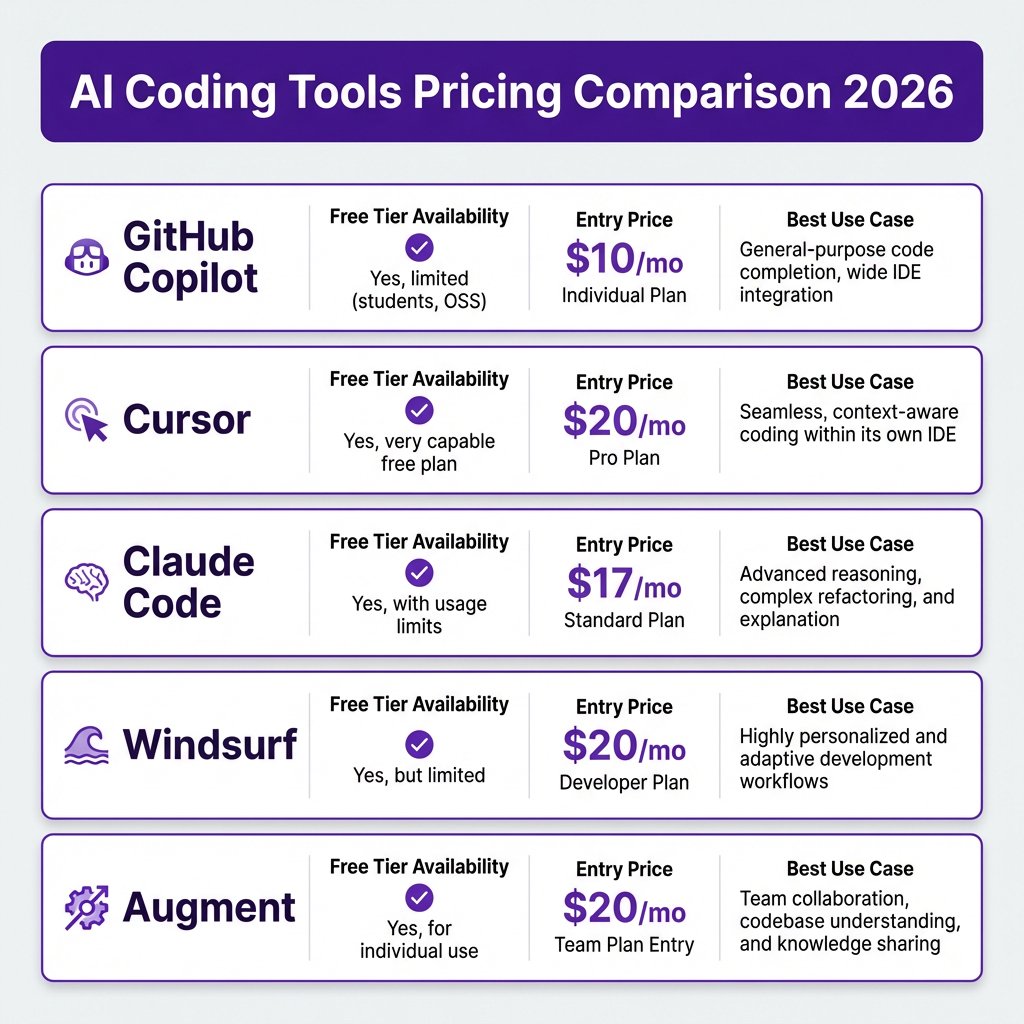
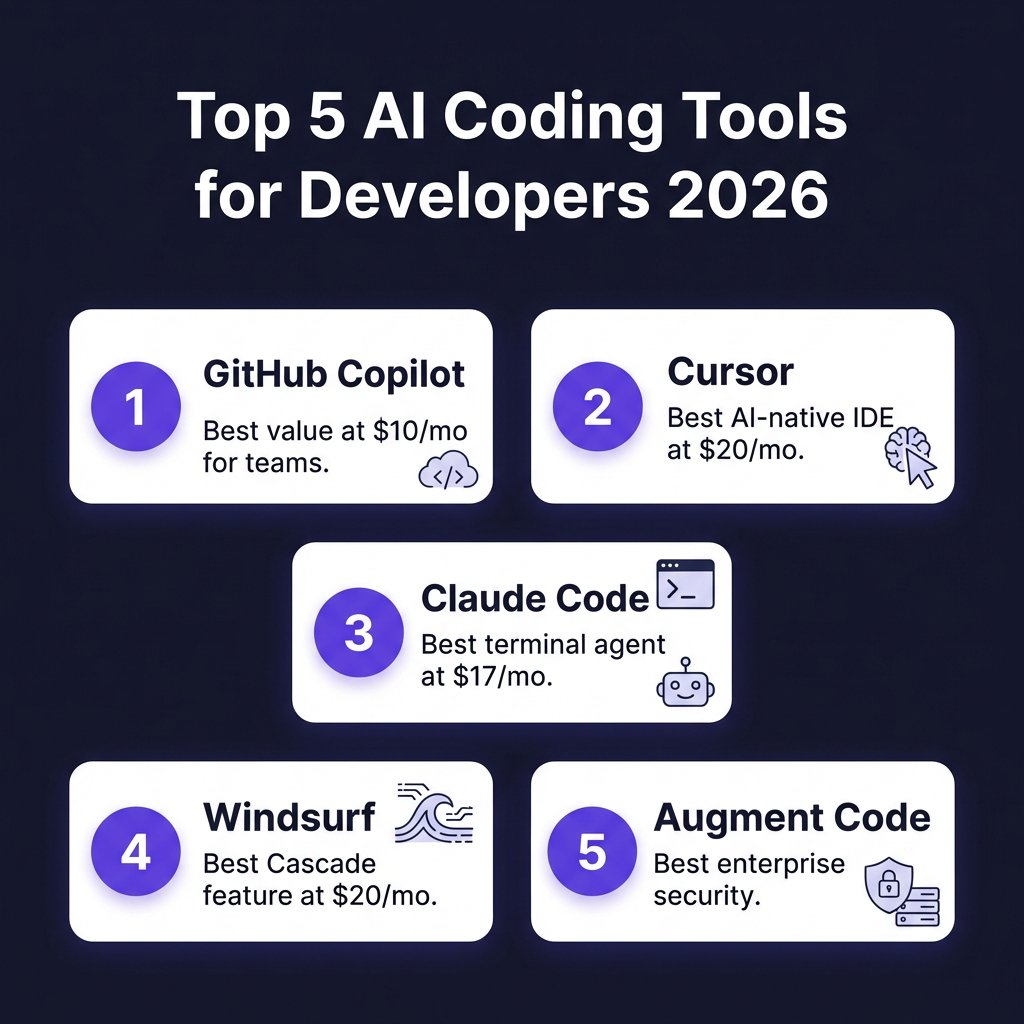
GitHub Copilot remains the default choice for good reason. At $10/month for the Pro plan, it’s the cheapest entry point among serious AI coding tools—and it delivers serious capability.
Pricing: Free tier (2,000 completions/month), Pro ($10/month), Pro+ ($20/month), Enterprise ($39/user/month).
What you get: 300 premium requests on Pro, multi-model support including Claude Opus 4.6 and OpenAI Codex, a coding agent that can create PRs from GitHub issues, and native integration across VS Code, JetBrains, Neovim, Visual Studio, and Xcode.
Best for: Teams already on GitHub who want multi-IDE support without forcing everyone onto a single editor. The coding agent’s ability to assign tasks from GitHub issues and compare outputs across Claude, Codex, and Copilot models is genuinely useful for code review workflows.
2. Cursor — Best AI-Native IDE Experience
Cursor rebuilt VS Code around AI instead of bolting AI onto an existing editor. The result is the most polished AI coding experience available—but it comes at a premium.
Pricing: Free (2,000 completions + 50 slow requests/month), Pro ($20/month), Pro+ ($60/month), Ultra ($200/month), Teams ($40/user/month).
What you get: AI-native interface with codebase-wide context, subagents for parallel task execution, cloud agents for heavy compute, a plugin marketplace, and multi-model support. The Pro plan includes a $20 credit pool for premium models.
Best for: Developers who want the most capable AI editor and don’t mind switching from their current IDE. The Ultra tier at $200/month gives you 20x usage multipliers—equivalent to $4,000 in standard API credits.
Catch: Cursor is completely useless offline. Fly to a conference with no WiFi, and you’ve got… VS Code without AI.
3. Claude Code — Best Terminal-First Agent
Claude Code is different. It’s not an IDE extension—it’s a terminal-based agent that can execute multi-step tasks, run shell commands, and edit files across your entire codebase autonomously.
Pricing: Free tier, Pro ($17–$20/month), Max 5x ($100/month), Max 20x ($200/month).
What you get: The deepest agentic capabilities of any tool on this list. Claude Code can run tests, iterate on failures, and complete complex refactoring tasks without babysitting. It uses Claude Opus, the strongest reasoning model available for coding tasks.
Best for: Developers comfortable in the terminal who need autonomous task execution. Agency teams managing large codebases and complex features get the most value here.
Warning: Token costs add up fast. Heavy users report $200–$2,000+ per month in API spend on top of the subscription. This isn’t a $20/month tool if you use it seriously.
4. Windsurf (Codeium) — Best Cascade Feature
Windsurf—formerly Codeium—offers a compelling middle ground with its Cascade feature, which provides a more agentic coding experience similar to Claude Code but within a more traditional IDE wrapper.
Pricing: Free tier, Pro ($20/month), Max ($200/month), Teams ($30/user/month).
What you get: Access to proprietary SWE-1 and SWE-1.5 models, unlimited Tab completions and Command inline edits on Pro, and daily + weekly quota refreshes. Premium models include Claude Sonnet 4.6, GPT-5, and Gemini 3.1 Pro.
Best for: Developers who want agentic features without the terminal-only limitation of Claude Code. The Pro tier covers most daily development workflows without hitting limits.
5. Augment Code — Best Enterprise Security
Augment Code is the new enterprise-focused entrant with security certifications that actually matter for regulated industries.
Pricing: Indie ($20/month, 40,000 credits), Standard ($60/month, 130,000 credits), Enterprise (custom).
What you get: ISO/IEC 42001 certification, SOC 2 Type II compliance, context engine processing up to 500,000 files, customer-managed encryption keys, and air-gapped deployment options. The Standard tier includes a coding agent.
Best for: Engineering teams in regulated industries (finance, healthcare, government) who can’t compromise on security. Also ideal for teams working with massive codebases—Augment handles 500,000 files while Cursor degrades beyond 15,000 lines.
6. Tabnine — Best for Privacy-Critical Environments
Tabnine offers something increasingly rare: fully local AI models where your code never leaves your infrastructure.
Pricing: Free (basic), Pro ($12/month), Enterprise (custom).
What you get: Local model execution, enterprise compliance features, and standard code completion. The Pro tier adds more capable cloud models if you need them.
Best for: Teams with strict data residency requirements or working on proprietary codebases that can’t touch third-party APIs. The tradeoff is capability—local models aren’t as powerful as cloud-based alternatives.
7. Amazon Q Developer — Best for AWS Workloads
Amazon Q Developer is purpose-built for AWS-centric development, with deep integration into the AWS ecosystem that other tools can’t match.
Pricing: Free tier, Professional ($19/month), Enterprise (custom).
What you get: AWS-specific code generation, security vulnerability scanning, code transformation for AWS services, and integration with AWS CI/CD pipelines.
Best for: Teams heavily invested in AWS infrastructure. If your stack is Lambda, S3, DynamoDB, and CloudFormation, Amazon Q will generate better code than general-purpose tools.
8. JetBrains AI Assistant — Best for JetBrains Users
JetBrains’ official AI assistant provides native integration across IntelliJ IDEA, PyCharm, WebStorm, and the rest of the JetBrains suite.
Pricing: Free tier, Pro ($10/month), Enterprise (custom).
What you get: Native IDE integration without third-party plugins, context-aware suggestions based on JetBrains’ deep code understanding, and seamless refactoring support.
Best for: Developers committed to JetBrains IDEs who want AI features without switching editors or dealing with plugin compatibility issues.
9. Replit Ghostwriter — Best for Beginners
Replit Ghostwriter combines an AI coding assistant with Replit’s cloud-based development environment, making it ideal for learning and rapid prototyping.
Pricing: Free tier, Core ($7/month), Teams (custom).
What you get: Integrated AI assistance within Replit’s cloud IDE, code explanation features, and instant deployment.
Best for: Beginners learning to code, educators, and teams doing rapid prototyping. The low price point and zero setup make it accessible, but you’re limited to the Replit platform.
10. Aider — Best Free Option
Aider is an open-source terminal-based coding assistant that pairs with your own API keys. It’s free software—you just pay for the LLM API usage.
Pricing: Free (open source). You bring your own API keys (OpenAI, Anthropic, etc.).
What you get: Multi-file editing, git integration, support for multiple models, and a growing community of contributors.
Best for: Cost-conscious developers comfortable with CLI tools and willing to handle their own API key management. The learning curve is steeper than commercial alternatives.
AI Coding Tools Pricing Comparison Table
| Tool | Free Tier | Entry Paid | Mid Tier | Enterprise |
|---|---|---|---|---|
| GitHub Copilot | 2,000 completions | $10/mo | $20/mo | $39/mo |
| Cursor | 2,000 + 50 slow | $20/mo | $60/mo | $40/mo |
| Claude Code | Limited | $17-20/mo | $100/mo | Custom |
| Windsurf | Limited | $20/mo | $200/mo | $30/mo |
| Augment | Limited | $20/mo | $60/mo | Custom |
| Tabnine | Basic | $12/mo | Custom | Custom |
| Amazon Q | Limited | $19/mo | Custom | Custom |
| JetBrains AI | Limited | $10/mo | Custom | Custom |
| Replit | Limited | $7/mo | Custom | Custom |
| Aider | Full | Free | Free | Free |
The Hidden Costs Nobody Talks About
Here’s what vendor pricing pages won’t tell you: the real cost of AI coding tools in 2026 isn’t the subscription—it’s the token consumption.
Agentic tools like Claude Code can cost $200–$2,000+ per engineer per month in API tokens alone. Cursor’s Ultra tier at $200/month exists because power users were blowing through credits. Even “cheap” tools get expensive when you’re processing large contexts or running autonomous agents.
The 2026 benchmark data shows healthy ROI on AI coding tools is 2.5–3.5x on average, with top-quartile organizations hitting 4–6x. But that’s only if you measure the right things: task completion speed, code quality, review effort, and end-to-end delivery metrics—not just how fast developers feel.
How to Choose the Right AI Coding Tool
Don’t standardize on one tool for your entire team. The 40-person engineering team that ran a 3-month comparison found something surprising: the tool that made individual developers feel most productive (Cursor) didn’t always produce the best team outcomes.
Instead, match the tool to the workflow:
- Use GitHub Copilot if you’re on GitHub and want the best value with multi-IDE support.
- Use Cursor if you want the most polished AI-native IDE and don’t mind switching editors.
- Use Claude Code if you need deep agentic capabilities and live in the terminal.
- Use Windsurf if you want agentic features with a more traditional IDE experience.
- Use Augment if you’re in a regulated industry or working with massive codebases.
- Use Tabnine if data privacy is non-negotiable.
Key Takeaways
- GitHub Copilot at $10/month is still the best value for most teams.
- Cursor’s AI-native experience justifies the $20/month premium for heavy users.
- Claude Code has the deepest capabilities but watch those token costs.
- Free tiers are genuinely usable in 2026—start there before paying.
- The $200/month tiers are only worth it if AI coding is your primary productivity lever.
- Most professional developers use 2–3 AI tools simultaneously for different tasks.
Frequently Asked Questions
What is the best AI coding tool in 2026?
GitHub Copilot offers the best value at $10/month for most developers. Cursor is the best AI-native IDE at $20/month. Claude Code is the most capable agentic tool but requires terminal comfort and has higher variable costs.
Can I use AI coding tools for free?
Yes. GitHub Copilot Free offers 2,000 completions/month. Cursor Free gives 2,000 completions plus 50 slow requests. Windsurf, Replit, and JetBrains all have usable free tiers. Aider is completely free and open source.
How much do AI coding tools really cost?
Beyond subscriptions, agentic tools can cost $200–$600/month per engineer in total when including token consumption. Claude Code users report $200–$2,000+/month in API costs for heavy usage. Budget for 2–3x the subscription price.
Is Cursor worth $20/month?
If you use the advanced features—multi-file editing, codebase-wide context, subagents—yes. Many developers report Cursor paying for itself in the first week. If you only need basic autocomplete, stick with Copilot.
What’s the difference between Copilot and Cursor?
Copilot is an AI extension for existing IDEs. Cursor is a complete IDE rebuilt around AI. Copilot sees your current file; Cursor sees your entire codebase. Copilot costs $10/month; Cursor starts at $20/month.
Conclusion
The best AI coding tool in 2026 depends on your workflow, not marketing claims. GitHub Copilot remains the safe default. Cursor justifies its premium for AI-native development. Claude Code offers unmatched agentic power for terminal users. And new entrants like Augment are raising the bar for enterprise security.
Start with free tiers. Measure actual productivity gains. And don’t be afraid to use multiple tools—most professional developers do.
Ready to streamline your SaaS billing and payments? Get started with Fungies.io—the merchant of record platform that handles tax compliance, global payments, and checkout for software companies.
References
- TLDL — AI Coding Tools Compared (2026)
- NxCode — AI Coding Tools Pricing Comparison 2026
- ModelsLab — GitHub Copilot vs Cursor vs Claude Code Pricing 2026
- SaaS Price Pulse — Cursor Pricing Analysis
- Verdent — Windsurf Pricing 2026
- Larridin — Developer Productivity Benchmarks 2026
- Panto — AI Coding Productivity Statistics 2026
- PinkLime — Claude Code vs GitHub Copilot vs Cursor 2026
- SitePoint — AI Coding Tools Comparison 2026