Here’s the uncomfortable truth: 85% of developers now use AI coding tools, but most are using the wrong one for their workflow. GitHub Copilot dominates with 42% market share, yet Cursor is hitting $500M ARR by solving problems Copilot ignores. And Claude Code? It’s quietly becoming the weapon of choice for developers who live in the terminal.
I’ve spent the last three months testing these three tools across real projects—API integrations, React components, database migrations, and refactoring legacy code. The differences aren’t subtle. They’re workflow-defining.
This guide breaks down exactly how Claude Code, Cursor, and GitHub Copilot compare in 2026. Real benchmarks. Real pricing. Real use cases. No fluff.
What Are AI Coding Agents (And Why They Matter in 2026)
AI coding agents have evolved far beyond autocomplete. In 2026, these tools write entire functions, refactor across multiple files, debug errors, and even execute terminal commands. The best ones understand your entire codebase, not just the file you’re editing.
Here’s what changed in the past year:
- Agentic workflows: Tools now perform multi-step tasks autonomously
- Multi-file editing: 78% of agent coding sessions now involve edits across multiple files
- Context windows expanded: 1M+ token contexts are now standard
- Terminal integration: CLI-first tools can execute commands and iterate
The result? Developers report 31.4% average productivity gains—but only when they pick the right tool for their workflow. Pick wrong, and you’re paying for features you’ll never use.
The Three Paradigms: How These Tools Are Fundamentally Different
Before comparing features, understand this: Claude Code, Cursor, and GitHub Copilot represent three completely different approaches to AI-assisted development.
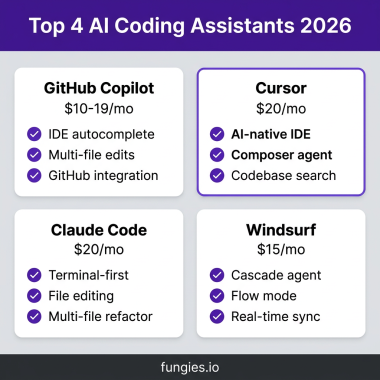
| Tool | Type | Best Model | Context Window | Price |
|---|---|---|---|---|
| Claude Code | CLI Agent | Claude Opus 4.6 | 1M tokens | $17/mo Pro |
| Cursor | AI-Native IDE | GPT-4o / Claude | Full project | $16/mo Pro |
| GitHub Copilot | IDE Extension | GPT-4o / Claude | Project-wide | $10/mo |
Claude Code: Terminal-Native Agentic Coding
Claude Code isn’t an IDE plugin. It’s a terminal application that happens to write code. Install it with npm install -g @anthropic-ai/claude-code, and you get an AI agent that can:
- Edit multiple files simultaneously
- Run terminal commands and iterate on results
- Auto-commit changes with descriptive messages
- Understand your entire codebase structure
Best for: Developers who live in the terminal, DevOps engineers, backend developers working with complex systems
Cursor: The AI-Native IDE Experience
Cursor is a VS Code fork built from the ground up for AI. It’s not an extension—it’s the entire editor reimagined. With features like Composer (multi-file editing), Tab (predictive completions), and Agent (autonomous task execution), Cursor feels like coding in the future.
Best for: Full-stack developers, frontend engineers, anyone wanting the most polished AI coding experience
GitHub Copilot: The Ecosystem Play
Copilot is the safe choice. It works in VS Code, JetBrains, Neovim, Visual Studio, and Xcode. It integrates deeply with GitHub—turn issues into PRs, review code with AI, and deploy with GitHub Actions. If your team is already on GitHub Enterprise, Copilot is the path of least resistance.
Best for: Enterprise teams, organizations needing multi-IDE support, GitHub-centric workflows
Head-to-Head Feature Comparison
| Feature | Claude Code | Cursor | GitHub Copilot |
|---|---|---|---|
| Multi-file Editing | Excellent (agentic) | Excellent (Composer) | Good (Workspace) |
| Terminal/CLI | Native (it IS the CLI) | Limited | Limited |
| IDE Support | Terminal only | VS Code fork only | VS Code, JetBrains, Neovim, Xcode |
| Git Integration | Native auto-commits | Basic | Deep (GitHub) |
| Model Flexibility | Claude only | Multiple (GPT-4o, Claude) | Multiple (GPT-4o, Claude, Codex) |
| Offline/Local | Via API | Via API | No |
| Learning Curve | Medium (terminal) | Low (VS Code) | Low (VS Code plugin) |
Pricing Breakdown: What You’ll Actually Pay
Pricing in 2026 is more complex than a simple monthly fee. Here’s the real cost breakdown:
| Plan | Claude Code | Cursor | GitHub Copilot |
|---|---|---|---|
| Free Tier | Limited | Limited | 2,000 completions |
| Pro/Individual | $17/mo | $16/mo | $10/mo |
| Team/Business | $100+/mo (Max) | $40/user/mo | $19/user/mo |
| Enterprise | Custom | $240/user/mo | Custom |
Value analysis: GitHub Copilot Pro at $10/month offers the best per-dollar value with 300 premium requests, coding agent, code review, and multi-model support. Cursor at $16/month justifies the premium with superior UX. Claude Code at $17/month is worth it only if you need deep terminal integration.
Performance Benchmarks: What the Data Shows
SWE-bench Verified scores measure how well AI tools handle real software engineering tasks. Here’s how they stack up in March 2026:
| Tool/Model | SWE-bench Verified | Best For |
|---|---|---|
| Claude Opus 4.6 (Claude Code) | 80.8% | Complex reasoning, multi-file refactoring |
| GPT-4o (Cursor/Copilot) | 76.2% | General coding, API integration |
| Claude Sonnet 4.6 | 68.0% | Everyday coding, writing tasks |
The gap is narrowing. In early 2026, the difference between top models was 10+ points. Now it’s 4-5 points. For most day-to-day tasks, you won’t notice the difference.
Real-World Use Cases: Which Tool for Which Job
Use Case 1: Building a Full-Stack Feature
Winner: Cursor
Cursor’s Composer mode handles frontend components, API endpoints, and database migrations in one session. The UI gives you visibility into what files are being changed before you commit.
Use Case 2: Refactoring Legacy Code
Winner: Claude Code
Claude Code’s agentic approach excels at understanding large codebases and making sweeping changes. The terminal interface lets you run tests and iterate quickly.
Use Case 3: GitHub-Centric Team Workflow
Winner: GitHub Copilot
Copilot’s integration with GitHub Issues, PRs, and Actions is unmatched. Turn an issue into a PR with a single command. Review code with AI assistance. Deploy seamlessly.
Use Case 4: Learning a New Framework
Winner: Cursor
Cursor’s explanations and inline documentation help you understand why code works, not just what it does. The VS Code interface feels familiar to most developers.
The Productivity Reality Check
Here’s what the research actually shows about AI coding productivity:
- 31.4% average productivity increase for developers using AI assistants
- 46% of all new code is now AI-generated
- 30-60% time savings on coding and testing tasks
- 2.74x more vulnerabilities in AI-generated vs human-written code (security matters)
But there’s a catch: productivity gains are only realized when teams adapt their workflows. Developers without AI coding skills are falling behind. The tools are getting better, but so is the baseline expectation.
How to Choose: The Decision Framework
Still unsure? Here’s the simplest decision tree:
- Choose Claude Code if: You live in the terminal, want agentic workflows that run commands autonomously, or need the best reasoning model (Claude Opus)
- Choose Cursor if: You want the best all-around IDE experience, work on full-stack features, or value polished UX over raw power
- Choose GitHub Copilot if: Your team uses GitHub Enterprise, you need multi-IDE support, or you want the best value at $10/month
Pro tip: Many developers use multiple tools. Cursor for daily editing + Claude Code for complex refactoring is a powerful combination.
Key Takeaways
- There’s no single “best” AI coding tool—only the best tool for your workflow
- Claude Code wins for terminal power users and complex reasoning tasks
- Cursor offers the most polished IDE experience for general development
- GitHub Copilot provides the best value and ecosystem integration
- The productivity gap between tools is shrinking—workflow fit matters more than raw benchmarks
- 85% of developers now use AI coding tools—adoption is no longer optional
Frequently Asked Questions
Can I use AI coding tools for free in 2026?
Yes. Windsurf offers a genuinely free tier for individuals. GitHub Copilot Free gives you 2,000 completions. Bolt.new provides 1M tokens/month. For CLI tools, Gemini CLI is free with a generous tier.
Will AI coding tools replace developers?
No. The role is shifting from “writing code” to “directing AI and reviewing output.” 90% of engineers are moving toward AI orchestration rather than line-by-line coding. The demand for developers who can effectively work with AI is increasing.
Which AI coding tool is best for beginners?
GitHub Copilot has the lowest learning curve—it’s a VS Code extension that feels familiar. Cursor is also beginner-friendly with its VS Code-based interface. Claude Code requires more comfort with terminal workflows.
Is AI-generated code secure?
AI-generated code has 2.74x more vulnerabilities than human-written code. Always review AI output, especially for authentication, authorization, and data handling. Use security scanning tools and never blindly trust generated code.
Can I switch between these tools easily?
Yes. They all work with standard code formats. The main friction is learning each tool’s interface and workflow patterns. Many developers keep multiple tools installed and use the right one for each task.
Conclusion
The AI coding landscape in 2026 is mature enough that you can’t go wrong with any of these three tools. Claude Code, Cursor, and GitHub Copilot are all capable of dramatically improving your productivity.
The question isn’t which tool is “best.” It’s which tool fits how you work. Terminal-first developers should try Claude Code. IDE lovers should go with Cursor. GitHub-centric teams should stick with Copilot.
Start with the one that matches your workflow. Master it. Then consider adding a second tool for specialized tasks. The developers who thrive in 2026 won’t be the ones using the “best” tool—they’ll be the ones who learned to work effectively with AI.
Ready to streamline your SaaS development workflow? Get started with Fungies.io—the Merchant of Record platform that handles payments, tax compliance, and checkout for indie developers and SaaS founders.