Here’s a number that should get your attention: 42% of all new code written in 2026 is AI-assisted. That’s not a projection. That’s happening right now, according to Sonar’s 2026 developer survey. Another 85% of developers report using AI coding tools daily.
The question isn’t whether you should use an AI coding agent. It’s which one actually deserves a spot in your workflow — and your budget.
I’ve spent the last month testing the major players, reviewing benchmark data, and talking to developers who use these tools in production. The result? Seven tools matter in 2026. Three of them are genuinely excellent. The rest have specific use cases where they shine.
This isn’t a feature checklist comparison. This is a practical guide to which agent solves which problem — and what you’ll actually pay for each one.
What Are AI Coding Agents (And Why They Beat Basic Autocomplete)
AI coding agents are a different beast from the autocomplete suggestions you get in VS Code. They operate at the repository level. They can:
- Edit multiple files simultaneously
- Run terminal commands and tests
- Iterate on their own work based on error output
- Understand your entire codebase, not just the current file
- Submit pull requests autonomously
The best agents don’t just write code faster. They handle the tedious, multi-step tasks that used to kill your flow state — refactoring across dozens of files, debugging complex issues, generating boilerplate for new features.
But here’s the catch: not every agent is built for every workflow. Some excel at reasoning through hard problems. Others prioritize speed and throughput. Some are IDE-native. Others live in your terminal. Picking the wrong one means paying for capabilities you’ll never use — or worse, fighting the tool instead of shipping code.
The 7 Best AI Coding Agents Ranked for 2026
I evaluated each tool across five criteria that actually matter to developers: cost efficiency, real productivity impact, code quality, repository understanding, and privacy controls. Benchmark scores (like SWE-bench) are included, but they’re one signal among many. What matters is how the tool performs on your real work.
1. Claude Code — Best for Complex Reasoning and Hard Problems
Claude Code is Anthropic’s terminal-native agent, and it’s the most capable tool on the market for genuinely difficult engineering problems. It hit $2.5 billion ARR in early 2026 — over half of Anthropic’s enterprise revenue — because engineering teams are willing to pay $100-200 per developer monthly when the tool saves them more than it costs.
Key specs:
- SWE-bench Verified: 80.9% (highest score, Opus 4.5)
- Terminal-Bench 2.0: 65.4%
- Context window: 200K tokens
- Starting price: $20/month
- Heavy usage cost: $150-200/month
What it does well:
Reasoning depth is Claude Code’s superpower. The 200K token context window means it can hold entire codebases in working memory. Built-in auto-compaction keeps long sessions coherent. It runs in your terminal with direct access to shell, file system, and dev tools.
Developers consistently describe Claude Code as the tool they reach for when other tools fail. Multi-file refactors, unfamiliar codebases, subtle architectural bugs — this is where Claude Code earns its keep. In February 2026, Anthropic shipped Agent Teams for multi-agent coordination, plus MCP server integration and custom hooks.
The drawbacks:
Cost is the loudest complaint. Billing is opaque, and developers report being surprised by API bills with no clear way to understand token consumption. Rate limits are frustrating even at the $200/month Max plan. And there’s no free tier — every major competitor offers some free path except Claude Code.
Verdict: If your work regularly involves complex architecture and problems where other tools give up, Claude Code is worth every penny. If you primarily write straightforward features, you’re overpaying.
2. Cursor — Best IDE-Native Experience for Daily Development
Cursor is a VS Code fork with over 1 million users and 360,000 paying customers. It’s the dominant AI-native IDE for a reason: it combines powerful agent capabilities with a polished, familiar interface that doesn’t break your flow.
Key specs:
- Users: 1M+ active
- Paying customers: 360K+
- Starting price: $16/month (annual) or $20/month
- Context: Deep codebase indexing
- Agent capability: High (parallel subagents)
What it does well:
Cursor 2.0 introduced a subagent system for parallel task processing, its own ultra-fast Composer model, and a redesigned agent-centric interface. The deep codebase indexing means it understands how your modules connect and what breaks when you change an interface.
For developers who spend most of their time in an IDE and want the best available completions and file-aware editing, Cursor is the default answer. It doesn’t require switching contexts or learning a new workflow — it enhances the one you already have.
The drawbacks:
Cursor’s credit-based billing can be unpredictable. Heavy usage burns through credits faster than expected, and the pricing model gives some teams pause at scale. It’s also VS Code-only — if you use JetBrains or another IDE, you’re out of luck.
Verdict: The best choice for developers who want a polished IDE experience with deep codebase awareness and ship features daily. Start here if you’re new to agentic coding.
3. GitHub Copilot — Best for Teams Already in the GitHub Ecosystem
GitHub Copilot is the most widely adopted AI coding tool, and for good reason. It integrates seamlessly with the platform where most developers already live. The 2026 updates added agent mode to VS Code, giving Copilot the ability to use tools, run terminal commands, and perform multi-step tasks.
Key specs:
- Individual price: $10/month
- Business price: $19/month per user
- Free tier: Yes (limited)
- IDE support: VS Code, JetBrains, Vim, Neovim
- Agent capability: Medium (improving with agent mode)
What it does well:
The GitHub integration is unmatched. Copilot can reference issues, pull requests, and documentation context. The issue-to-PR pipeline is tightly integrated, offering a low-friction path for teams already standardized on GitHub. Agent mode in VS Code now gives Copilot terminal access, file editing, and MCP server support.
For teams new to AI-assisted development, Copilot offers the lowest-friction entry point. The pricing is predictable, the IDE support is broad, and the learning curve is minimal.
The drawbacks:
Copilot’s agent capabilities lag behind dedicated agents like Claude Code and Cursor. Multi-file editing is less reliable, and the reasoning depth isn’t on par with Claude’s Opus models. It’s an excellent assistant that recently gained agent features — not an agent-first tool.
Verdict: The right starting point for teams new to AI coding tools or deeply invested in the GitHub ecosystem. Add Claude Code or Cursor when you need deeper agent capabilities.
4. OpenAI Codex CLI — Best Open-Source Option for Speed
OpenAI’s Codex CLI is the new open-source contender, built in Rust and backed by the GPT-5.x family. It acquired over one million developers in its first month — the fastest adoption of any tool on this list.
Key specs:
- Terminal-Bench 2.0: 77.3% (GPT-5.3)
- Speed: 240+ tokens per second
- Developers: 1M+ (first month)
- Price: $20/month (OpenAI API)
- License: Open source (Rust)
What it does well:
Raw speed. At 240+ tokens per second — 2.5x faster than Claude Opus — Codex is the throughput champion. For high-volume edits, boilerplate generation, and tasks where speed matters more than depth, nothing else comes close.
Being open-source means you can read the code, fork it, and extend it. Multi-agent orchestration through the Agents SDK and MCP enables parallel processing across git worktrees. The community is growing fast with 4,200+ weekly contributors.
The drawbacks:
Codex is fast but shallow compared to Claude. Developers consistently report that it handles straightforward tasks well but struggles with subtle bugs, complex refactors, and architectural decisions. Usage limits (30-150 messages) burn through fast when running multiple agents.
Verdict: The best choice when throughput and speed matter more than reasoning depth. Many developers use both: Codex for volume, Claude for depth.
5. Windsurf — Best Value for Cost-Conscious Developers
Windsurf (formerly Codeium) delivers most of what Cursor offers for $1 less per month — and with more predictable billing. It’s the value option that doesn’t feel like a compromise.
Key specs:
- Starting price: $15/month
- Free tier: Yes
- Agent capability: High (5 parallel agents)
- Billing: More predictable than Cursor
What it does well:
Windsurf offers parallel agent processing (5 agents simultaneously), deep codebase understanding, and a polished IDE experience. In February 2026, Windsurf shipped multi-agent support in the same two-week window as Grok Build and Claude Code Agent Teams.
The pricing is straightforward, and the free tier is genuinely usable for evaluation. For teams where Cursor’s credit-based billing creates uncertainty, Windsurf is worth serious consideration.
The drawbacks:
The ecosystem is smaller than Cursor’s, and some developers report slightly less polished completions. It’s a strong alternative, not a direct replacement, for teams that prioritize cost predictability.
Verdict: The best value option for developers who want agentic capabilities without premium pricing. Start here if cost predictability matters.
6. Cline — Best for Full Control and Transparency
Cline is an open-source VS Code extension that gives you complete visibility into what you’re paying for. You bring your own API keys and pay only for the tokens you use — no markup, no subscriptions, no surprises.
Key specs:
- Price: Free (API costs only)
- License: Open source
- MCP support: First-class
- Transparency: Full cost visibility
What it does well:
Cline offers high agentic capability with complete cost transparency. You control which models you use, how much you spend, and what capabilities you enable. MCP support is first-class, letting you extend the agent with custom tools.
For developers who want to understand exactly what they’re paying for and optimize their spending, Cline is the clear choice. It’s also popular in regulated industries where BYOM (bring your own model) is required.
The drawbacks:
Setup is more complex than turnkey solutions. You need to manage your own API keys and monitor your own spending. The UX is functional but not as polished as Cursor or Windsurf.
Verdict: The right choice for developers who want full control over costs and models, or teams in regulated industries requiring BYOM.
7. Devin — Best for Autonomous Task Completion
Devin is the most autonomous agent on the market. It can take a task description, plan the work, write the code, run tests, fix bugs, and submit a pull request — all without human intervention.
Key specs:
- Autonomy level: Very high
- Starting price: $20/month + usage
- Best for: Defined, repetitive engineering tasks
- MCP support: No
What it does well:
Devin excels at well-defined, repetitive engineering backlogs. If you have a queue of similar tasks — refactoring patterns, updating dependencies, generating boilerplate — Devin can work through them autonomously while you focus on higher-level work.
The drawbacks:
Devin requires more oversight than marketing suggests. It works best on bounded, well-specified tasks. Open-ended or ambiguous work often requires significant human guidance. The lack of MCP support limits extensibility compared to other tools.
Verdict: Worth considering for teams with clear, repetitive engineering backlogs. Not the right choice for exploratory or ambiguous work.
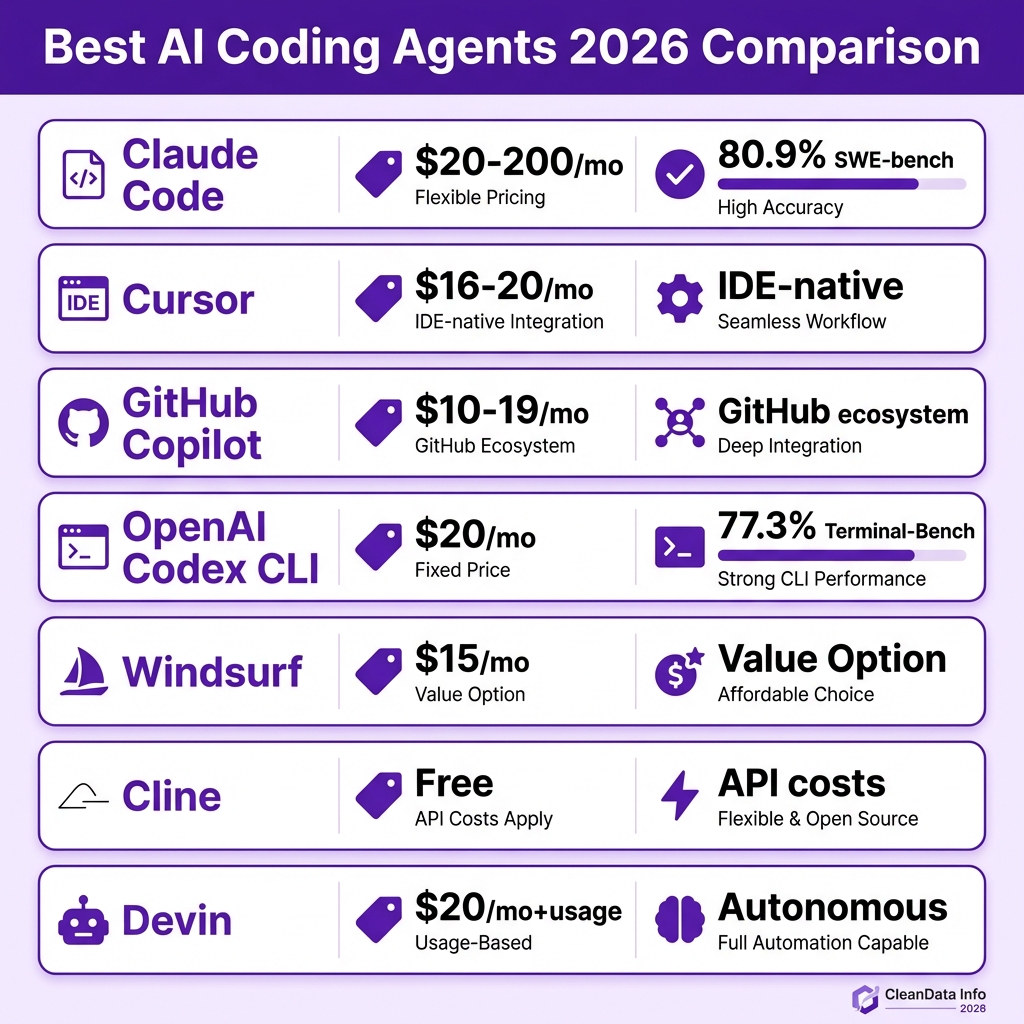
AI Coding Agents Comparison: At a Glance
| Agent | Best For | Starting Price | SWE-bench Score | Free Tier | MCP Support |
|---|---|---|---|---|---|
| Claude Code | Complex reasoning | $20-200/mo | 80.9% | No | Yes |
| Cursor | Daily IDE work | $16-20/mo | ~75% | Limited | Yes |
| GitHub Copilot | GitHub ecosystem | $10-19/mo | ~70% | Yes | Limited |
| OpenAI Codex CLI | Speed & open source | $20/mo | 77.3% | No | Yes |
| Windsurf | Value & predictability | $15/mo | ~72% | Yes | Yes |
| Cline | Full cost control | Free (API only) | Varies by model | Yes | Yes |
| Devin | Autonomous tasks | $20/mo + usage | N/A | No | No |
How to Choose the Right AI Coding Agent
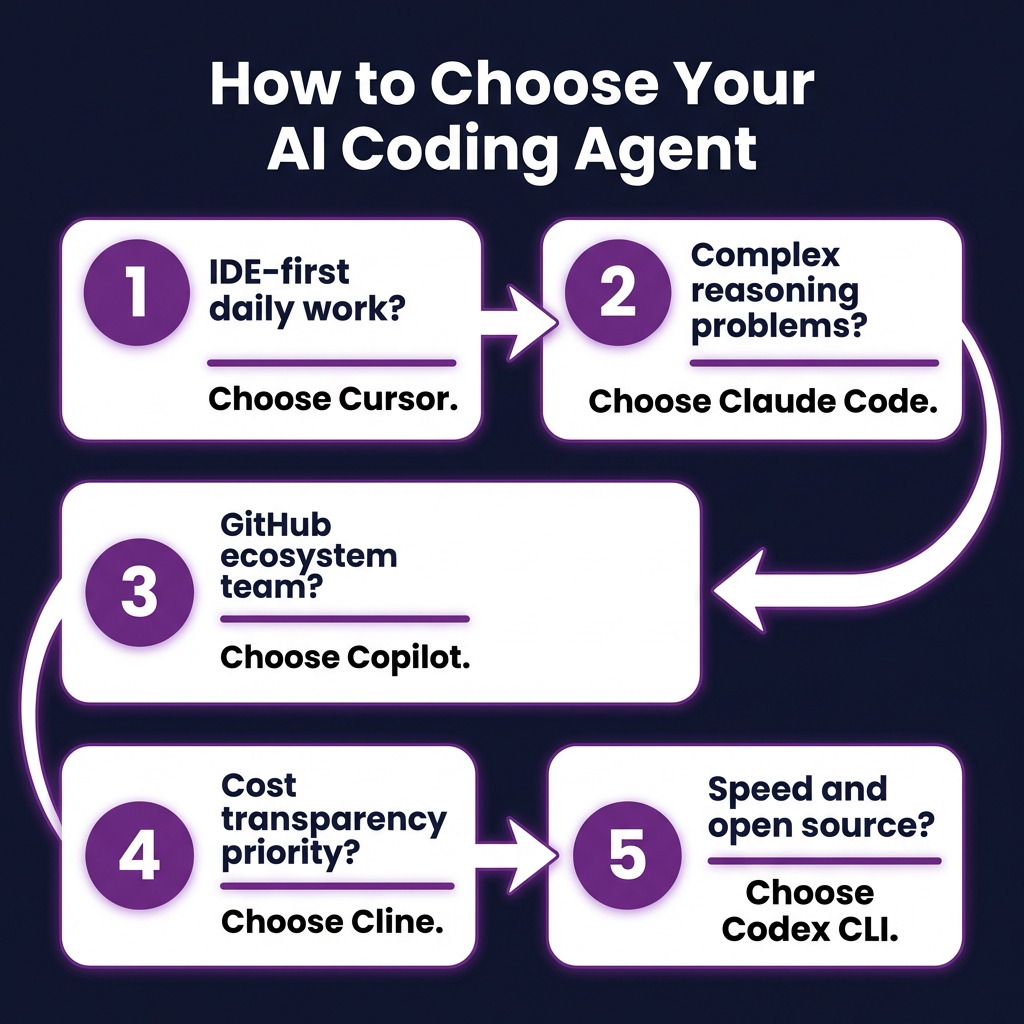
The right tool depends on where you are in your AI adoption and what problems you’re actually trying to solve. Here’s a decision framework based on real usage patterns:
If You’re an Individual Developer
- Start with Cursor if you spend most of your time in an IDE and want the best completions and file-aware editing
- Choose Claude Code if you prioritize reasoning quality over UX polish and work heavily in the terminal
- Try Windsurf if cost predictability matters and you want most of Cursor’s capabilities for less
- Use Cline if you want full transparency into costs and control over which models you use
If You’re Standardizing a Team
- Start with GitHub Copilot if your team is new to AI coding and you want the lowest-friction entry
- Move to Cursor when your team is ready to lean into agentic workflows and can manage credit billing
- Consider Windsurf if Cursor’s billing model creates uncertainty at your scale
- Provide Claude Code licenses to senior developers who handle the most complex architectural work
If You Need Production-Grade Infrastructure
For enterprise deployment, capability is only part of the equation. You need sandboxed execution, reproducible runs, cost analytics, governance controls, and compliance posture. According to Gartner, 40% of enterprise applications will include task-specific AI agents by the end of 2026 — up from less than 5% today. If you’re in this category, evaluate tools like Codegen that were built specifically for orchestration and governance.
Key Takeaways: What Actually Matters
After testing these tools and talking to developers using them in production, here are the conclusions that matter:
- Benchmarks don’t tell the whole story. A tool that scores 80% on SWE-bench but breaks your flow with bad UX or slow responses isn’t necessarily better than a 70% tool that you actually enjoy using.
- Most developers use more than one tool. The common pattern is Cursor or Copilot for daily feature work, Claude Code for complex refactors and hard problems.
- Cost scales with capability. Heavy Claude Code usage runs $150-200/month, but for developers working on genuinely hard problems, the cost is trivially justified by the time saved.
- Billing transparency varies. Cursor’s credit model can be unpredictable. Cline gives you full visibility. Know what you’re signing up for.
- The architecture matters as much as the model. In one February 2026 test, three different agent frameworks running the same underlying model scored 17 issues apart on 731 total problems. How the agent is built affects results independent of the LLM.
Frequently Asked Questions
What’s the best free AI coding agent?
Cline is completely free — you only pay for API tokens you use. Windsurf and GitHub Copilot both offer usable free tiers for evaluation. If you want a free terminal agent, Gemini CLI is also worth exploring.
Can I use multiple AI coding agents together?
Yes, and many developers do. The most common pattern is using Cursor or Copilot for daily coding and Claude Code for complex tasks. Some developers also use Codex CLI for high-volume boilerplate generation alongside a more capable agent for difficult work.
Will AI coding agents replace developers?
No. What we’re seeing is a shift in what developers spend time on. Agents handle repetitive, multi-step tasks — refactoring, boilerplate, debugging — freeing developers to focus on architecture, product decisions, and creative problem-solving. The developers who thrive will be those who learn to work effectively with these tools.
How do I evaluate which agent is right for me?
Commit to one tool, use it on real work for three to four weeks, and evaluate by what you actually shipped rather than what the demo looked like. Pay attention to whether the tool breaks your flow, how often you need to re-prompt, and whether you trust the code it generates without reviewing every line.
Are AI coding agents secure for proprietary code?
It depends on the tool and your requirements. Tools like Cline with BYOM support keep your code on infrastructure you control. Enterprise-focused tools like Codegen offer on-premises deployment. Always review the data handling policies of any tool before using it with proprietary code.
Conclusion: Start With Your Workflow, Not the Hype
The best AI coding agent isn’t the one with the highest benchmark score or the most features. It’s the one that fits how you actually work and solves the problems you actually have.
If you’re in the terminal all day and regularly tackle complex architectural problems, Claude Code is worth the premium. If you want a polished IDE experience that enhances your existing workflow, start with Cursor. If you’re new to AI coding or deeply integrated with GitHub, Copilot is the low-friction entry point. And if cost predictability matters, Windsurf and Cline offer genuine alternatives.
The 42% of AI-assisted code isn’t going away. It’s growing. The developers who treat these tools as teammates rather than replacements — who learn when to delegate and when to take control — are the ones shipping faster and building better software.
Ready to streamline your development workflow? Fungies.io helps SaaS developers and indie game studios handle payments, taxes, and compliance — so you can focus on building great products. Get started free and see why developers trust Fungies as their Merchant of Record.
References
- Sonar 2026 Developer Survey — 42% AI-assisted code statistic
- Morph LLM — AI Coding Agent Testing (2026): https://www.morphllm.com/ai-coding-agent
- Codegen Blog — Best AI Coding Agents 2026: https://codegen.com/blog/best-ai-coding-agents/
- TLDL — AI Coding Tools Comparison 2026: https://www.tldl.io/resources/ai-coding-tools-2026
- SemiAnalysis — Claude Code Revenue Analysis: https://newsletter.semianalysis.com/p/claude-code-is-the-inflection-point
- Gartner — AI Agent Adoption Predictions 2026