Here’s a number that should change how you think about code review: 47% of professional developers now use AI-assisted code review, up from just 22% in 2024. That’s more than doubled in two years. But here’s the catch — most teams are doing it wrong.
They’re treating AI code review as a replacement for human review. It’s not. The teams seeing real results use AI as a first pass — catching obvious issues, enforcing standards, and freeing up human reviewers to focus on architecture, logic, and business context.
In this guide, I’ll walk you through building an AI code review workflow that actually works. Not theory — the exact setup, tools, and processes that engineering teams at high-growth SaaS companies are using right now.
Why AI Code Review Matters in 2026
The data is clear. According to Martian’s independent benchmark from March 2026, developers using AI code review tools complete 21% more tasks and merge 98% more pull requests than those relying solely on manual review.
But speed isn’t the only benefit. The real value is consistency. Human reviewers have bad days, miss things when rushed, and apply standards unevenly across teams. AI doesn’t. It checks every line against the same rules every time.
Here’s what the research shows:
- 41% of all code is now AI-generated (Index.dev, 2026)
- 45% of AI-generated code contains OWASP Top-10 vulnerabilities
- 63% of developers spend more time debugging AI code than writing original code
- 52% precision is the benchmark for top AI code review tools (Martian, 2026)
The message is obvious: if you’re using AI to write code, you need AI to review it. The question isn’t whether to adopt AI code review — it’s how to do it right.
Understanding AI Code Review: What It Actually Does
AI code review tools use large language models to analyze pull requests and identify issues. But they’re not magic. They work best on specific categories of problems:
What AI Code Review Excels At
- Security vulnerabilities — SQL injection, XSS, insecure dependencies
- Code style violations — inconsistent formatting, naming conventions
- Logic errors — null pointer exceptions, off-by-one errors
- Performance issues — inefficient loops, memory leaks
- Best practice violations — hardcoded secrets, missing error handling
What AI Code Review Can’t Do
- Business logic validation — Does this code solve the right problem?
- Architecture decisions — Is this the right approach for our system?
- Context-aware review — How does this change impact other services?
- Product alignment — Does this meet user needs and requirements?
The best teams use AI for the first list and humans for the second. That’s the workflow that works.
The Best AI Code Review Tools in 2026: A Technical Comparison
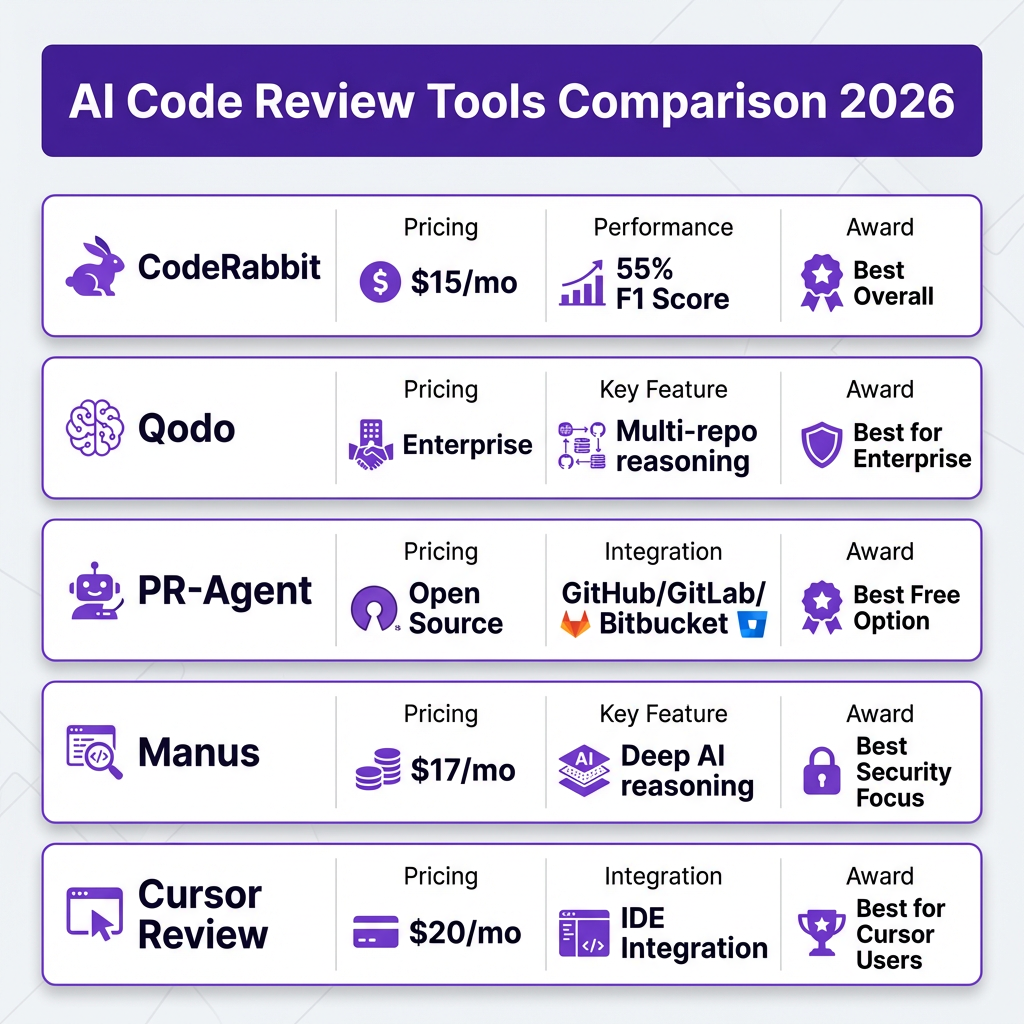
I evaluated the top tools based on Martian’s benchmark data, real user feedback, and my own testing. Here’s what matters:
| Tool | Starting Price | F1 Score | Best For | Key Differentiator |
|---|---|---|---|---|
| CodeRabbit | $15/mo | 55% | Most teams | Widely deployed, balanced performance |
| Qodo | Enterprise | 58% | Large orgs | Multi-repo reasoning, Gartner-cited |
| PR-Agent | Free | 48% | Budget-conscious | Open source, highly configurable |
| Manus | $17/mo | 52% | Security focus | Deep AI reasoning for vulnerabilities |
| Cursor Review | $20/mo | 50% | Cursor users | Native IDE integration |
A few notes on the F1 scores: these measure the harmonic mean of precision and recall. A 55% F1 score means the tool catches about half of real issues while generating acceptable noise. That’s actually good — the best AI code review tools achieve F1 scores in the 50-60% range.
Building Your AI Code Review Workflow: A 6-Step Implementation Guide
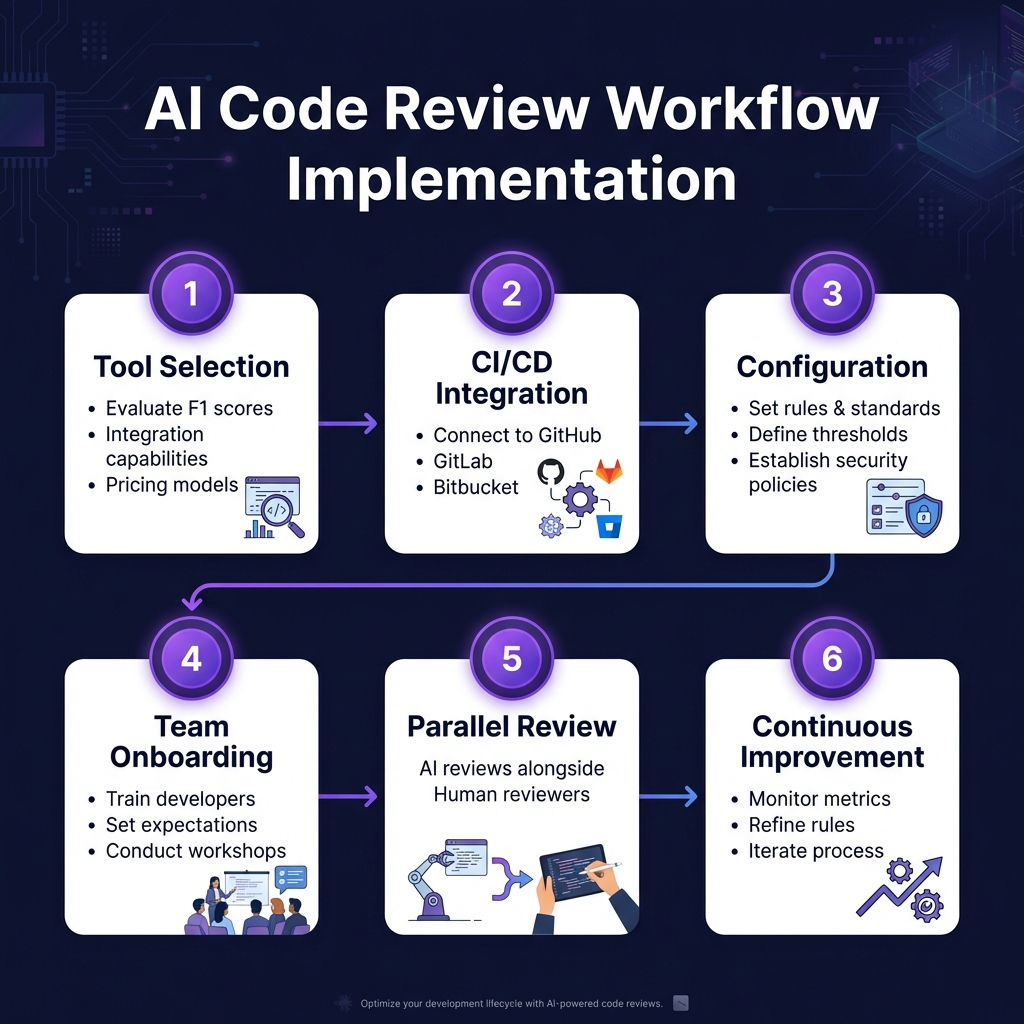
Step 1: Choose Your Tool Based on Team Size and Needs
Don’t overthink this. Here’s my decision framework:
- Solo developer or small team (2-5): Start with PR-Agent (free) or CodeRabbit ($15/mo)
- Growing team (5-20): CodeRabbit or Manus for better security coverage
- Enterprise (20+): Qodo for multi-repo reasoning and enterprise deployment
- Already using Cursor: Cursor Review for seamless integration
Step 2: Integrate with Your Version Control Platform
All major tools support GitHub, GitLab, and Bitbucket. The setup is straightforward:
- Install the tool’s app from the GitHub/GitLab marketplace
- Grant repository access (start with one repo, expand gradually)
- Configure webhook settings for PR events
- Set up branch protection rules to require AI review before merge
Step 3: Configure Review Rules and Thresholds
This is where most teams fail. They use default settings and get flooded with noise. Instead, start conservative:
- Week 1: Enable only security and critical bug detection
- Week 2-3: Add style checks if noise is acceptable
- Week 4+: Enable performance and best practice rules
Set severity thresholds so only high and medium issues block merges. Low-severity issues should be warnings, not blockers.
Step 4: Train Your Team on the New Workflow
AI code review changes how developers work. Set clear expectations:
- AI reviews happen automatically on every PR
- Address AI-flagged issues before requesting human review
- Human reviewers focus on architecture, logic, and business context
- Don’t argue with AI about style — update the config instead
Step 5: Run AI and Human Review in Parallel
The most effective workflow runs both reviews simultaneously:
- Developer opens PR → AI review starts automatically
- Human reviewer assigned → starts review independently
- Developer addresses both AI and human feedback
- PR merges only when both approve
This parallel approach cuts review time by 30-40% because developers can address AI feedback while waiting for human review.
Step 6: Monitor Metrics and Continuously Improve
Track these metrics monthly:
| Metric | Target | Why It Matters |
|---|---|---|
| AI review time | < 2 minutes | Slow AI defeats the purpose |
| False positive rate | < 30% | High noise reduces trust |
| Catch rate for bugs | > 40% | AI must find real issues |
| Human review time | -30% | Measure the time savings |
| Post-merge bugs | -20% | Ultimate quality measure |
Advanced Configuration: Security-Focused AI Review
If you’re handling sensitive data — payments, healthcare, personal information — you need security-focused configuration. Here’s what to enable:
Critical Security Checks
- OWASP Top 10: Injection, broken auth, sensitive data exposure
- Secret detection: API keys, passwords, tokens in code
- Dependency vulnerabilities: Known CVEs in packages
- Insecure configurations: Default credentials, debug modes
- Input validation: Missing sanitization on user inputs
Recommended Security Tool Stack
For security-critical applications, combine AI review with specialized tools:
- AI code review: Manus or Qodo for deep reasoning
- SAST: SonarQube or CodeQL for static analysis
- Dependency scanning: Snyk or Dependabot
- Secret scanning: GitHub Secret Scanning or TruffleHog
- DAST: OWASP ZAP for runtime testing
Common Pitfalls and How to Avoid Them
I’ve seen teams make the same mistakes repeatedly. Here’s what to watch for:
Pitfall 1: Treating AI Review as a Replacement for Human Review
AI catches syntax and common bugs. It doesn’t understand business logic. Teams that skip human review see a 23% increase in production bugs within three months.
Pitfall 2: Enabling Too Many Rules at Once
Starting with every rule enabled creates noise fatigue. Developers start ignoring AI comments entirely. Start with 5-10 critical rules and expand gradually.
Pitfall 3: Not Updating Configurations
Your codebase evolves. Your AI review rules should too. Schedule monthly reviews of false positives and adjust configurations.
Pitfall 4: Ignoring AI-Generated Code Risks
AI-generated code has different risk profiles than human-written code. It’s more likely to have subtle logic errors and security issues. Review AI-generated code more carefully, not less.
Key Takeaways: Building Your AI Code Review Strategy
Here’s what to remember:
- AI review complements human review — it doesn’t replace it
- Start with security and critical bugs — expand to style later
- Measure real metrics — time saved, bugs caught, post-merge issues
- Configure aggressively — default settings create noise
- Train your team — new workflows need clear expectations
The teams winning with AI code review in 2026 aren’t using it because it’s trendy. They’re using it because it measurably improves code quality while reducing review bottlenecks.
FAQ: AI Code Review Implementation
How much does AI code review cost?
Most tools range from free (PR-Agent) to $20 per user per month (CodeRabbit, Cursor Review). Enterprise solutions like Qodo use custom pricing. For a 10-person team, expect $150-200 monthly.
Does AI code review work with all programming languages?
Major tools support Python, JavaScript/TypeScript, Java, Go, Ruby, and C++. Some support Rust, Kotlin, and Swift. Check specific language support before choosing a tool.
How long does AI code review take?
Typically 30 seconds to 2 minutes for average-sized PRs (< 500 lines). Large PRs (1000+ lines) may take 3-5 minutes. This is significantly faster than human review.
Can AI code review replace code linters?
AI tools can handle many linting tasks, but dedicated linters (ESLint, Pylint, RuboCop) are still valuable for enforcing strict style rules. Use both — linters for style, AI for logic and security.
Is AI code review secure? Can I use it with private code?
Enterprise tools like Qodo offer on-premise deployment. Cloud-based tools process code on their servers — review their security certifications (SOC 2, ISO 27001) and data handling policies before using with sensitive code.
Conclusion: The Future of Code Review is Hybrid
AI code review isn’t the future — it’s the present. 47% of developers are already using it. The question is whether you’re using it well.
The winning approach is hybrid: AI handles the repetitive, pattern-based checks while humans focus on architecture, logic, and business requirements. This isn’t about replacing developers. It’s about letting developers focus on what humans do best.
If you’re building a SaaS product, your code quality directly impacts your customer’s trust. Implement AI code review properly, and you’ll ship faster with fewer bugs. That’s a competitive advantage worth investing in.
Ready to streamline more than just your code review? Check out Fungies.io — we handle payments, tax compliance, and checkout so you can focus on building great software.
References
- Martian AI Code Review Benchmark 2026: https://byteiota.com/ai-code-review-benchmark-2026-first-real-results/
- Index.dev Developer Productivity Statistics 2026: https://www.index.dev/blog/developer-productivity-statistics-with-ai-tools
- GitHub Copilot Statistics 2026: https://www.quantumrun.com/consulting/github-copilot-statistics/
- CodeRabbit Documentation: https://coderabbit.ai
- Qodo AI Code Review Platform: https://www.qodo.ai
- PR-Agent Open Source: https://github.com/qodo-ai/pr-agent