Here’s a number that should get your attention: GitHub Copilot Pro costs $10 per month and scores 56.0% on SWE-Bench Verified. Cursor Pro costs twice as much at $20 and scores 51.7%. The cheaper tool performs better on industry-standard benchmarks.
But that’s not the whole story. Cursor finishes tasks 30% faster (62.9s vs 89.9s). It offers deeper IDE integration. And it runs autonomous cloud agents that can test their own code in sandboxed browsers.
The AI coding agent market has exploded in 2026. Pricing models have fragmented into credits, tokens, quotas, and premium requests. What you get for your money varies dramatically between tools. This guide breaks down the real costs, features, and value of every major AI coding agent available today.
What Are AI Coding Agents?
AI coding agents are autonomous development partners that go far beyond simple autocomplete. In 2026, these tools plan multi-step tasks, edit dozens of files simultaneously, run terminal commands, and even launch browsers to visually verify their work.
The key distinction is agentic capability. Traditional code completion suggests the next line. AI coding agents can:
- Understand entire codebases across multiple files
- Execute terminal commands and build processes
- Iterate on failures and self-correct
- Open pull requests from GitHub issues
- Run tests and verify changes visually
According to recent industry data, 40% of enterprise applications will include task-specific AI agents by end of 2026, up from less than 5% today. The question isn’t whether to adopt AI coding agents—it’s which one gives you the best return on your investment.
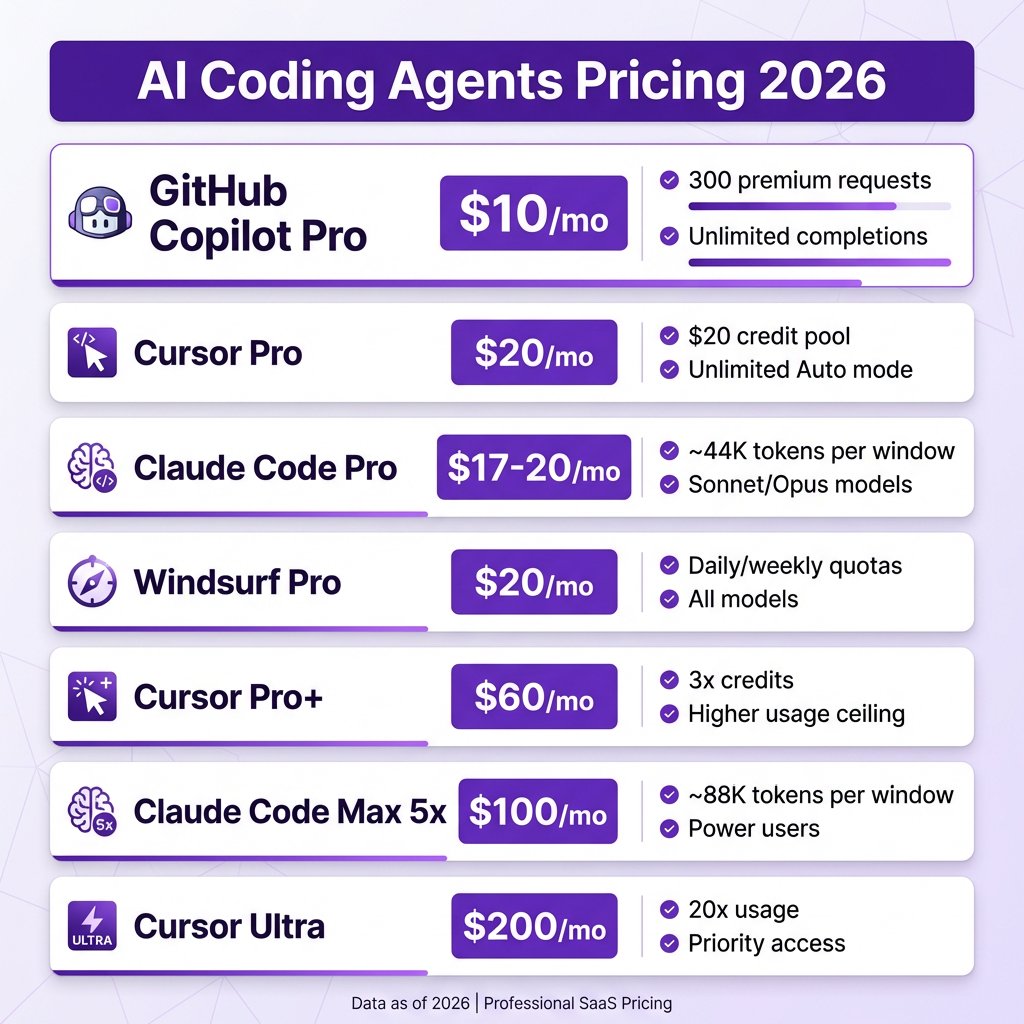
The 7 Best AI Coding Agents Ranked by Value
1. GitHub Copilot Pro — Best Overall Value ($10/mo)
GitHub Copilot Pro is the undisputed value champion. At $10 per month, you get:
- 300 premium requests per month
- Unlimited completions
- Multi-model support including Claude Opus 4.6
- Coding agent that opens PRs from GitHub issues
- Code review capabilities
The SWE-Bench Verified score of 56.0% beats Cursor’s 51.7%, despite costing half the price. Copilot integrates into VS Code, JetBrains, Neovim, Visual Studio, and Xcode—making it the most versatile option for teams using different editors.
Best for: Developers who want maximum value, teams on GitHub Enterprise, and anyone who needs IDE flexibility.
2. Cursor Pro — Best IDE Experience ($20/mo)
Cursor is a VS Code fork built from the ground up for AI-assisted development. It’s now a $500M+ ARR business and dominates the AI-native IDE category.
Cursor Pro at $20/month includes:
- $20 credit pool for model usage
- Unlimited Auto mode (lets the model choose the best approach)
- Composer mode for multi-file editing
- Cloud agents with browser testing and video proof
- Subagent support for parallel task execution
Where Cursor wins is workflow integration. Deep codebase indexing, shared team indices, and subagents that spawn subagents make it the most powerful tool for complex, multi-step development.
Best for: Developers who want the most polished AI-native IDE experience and work on complex, multi-file projects.
3. Claude Code — Best for Terminal Power Users ($17-20/mo)
Claude Code is Anthropic’s terminal-native agent. It leverages Claude Opus 4.6, which scored 80.9% on SWE-Bench Verified—the highest score on record.
Claude Code Pro includes:
- ~44,000 tokens per 5-hour window
- Access to 1M token context window with Opus 4.6
- Native terminal integration
- Automatic git commits
- Tool use capabilities
The trade-off is that Claude Code lives in your terminal, not your IDE. It’s designed for developers who prefer command-line workflows and want the best reasoning model available.
Best for: Terminal-first developers, complex reasoning tasks, and those who need the highest-quality model output.
4. Windsurf — Best Free Option ($0-20/mo)
Windsurf (formerly Codeium) offers a genuinely free tier for individuals. As of March 2026, they switched to daily and weekly quotas.
Key features:
- Free tier with basic access
- Pro at $20/mo with daily/weekly quotas
- Cascade AI for real-time context
- Flow state features
- All models included on paid plans
Windsurf delivers 80% of what Cursor offers at a lower price point. The free tier is actually usable for real development work.
Best for: Budget-conscious developers, students, and anyone wanting to try AI coding without committing to a paid plan.
5. Aider — Best Open Source (Free)
Aider is a free, open-source terminal agent with native git integration. It supports multiple models including GPT-4, Claude, and local models via Ollama.
Key features:
- Completely free
- Native git integration
- Multi-model support
- Vim/Emacs friendly
- Local model support
You only pay for API costs. For developers comfortable with terminal workflows who want full transparency, Aider is unbeatable.
Best for: Open-source enthusiasts, privacy-conscious developers, and those who want full control over their tools.
6. Cursor Pro+ — For Heavy Users ($60/mo)
Cursor Pro+ triples your credit pool to $60/month. It’s designed for developers who consistently exhaust the standard Pro plan.
The upgrade makes sense if you’re hitting daily limits on Pro and find yourself waiting for credits to reset. At this tier, you’re paying for throughput.
Best for: Professional developers using AI as their primary productivity tool and hitting limits on standard plans.
7. Claude Code Max — For Power Users ($100/mo)
Claude Code Max 5x doubles your token allocation to ~88,000 tokens per window. This is for developers running complex agentic workflows that burn through tokens quickly.
At $100/month, this tier is only justified if AI coding is your primary productivity lever and you consistently exhaust lower-tier limits.
Best for: Developers running complex, multi-step agentic workflows on large codebases.
Complete Pricing Comparison Table
| Tool | Price | Key Limit | SWE-Bench Score | Best Feature |
|---|---|---|---|---|
| GitHub Copilot Pro | $10/mo | 300 premium requests | 56.0% | Multi-model, all IDEs |
| Claude Code Pro | $17-20/mo | ~44K tokens/window | 80.9% | Best reasoning model |
| Cursor Pro | $20/mo | $20 credit pool | 51.7% | AI-native IDE |
| Windsurf Pro | $20/mo | Daily quotas | ~50% | Free tier available |
| Amazon Q Developer | $19/mo | AWS-focused | N/A | AWS integration |
| Cursor Pro+ | $60/mo | $60 credit pool | 51.7% | 3x usage ceiling |
| Claude Code Max 5x | $100/mo | ~88K tokens/window | 80.9% | 2x token allocation |
| Cursor Ultra | $200/mo | 20x usage | 51.7% | Priority access |
Free Tiers That Actually Work in 2026
You don’t need to pay to start using AI coding agents. Here are the free tiers that are genuinely usable:
- Bolt.new: 1M tokens per month
- GitHub Copilot Free: 2,000 completions + 50 premium requests per month
- Codex CLI: Open source, pay only for API costs
- Windsurf: Free tier with basic features
- Aider: Completely free and open source
For developers just getting started or working on side projects, these free tiers provide real capability. You can ship production code without spending a dime.
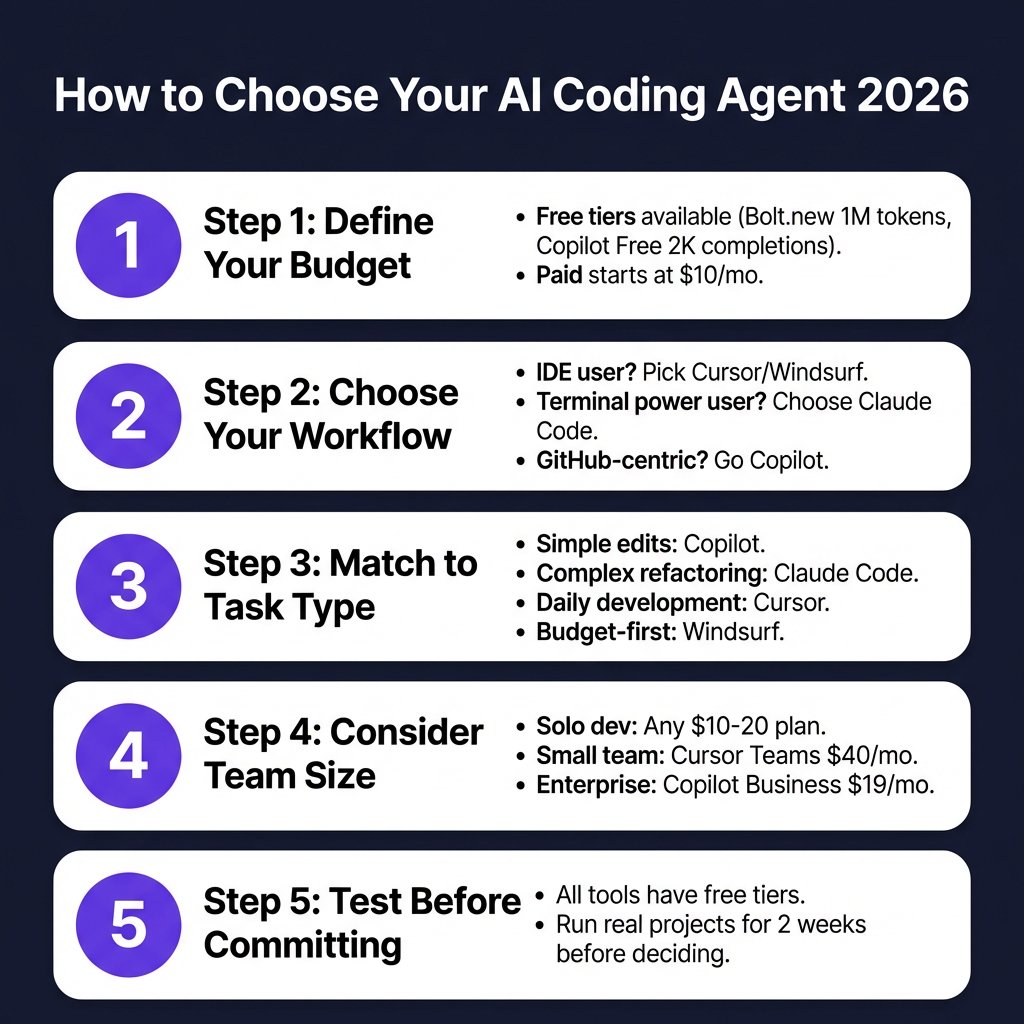
How to Choose: Decision Framework
Here’s a practical framework for choosing your AI coding agent:
Choose GitHub Copilot If:
- You want the best value ($10/mo)
- Your team uses multiple IDEs
- You’re already on GitHub Enterprise
- You want minimal setup friction
Choose Cursor If:
- You want an AI-native IDE experience
- You work on complex, multi-file projects
- You need cloud agents with browser testing
- You want subagent support for parallel tasks
Choose Claude Code If:
- You live in the terminal
- You need the best reasoning model (Opus 4.6)
- You want agentic workflows with tool use
- You prefer CLI-based development
Choose Windsurf If:
- You want a capable free tier
- Cost predictability matters
- You want most of Cursor’s features for less
The Hybrid Approach: Using Multiple Tools
Many professional developers use multiple AI coding agents. The most common pattern is:
- Cursor or Copilot for daily editing and inline suggestions
- Claude Code for complex refactoring and terminal workflows
This hybrid approach gives you the best of both worlds: IDE integration for everyday work and the most powerful reasoning model for complex tasks.
Several large engineering organizations run Copilot for its IDE breadth while using Claude Code or Cursor for specific high-leverage tasks. The tools complement each other.
Key Takeaways
- GitHub Copilot Pro at $10/mo offers the best value with a 56.0% SWE-Bench score
- Cursor Pro at $20/mo provides the best AI-native IDE experience
- Claude Code at $17-20/mo has the highest-quality model (80.9% SWE-Bench)
- Windsurf offers a genuinely usable free tier
- Free tiers in 2026 are capable enough for real production work
- The $20/mo tier is the new standard across the industry
- Heavy users should budget $60-100/mo for power tiers
FAQ
What is the cheapest AI coding agent in 2026?
Aider is completely free and open source—you only pay for API costs. Among commercial tools, GitHub Copilot Pro at $10/mo offers the best value with premium features included.
Which AI coding agent has the best performance?
Claude Code with Opus 4.6 scores 80.9% on SWE-Bench Verified, the highest of any tool. GitHub Copilot scores 56.0% and Cursor scores 51.7%.
Can I use AI coding agents for free?
Yes. Windsurf, GitHub Copilot Free, Bolt.new, and Aider all offer genuinely usable free tiers capable of production work.
Should I choose Cursor or Copilot?
Choose Copilot if you want the best value ($10/mo), use multiple IDEs, or are on GitHub Enterprise. Choose Cursor if you want an AI-native IDE with deeper agent capabilities.
How much should I budget for AI coding tools?
Most developers can get excellent results with $10-20/mo. Power users who rely on AI as their primary productivity tool should budget $60-100/mo.
Conclusion
The AI coding agent market has matured rapidly. Pricing has stabilized around $10-20/mo for standard tiers, with power options at $60-200/mo for heavy users.
GitHub Copilot Pro remains the value champion at $10/mo with strong benchmark performance. Cursor justifies its $20/mo price with the best IDE integration and agent capabilities. Claude Code offers the highest-quality model for terminal-first developers.
The good news: free tiers in 2026 are genuinely usable. You can start experimenting without committing to a paid plan. Run real projects for 2-3 weeks, evaluate what you actually ship, then upgrade the tool that fits your workflow.
Ready to streamline your SaaS payments and checkout experience? Get started with Fungies.io—the merchant of record platform that handles payments, tax compliance, and checkout for game and SaaS developers.
References
- TLDL.io AI Coding Tools Comparison 2026: https://www.tldl.io/resources/ai-coding-tools-2026
- NxCode AI Coding Tools Pricing Comparison 2026: https://www.nxcode.io/resources/news/ai-coding-tools-pricing-comparison-2026
- MorphLLM Cursor vs Copilot Comparison: https://morphllm.com/comparisons/cursor-vs-copilot
- Codegen Best AI Coding Agents 2026: https://codegen.com/blog/best-ai-coding-agents/
- BenchLM LLM Pricing 2026: https://benchlm.ai/blog/posts/llm-pricing-2026
- CloudIDR LLM API Pricing: https://www.cloudidr.com/llm-pricing