Creating a professional gaming website has never been easier. Whether you’re an indie game developer showcasing your latest project, a streamer building your brand, or a gaming community leader, the right gaming website builder can transform your online presence. In this comprehensive guide, we’ll explore the best platforms for 2026, compare features and pricing, and walk you through the exact steps to launch your site.
The gaming industry is booming — with over 3 billion gamers worldwide and the market projected to reach $256 billion by 2026. Having a dedicated website isn’t just optional anymore; it’s essential for standing out in a crowded marketplace. From selling games directly to building a community around your content, your website serves as the central hub for everything you create.
Why Every Gamer Needs a Website in 2026
Social media platforms like Twitch, YouTube, and Discord are great for engagement, but they come with significant limitations. Algorithm changes can decimate your reach overnight, and you never truly own your audience. A gaming website gives you complete control over your brand, content, and monetization strategies.
Here are the key benefits of having your own gaming website:
- Direct monetization: Sell games, merchandise, and digital products without platform fees eating into your profits
- Email list ownership: Build a direct line to your most engaged fans
- SEO visibility: Rank for gaming keywords and attract organic traffic
- Professional credibility: Stand out when pitching to publishers, sponsors, or collaborators
- Community building: Create forums, leaderboards, and exclusive member areas
Top Gaming Website Builders Compared
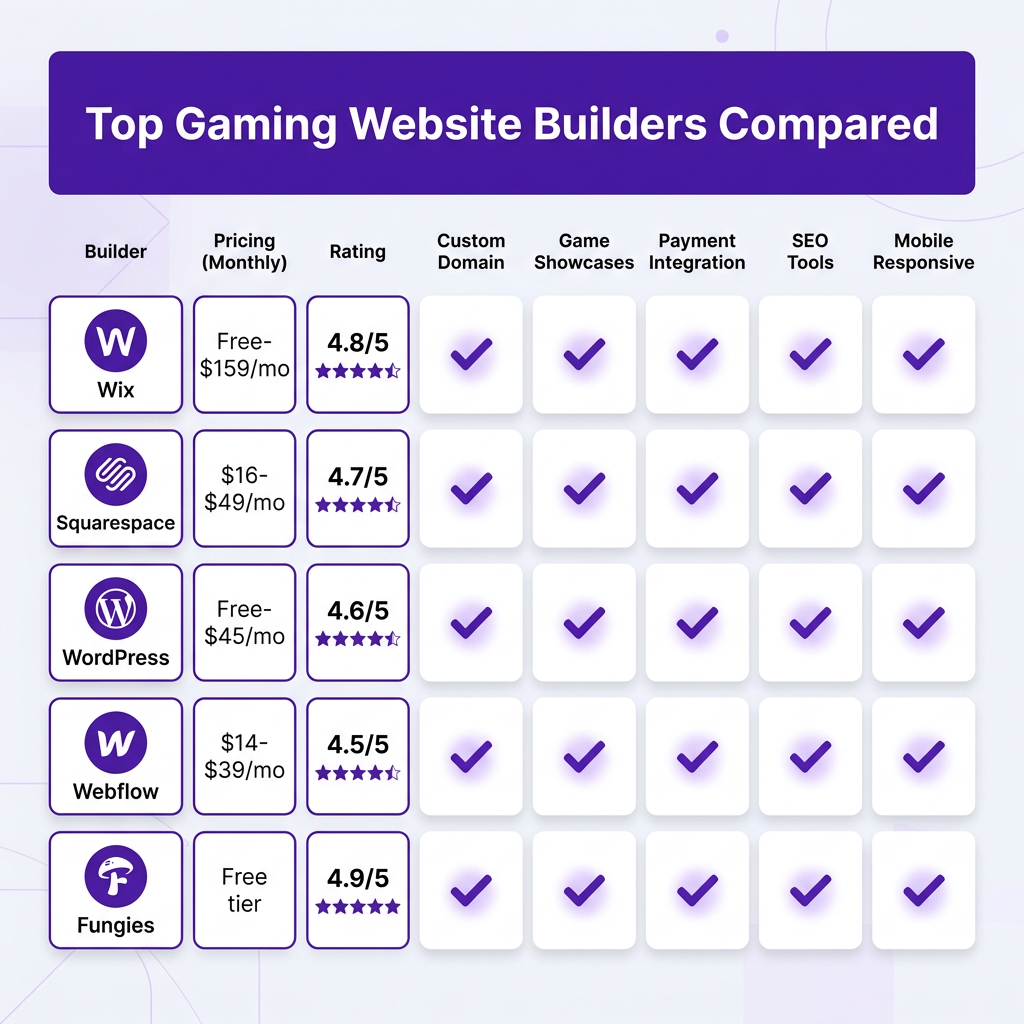
Choosing the right platform depends on your technical skills, budget, and specific needs. We’ve tested the leading gaming website builders and evaluated them based on ease of use, customization options, gaming-specific features, and value for money.
1. Wix — Best for Beginners
Wix offers an intuitive drag-and-drop interface that makes website creation accessible to everyone. Their gaming templates include features like video galleries, tournament brackets, and team showcases. Pricing ranges from free (with Wix ads) to $159/month for advanced business features. The platform handles hosting, security, and updates automatically.
Key features: 900+ templates, Wix ADI AI builder, App Market with gaming plugins, built-in SEO tools, and mobile optimization.
2. Squarespace — Best for Visual Design
Squarespace is renowned for stunning, professionally designed templates. Their gaming and entertainment templates emphasize visual storytelling — perfect for showcasing game screenshots, trailers, and artwork. Plans start at $16/month and include unlimited bandwidth, free custom domains (annual plans), and 24/7 support.
Key features: Award-winning templates, built-in analytics, integrated e-commerce, scheduling tools for tournaments, and member areas.
3. WordPress.org — Best for Flexibility
WordPress powers over 43% of all websites and offers unmatched flexibility. With thousands of gaming themes and plugins, you can create anything from a simple portfolio to a complex multiplayer gaming portal. While there’s a steeper learning curve, the possibilities are virtually limitless. Hosting costs range from $3-$45/month.
Key features: Complete customization, 59,000+ plugins, gaming-specific themes like PlayerX and Youplay, WooCommerce for selling games, and full database control.
4. Webflow — Best for Design Control
Webflow bridges the gap between visual design and clean code. It’s ideal for designers who want pixel-perfect control without writing CSS. Gaming websites built on Webflow load incredibly fast and offer smooth animations. Plans range from free (Webflow.io domain) to $39/month for site plans.
Key features: Visual CSS editor, CMS for dynamic content, interactions and animations, clean code export, and responsive design tools.
5. Fungies — Best for Game Developers
Fungies is specifically built for game developers and digital creators. Unlike general-purpose builders, it includes built-in payment processing, tax compliance, and digital delivery. You can sell games, DLC, and in-game items directly without integrating multiple third-party services. The free tier lets you start immediately.
Key features: Merchant of Record handling, automatic tax compliance, 50+ payment methods, game key distribution, analytics dashboard, and zero setup fees.
5 Steps to Launch Your Gaming Website
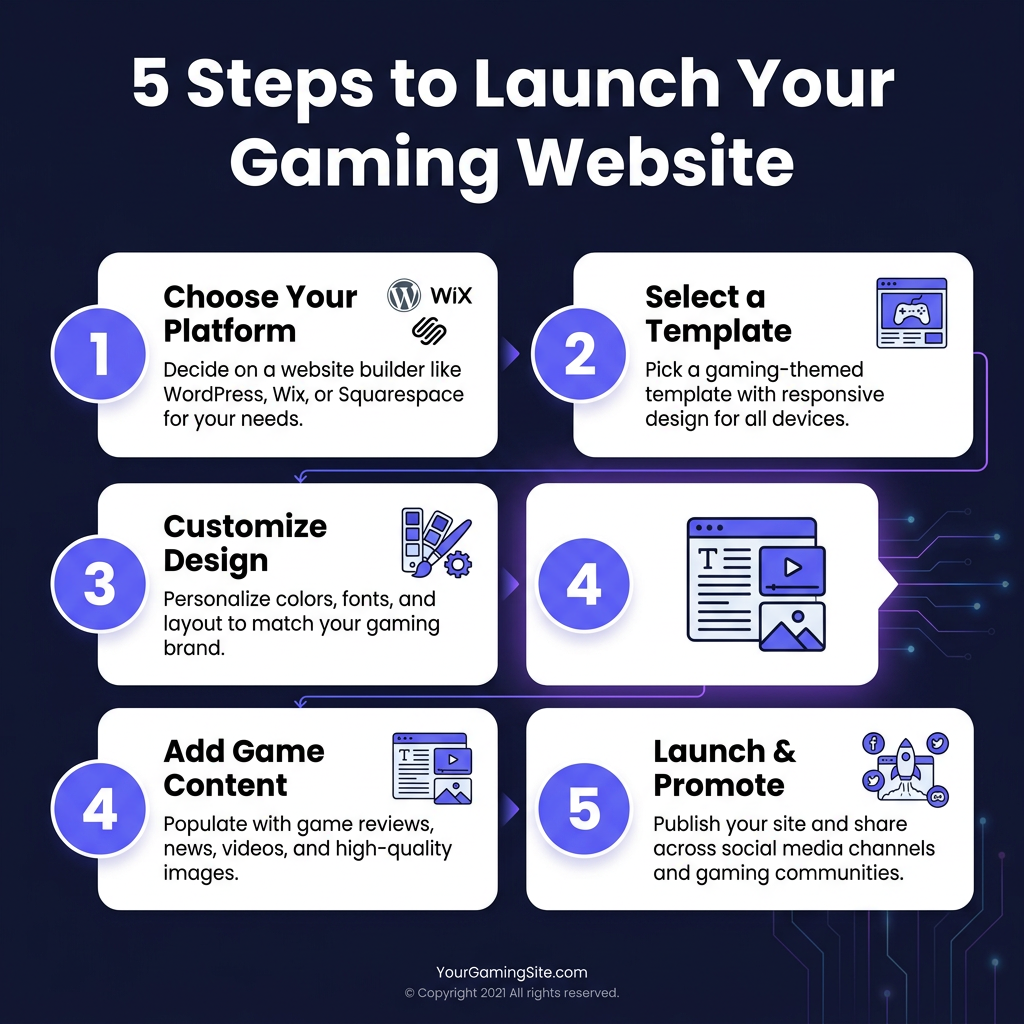
Building your gaming website doesn’t have to be complicated. Follow this proven process to go from idea to live site in under a week:
Step 1: Define Your Goals
Before choosing a platform, clarify what you want to achieve. Are you selling games directly? Building a portfolio? Creating a community hub? Your goals will determine which features matter most. Write down your top 3 objectives and refer to them when evaluating builders.
Step 2: Choose Your Platform
Based on our comparison above, select the builder that aligns with your technical skills and goals. Beginners should start with Wix or Squarespace. Developers and designers may prefer WordPress or Webflow. If you’re selling games, Fungies offers the most streamlined experience.
Step 3: Select and Customize Your Template
Most platforms offer gaming-specific templates. Choose one that matches your aesthetic and has the layout features you need. Customize colors, fonts, and imagery to match your brand. Upload your logo, game screenshots, and hero images. Remember: consistency builds trust.
Step 4: Add Essential Content
Every gaming website needs these core pages: Home (your elevator pitch), Games/Portfolio (showcase your work), About (your story), Blog (SEO and updates), and Contact/Store (how to reach you or buy). Write compelling copy that speaks to your audience’s desires and pain points.
Step 5: Launch and Promote
Before going live, test your site on mobile devices and different browsers. Set up Google Analytics to track visitors. Create a launch plan: announce on social media, email your list, and consider a small ad campaign. The work doesn’t stop at launch — consistently add fresh content to keep visitors returning.
Essential Features for Gaming Websites
Regardless of which builder you choose, ensure your gaming website includes these must-have features:
- Responsive design: 60%+ of gaming traffic comes from mobile devices
- Fast loading: Every second of delay reduces conversions by 7%
- Video integration: Showcase trailers and gameplay footage
- Social proof: Display reviews, ratings, and player counts
- Clear CTAs: Make it obvious what visitors should do next
- SEO optimization: Use gaming keywords in titles, headers, and meta descriptions
Frequently Asked Questions
What’s the best free gaming website builder?
Wix and Webflow both offer free plans to get started. However, free plans typically include platform branding and limited features. For a professional gaming website without ads, expect to invest $10-30/month.
Can I sell games directly on my website?
Yes! Platforms like Fungies, Shopify, and WordPress with WooCommerce allow direct game sales. You’ll need payment processing, digital delivery, and tax compliance — which is why specialized platforms like Fungies are popular among indie developers.
Do I need coding skills to build a gaming website?
No. Modern website builders use drag-and-drop interfaces that require zero coding. However, basic HTML/CSS knowledge helps with advanced customization on platforms like WordPress and Webflow.
How long does it take to build a gaming website?
With a website builder, you can launch a basic gaming website in 2-4 hours. A more comprehensive site with multiple pages, e-commerce, and custom design typically takes 1-2 weeks.
Which platform is best for esports teams?
WordPress and Wix are popular for esports teams due to their tournament bracket plugins, team roster displays, and match scheduling features. Squarespace also works well for teams prioritizing visual branding.
Conclusion
Choosing the right gaming website builder is a crucial decision that impacts your online presence for years to come. For beginners, Wix and Squarespace offer the easiest path to a professional site. Developers and designers will appreciate the flexibility of WordPress and Webflow. And if you’re selling games or digital products, Fungies provides the specialized tools you need to monetize effectively.
Remember: the best website is one that actually gets built. Don’t let perfectionism delay your launch. Start with a simple site, gather feedback from your community, and iterate based on real user data. Your gaming website is a living project that grows with your career.
Ready to Monetize Your Gaming Content?
Join hundreds of game developers using Fungies.io — sell games, DLC, and in-game items with automated tax compliance and 50+ payment methods.
No credit card required