82% of developers now use AI coding assistants daily or weekly. That’s not a future prediction—it’s happening right now in 2026. The question isn’t whether you should use an AI coding assistant. It’s which one actually fits your workflow, budget, and team setup.
I’ve spent months testing the major players: GitHub Copilot, Cursor, Claude Code, and Windsurf. This guide cuts through the marketing fluff and gives you a practical framework for making the right choice.

What Is an AI Coding Assistant?
An AI coding assistant is a tool that uses large language models to help you write, review, and refactor code. The category has evolved fast. In 2023, these tools mostly offered autocomplete. By 2026, they’re autonomous agents that can:
- Write entire functions from natural language descriptions
- Refactor code across multiple files simultaneously
- Run terminal commands and execute tests
- Review pull requests and suggest fixes
- Explain complex codebases in plain English
The market is growing at 13.9% annually. But more options means more confusion. Let’s break down what actually matters.
The State of AI Coding Assistants in 2026
Before we compare specific tools, here’s what changed in the past year:
- Usage-based pricing is now standard. Most tools moved away from unlimited plans to credit-based systems tied to actual API costs.
- Agent capabilities are table stakes. Every major tool now offers multi-file editing and autonomous task execution.
- Free tiers got genuinely usable. You can now code with AI assistance without spending a dime.
- Model diversity increased. Tools now offer multiple LLM options (Claude, GPT, Gemini) instead of locking you into one.
Developers report saving 30–75% of their time on coding, testing, and documentation tasks. But tool selection matters. The wrong choice means hitting rate limits, fighting your IDE, or paying for features you don’t use.
The 5 Contenders: A Quick Overview
Here are the five AI coding assistants worth considering in 2026:
| Tool | Best For | Starting Price | Key Strength |
|---|---|---|---|
| GitHub Copilot | Teams on GitHub | $10/mo | Platform integration |
| Cursor | Daily IDE users | $20/mo | Polished UX |
| Claude Code | Terminal workflows | $20/mo | Reasoning quality |
| Windsurf | AI-first editing | $15-20/mo | Generous free tier |
| GitHub Copilot Free | Beginners | $0 | Zero cost entry |
Deep Dive: Each Tool Examined
GitHub Copilot: The Safe Choice
GitHub Copilot remains the most widely adopted AI coding assistant. If your team already uses GitHub, it’s the path of least resistance.
Pricing tiers:
- Free: 2,000 completions + 50 premium requests/month
- Pro ($10/mo): Unlimited completions + 300 premium requests
- Pro+ ($39/mo): 1,500 premium requests + all models
- Business ($19/user/mo): Team features + policy controls
- Enterprise ($39/user/mo): 1,000 requests + custom models
What “premium requests” include: Chat, agent mode, code review, model selection, and CLI usage. Basic autocomplete doesn’t count against your quota.
Best for: Teams standardized on GitHub who want tight integration with pull requests, Actions, and team workflows.
Cursor: The Developer Favorite
Cursor has become the darling of developers who want an AI-native IDE experience. It looks like VS Code because it is VS Code—just with AI deeply integrated.
Pricing tiers:
- Hobby (Free): 2,000 completions + 50 slow requests
- Pro ($20/mo): $20 credit pool for premium models
- Pro+ ($60/mo): Larger credit pool + priority support
- Ultra ($200/mo): Unlimited for power users
- Business ($40/user/mo): Team collaboration features
How the credit pool works: Every premium model request deducts from your pool based on actual API pricing. Claude Opus costs more than GPT-4o. When you run out, you can switch to the “Auto” model for unlimited usage or pay overages.
Best for: Developers who want the most polished AI coding experience and don’t mind paying $20/month for it.
Claude Code: The Power User’s Tool
Claude Code is different. It’s not an IDE plugin—it’s a terminal-based agent that works alongside your existing editor. This makes it ideal for developers who live in the command line.
Pricing tiers:
- Free: Limited daily usage
- Pro ($20/mo): Standard access to Claude Sonnet
- Max 5x ($100/mo): 5x usage limits
- Max 20x ($200/mo): 20x usage limits for heavy users
Key advantage: Claude Code uses Anthropic’s own models, which many developers consider best-in-class for reasoning and code understanding. It can execute terminal commands, edit files, and iterate on tasks autonomously.
Best for: Developers who prefer terminal workflows and want the strongest reasoning capabilities.
Windsurf: The Value Pick
Windsurf (formerly Codeium) offers the best value proposition in 2026. Its free tier is genuinely usable, and paid plans cost less than competitors.
Pricing tiers:
- Free: Generous quota for hobbyists
- Pro ($15-20/mo): Standard quota with daily/weekly refreshes
- Max ($200/mo): Heavy quota for power users
Unique feature: Windsurf has its own AI model (SWE-1.5) purpose-built for coding. This reduces dependence on third-party providers.
Best for: Budget-conscious developers and those who want an AI-first IDE without the premium price tag.
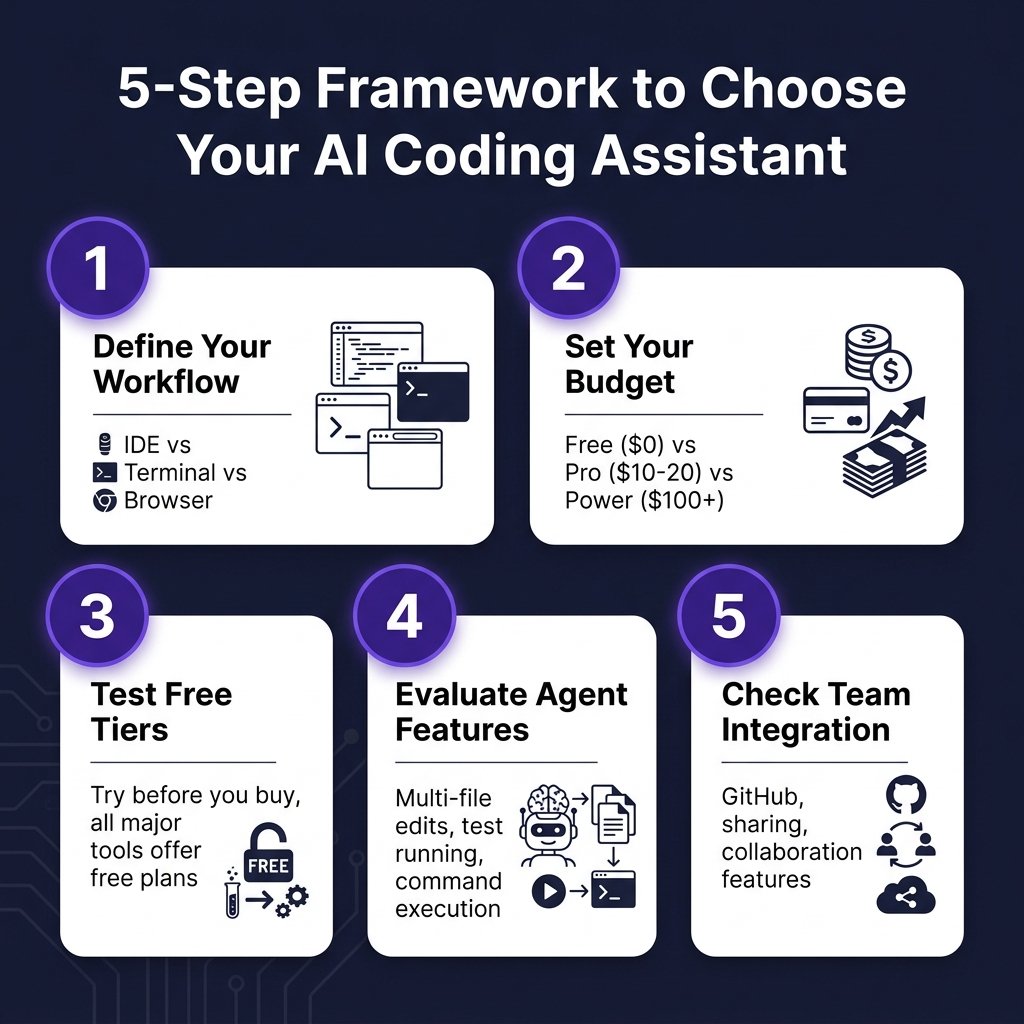
The 5-Step Framework for Choosing
Here’s how to actually make this decision without getting paralyzed by options:
Step 1: Define Your Primary Workflow
Where do you spend most of your coding time?
- IDE-centric (VS Code, JetBrains): Cursor or GitHub Copilot
- Terminal-heavy: Claude Code
- Mixed workflow: GitHub Copilot (works everywhere)
Step 2: Set Your Budget Reality
Be honest about what you’ll actually pay:
- $0 (Free): GitHub Copilot Free or Windsurf Free—both are genuinely usable
- $10-20/month: GitHub Copilot Pro, Cursor Pro, or Claude Code Pro
- $100+/month: Only if AI coding is your primary productivity lever
Most developers don’t need the $200 tiers. Start lower and upgrade only when you consistently hit limits.
Step 3: Test Free Tiers First
Every major tool offers a free tier. Use them. Spend a week with each on a real project. Pay attention to:
- How often you hit rate limits
- Whether the suggestions actually help or get in the way
- How well it understands your specific codebase
Step 4: Evaluate Agent Capabilities
Basic autocomplete is commoditized. The real differentiator is agent mode—can the tool:
- Edit multiple files in one session?
- Run terminal commands and tests?
- Iterate based on error messages?
- Understand your entire codebase, not just the current file?
Test this specifically. Ask each tool to refactor a feature that touches 3+ files. See which one handles it best.
Step 5: Check Team Integration
If you’re choosing for a team, consider:
- GitHub integration: Copilot has native advantages here
- Sharing features: Can you share prompts, custom commands, or context?
- Policy controls: Business tiers offer admin controls and audit logs
- Onboarding friction: How quickly can new team members get productive?
Detailed Pricing Comparison
Here’s the complete pricing breakdown for individual developers:
| Tool | Free Tier | Entry Paid | Mid Tier | Premium |
|---|---|---|---|---|
| GitHub Copilot | 2K completions + 50 premium | $10/mo (300 premium) | $39/mo (1,500 premium) | $39/mo Enterprise |
| Cursor | 2K completions + 50 slow | $20/mo ($20 credits) | $60/mo | $200/mo Ultra |
| Claude Code | Limited daily | $20/mo Pro | $100/mo Max 5x | $200/mo Max 20x |
| Windsurf | Generous quota | $15-20/mo Pro | N/A | $200/mo Max |
Key insight: GitHub Copilot Pro at $10/month offers the best per-dollar value for most developers. No other paid plan comes close for basic usage.
Real-World Usage Recommendations
For Solo Developers
Start with GitHub Copilot Free or Windsurf Free. Both give you enough to evaluate whether AI coding fits your workflow. If you find yourself hitting limits after 2-3 weeks, upgrade to GitHub Copilot Pro ($10) or Cursor Pro ($20).
For Small Teams (2-10 developers)
Standardize on one tool to reduce context switching. GitHub Copilot Business ($19/user) is the safe choice if you use GitHub. Cursor Business ($40/user) offers a better experience if budget allows.
For Enterprises
Consider a tiered approach: Give all developers GitHub Copilot Pro ($10) for daily use, and provide Cursor Pro+ or Claude Code Max licenses to senior developers handling complex refactoring.
Security-conscious organizations should evaluate enterprise tiers with SSO, audit logs, and policy controls. GitHub Copilot Enterprise and Cursor Enterprise both offer these features.
Key Takeaways
- There’s no single “best” AI coding assistant—only the best one for your specific situation
- Free tiers are genuinely usable in 2026. Start there.
- GitHub Copilot Pro ($10/mo) offers the best value for most developers
- Cursor Pro ($20/mo) wins on user experience and polish
- Claude Code excels for terminal-based workflows and complex reasoning
- Windsurf offers the best free tier and lowest entry price
- The $100-200 tiers are only worth it if AI coding is your primary productivity lever
Frequently Asked Questions
Can I use AI coding assistants for free?
Yes. GitHub Copilot Free offers 2,000 completions and 50 premium requests monthly. Windsurf’s free tier is also generous enough for light use. These aren’t trials—they’re permanent free plans.
Which AI coding assistant has the best code quality?
Quality varies by task. Claude Code and Cursor generally produce better code for complex reasoning tasks. GitHub Copilot excels at boilerplate and common patterns. The best approach is to test multiple tools on your actual codebase.
Will AI coding assistants replace developers?
No. Current data shows developers using AI assistants write 12-15% more code and report 21% higher productivity. But these tools augment developers—they don’t replace the need for human judgment, architecture decisions, and code review.
Can I use multiple AI coding assistants?
Yes. Many developers use GitHub Copilot for daily autocomplete and Cursor or Claude Code for complex tasks. This “tiered tool” approach is increasingly common.
What’s the best AI coding assistant for beginners?
Start with GitHub Copilot Free. It has the simplest setup, works in popular editors, and has extensive documentation. Once you’re comfortable, explore Cursor for a more AI-native experience.
Conclusion
Choosing an AI coding assistant in 2026 comes down to three factors: your workflow, your budget, and your team’s needs. The good news? You can’t really make a wrong choice—these are all excellent tools. The bad news? Analysis paralysis is real.
Here’s my recommendation: Start with GitHub Copilot Free today. Spend a week using it seriously. If you love it but hit limits, upgrade to Pro ($10). If you find the experience lacking, try Cursor or Windsurf. The cost of trying is zero. The cost of waiting is lost productivity.
And if you’re building a SaaS product and need to handle payments, taxes, and compliance without the headache, check out Fungies.io. We help developers monetize their products globally with a single integration.
References
- Gartner Peer Insights: AI Code Assistants Reviews 2026
- NXCode: AI Coding Tools Pricing Comparison 2026
- SitePoint: AI Coding Tools Comparison 2026
- Second Talent: AI Coding Assistant Statistics 2026
- PE Collective: GitHub Copilot Pricing 2026
- SSD Nodes: Claude Code Pricing in 2026
- Verdent AI: Windsurf Pricing 2026