Here’s a number that should get your attention: developers using AI workflow automation tools report saving 15+ hours per week on repetitive tasks. That’s nearly two full workdays reclaimed for actual coding.
In 2026, workflow automation isn’t just for marketers anymore. Developers are using tools like n8n, Zapier, and Make to automate deployments, sync data across systems, trigger CI/CD pipelines, and handle incident responses—without writing custom scripts for every integration.
But with so many options available, which tool should you choose? I’ve analyzed the top 7 AI workflow automation platforms based on real pricing, integration capabilities, AI features, and developer experience. Let’s dive in.
What Is AI Workflow Automation?
AI workflow automation combines traditional workflow orchestration with large language models to create intelligent, adaptive automations. Instead of rigid “if this, then that” logic, these tools can:
- Parse unstructured data and make decisions based on context
- Generate content, code, or responses dynamically
- Handle errors and edge cases with AI-powered recovery
- Integrate with 5,000+ apps and services via APIs
For developers, this means less time writing boilerplate integration code and more time building core product features.
The 7 Best AI Workflow Automation Tools Compared
1. n8n — Best for Technical Teams and AI-Native Workflows
n8n (pronounced “nodemation”) is the open-source powerhouse of workflow automation. Unlike competitors, it treats AI as a first-class citizen rather than an afterthought.
Key Features:
- Open-source with self-hosting option (free)
- Native AI agent support with tool calling and memory management
- 400+ integrations including GitHub, Slack, PostgreSQL, AWS
- Visual workflow builder with JavaScript/Python code nodes
- RAG (Retrieval-Augmented Generation) pipeline support
Pricing: Self-hosted: Free | Cloud Starter: $24/month | Pro: $60/month | Enterprise: Custom
Best For: Engineering teams who want full control, need on-premise deployment, or are building AI-powered automations.
2. Zapier — Best for Quick Integrations and Non-Technical Teams
Zapier is the 800-pound gorilla of workflow automation with 7,000+ app integrations and the most user-friendly interface.
Key Features:
- 7,000+ app integrations (largest library)
- Zapier AI with natural language workflow creation
- Multi-step Zaps with conditional logic
- Built-in data formatting and transformation
- Team collaboration features
Pricing: Free: 100 tasks/month | Starter: $19.99/month | Professional: $49/month | Team: $69/month | Company: Custom
Best For: Teams that need to connect many different SaaS tools quickly without technical setup.
3. Make (formerly Integromat) — Best Visual Workflow Design
Make stands out with its visual scenario builder that shows data flow in real-time—like watching your automation come alive.
Key Features:
- Visual drag-and-drop scenario builder
- 1,800+ app integrations
- Advanced data transformation with iterators and aggregators
- Real-time execution visualization
- Error handling with rollback capabilities
Pricing: Free: 1,000 ops/month | Core: $9/month | Pro: $16/month | Teams: $29/month | Enterprise: Custom
Best For: Teams that value visual workflow design and need complex data transformations.
4. GitHub Actions — Best for CI/CD and DevOps Workflows
While not a traditional automation platform, GitHub Actions has evolved into a powerful workflow engine for developers.
Key Features:
- Native GitHub integration
- 20,000+ community-created actions
- Matrix builds across multiple environments
- Self-hosted runners for private infrastructure
- Workflow reuse with composite actions
Pricing: Free: 2,000 minutes/month (public repos) | Pro: $4/user/month | Team: $4/user/month | Enterprise: $21/user/month
Best For: Development teams already using GitHub who need CI/CD, testing, and deployment automation.
5. Pipedream — Best for Developer-Focused Integrations
Pipedream is built by developers, for developers. It offers the simplicity of Zapier with the power of custom code.
Key Features:
- 1,000+ integrated apps
- Native Node.js, Python, and Go code support
- Event-driven architecture
- Custom HTTP triggers and responses
- Built-in authentication management
Pricing: Free: 10,000 credits/month | Basic: $19/month | Advanced: $49/month | Business: $99/month
Best For: Developers who want to write custom logic without managing infrastructure.
6. Activepieces — Best Open-Source Alternative
Activepieces is the rising star in open-source automation, positioning itself as a business-friendly alternative to n8n.
Key Features:
- Truly open-source (MIT license)
- 100+ integrations with focus on business apps
- TypeScript-based piece development
- Self-hosted or cloud options
- Human-in-the-loop approvals
Pricing: Self-hosted: Free | Cloud: $15/month | Pro: $39/month | Enterprise: Custom
Best For: Teams wanting open-source flexibility with a simpler learning curve than n8n.
7. Workato — Best for Enterprise-Grade Automation
Workato is the enterprise choice, offering the power of traditional integration platforms with modern AI capabilities.
Key Features:
- 1,000+ connectors for enterprise apps
- AI-powered recipe (workflow) suggestions
- Enterprise security and compliance (SOC 2, GDPR)
- Hybrid deployment options
- Advanced data mapping and transformation
Pricing: Starting at $10,000/year (enterprise-focused)
Best For: Large enterprises with complex integration needs and strict compliance requirements.
AI Workflow Automation Tools: Side-by-Side Comparison
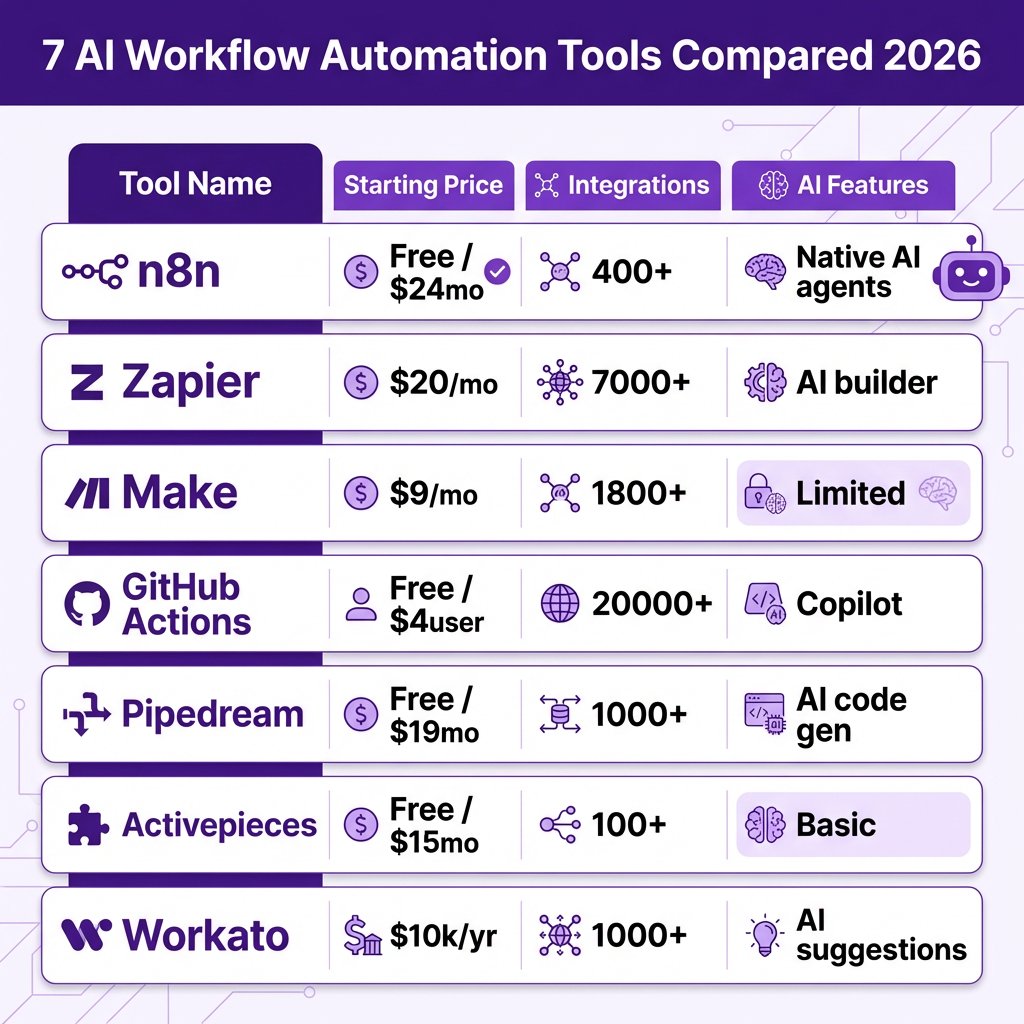
| Tool | Starting Price | Integrations | AI Features | Self-Hosted | Best For |
|---|---|---|---|---|---|
| n8n | Free / $24/mo | 400+ | Native AI agents, RAG | Yes | Technical teams |
| Zapier | $19.99/mo | 7,000+ | AI workflow builder | No | Quick integrations |
| Make | $9/mo | 1,800+ | Limited AI features | No | Visual design |
| GitHub Actions | Free / $4/user | 20,000+ actions | Copilot integration | Runners only | CI/CD workflows |
| Pipedream | Free / $19/mo | 1,000+ | AI code generation | No | Developers |
| Activepieces | Free / $15/mo | 100+ | Basic AI features | Yes | Open-source fans |
| Workato | $10,000+/yr | 1,000+ | AI recipe suggestions | Hybrid | Enterprise |
How to Choose the Right Tool for Your Team
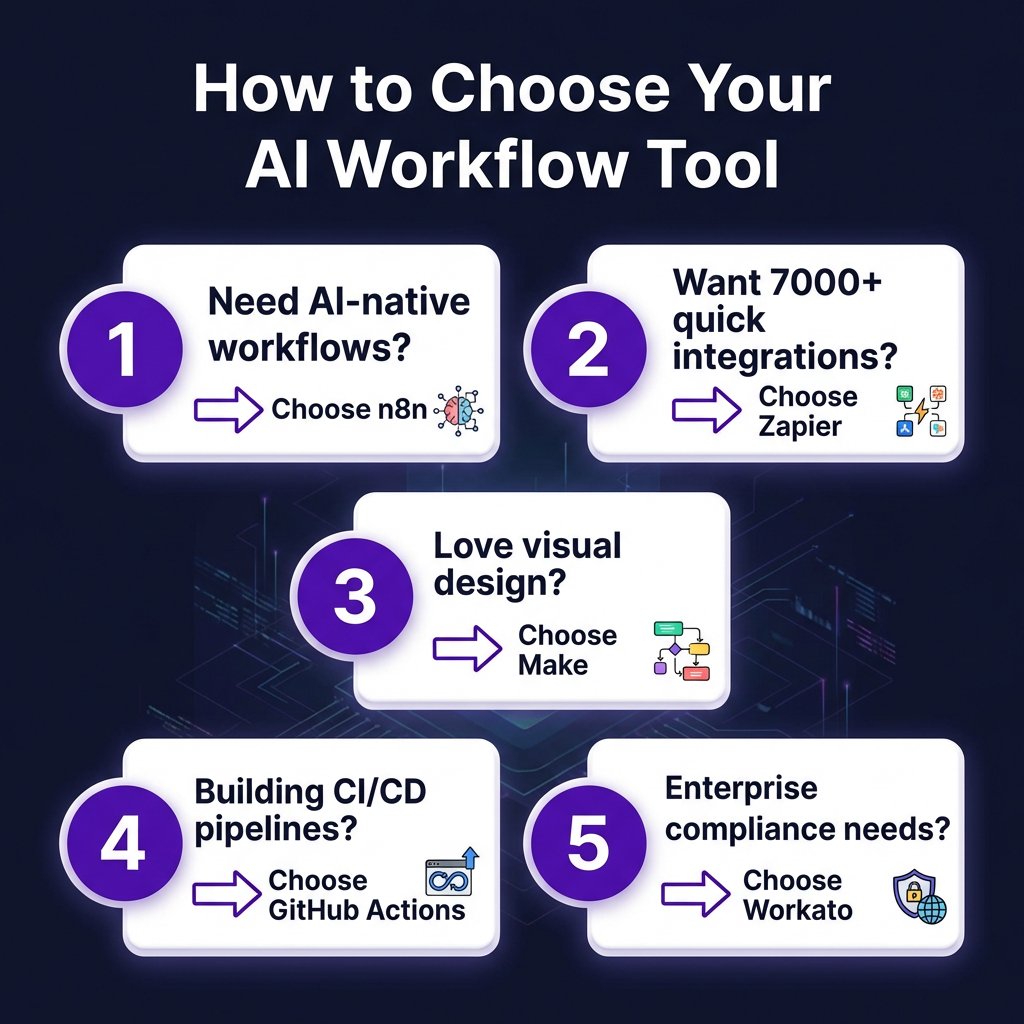
With seven solid options, here’s my decision framework:
Choose n8n if: You need AI-native workflows, want to self-host, or have technical team members comfortable with JavaScript/Python.
Choose Zapier if: You need to connect many different SaaS tools quickly and don’t want to think about infrastructure.
Choose Make if: You value visual workflow design and need to handle complex data transformations.
Choose GitHub Actions if: You’re already using GitHub and need CI/CD, testing, or deployment automation.
Choose Pipedream if: You want to write custom code but don’t want to manage servers.
Choose Activepieces if: You want open-source but find n8n too complex.
Choose Workato if: You’re an enterprise with complex needs and a substantial budget.
Real-World Developer Use Cases
Here are specific ways developers are using these tools in 2026:
Automated Incident Response
When PagerDuty triggers an alert, n8n automatically creates a Slack channel, pulls relevant logs from Datadog, generates an incident summary with AI, and assigns the on-call engineer.
Content Publishing Pipeline
New blog post in Notion → Make extracts content → AI generates social media variants → Zapier schedules posts across LinkedIn, Twitter, and dev.to.
Customer Data Sync
Stripe payment → Pipedream triggers → Customer data enriched with Clearbit → Added to HubSpot → Welcome email sent via SendGrid.
Key Takeaways
- n8n leads for AI-native workflows — Its built-in AI agent support and RAG capabilities make it the most powerful option for technical teams.
- Zapier wins on integrations — With 7,000+ apps, it connects to almost anything, but at a higher price point.
- Make offers the best visual experience — Real-time execution visualization helps debug complex workflows.
- Open-source options are production-ready — n8n and Activepieces offer enterprise-grade features without vendor lock-in.
- Start simple, expand gradually — Most teams begin with one tool and add others as needs evolve.
FAQ
What’s the difference between n8n and Zapier?
n8n is open-source with native AI support and self-hosting options, making it ideal for technical teams. Zapier is closed-source with more integrations but less flexibility. n8n charges per workflow execution; Zapier charges per “Zap” (task).
Can I use AI workflow automation for free?
Yes. n8n (self-hosted), Activepieces (self-hosted), GitHub Actions (public repos), and Zapier/Make (limited free tiers) all offer free options. For production use, expect to pay $15-60/month.
Which tool is best for CI/CD automation?
GitHub Actions is purpose-built for CI/CD with 20,000+ community actions. For multi-platform needs, consider n8n or Pipedream for orchestrating across different systems.
Do these tools require coding knowledge?
Zapier and Make work well for non-technical users. n8n, Pipedream, and GitHub Actions require some technical knowledge but offer more power and flexibility.
Can I self-host these automation tools?
n8n and Activepieces offer full self-hosting. Workato offers hybrid deployment. Zapier, Make, and Pipedream are cloud-only.
Conclusion
AI workflow automation has become essential infrastructure for development teams in 2026. Whether you choose the AI-native power of n8n, the integration breadth of Zapier, or the visual elegance of Make, the key is starting with one use case and expanding from there.
My recommendation? If you’re technical, start with n8n self-hosted. You’ll get unlimited workflows for free and can always upgrade to cloud when you need collaboration features. If you need something running in 10 minutes, Zapier is still the fastest path to value.
Ready to automate your SaaS workflows? Get started with Fungies — our platform handles payments, tax compliance, and checkout automation so you can focus on building your product.
References
- n8n Pricing — Official pricing page
- Zapier Pricing — Official pricing page
- Make Pricing — Official pricing page
- GitHub Actions — Official documentation
- Pipedream Pricing — Official pricing page
- Activepieces Pricing — Official pricing page
- Workato Pricing — Official pricing page