Here’s something that might surprise you: you don’t need an LLC, corporation, or any formal business entity to start accepting payments online. In 2026, solo founders, indie hackers, and side project builders are launching products and collecting revenue using nothing more than their personal information and a bank account.
I spent years thinking I needed to incorporate before I could sell anything. That belief cost me months of potential revenue and added unnecessary complexity to what should have been simple. The truth? Payment technology has evolved. What once required a merchant account, business registration, and weeks of paperwork now takes under an hour.
What Is a Payment Facilitator (PayFac)?
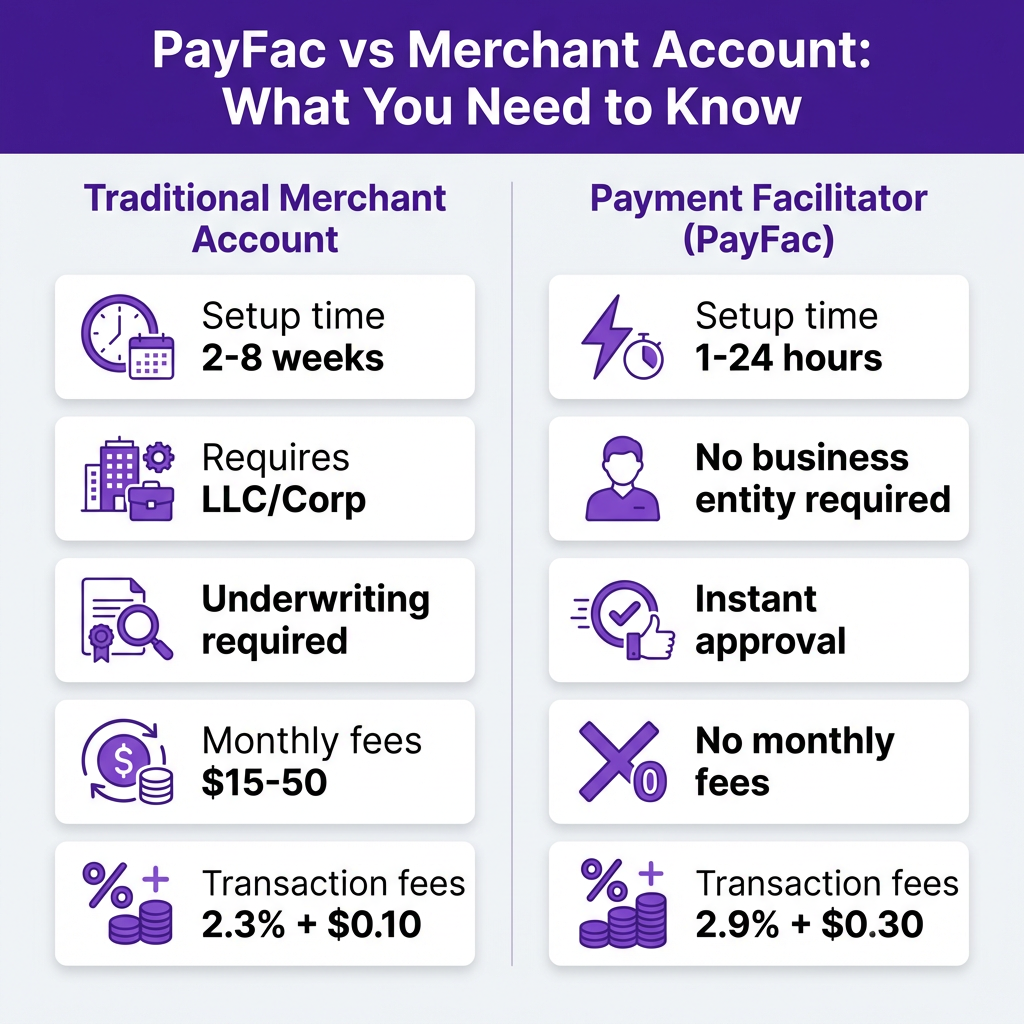
A Payment Facilitator, or PayFac, is a company that holds a master merchant account with an acquiring bank. Instead of requiring every seller to get their own merchant account (which involves credit checks, business documentation, and lengthy underwriting), PayFacs let you process payments under their umbrella.
Think of it like subletting an apartment. The PayFac has the master lease (merchant account), and you rent a room (payment processing) without needing to qualify for the whole building. You get paid. They handle the banking relationships, compliance, and risk management.
The key difference: traditional merchant accounts require you to be a registered business entity. PayFacs don’t. You can sign up as an individual using your Social Security Number (in the US) or equivalent tax ID in other countries.
Why This Matters for Indie Hackers and Side Projects
Most side projects never make a dollar because the founder gets stuck on logistics. “I need to form an LLC first.” “I should talk to an accountant.” “What if I get sued?” These concerns are valid, but they shouldn’t block you from validating your idea.
Here’s the reality: you can start as a sole proprietor (which requires zero paperwork in most jurisdictions) and incorporate later if your project gains traction. The IRS in the United States, for example, allows individuals to report business income on Schedule C of their personal tax return. No LLC required.
Payment facilitators make this approach viable. They let you test, iterate, and earn without the upfront costs and administrative burden of formal business structures. If your project flops, you haven’t wasted $500 on incorporation fees. If it succeeds, you can always formalize your business structure once revenue justifies it.
The Legal Framework: What You Actually Need
Let’s clear up the confusion. Operating as a sole proprietor (without an LLC or corporation) is completely legal in virtually every country. You’re simply an individual conducting business. The requirements are minimal:
- United States: No registration required at the federal level. Some cities or states may require a business license depending on your industry, but many don’t for digital products or SaaS.
- United Kingdom: You can operate as a sole trader. You must register with HMRC if your turnover exceeds £1,000, but you can still accept payments before that threshold.
- European Union: Rules vary by country, but most allow sole proprietorships (Einzelunternehmen in Germany, Entreprise Individuelle in France) with minimal setup.
- Canada: You can operate under your own name without registration. If you use a business name, you may need to register it provincially.
- Australia: You can use your Tax File Number (TFN) as a sole trader. ABN registration is recommended but not strictly required to start.
The critical point: payment facilitators accept personal tax IDs. You don’t need an Employer Identification Number (EIN) or business tax ID to get started.
Best Platforms to Accept Payments Without a Business Account
Not all payment platforms are created equal. Some strictly require business documentation. Others welcome individuals. Here are the best options for accepting payments without formal business registration:
1. Stripe
Stripe is the gold standard for developers, and yes, you can use it as an individual. During signup, select “Individual / Sole Proprietorship” as your business type and provide your personal information.
- Setup time: 10-15 minutes
- Requirements: Personal ID, bank account, SSN (US) or equivalent
- Fees: 2.9% + $0.30 per transaction
- Best for: Developers who want full API control and customization
The catch: Stripe’s risk assessment can be strict. If you’re selling high-risk products or operating from certain countries, you might face additional verification. But for standard SaaS, digital products, or services, individual accounts work fine.
2. PayPal
PayPal has supported individual sellers since its inception. You can create a Business account using your personal information without any formal business entity.
- Setup time: 5 minutes
- Requirements: Email, bank account, personal ID for verification
- Fees: 3.49% + $0.49 per transaction
- Best for: Quick setup, consumer trust, international reach
PayPal’s higher fees sting, but their brand recognition converts better in some markets. For side projects testing demand, the tradeoff can be worth it.
3. Fungies
Fungies operates as a Merchant of Record, which means they handle tax compliance, VAT collection, and regulatory requirements globally. You can sign up as an individual and start selling digital products or SaaS subscriptions immediately.
- Setup time: Under 10 minutes
- Requirements: Personal information, bank account for payouts
- Fees: 5% + $0.50 per transaction (all-inclusive, no hidden fees)
- Best for: Global sales, tax compliance, no-code checkout
Unlike Stripe or PayPal, Fungies handles VAT, GST, and sales tax automatically. If you’re selling to customers in the EU, UK, or other regions with complex tax rules, this saves you from registration headaches.
4. Gumroad
Gumroad built its reputation serving creators and indie hackers. They accept individual sellers and handle payment processing, file delivery, and basic email marketing.
- Setup time: 5 minutes
- Requirements: Email, bank account, personal ID
- Fees: 10% + processing fees (or $9/month + 3.5% + $0.30 on premium)
- Best for: Digital products, ebooks, courses, simple selling
The free tier’s 10% fee is steep, but Gumroad’s simplicity makes it ideal for first-time sellers testing a product idea.
5. LemonSqueezy
LemonSqueezy targets software sellers specifically. They handle merchant of record duties, tax compliance, and offer a polished checkout experience. Individual sellers are welcome.
- Setup time: 10 minutes
- Requirements: Personal information, payout method
- Fees: 5% + $0.50 per transaction
- Best for: Software licenses, SaaS, digital downloads
Step-by-Step: Setting Up Your First Payment Collection
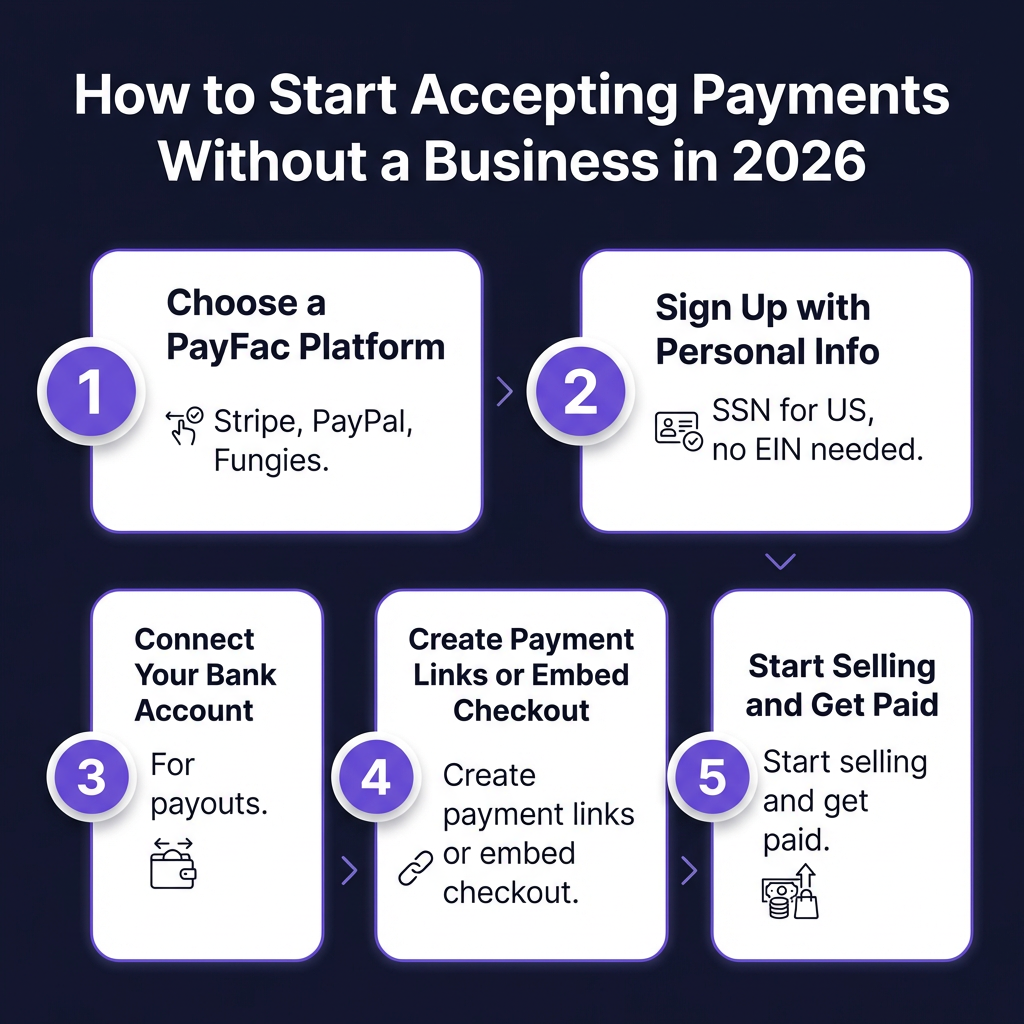
Here’s exactly how to start accepting payments as an individual, using Fungies as an example (the process is similar across platforms):
Step 1: Choose Your Platform
Evaluate based on your needs. Selling software globally with tax compliance? Consider Fungies or LemonSqueezy. Need maximum customization? Stripe. Want the fastest setup? PayPal or Gumroad.
Step 2: Create Your Account
Sign up using your personal email. When asked for business type, select “Individual” or “Sole Proprietorship.” Provide your legal name, address, and tax ID (SSN in the US, National Insurance Number in the UK, etc.).
Step 3: Connect Your Bank Account
Link a personal bank account for payouts. Most platforms support standard checking accounts. Some also offer instant payout options to debit cards for a small fee.
Step 4: Verify Your Identity
Upload a photo ID (passport, driver’s license) when prompted. This is required by financial regulations (KYC/AML laws). Verification typically takes minutes to 24 hours.
Step 5: Create Your First Product or Payment Link
Set up your offering. This could be a SaaS subscription, digital download, or service. Most platforms provide hosted checkout pages you can link to directly, or embeddable buttons for your website.
Step 6: Test and Launch
Make a test purchase using the platform’s sandbox mode or a small real transaction. Verify that payments process and funds reach your bank account. Then share your link and start selling.
Tax Implications: What You Need to Know
Accepting payments as an individual doesn’t exempt you from taxes. Here’s what to understand:
Income Reporting
In the United States, payment processors issue a 1099-K form if you process more than $600 in a calendar year (threshold changed in 2024). You must report this income on your tax return, even without a 1099-K.
Other countries have similar reporting requirements. In the UK, you must register as self-employed if your trading income exceeds £1,000. In the EU, income must be declared on your personal tax return.
Deductible Expenses
Even as a sole proprietor, you can deduct legitimate business expenses: software subscriptions, hosting costs, marketing spend, payment processing fees, and equipment used for your business. Keep receipts and records.
Quarterly Estimated Taxes
If you expect to owe more than $1,000 in taxes (US), you should make quarterly estimated payments to avoid penalties. Set aside 25-30% of revenue for taxes to be safe.
When to Incorporate (And When to Wait)
Operating as an individual works well for testing ideas and early revenue. But there are signs it’s time to formalize your business structure:
| Signal | Action |
|---|---|
| Monthly revenue exceeds $3,000-5,000 | Consider LLC for liability protection |
| You have co-founders or employees | Formal entity required for equity/HR |
| Operating in regulated industry | Licenses may require business entity |
| Seeking external investment | Investors require corporate structure |
| Significant personal assets at risk | LLC/Corp provides liability shield |
| Tax burden becomes significant | S-Corp election could save money |
Honestly, most side projects never reach these thresholds. Don’t let the fantasy of future success complicate your present. Start simple. Add complexity only when revenue justifies it.
Risks and Limitations to Consider
This approach isn’t perfect. Understand the tradeoffs:
Personal Liability
As a sole proprietor, your personal assets are at risk if your business is sued. For low-risk digital products or SaaS, this exposure is minimal. For physical products, professional services, or regulated industries, an LLC makes more sense.
Account Stability
Payment processors monitor all accounts for fraud and risk. Individual accounts sometimes face more scrutiny or unexpected holds. Keep backup options (have both Stripe and PayPal ready, for example).
Professional Perception
Some enterprise customers expect to deal with established businesses. For B2C or indie hacker audiences, this rarely matters. For B2B sales to large corporations, a formal business structure may help credibility.
FAQ: Accepting Payments Without a Business Account
Is it legal to accept payments without an LLC?
Yes. Operating as a sole proprietor is legal in virtually all jurisdictions. You report business income on your personal tax return. No LLC or corporation is required to start.
Do I need an EIN to accept payments?
No. Payment facilitators accept personal tax IDs. In the US, you can use your Social Security Number. An EIN is only required if you form an LLC or corporation, or if you have employees.
Will payment processors report my income to tax authorities?
Yes. In the US, payment processors issue 1099-K forms for annual processing over $600. This information is reported to the IRS. You’re responsible for declaring this income on your tax return.
Can I use a personal bank account for business payments?
Yes, as a sole proprietor. However, mixing personal and business funds complicates accounting. Consider a separate personal account dedicated to business activity, even without a formal business entity.
What’s the best payment platform for beginners?
For absolute beginners, PayPal or Gumroad offer the simplest setup. For developers building SaaS, Stripe or Fungies provide more control. For global sales with tax compliance handled automatically, consider Fungies or LemonSqueezy.
Conclusion: Start Now, Formalize Later
The barrier to accepting payments online has never been lower. You don’t need an LLC. You don’t need a business bank account. You don’t need weeks of paperwork. What you need is a product people want to pay for and the willingness to start.
Payment facilitators have democratized access to commerce. Solo founders can compete with established businesses from day one. The tools are there. The only question is whether you’ll use them.
My advice? Pick a platform from this guide. Set up your account this afternoon. Create your first payment link. Share it. See what happens. You can always incorporate later if things take off. But you’ll never know unless you start.
Ready to accept payments without the hassle? Create your free Fungies account and start selling in minutes — no business registration required.
Sources
- Stripe: How to accept payments online without a merchant account
- OFX: How to accept online payments without a merchant account
- GoCardless: How to Accept Credit Card Payments Without a Merchant Account
- Worldpay: Accepting Cards Without A Merchant Account
- BillBlend: Payment Facilitator vs. Payment Processor 2026
- InstantAccept: Merchant Account vs PayFac
- IRS: Sole Proprietorships