Here’s a number that should stop you in your tracks: 92% of developers now use AI coding tools, yet the average productivity gain is stuck at just 10%. That’s not a technology problem—that’s a selection problem.
Most teams pick an AI coding assistant based on hype, not fit. They default to GitHub Copilot because it’s familiar. Or they jump on Cursor because their Twitter feed won’t stop talking about it. Six months later, they’re wondering why their “AI-powered” workflow feels like a $20/month autocomplete tool.
This guide fixes that. I’ll walk you through a practical framework for choosing the right AI coding assistant for your specific team, workflow, and budget. No fluff. Just the criteria that actually matter.
What AI Coding Assistants Actually Do (And Don’t Do)
Before you compare tools, you need to understand what you’re comparing. AI coding assistants fall into three distinct categories in 2026:
1. Inline Completion Tools
These predict the next few lines of code as you type. Think of them as supercharged autocomplete. GitHub Copilot started here, and it’s still the best at it. They’re fast, unobtrusive, and work in any file you’re editing.
2. Chat-Based Assistants
These let you ask questions, generate code blocks, and get explanations in a conversational interface. Cursor and Copilot Chat excel here. They’re great for learning unfamiliar codebases or brainstorming implementations.
3. Agentic Coding Tools
This is where things get interesting. Agentic tools like Claude Code, Cursor’s Composer, and Windsurf’s Cascade can perform multi-step tasks: reading multiple files, making edits across your codebase, running tests, and even committing changes. They’re not just assistants—they’re junior developers you can delegate to.
The mistake most teams make? Buying an agentic tool and using it like a completion assistant. Or buying a completion tool and expecting it to refactor your entire architecture. Match the tool to your actual workflow needs.
The 2026 AI Coding Assistant Landscape
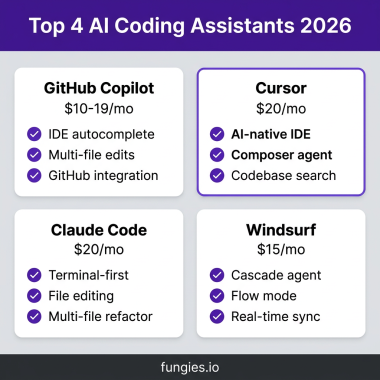
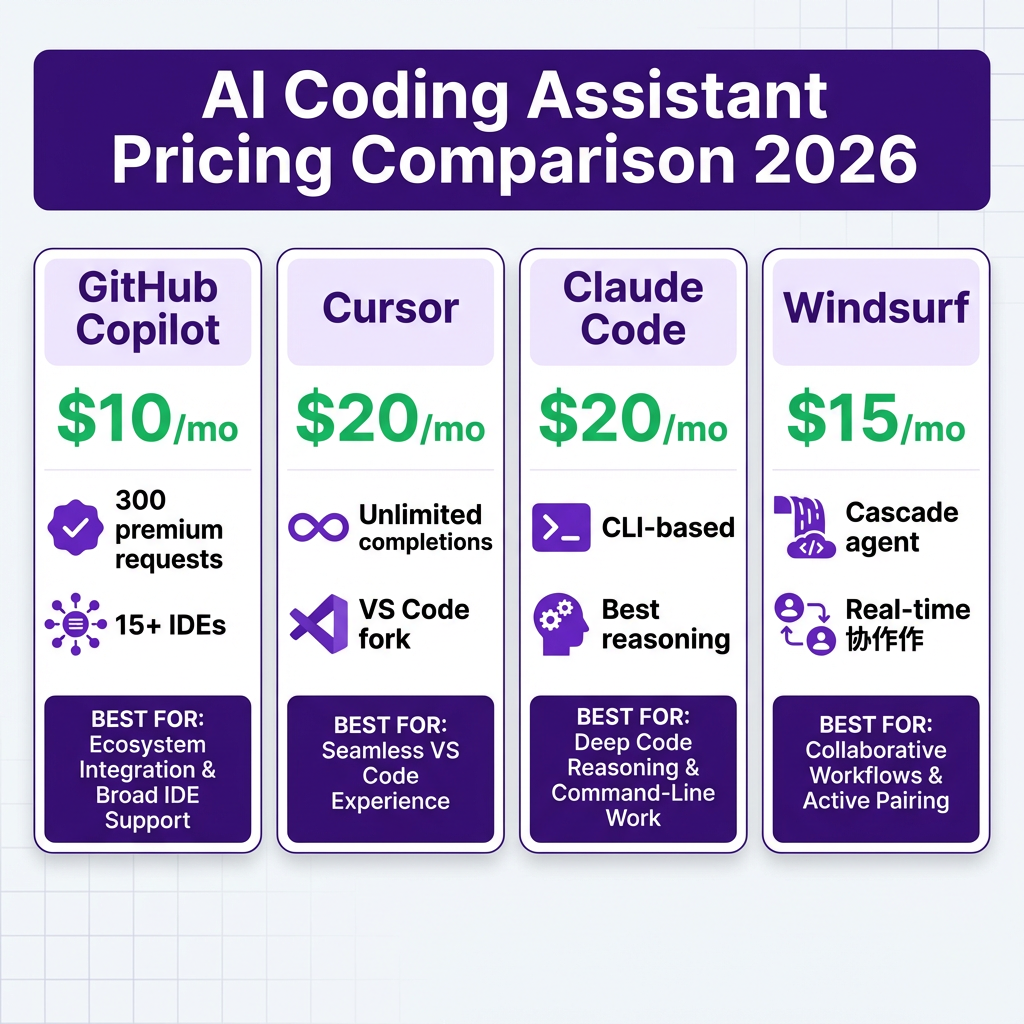
Four tools dominate the market in 2026. Here’s how they actually compare:
| Tool | Price | Best For | Key Strength | Main Limitation |
|---|---|---|---|---|
| GitHub Copilot | $10-39/mo | Teams using GitHub | Broad IDE support, GitHub integration | Limited agent capabilities |
| Cursor | $20/mo | Daily development | AI-native IDE, multi-model | VS Code only |
| Claude Code | $20/mo | Complex reasoning | Best-in-class architecture decisions | CLI only, steeper learning curve |
| Windsurf | $15/mo | Real-time collaboration | Cascade agent, collaborative editing | Newer, smaller ecosystem |
Deep Dive: Each Tool Explained
GitHub Copilot: The Safe Choice
Copilot is the Microsoft Office of AI coding tools—everyone’s heard of it, it works everywhere, and it’s fine. With support for 15+ IDEs including VS Code, JetBrains, Neovim, and Visual Studio, it’s the most accessible option.
Pricing breakdown:
- Free: 2,000 completions + 50 premium requests/month
- Pro: $10/month (300 premium requests)
- Pro+: $39/month (1,500 premium requests + all models)
- Business: $19/user/month
- Enterprise: $39/user/month
Premium requests power chat, agent mode, code review, and model selection. Heavy users can burn through 300 requests fast—plan for Pro+ if your team uses chat features daily.
Choose Copilot if: Your team uses multiple IDEs, you’re deeply integrated with GitHub, or you need a solution that “just works” without configuration headaches.
Cursor: The AI-Native IDE
Cursor isn’t a plugin—it’s a fork of VS Code built from the ground up for AI. That means deeper integration: codebase-wide context awareness, multi-file editing, and a Composer feature that can generate entire features from descriptions.
Cursor’s killer feature is model flexibility. You can switch between GPT-4, Claude, and Gemini mid-conversation, comparing outputs on the same problem. When one model gets stuck, another might nail it.
Pricing: $20/month for Pro (unlimited completions, 500 fast requests). Team plans at $40/user/month add centralized billing and usage analytics.
Choose Cursor if: Your team lives in VS Code, you want the most powerful AI editing experience, and you’re willing to switch IDEs for it.
Claude Code: The Architect’s Choice
Claude Code is different. It’s a terminal-based tool, not an IDE plugin. You run it from the command line, and it can read your entire codebase, understand cross-file dependencies, and make architectural recommendations that other tools miss.
Here’s where Claude Code shines: complex refactoring across multiple files, debugging issues that span your entire stack, and making architectural decisions. When developers run the same complex task through Copilot, Cursor, and Claude Code, Claude consistently produces the highest quality output—but it takes longer.
Pricing: $20/month for Pro (5-hour usage window). Max plans at $100-200/month extend usage limits. API access is pay-per-token.
Choose Claude Code if: You work on large codebases, make frequent architectural decisions, or need deep reasoning over raw speed.
Windsurf: The Collaborative Agent
Windsurf (formerly Codeium) combines an AI-native IDE with Cascade—an agent that can perform multi-step coding tasks while you watch or collaborate. Its real-time collaboration features let multiple developers work with the same AI agent simultaneously.
At $15/month, it’s the cheapest full-featured option. The trade-off? A smaller ecosystem and less mature tooling compared to Cursor.
Choose Windsurf if: Budget matters, you want collaborative AI features, or you’re curious about agentic coding but don’t want to pay Cursor prices.

The 5-Step Framework for Choosing Your Tool
Now that you know the players, here’s how to actually decide. Work through these five steps in order:
Step 1: Define Your Primary Workflow
Be honest about how your team actually works:
- IDE-centric workflow: You spend 90% of your time in one IDE. Cursor or Windsurf will give you the best experience.
- Multi-tool workflow: You switch between IDE, terminal, browser, and documentation. Copilot’s broad IDE support wins here.
- CLI-heavy workflow: You’re in the terminal constantly. Claude Code fits naturally into how you already work.
Step 2: Set Your Budget Reality
Don’t just look at sticker prices. Calculate total cost of ownership:
- $0-20/month per developer: Copilot Pro, Windsurf Pro, or Cursor Pro. Good for individuals and small teams.
- $20-50/month per developer: Copilot Pro+, Cursor Team, or Claude Code Pro. Necessary for power users.
- $50+/month per developer: Claude Code Max, Enterprise plans, or hybrid setups. Worth it for senior developers who ship critical code.
Step 3: Evaluate Your Context Needs
How much of your codebase does the AI need to understand?
- Single-file tasks: Any tool works. Copilot’s completions are sufficient.
- Multi-file features: Cursor’s codebase awareness or Claude Code’s deep context shines here.
- Full architecture decisions: Claude Code is the clear winner for complex, cross-system reasoning.
Step 4: Test With Real Tasks
Don’t evaluate based on demo videos. Give each tool the same three tasks from your actual backlog:
- A bug fix that requires understanding multiple files
- A feature addition that follows existing patterns
- A refactoring task that touches 5+ files
Measure: time to complete, code quality, and how much manual cleanup was required.
Step 5: Measure ROI After 30 Days
After a month of real use, check these metrics:
- Lines of code written by AI vs. manually
- Time from task assignment to PR
- Code review comments per PR (lower is better)
- Developer satisfaction scores
- Actual tool usage (not just subscriptions)
If you’re not seeing at least a 15% productivity improvement, you have the wrong tool—or the wrong workflow.
The Hybrid Approach Most Teams Should Consider
Here’s a secret the tool vendors won’t tell you: the best setup often involves multiple tools.
The most productive engineering teams I see in 2026 use a tiered approach:
- Everyone gets Copilot Pro ($10/mo): For inline completions and basic chat. It works in every IDE and provides a baseline AI experience.
- Senior developers get Cursor ($20/mo) or Claude Code ($20/mo): For complex work that justifies the additional cost. These developers become internal AI power users and help train the rest of the team.
- Team leads track usage and ROI monthly: Cancel licenses that aren’t being used. Upgrade developers who hit usage limits. Treat AI tools like any other infrastructure cost.
This hybrid approach costs $30-40 per developer but delivers significantly more value than a one-size-fits-all solution.
Key Takeaways
- Match the tool to your workflow, not the hype. CLI users should consider Claude Code. IDE-loyal developers should try Cursor. Multi-IDE teams should start with Copilot.
- Budget for power users separately. Not everyone needs the same tool. A junior developer and a staff engineer have different needs.
- Test with real work, not toy problems. The difference between tools only shows up in complex, multi-file tasks.
- Measure ROI rigorously. If you’re not tracking productivity gains, you’re guessing.
- Consider the hybrid approach. Most teams benefit from tiered tooling rather than standardizing on one option.
Frequently Asked Questions
Can I use multiple AI coding assistants at once?
Yes, and many developers do. Copilot for completions, Cursor or Claude Code for complex tasks is a common pattern. Just be mindful of context window limits and API costs.
Which AI coding assistant has the best security?
For sensitive codebases, self-hosted or enterprise options matter. Claude Code offers the most control since it runs locally. Copilot Enterprise includes audit logs and compliance features. Cursor and Windsurf process code through their servers—review their security whitepapers if this is a concern.
Do AI coding assistants work with all programming languages?
All major tools support Python, JavaScript, TypeScript, Java, C++, and Go well. Niche languages vary—test with your specific stack before committing. Claude Code generally handles unfamiliar languages better due to its reasoning capabilities.
How do I convince my manager to pay for AI coding tools?
Run a 2-week trial with 2-3 developers. Track time-to-completion on similar tasks with and without the tool. Most managers approve $20/month per developer when shown a 20%+ productivity gain. Frame it as developer tooling, not a luxury.
What’s the best free AI coding assistant?
GitHub Copilot Free (2,000 completions + 50 premium requests) is the most capable free tier. For unlimited free usage, Codeium (now Windsurf) offers a generous free plan with solid completions. Open-source alternatives like Continue.dev let you bring your own API keys.
Conclusion
Choosing an AI coding assistant isn’t about finding the “best” tool—it’s about finding the right tool for your specific situation. The teams seeing real productivity gains aren’t the ones with the fanciest AI; they’re the ones who matched their tooling to their workflow, measured the results, and iterated.
Start with the 5-step framework. Test rigorously. And don’t be afraid to use multiple tools—AI coding assistants are cheap compared to developer time, and the productivity gains compound.
Ready to streamline more than just your coding workflow? Fungies.io handles payments, tax compliance, and checkout for SaaS companies—so you can focus on shipping great code, not wrestling with merchant accounts.
References
- Developer Productivity Statistics with AI Tools 2026 – Index.dev
- 93% of Developers Use AI. Why Is Productivity Only 10%? – ShiftMag
- AI Coding Tools Comparison 2026 – SitePoint
- Claude Code vs Cursor vs Copilot: The Honest 2026 Developer Comparison
- GitHub Copilot Pricing 2026 – PE Collective
- Claude Code Pricing in 2026 – SSDNodes