84% of developers now use AI coding tools regularly. Yet most are still hard-coding integrations for every new tool they want their AI to access. There’s a better way.
The Model Context Protocol (MCP), introduced by Anthropic in November 2024, has become the USB-C for AI applications. Microsoft, OpenAI, and Google have all adopted it. The official MCP servers repository has 86,000+ GitHub stars. If you’re building AI-powered applications in 2026, MCP isn’t optional—it’s the standard.
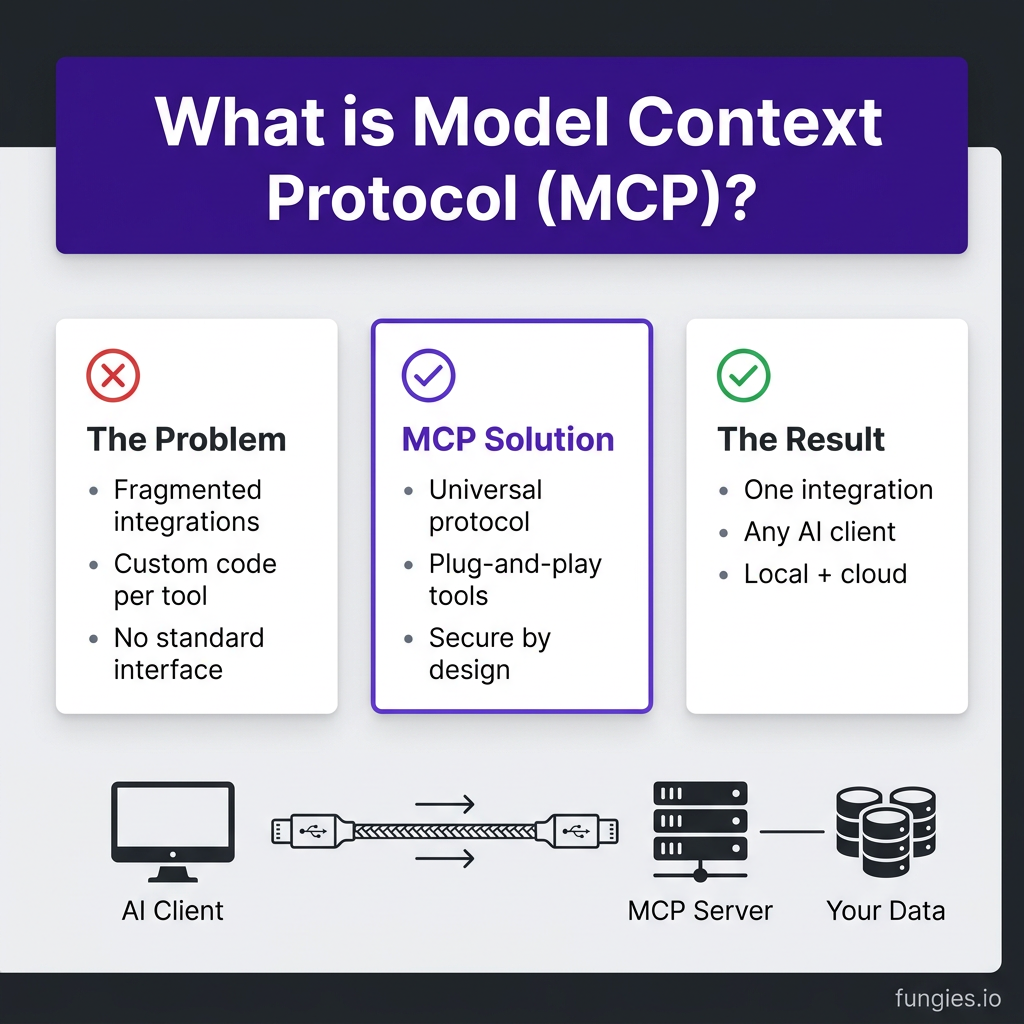
What Is Model Context Protocol (MCP)?
MCP is an open standard that enables secure, two-way connections between AI assistants and data sources. Think of it as a universal interface—like USB-C, but for AI tools.
Before MCP, every integration was custom. You built one connector for OpenAI’s function calling. Another for Claude. A third for your local Llama model. Each had different authentication, different schemas, different error handling.
MCP solves this with a client-server architecture:
- MCP Clients — AI applications like Claude Desktop, Cursor, or your custom agent that connect to servers
- MCP Servers — Lightweight programs that expose specific capabilities (tools, resources, prompts) through a standardized protocol
- Transport — Communication happens via stdio (local) or HTTP/SSE (remote)
The result? Write once, use anywhere. Build an MCP server for your database, and Claude Desktop, Cursor, and any MCP-compliant client can use it without modification.
Why MCP Matters for Developers in 2026
The AI tooling landscape has fragmented. Developers juggle multiple AI providers, each with different integration patterns. MCP unifies this.
Key Benefits
- Standardization — One protocol for all AI tool integrations
- Security — Local-first design keeps sensitive data on your machine
- Composability — Chain multiple MCP servers together for complex workflows
- Ecosystem — 100+ community servers available on GitHub
- Vendor Independence — Switch between Claude, GPT-4, Gemini without rewriting integrations
How MCP Works: The Architecture
MCP uses JSON-RPC 2.0 for communication. The protocol defines three core primitives:
| Primitive | Direction | Purpose |
|---|---|---|
| Tools | Server → Client | Executable functions AI can call (query DB, search web) |
| Resources | Server → Client | Data sources AI can read (files, API responses) |
| Prompts | Server → Client | Reusable prompt templates for common tasks |
When an MCP client connects to a server, it first discovers available capabilities via tools/list, resources/list, or prompts/list. The AI then decides which tools to call based on the user’s request.
Popular MCP Servers for Developers
The community has built MCP servers for virtually every common developer need. Here are the most useful ones:
| Server | Purpose | Use Case |
|---|---|---|
| GitHub MCP | Repository operations | Create PRs, search code, manage issues |
| PostgreSQL MCP | Database queries | Let AI read/write your database safely |
| Firecrawl MCP | Web scraping | Extract clean content from any URL |
| Slack MCP | Messaging | Send messages, search channels |
| Filesystem MCP | Local files | Read, write, search files on your machine |
| Brave Search MCP | Web search | Real-time search results for AI |
The official modelcontextprotocol/servers repository on GitHub has 86,000+ stars and includes reference implementations for filesystem, Git, SQLite, and more.
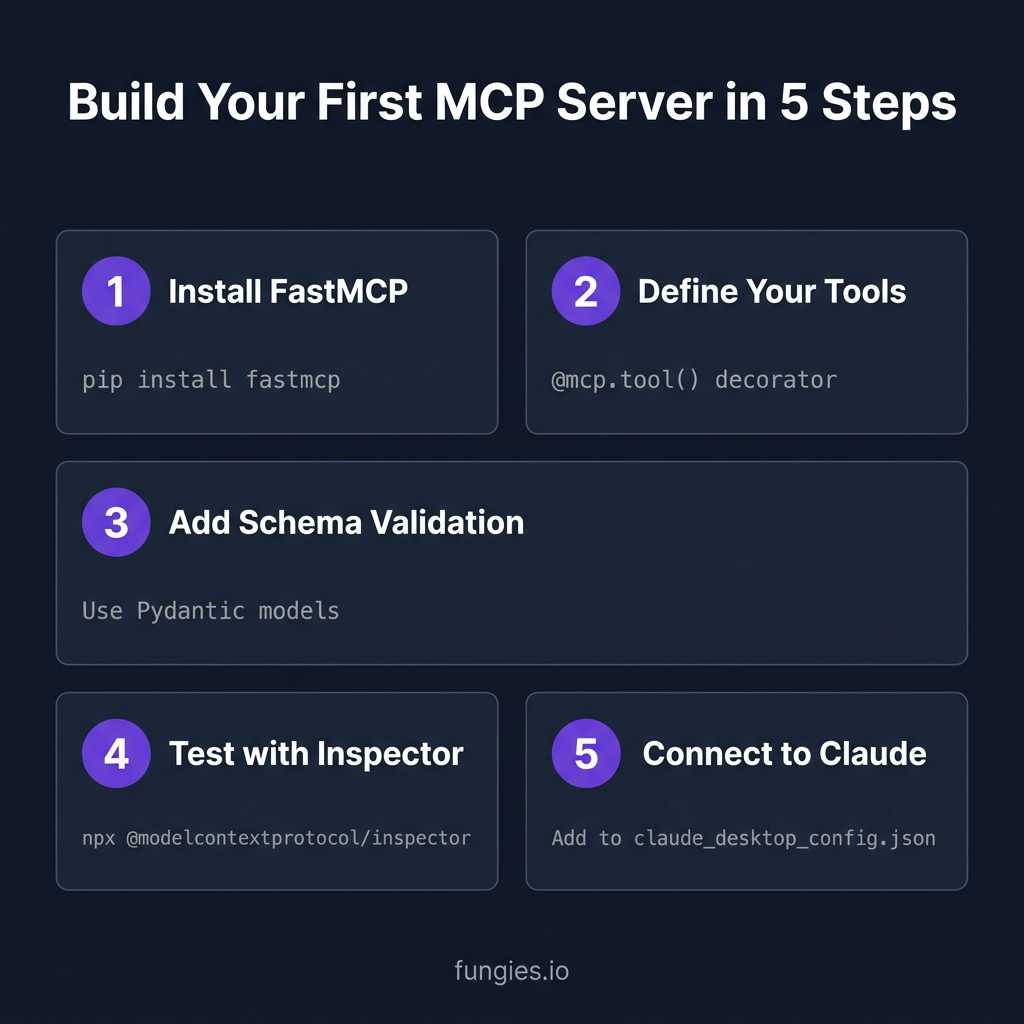
Building Your First MCP Server: Step-by-Step
Let’s build a simple MCP server that exposes a calculator tool. We’ll use Python and the FastMCP framework.
Step 1: Install FastMCP
pip install fastmcpStep 2: Create Your Server
# calculator_server.py
from fastmcp import FastMCP

# Create server instance
mcp = FastMCP("calculator")

@mcp.tool()
def add(a: float, b: float) -> float:
    """Add two numbers together."""
    return a + b

@mcp.tool()
def multiply(a: float, b: float) -> float:
    """Multiply two numbers."""
    return a * b

if __name__ == "__main__":
    mcp.run()
Step 3: Configure Claude Desktop
Add your server to Claude Desktop’s configuration:
// ~/Library/Application Support/Claude/claude_desktop_config.json
{
  "mcpServers": {
    "calculator": {
      "command": "python",
      "args": ["/path/to/calculator_server.py"]
    }
  }
}
Step 4: Test It
Restart Claude Desktop. You should see a hammer icon indicating tools are available. Try asking: “What’s 147 times 289?” Claude will call your multiply tool automatically.
Advanced MCP Patterns
Resources: Exposing Data
Tools let AI take actions. Resources let AI read data. Here’s how to expose a JSON file:
@mcp.resource("config://app")
def get_config() -> str:
    """Return application configuration."""
    with open("config.json") as f:
        return f.read()
Dynamic Tools
Your server can register tools dynamically based on runtime conditions:
# Register tools based on available APIs
if os.getenv("STRIPE_API_KEY"):
    @mcp.tool()
    def create_customer(email: str) -> dict:
        """Create a Stripe customer."""
        # Implementation here
        pass
Error Handling
MCP servers should return clear errors that help the AI recover:
@mcp.tool()
def query_database(sql: str) -> dict:
    """Execute a SQL query."""
    try:
        result = db.execute(sql)
        return {"success": True, "data": result}
    except Exception as e:
        return {"success": False, "error": str(e)}
MCP vs. Function Calling: What’s the Difference?
You might be wondering: doesn’t OpenAI already have function calling? Yes, but MCP is different.
| Feature | OpenAI Function Calling | MCP |
|---|---|---|
| Standard | Vendor-specific | Open standard |
| Portability | OpenAI only | Any MCP client |
| Transport | HTTP API | stdio or HTTP/SSE |
| Local execution | Limited | Native support |
| Tool discovery | Static | Dynamic |
| Ecosystem | Closed | Open, growing rapidly |
MCP doesn’t replace function calling—it standardizes it. An MCP server can expose the same tools to Claude, GPT-4, Gemini, or any other model that speaks MCP.
Security Best Practices
MCP servers can execute code and access data. Security matters.
- Validate all inputs — Use Pydantic or similar for strict schema validation
- Principle of least privilege — Only expose what the AI actually needs
- Audit logging — Log all tool calls for debugging and security review
- Environment isolation — Run untrusted MCP servers in containers
- User confirmation — For destructive operations, require explicit approval
Key Takeaways
- MCP is the emerging standard for AI tool integration—think USB-C for AI
- Build once, use with any MCP-compliant client (Claude, Cursor, custom agents)
- Start with FastMCP for Python or the official SDK for TypeScript
- Leverage the 100+ community servers before building your own
- Always validate inputs and follow security best practices
Frequently Asked Questions
What programming languages support MCP?
Official SDKs exist for Python and TypeScript. Community implementations are available for Go, Rust, and Java. The protocol itself is language-agnostic since it uses JSON-RPC.
Can MCP servers run remotely?
Yes. While stdio is common for local servers, MCP supports HTTP with Server-Sent Events (SSE) for remote deployments. This enables cloud-hosted MCP servers that multiple clients can share.
Is MCP only for Claude?
No. While Anthropic created MCP, it’s an open standard. OpenAI, Microsoft, and Google have all announced support. Cursor, Zed, and other AI-native IDEs already support MCP.
How do I debug MCP servers?
Use the official MCP Inspector: npx @modelcontextprotocol/inspector. It provides a web UI to browse tools, test calls, and inspect JSON-RPC messages.
Where can I find more MCP servers?
Check the official servers repository and the awesome-mcp-servers curated list with 4,100+ stars.
Conclusion
MCP represents a fundamental shift in how we build AI-powered applications. Instead of hard-coding integrations for every tool, we can now build standardized, reusable connectors that work across the entire AI ecosystem.
If you’re building AI applications in 2026, learning MCP isn’t optional—it’s essential. Start small: pick one MCP server from the community, integrate it with Claude Desktop, and experience the difference standardized tooling makes.
Ready to build AI-powered checkout flows for your SaaS? Get started with Fungies—the Merchant of Record platform that handles payments, tax compliance, and checkout for game and SaaS developers.
References
- Official MCP Servers Repository — 86k stars
- Awesome MCP Servers — Curated list
- 10 Best MCP Servers for Developers — Firecrawl
- Build an MCP Server in TypeScript — Digital Applied
- Build an MCP Server — Codecademy
- Introducing MCP — Anthropic
- AI Coding Assistant Statistics 2026 — Uvik