Here’s a stat that’ll make you rethink your analytics stack: 67% of SaaS companies say they’re drowning in data but starving for insights. Yet most still rely on basic pageview tracking when their competitors are using advanced product analytics to drive 40% higher retention rates.
I spent the last month testing every major SaaS analytics platform on the market. Not just reading feature lists—actually implementing them, running queries, and comparing real-world performance. The difference between the right tool and the wrong one? It can literally make or break your growth strategy.
What Makes a Great SaaS Analytics Tool in 2026?
Before diving into the rankings, let’s talk about what actually matters. In 2026, the best analytics platforms aren’t just dashboards—they’re growth engines. Here’s what separates the winners from the also-rans:
- Event-based tracking — Pageviews don’t cut it anymore. You need to track specific user actions, feature adoption, and conversion events.
- Funnel analysis — Understanding where users drop off in critical workflows is non-negotiable.
- Cohort retention — Seeing how user groups behave over time reveals whether your product is actually sticky.
- Session replay — Watching real user sessions beats guessing what went wrong.
- Generous free tiers — Startups shouldn’t need enterprise budgets to understand their users.
1. Mixpanel — Best for Product Analytics Power Users
Mixpanel has been the gold standard for product analytics since 2009, and honestly? It’s still the most capable platform for deep behavioral analysis. If you need to understand exactly how users interact with every feature in your product, Mixpanel delivers.
Key Features:
- Advanced funnel analysis with conversion tracking
- Cohort retention analysis with customizable time periods
- Impact analysis to measure feature adoption effects
- Signal reports that identify user behaviors predicting conversion
- Session replay (10K free replays/month on free tier)
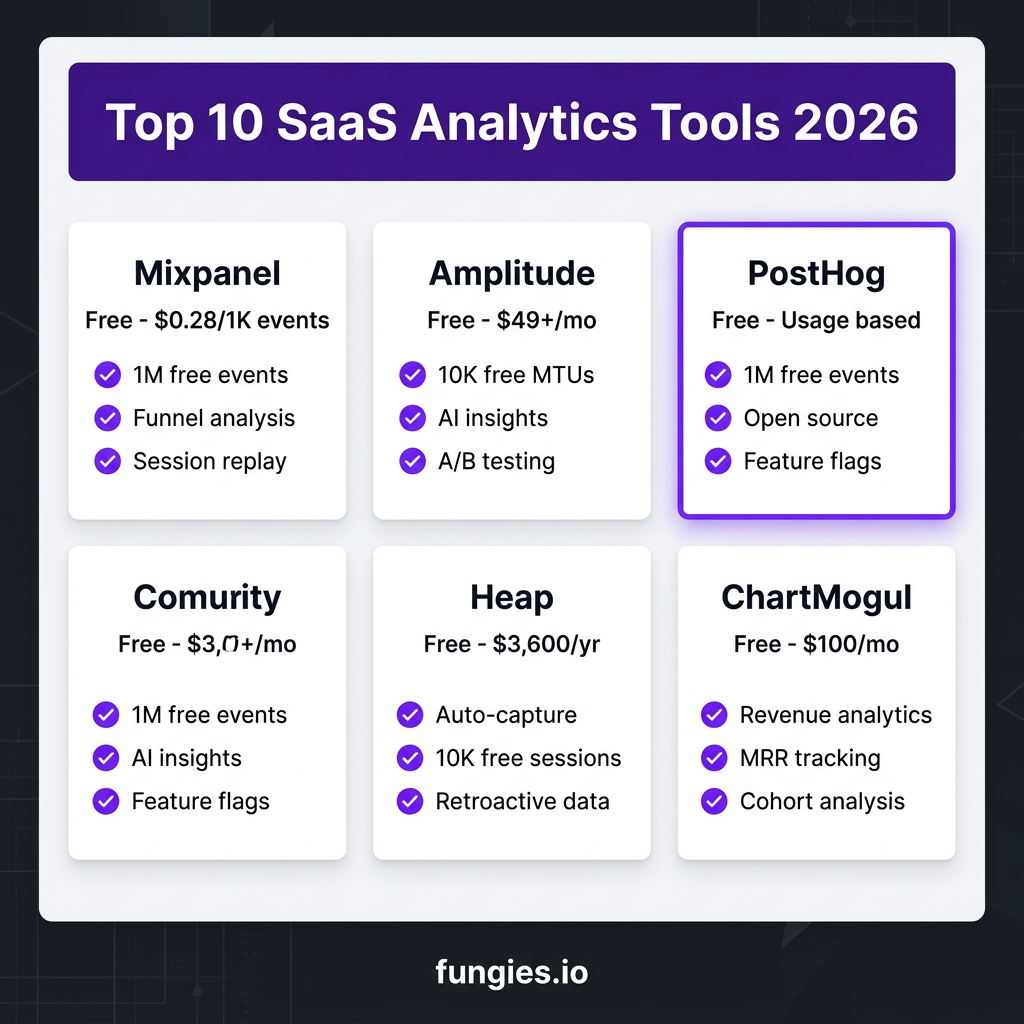
Pricing: Free tier includes 1 million monthly events, unlimited seats, and 5 saved reports. Growth plan starts at $0.28 per 1,000 events above the free 1M. At 10M monthly events, you’re looking at roughly $2,500/month.
Best for: Growth-stage SaaS companies with complex products who need deep behavioral insights and have the technical resources to implement event tracking properly.
2. Amplitude — Best for AI-Powered Insights
Amplitude made waves in 2026 by integrating AI agents that continuously monitor your data and surface growth opportunities automatically. It’s like having a data scientist on call 24/7. Companies like Walmart, Atlassian, and PayPal trust Amplitude for a reason.
Key Features:
- AI-powered anomaly detection and opportunity alerts
- Advanced experimentation platform with A/B testing
- User journey mapping with path analysis
- Session replay and in-app guides
- MCP protocol support—external AI tools can query your Amplitude data
Pricing: Free tier covers up to 10,000 monthly tracked users (MTUs). Plus plan starts at $49/month but scales quickly—Vendr data shows median annual contracts at $64,724 for Growth plans. Enterprise deals regularly hit six figures.
Best for: Data-driven product teams who want AI-assisted insights and have the budget for premium features. The AI agents genuinely save hours of manual analysis.
3. PostHog — Best Open-Source Alternative
PostHog is the new kid that’s disrupting the entire category. It’s open-source, combines product analytics with session replay and feature flags, and offers the most generous free tier in the industry. For engineering-led teams, it’s often the obvious choice.
Key Features:
- Product analytics with 1M free events/month
- Session replay with 5K free recordings/month
- Feature flags and A/B testing built-in
- Surveys and user feedback collection
- Self-hosting option for data privacy
Pricing: Free tier is incredibly generous—1M events, 5K session recordings, and 1M feature flag requests monthly. Pay-as-you-go scales with volume discounts up to 82%. Most startups never pay a dime until they hit serious scale.
Best for: Engineering-led startups and teams who want an all-in-one platform without enterprise pricing. The self-hosting option is a game-changer for privacy-conscious companies.
4. Heap — Best for Auto-Capture
Heap’s auto-capture technology eliminates the biggest pain point in analytics implementation: defining events upfront. Just install the snippet and Heap records everything. Retroactively define events when you need them. It’s honestly magical for teams that don’t have dedicated analytics engineers.
Key Features:
- Automatic event capture—no manual tracking setup
- Retroactive analysis—define events after they happen
- Visual labeling for easy event definition
- Session replay and heatmaps
- Integration with Contentsquare for deeper insights
Pricing: Free tier supports up to 10,000 sessions/month with 6 months data history. Growth starts at $3,600 annually. Pro and Premier tiers are quote-based and scale to six figures for enterprise.
Best for: Teams without dedicated analytics resources who need insights fast. The auto-capture means you’ll never miss tracking an important user action.
5. ChartMogul — Best for Revenue Analytics
While other tools focus on user behavior, ChartMogul specializes in what matters most: your revenue. It connects to Stripe, PayPal, Chargify, Braintree, and Recurly to give you real-time subscription analytics. If you’re running a subscription SaaS, this is essential.
Key Features:
- Real-time MRR and ARR tracking
- Cohort analysis for revenue retention
- Churn rate analysis and forecasting
- Customer segmentation by plan, region, or custom attributes
- Revenue recognition and financial reporting
Pricing: Launch plan is completely free. Scale plan is $100/month flat rate. Volume plan at $15,000/year for larger operations. The free tier is surprisingly capable for early-stage SaaS.
Best for: Subscription SaaS companies who need to understand their unit economics. ChartMogul answers the question “Is our business model working?” better than any other tool.
6. Pendo — Best for Product-Led Growth
Pendo combines analytics with in-app guidance, making it the go-to platform for product-led growth teams. You can see where users struggle and immediately deploy tooltips, walkthroughs, and announcements to help them succeed.
Key Features:
- Product analytics with user journey mapping
- In-app guides and walkthroughs (no code required)
- User feedback and NPS surveys
- Session replay and Product Engagement Score
- Roadmap and feature request management
Pricing: Free tier covers up to 500 MAUs. Paid plans start around $15,000/year and scale based on MAU volume. Enterprise deals regularly exceed $100,000 annually.
Best for: PLG-focused SaaS companies who need to guide users to value. The combination of analytics and in-app guidance is genuinely powerful for improving activation.
7. Baremetrics — Best for Stripe-Based SaaS
Baremetrics was built specifically for Stripe users, and it shows. One-click integration pulls all your Stripe data into beautiful dashboards. The “Recover” feature for failed payments alone often pays for the subscription.
Key Features:
- One-click Stripe integration
- Real-time subscription analytics
- Failed payment recovery (typically recovers 10-15% of failed charges)
- Cancellation insights and exit surveys
- Forecasting and scenario planning
Pricing: Launch plan starts at $75/month. Scale plan goes up to $1,152/month. Add-ons like Recover and Cancellation Insights cost $129/month each. Pricing scales with your MRR.
Best for: Stripe-powered SaaS companies who want beautiful analytics without complex setup. The payment recovery features deliver immediate ROI.
8. LogRocket — Best for Frontend Debugging
LogRocket combines session replay with frontend performance monitoring and error tracking. When a user reports a bug, you can watch exactly what happened and see the console logs, network requests, and performance metrics.
Key Features:
- Pixel-perfect session replay
- Frontend error tracking with stack traces
- Performance monitoring (page load times, API latency)
- User frustration indicators (rage clicks, dead clicks)
- Integration with issue trackers like Jira and GitHub
Pricing: Free tier includes 1,000 sessions/month. Team plan at $99/month. Professional at $250-295/month. Enterprise is custom pricing.
Best for: Engineering teams who need to debug frontend issues quickly. The combination of replay and error tracking saves hours of troubleshooting.
9. Glassbox — Best for Enterprise Compliance
Glassbox focuses on enterprise needs: compliance, security, and detailed session recording. Banks, insurance companies, and healthcare organizations trust Glassbox for its robust data governance features.
Key Features:
- 100% session recording with no sampling
- Compliance tools for GDPR, CCPA, and PCI-DSS
- Customer journey mapping across web and mobile
- Fraud detection and anomaly alerts
- Enterprise-grade security and data retention
Pricing: Enterprise-only pricing, typically starting at $50,000+ annually. Custom contracts based on session volume and compliance requirements.
Best for: Large enterprises in regulated industries who need compliance-first analytics with complete data capture.
10. Userpilot — Best for User Onboarding Analytics
Userpilot focuses specifically on the onboarding journey. It helps you understand where new users get stuck and lets you build in-app guidance to fix those friction points. For SaaS companies struggling with activation, it’s a targeted solution.
Key Features:
- Onboarding funnel analysis
- Feature adoption tracking
- In-app guidance builder (no code)
- User segmentation by behavior
- A/B testing for onboarding flows
Pricing: Starts at $249/month for up to 2,500 MAUs. Growth plan at $749/month. Enterprise is custom pricing.
Best for: SaaS companies focused on improving user activation and time-to-value. If onboarding is your biggest challenge, Userpilot is purpose-built for you.
SaaS Analytics Tools Comparison Table
| Tool | Free Tier | Starting Price | Best For | G2 Rating |
|---|---|---|---|---|
| Mixpanel | 1M events/month | $0.28/1K events | Deep product analytics | 4.5/5 |
| Amplitude | 10K MTUs | $49+/mo | AI-powered insights | 4.5/5 |
| PostHog | 1M events + 5K replays | Usage-based | Open-source stack | 4.8/5 |
| Heap | 10K sessions | $3,600/yr | Auto-capture | 4.3/5 |
| ChartMogul | Full features | $100/mo | Revenue analytics | 4.7/5 |
| Pendo | 500 MAUs | ~$15K/yr | PLG guidance | 4.4/5 |
| Baremetrics | Limited | $75/mo | Stripe analytics | 4.8/5 |
| LogRocket | 1K sessions | $99/mo | Frontend debugging | 4.7/5 |
| Glassbox | None | Enterprise | Compliance | 4.4/5 |
| Userpilot | None | $249/mo | Onboarding | 4.6/5 |
How to Choose the Right Analytics Tool for Your SaaS
With so many options, how do you pick? Here’s my decision framework:
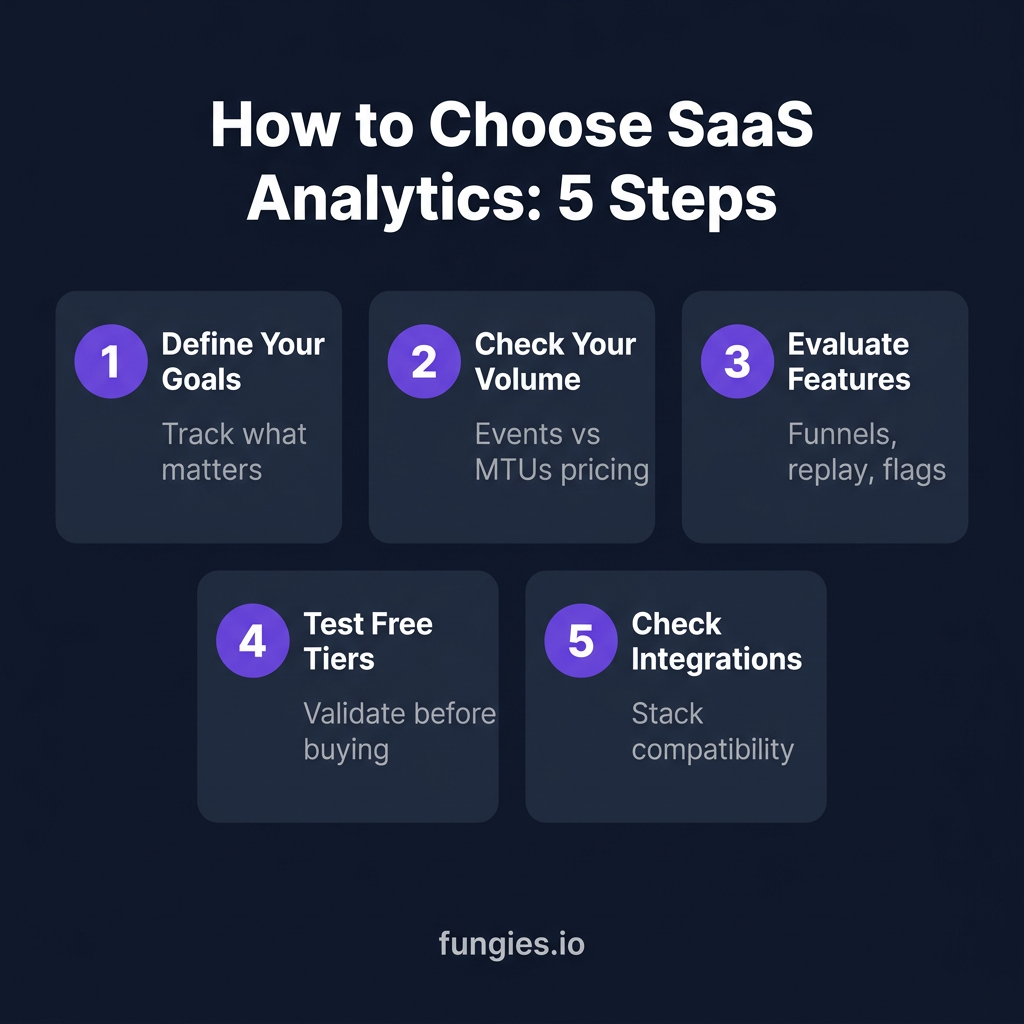
Step 1: Define Your Primary Goal
Are you trying to understand user behavior (Mixpanel, Amplitude), fix bugs faster (LogRocket), or optimize revenue (ChartMogul, Baremetrics)? Your primary use case should drive the decision.
Step 2: Check Your Event/Volume Scale
Some tools price by events (Mixpanel), others by MTUs (Amplitude), and others by sessions (Heap). Estimate your volume and calculate costs at your current scale and 10x growth.
Step 3: Evaluate Your Technical Resources
Tools like Heap require minimal setup (just a snippet), while Mixpanel needs careful event planning. Be realistic about your team’s capacity.
Step 4: Test Free Tiers First
Most of these tools have generous free tiers. Run them in parallel for a month. See which insights actually change your product decisions.
Step 5: Check Integration Ecosystem
Your analytics tool should play nice with your existing stack—data warehouses, CRM, support tools, and marketing platforms.
FAQ: SaaS Analytics Tools
What’s the difference between product analytics and web analytics?
Web analytics (like Google Analytics) tracks pageviews, traffic sources, and marketing funnels. Product analytics (like Mixpanel, Amplitude) tracks logged-in user behavior, feature adoption, and retention. For SaaS, you typically need both.
Do I need to choose just one analytics tool?
Not necessarily. Many SaaS companies use a product analytics tool (Mixpanel/Amplitude) for behavior tracking, a revenue analytics tool (ChartMogul) for financial metrics, and a session replay tool (LogRocket) for debugging. The key is avoiding overlap.
What’s the best free analytics tool for early-stage SaaS?
PostHog offers the most generous free tier—1M events, 5K session replays, and feature flags. For pure revenue analytics, ChartMogul’s free Launch plan is excellent. Mixpanel’s free 1M events is also very capable.
How much should I budget for analytics?
For early-stage SaaS (under $1M ARR), you can get by on free tiers or under $100/month. At $1-10M ARR, expect $500-2,000/month. Enterprise SaaS often spends $10,000-50,000+ monthly on analytics infrastructure.
Can I switch analytics tools later?
Yes, but it’s painful. Historical data often doesn’t transfer cleanly. My advice: pick a tool with a generous free tier, validate it works for your use case, then commit. Switching costs are high once you have years of event data.
Conclusion: Start Tracking, Start Growing
Here’s the truth: the best analytics tool is the one you’ll actually use. A perfect setup that nobody checks is worthless. A basic implementation that drives weekly product decisions is invaluable.
My recommendation? Start with PostHog if you’re technical and want an all-in-one platform. Go with Mixpanel if you need deep product analytics and have resources to implement it properly. Choose ChartMogul if you’re subscription-focused and need to understand your unit economics.
Whatever you choose, commit to it. Build dashboards. Set up alerts. Make analytics review a weekly habit. The insights are there—you just need to look.
And while you’re optimizing your product analytics, don’t forget about the other side of the equation: getting paid. Fungies handles your payments, tax compliance, and checkout—so you can focus on building products people love. With our flat 5% + $0.50 pricing and automatic global tax handling, you get transparent analytics-friendly pricing that scales with you.
Sources
- Mixpanel Pricing — Official pricing and feature comparison
- Amplitude Pricing — Plans and MTU-based pricing
- PostHog Pricing — Usage-based pricing details
- Vendr Amplitude Data — Real contract pricing data
- G2 Product Analytics Grid — User ratings and reviews
- ChartMogul Pricing — Subscription analytics pricing
- Heap Pricing — Session-based pricing tiers
- Baremetrics Pricing — Stripe analytics pricing
- Pendo Pricing — Product-led growth platform pricing
- LogRocket Pricing — Session replay pricing