Here’s a paradox that should keep every engineering manager awake at night: 84% of developers now use AI coding tools, yet 88% of organizations report security incidents from AI-generated code. We’re shipping faster than ever, but we’re also breaking things faster than ever.
In 2026, AI agents aren’t just suggesting code completions—they’re autonomously writing tests, reviewing pull requests, and deploying to production. The teams that figure out how to harness this power without creating chaos are pulling ahead. Everyone else is drowning in technical debt they can’t explain.
This guide shows you exactly how to integrate AI agents into your CI/CD pipeline—the right way. No fluff. Real data. Specific tools. Let’s go.
What Are AI Agents in CI/CD?
Let’s get our definitions straight. An AI coding assistant suggests the next line of code. An AI agent plans, executes, and adapts across complex multi-step workflows without human intervention.
In a CI/CD context, that means an AI agent can:
- Ingest a requirements document and identify gaps
- Generate code across multiple files
- Run tests and flag failures
- Create a pull request with detailed descriptions
- Route code to the right human reviewers
- Auto-fix broken builds based on error logs
We’re talking about a shift from “AI-assisted” to “AI-autonomous” development. And it’s happening fast. Claude Code went from zero to the #1 most-used AI coding tool in just eight months after its May 2025 release.
Why AI Agents in CI/CD Actually Matter
The productivity data is hard to ignore. According to the 2026 Pragmatic Engineer survey and JetBrains Developer Ecosystem data:
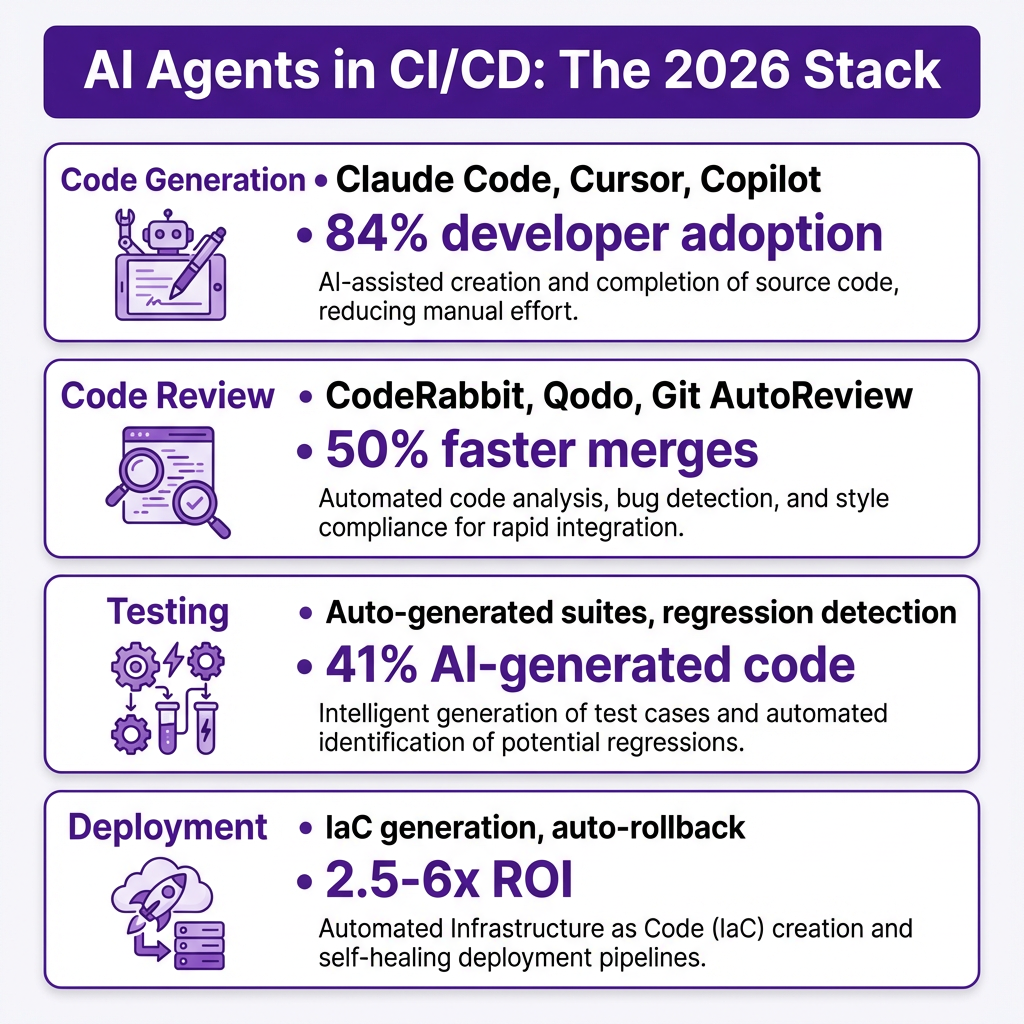
- 41% of all production code is now AI-generated
- AI code review tools deliver 50% faster merge times
- Teams report 2.5-3.5x ROI on AI coding tools, with top performers hitting 4-6x
- 85% of developers regularly use AI tools for coding
But here’s the cost reality nobody talks about: agentic tools like Claude Code can run $200-$600 per engineer per month when you factor in API token costs. That’s not the $30-60 seat license most people budget for.
The competitive pressure is real. Teams not using AI are falling behind. Developers spend less time on boilerplate and more time on architecture—if they implement AI agents correctly.
The AI Agent CI/CD Stack: Four Layers
Before you start buying tools, understand the stack. Each layer serves a different purpose, and you don’t need everything on day one.
Layer 1: Code Generation Agents
These are your primary productivity drivers. Claude Code, Cursor, and GitHub Copilot dominate this space in 2026. They range from inline suggestions (Copilot) to full file generation and multi-file editing (Claude Code, Cursor).
Key players: Claude Code ($17/mo Pro), Cursor ($20/mo Pro), GitHub Copilot ($10/mo)
Layer 2: Code Review Agents
This is where AI agents get serious about quality. Tools like CodeRabbit, Qodo, Git AutoReview, and CodeAnt AI analyze pull requests, catch security issues, and enforce coding standards—automatically.
Key players: CodeRabbit ($24/user/mo), Git AutoReview ($14.99/mo), CodeAnt AI (custom)
Layer 3: Testing Agents
AI-generated test suites, regression detection, and intelligent test selection. These agents identify what to test based on code changes, not just coverage metrics.
Layer 4: Deployment Agents
Infrastructure as Code generation, automated rollback on failure, and deployment optimization. These agents handle the “last mile” of getting code to production safely.
Step-by-Step Integration Guide
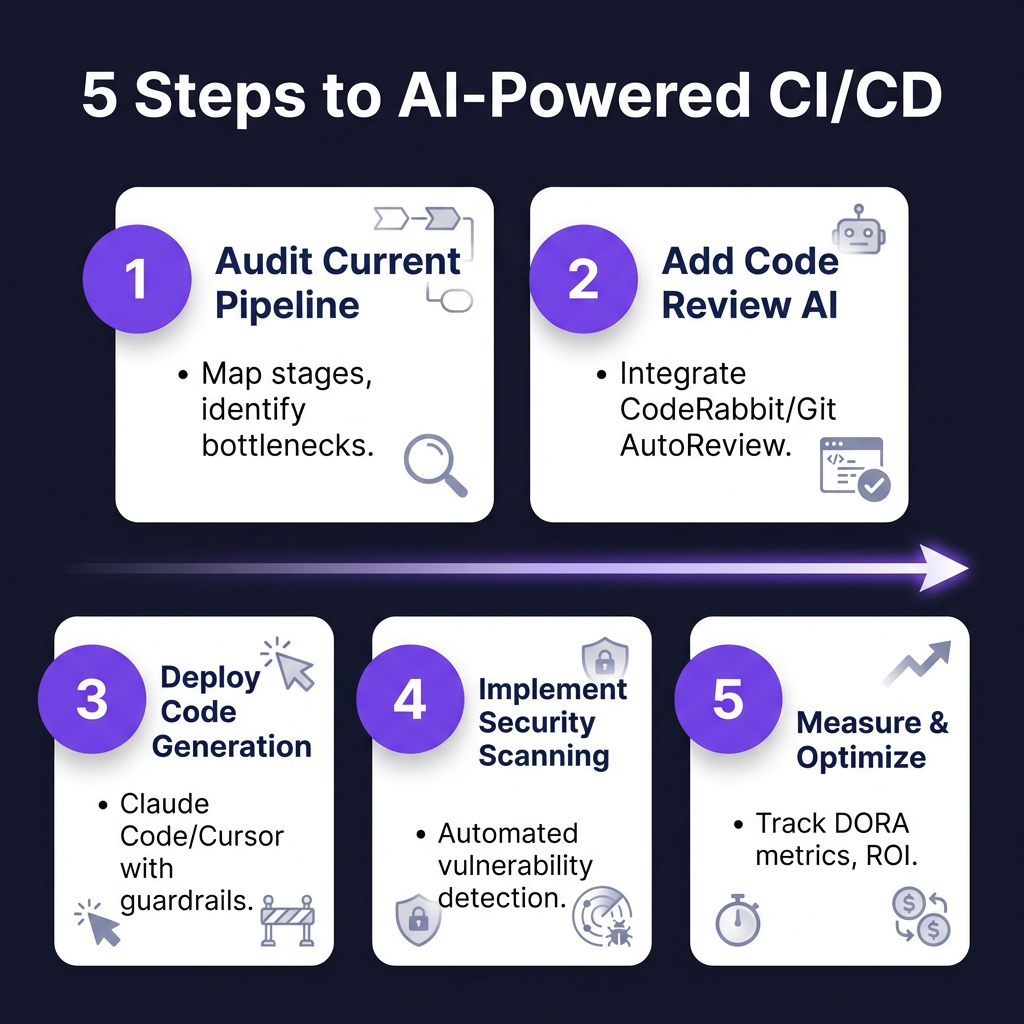
Here’s the practical implementation roadmap. Don’t skip steps—each builds on the previous one.
Step 1: Audit Your Current Pipeline
Before adding AI, know what you’re optimizing. Map your existing CI/CD stages:
- How long does code sit in review?
- What’s your build failure rate?
- Where do manual interventions happen?
- What are your DORA metrics baseline?
Measure these for two weeks. You can’t improve what you don’t measure.
Step 2: Start with Code Review Automation
Code review is the lowest-risk, highest-impact place to start. Here’s a GitHub Actions example for CodeRabbit:
# .github/workflows/ai-code-review.yml
name: AI Code Review
on:
  pull_request:
    types: [opened, synchronize]

jobs:
  ai-review:
    runs-on: ubuntu-latest
    steps:
      - uses: coderabbitai/ai-pr-reviewer@latest
        env:
          GITHUB_TOKEN: ${{ secrets.GITHUB_TOKEN }}
          CODERABBIT_API_KEY: ${{ secrets.CODERABBIT_API_KEY }}
Set human-in-the-loop approval for AI suggestions. Tools like Git AutoReview require human approval before publishing comments—this prevents AI mistakes from polluting your PRs.
Step 3: Add AI Code Generation
Deploy Claude Code or Cursor to your team with clear usage policies:
- Define what code can be AI-generated (boilerplate: yes, security-critical: no)
- Set maximum AI code churn ratio (keep under 1.5x human code churn)
- Require human review for AI-generated code in critical paths
Step 4: Implement Security Scanning
AI-generated code has unique security risks. Add automated scanning to your pipeline:
# Add to your CI workflow
- name: Security Scan
  uses: snyk/actions/node@master
  with:
    args: --severity-threshold=high
Tools like CodeAnt AI combine AI review with continuous security scanning (SAST, secrets detection, dependency checks) in one integration.
Step 5: Measure and Optimize
Track these metrics monthly:
- Deployment frequency (DORA metric)
- Lead time for changes
- Change failure rate
- Mean time to recovery
- AI tool cost per engineer
- AI vs human code churn ratio
Adjust your AI agent configuration based on what the data tells you.
AI Code Review Tools Comparison
| Tool | Pricing | GitHub Actions | GitLab CI | Human-in-Loop | Best For |
|---|---|---|---|---|---|
| CodeRabbit | $24/user/mo | Yes | Yes | No | High-volume teams |
| Git AutoReview | $14.99/mo | Yes | No | Yes | Security-conscious |
| CodeAnt AI | Custom | Yes | Yes | Optional | Enterprise |
| Qodo | Custom | Yes | Yes | No | Full automation |
| Sourcery | $15/mo | Yes | Yes | No | Refactoring |
My recommendation: Start with Git AutoReview if you want human oversight, or CodeRabbit if you trust AI to auto-publish feedback. CodeAnt AI is worth evaluating for enterprise teams needing unified code health metrics.
Security and Governance: The 88% Problem
That 88% security incident rate isn’t a typo. AI-generated code introduces specific vulnerabilities:
- Dependency confusion: AI suggests packages that don’t exist or are typosquatted
- Hardcoded secrets: AI copies example code with placeholder credentials
- Logic flaws: AI generates code that compiles but has subtle security bugs
- Outdated patterns: AI training data includes deprecated, vulnerable libraries
Implement these guardrails:
- Mandatory security scans for all AI-generated code
- Human review required for authentication, authorization, and payment code
- AI code churn monitoring—if AI code is rewritten more than 1.5x human code, reduce AI usage
- Dependency pinning—never let AI suggest new package versions blindly
Real-World Implementation Patterns
Based on 2026 adoption data, three patterns emerge:
Pattern 1: Gradual Adoption with Guardrails
Start with 20% AI-generated code, increase as team comfort grows. This is the safest approach for established teams with legacy codebases. Most Fortune 500 companies use this pattern.
Pattern 2: AI-First for New Projects
Greenfield development with AI agents from day one. Startups and internal tools teams use this to move fast. Risk: technical debt accumulates faster if you’re not careful.
Pattern 3: Hybrid Human-AI Teams
Senior developers review AI output; juniors learn from AI suggestions. This balances speed with mentorship. Best for teams with mixed experience levels.
Cost Analysis and ROI Reality
Let’s talk money. Here’s the real cost breakdown per engineer per month:
- Claude Code Pro: $17/mo base + $100-300 API tokens
- Cursor Pro: $20/mo base + $50-200 API tokens
- CodeRabbit: $24/mo
- Security scanning: $20-50/mo
Total: $200-600 per engineer per month
ROI calculation: If an AI agent saves 5 hours per week at $100/hour fully-loaded cost, that’s $2,000/month in value for $400 in costs—a 5x return.
When AI agents don’t make sense: Teams with strict compliance requirements that can’t accept AI-generated code, or projects where code longevity matters more than speed.
Key Takeaways
- 84% of developers use AI tools—the question isn’t if you’ll adopt, but how well
- Start with code review automation—it’s the lowest-risk entry point
- Budget $200-600 per engineer per month for agentic AI tools, not $30-60
- Watch your AI code churn ratio—if it’s over 1.5x human code, pull back
- Implement mandatory security scanning—88% of orgs have had AI-related security incidents
- Measure DORA metrics before and after to prove ROI
FAQ: AI Agents in CI/CD
Will AI agents replace developers?
No. AI agents handle routine coding, testing, and deployment tasks. Developers focus on architecture, complex problem-solving, and reviewing AI output. The role shifts from “writing code” to “directing AI agents.”
How do I prevent AI-generated security vulnerabilities?
Use mandatory security scanning in CI/CD, require human review for security-critical code, and monitor AI code churn. Tools like CodeAnt AI and Snyk catch most AI-generated vulnerabilities before they reach production.
What’s the best AI code review tool for small teams?
Git AutoReview at $14.99/mo offers the best value with human-in-the-loop approval. CodeRabbit at $24/user/mo scales better for larger teams.
Can I use AI agents with GitLab CI?
Yes. CodeRabbit, Qodo, and CodeAnt AI all support GitLab CI. Git AutoReview currently only supports GitHub.
How do I measure ROI on AI coding tools?
Track DORA metrics (deployment frequency, lead time, change failure rate, MTTR), measure time saved per developer, and compare AI tool costs against productivity gains. Healthy ROI is 2.5-3.5x; top teams hit 4-6x.
Conclusion
AI agents in CI/CD aren’t the future—they’re the present. The teams winning in 2026 aren’t those with the most AI tools; they’re the ones with the smartest integration strategy. Start with code review automation. Add generation tools with guardrails. Measure everything. And never forget that AI is a multiplier of your existing processes—if your pipeline is broken, AI will just break it faster.
Ready to streamline your payment infrastructure while you upgrade your development workflow? Get started with Fungies.io—the Merchant of Record platform that handles payments, tax compliance, and checkout so you can focus on shipping great software.
References
- Pragmatic Engineer. “AI Tooling for Software Engineers in 2026.” https://newsletter.pragmaticengineer.com/p/ai-tooling-2026
- JetBrains. “2025 Developer Ecosystem Survey.” https://www.jetbrains.com/lp/devecosystem-2025/
- Index.dev. “Top 100 Developer Productivity Statistics with AI Coding Tools (2026).” https://www.index.dev/blog/developer-productivity-statistics-with-ai-tools
- BuildMVP Fast. “AI Agents in CI/CD: Productivity, Risk & Governance (2026).” https://www.buildmvpfast.com/blog/ai-agents-ci-cd-pipeline-devops-automation-2026
- Larridin. “Developer Productivity Benchmarks 2026.” https://larridin.com/developer-productivity-hub/developer-productivity-benchmarks-2026
- Modall. “AI in Software Development: 25+ Trends & Statistics (2026).” https://modall.ca/blog/ai-in-software-development-trends-statistics
- CodeRabbit. AI Code Review Platform. https://coderabbit.ai
- Git AutoReview. Human-in-the-Loop AI Code Review. https://gitautoreview.com