Developers spent an estimated $4.2 billion on AI coding tools in 2025. That number is projected to hit $8.7 billion by the end of 2026. Yet most developers have no idea what they’re actually paying for—or which tool delivers the best value for their specific workflow.
I’ve analyzed the pricing structures, token limits, and hidden costs of every major AI coding assistant on the market. The results? The most expensive option isn’t always the best, and the cheapest might cost you more in lost productivity than it saves in subscription fees.
This guide breaks down AI coding tools pricing 2026 with real numbers, actual use cases, and a value ranking that prioritizes your productivity over marketing hype.
What the $20 Tier Actually Gets You
The $20/month price point has become the industry standard for individual developers. But what you get for that money varies dramatically between tools. Understanding these differences is crucial for making the right choice.
Token Economics: The Hidden Metric
Most AI coding tools use some form of token-based pricing, even if they present it as “credits” or “requests.” Here’s what $20 actually buys you across the major platforms:
| Tool | $20 Tier Name | What You Get | Approximate Tokens |
|---|---|---|---|
| GitHub Copilot | Pro | 300 premium requests + unlimited completions | ~300K-600K |
| Cursor | Pro | $20 credit pool | ~400K-800K |
| Claude Code | Pro | ~44,000 tokens per 5-hour window | ~2.6M/month |
| Windsurf | Pro | Daily/weekly quotas | ~500K-1M |
| Amazon Q | Pro | High limits (50+ chats/day) | ~1M+ |
The key insight: not all tokens are equal. Claude Code’s tokens are premium-grade (Claude Opus 4.6 quality), while Copilot’s “unlimited completions” use lighter models for autocomplete but charge premium rates for agentic tasks.
Model Quality vs. Quantity
When comparing Claude Code pricing against competitors, you’re paying for access to Claude Opus 4.6—currently the highest-quality coding model available. Here’s how the underlying LLM costs break down:
| Model | Input Cost (per 1M tokens) | Output Cost (per 1M tokens) | Quality Score |
|---|---|---|---|
| Claude Opus 4.6 | $5.00 | $25.00 | 100 |
| GPT-5.2 | $1.75 | $14.00 | 96 |
| Gemini 3 Flash | $0.50 | $3.00 | 87 |
| DeepSeek V3.2 | $0.26 | $0.38 | 79 |
This explains why Claude Code at $20 can offer fewer raw tokens but deliver better results—it’s using significantly more expensive underlying models.
The 7 Tools Ranked by Value
After analyzing pricing, features, and real-world productivity gains, here’s my value ranking for AI IDE comparison in 2026:
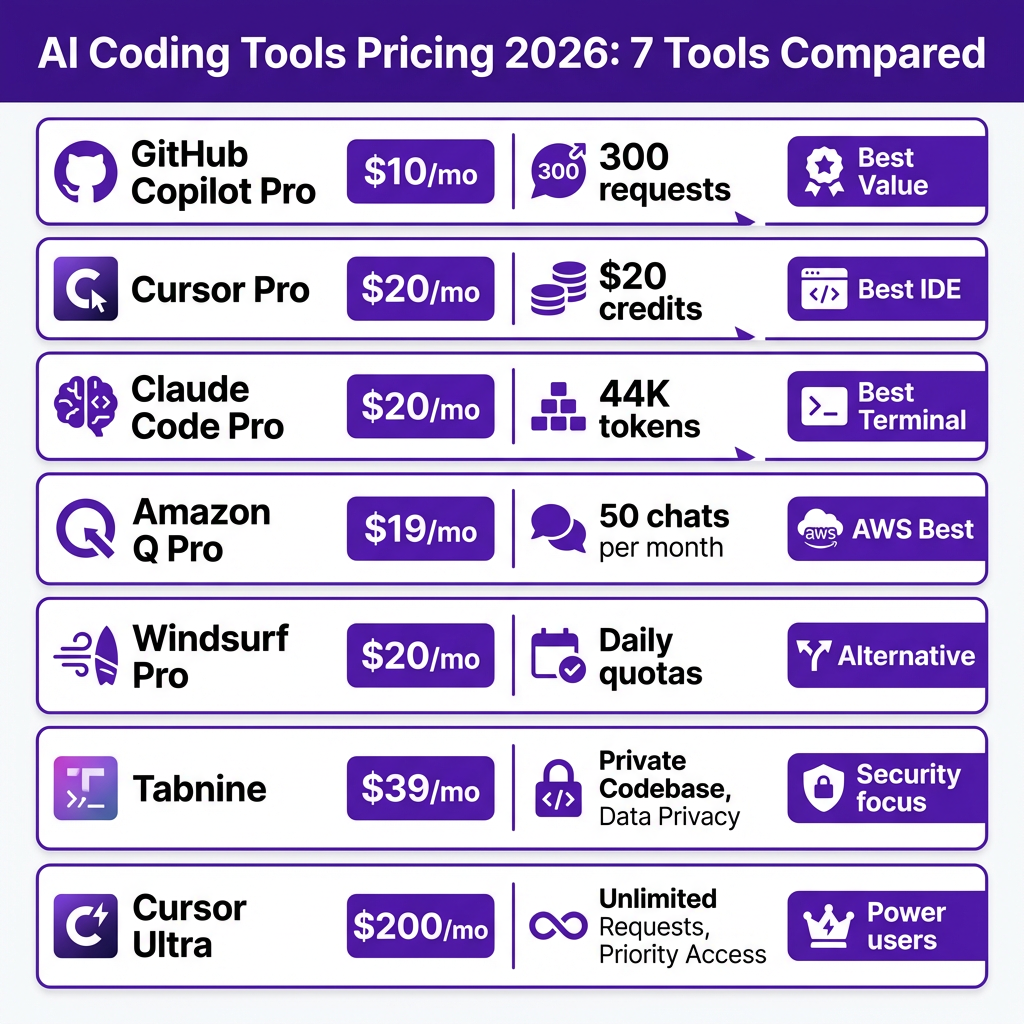
#1 GitHub Copilot Pro ($10/mo) — Best Overall Value
At half the price of most competitors, Copilot Pro delivers exceptional value. For $10/month ($100/year), you get:
- 300 premium requests per month
- Unlimited code completions
- Integrated coding agent
- Code review features
- Access to Claude Opus 4.6 for premium requests
The “unlimited completions” feature is the secret weapon here. While other tools meter every interaction, Copilot’s autocomplete works without limits. For developers who primarily need inline suggestions with occasional complex agentic tasks, this is unbeatable value.
Best for: General developers, GitHub ecosystem users, those who want quality AI assistance without breaking the bank.
#2 Cursor Pro ($20/mo) — Best AI-Native IDE
Cursor has redefined what an AI-powered IDE can be. Built from the ground up around AI assistance rather than bolted onto an existing editor, it offers:
- $20 monthly credit pool (roughly 400K-800K tokens)
- Extended agent requests for complex multi-file operations
- All frontier models (GPT-4, Claude, Gemini)
- MCPs, skills, and hooks for extensibility
- Cloud agents for background processing
- Unlimited Auto mode
When comparing Cursor vs Copilot cost, you’re paying 2x for a fundamentally different experience. Cursor isn’t an extension—it’s a complete IDE replacement with AI at its core. The tab-based interface, composer mode, and agentic capabilities make it worth the premium for power users.
Best for: Developers who want the most advanced AI-native experience, those working on complex multi-file refactors, power users.
#3 Claude Code Pro ($20/mo) — Best for Terminal/Agentic Workflows
Anthropic’s Claude Code takes a different approach. Instead of living inside your IDE, it runs in your terminal and can manipulate your entire codebase:
- ~44,000 tokens per 5-hour window
- Access to Claude Sonnet 4.6 and Opus 4.6
- Terminal-native interface
- Full codebase context awareness
- Agentic task execution
The token allocation works out to roughly 2.6 million tokens per month if you use all your windows. But the real value is quality over quantity—Claude Opus 4.6 consistently outperforms other models on complex coding tasks.
Best for: Terminal-focused developers, those who prefer CLI workflows, developers working on complex architectural decisions.
#4 Amazon Q Developer Pro ($19/mo) — Best for AWS Teams
Amazon Q Developer is the sleeper hit of 2026. At $19/user/month, it offers:
- High usage limits (50+ agentic chats per day)
- Deep AWS service integration
- Codebase customization and learning
- Security scanning and vulnerability detection
- Seamless IDE integration (VS Code, JetBrains)
If you’re building on AWS, the integration alone justifies the cost. Q Developer understands your infrastructure, can generate CloudFormation templates, and provides context-aware suggestions based on your actual AWS setup.
Best for: AWS-centric development teams, cloud-first architectures, enterprises with existing AWS commitments.
#5 Windsurf Pro ($20/mo) — Solid Alternative to Cursor
Windsurf (formerly Codeium) has evolved into a genuine Cursor competitor. At $20/month (up from $15 in 2025), you get:
- Daily and weekly usage quotas
- Access to all frontier models
- Strong autocomplete capabilities
- Good IDE integration
The pricing increase reflects improved model access and features. While it doesn’t match Cursor’s agentic capabilities, it’s a solid choice for developers who want quality AI assistance without Cursor’s complexity.
Best for: Developers seeking a Cursor alternative, those who want simpler pricing without credit pools.
#6 Tabnine Code Assistant ($39/mo) — Best for Security-Focused Teams
Tabnine takes a different approach, focusing on privacy and enterprise security:
- $39/user/month (annual billing)
- AI completions and chat
- On-premise deployment available
- Full code privacy (never trains on your code)
- Enterprise-grade security compliance
The higher price reflects the enterprise focus. For teams handling sensitive code or working in regulated industries, Tabnine’s privacy guarantees are worth the premium. The on-premise option is a differentiator no other major tool offers.
Best for: Enterprise teams, regulated industries, organizations with strict data privacy requirements.
#7 Cursor Ultra ($200/mo) — For Power Users Only
At $200/month, Cursor Ultra is not for everyone. But for the right user, it’s transformative:
- 20x usage credits compared to Pro
- Priority access during peak times
- Higher rate limits
- Early access to new features
This tier makes sense for professional developers who spend 6+ hours daily in their IDE and rely heavily on AI assistance. If you’re hitting Cursor Pro’s limits regularly, the upgrade pays for itself in productivity gains.
Best for: Professional developers using AI 6+ hours daily, teams with heavy AI dependency, those who need guaranteed availability.
Hidden Costs to Watch For
The sticker price rarely tells the full story. Here are the hidden costs that can blow your budget:
Token Overages
Most tools use some form of credit system. When you exceed your allocation:
- Cursor: Additional credits auto-purchase at $10 per block
- Claude Code: Must upgrade to Max tiers ($100 or $200/month)
- Copilot: Premium requests stop; unlimited completions continue
Track your usage for the first month to understand your actual consumption patterns.
Premium Model Surcharges
Some tools charge extra for access to the best models:
- Copilot Pro+ ($39/mo) unlocks o3 and full Claude Opus 4.6
- Cursor uses credits faster for Claude Opus vs. GPT-4
- Claude Code Max tiers required for higher Opus usage
Agentic Multipliers
Agentic features (multi-file edits, codebase-wide refactors) consume 5-10x more tokens than simple autocomplete. A single complex agentic request can burn through your daily allocation.
Free Tiers That Are Actually Usable
Not ready to commit? These free tiers offer genuine utility:
GitHub Copilot Free
- 50 premium requests per month
- 2,000 completions per month
- Limited but functional for light usage
Amazon Q Developer Free
- 50 agentic chats per month
- 25 AWS queries per month
- Good for evaluating the tool
Bolt.new
StackBlitz’s Bolt.new offers a generous free tier for web development with AI assistance. While not a direct Copilot alternative, it’s excellent for rapid prototyping.
Codex CLI (OpenAI)
OpenAI’s Codex CLI provides free access for light usage. It’s terminal-based like Claude Code but with GPT-4o powering the interactions.
Complete Pricing Comparison Table
| Tool | Free Tier | Pro Tier | Premium Tiers | Team/Business |
|---|---|---|---|---|
| GitHub Copilot | 50 requests, 2K completions | $10/mo — 300 requests, unlimited completions | Pro+ $39/mo — 1,500 requests | Business $19/user, Enterprise $39/user |
| Cursor | Limited agent + completions | $20/mo — $20 credits, all models | Pro+ $60/mo, Ultra $200/mo | Teams $40/user/mo |
| Claude Code | Not available | $20/mo — ~44K tokens/window | Max 5x $100/mo, Max 20x $200/mo | Enterprise pricing |
| Windsurf | Limited quotas | $20/mo — daily/weekly quotas | Max $200/mo — highest quotas | Teams $40/seat/mo |
| Amazon Q | 50 chats, 25 AWS queries | $19/mo — high limits | — | Enterprise pricing |
| Tabnine | Basic completions | Code Assistant $39/mo (annual) | Agentic Platform $59/mo (annual) | Enterprise pricing |
Which Tool Should You Choose?
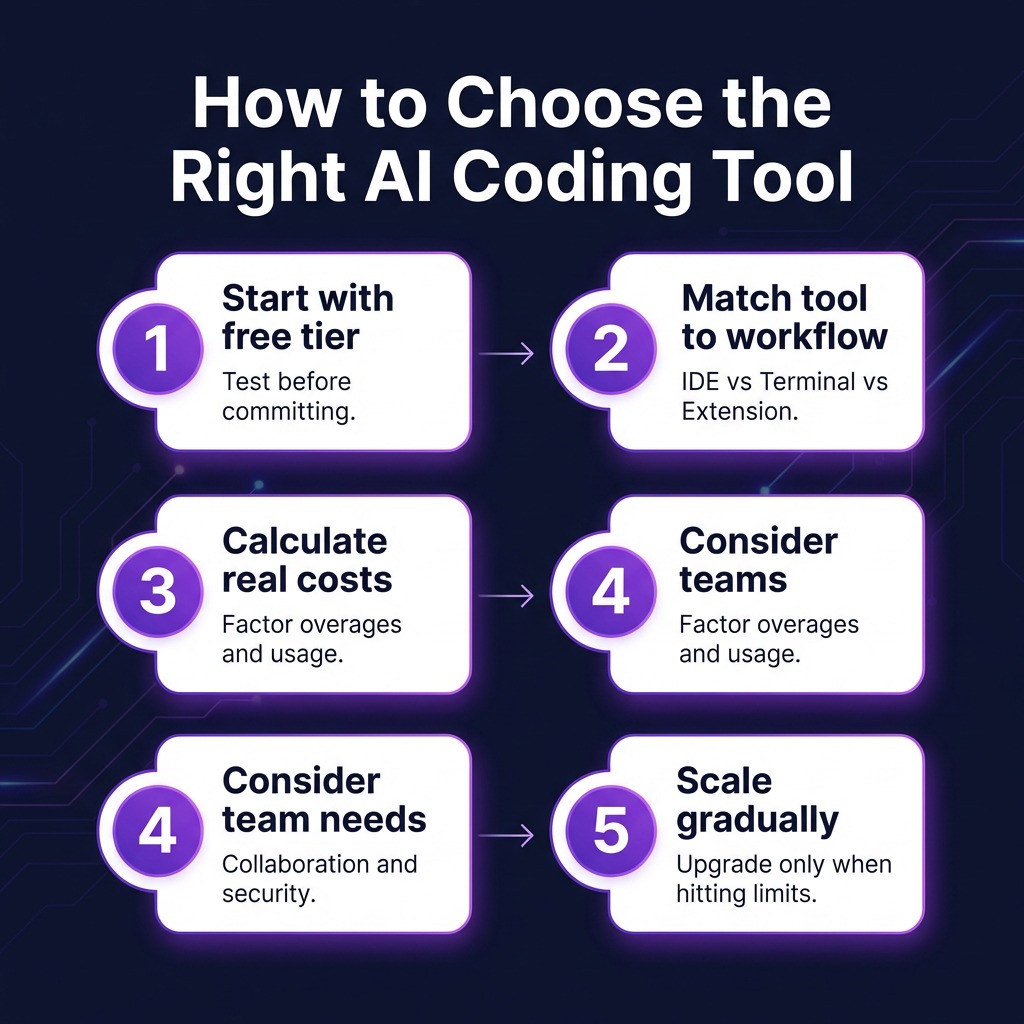
Use this decision framework to find your best value AI coding assistant:
Choose GitHub Copilot Pro if:
- You want the best value for general development
- You primarily need autocomplete with occasional complex tasks
- You work in the GitHub ecosystem
- Budget is a primary concern
Choose Cursor Pro if:
- You want the most advanced AI-native IDE experience
- You frequently perform multi-file refactors
- You value agentic capabilities and composer mode
- You’re willing to pay 2x for a premium experience
Choose Claude Code if:
- You prefer terminal-based workflows
- You need the highest-quality model (Claude Opus 4.6)
- You work on complex architectural decisions
- You want agentic capabilities without IDE lock-in
Choose Amazon Q Developer if:
- You build primarily on AWS
- You want deep infrastructure integration
- You need security scanning and vulnerability detection
- You’re already invested in the AWS ecosystem
Choose Tabnine if:
- Code privacy is non-negotiable
- You work in a regulated industry
- You need on-premise deployment options
- Enterprise security compliance is required
Frequently Asked Questions
Is GitHub Copilot still worth it in 2026?
Yes. At $10/month with unlimited completions, Copilot Pro remains the best value for most developers. The addition of Claude Opus 4.6 access for premium requests keeps it competitive with more expensive alternatives.
What’s the difference between Cursor and Copilot?
Copilot is an AI assistant inside your existing IDE. Cursor is a complete IDE built around AI from the ground up. Cursor offers more advanced agentic capabilities but costs twice as much. For most developers, Copilot’s integration and price point make it the better choice.
Can I use multiple AI coding tools together?
Absolutely. Many developers use Copilot for day-to-day autocomplete and Cursor or Claude Code for complex refactoring tasks. Each tool has strengths, and combining them can maximize productivity.
Do these tools work with all programming languages?
All major tools support Python, JavaScript/TypeScript, Java, C++, Go, and Ruby. Support for niche languages varies—check documentation if you work in specialized languages like Rust, Swift, or Kotlin.
Will AI coding tools replace developers?
No. These tools augment developer productivity but don’t replace the need for human judgment, architecture decisions, and understanding business requirements. The developers who thrive in 2026 will be those who learn to work effectively with AI assistance.
Conclusion
The AI coding tools pricing 2026 landscape offers options for every budget and workflow. GitHub Copilot Pro at $10/month delivers unbeatable value for most developers. Cursor Pro at $20/month justifies its premium for those who want the most advanced AI-native experience. Claude Code excels for terminal-focused developers who prioritize model quality.
Start with the free tier that matches your workflow, track your actual usage, and upgrade based on real productivity gains rather than marketing promises. The right tool pays for itself—choose based on how you actually work, not how you think you should work.
Ready to streamline your development workflow? Sign up for Fungies and handle payments, taxes, and compliance for your SaaS or digital products without writing a single line of billing code.