Here’s a number that should get your attention: 93% of developers now use AI tools as part of their daily workflow. That’s not a projection. That’s from a JetBrains survey of over 10,000 professional developers published in January 2026. The AI coding assistant market has exploded to $12.8 billion this year, and it’s projected to hit $30.1 billion by 2032.
But here’s what most comparison articles won’t tell you: 70% of engineers use 2-4 AI coding tools simultaneously. The dominant pattern? Cursor for editing plus Claude Code for complex tasks. Tool stacking isn’t the exception anymore—it’s the norm.
What Are AI Coding Agents?
AI coding agents go beyond simple autocomplete. They’re context-aware systems that can understand your entire codebase, write multi-file changes, debug errors, run tests, and even execute terminal commands. Think of them as pair programmers that never sleep, never get tired, and have read every Stack Overflow thread ever written.
The key difference between 2024 and 2026? Context windows. The best agents now handle 1 million+ tokens, meaning they can process your entire codebase—not just the file you’re currently editing. This changes everything about how developers work.
How We Ranked These AI Coding Agents
Every ranking on this list is backed by real data:
- User satisfaction: JetBrains April 2026 AI Pulse survey (10,000+ developers)
- Market data: Verified revenue, user counts, and growth metrics
- Pricing: Current 2026 rates from official sources
- Real-world testing: Feature comparison based on documented capabilities
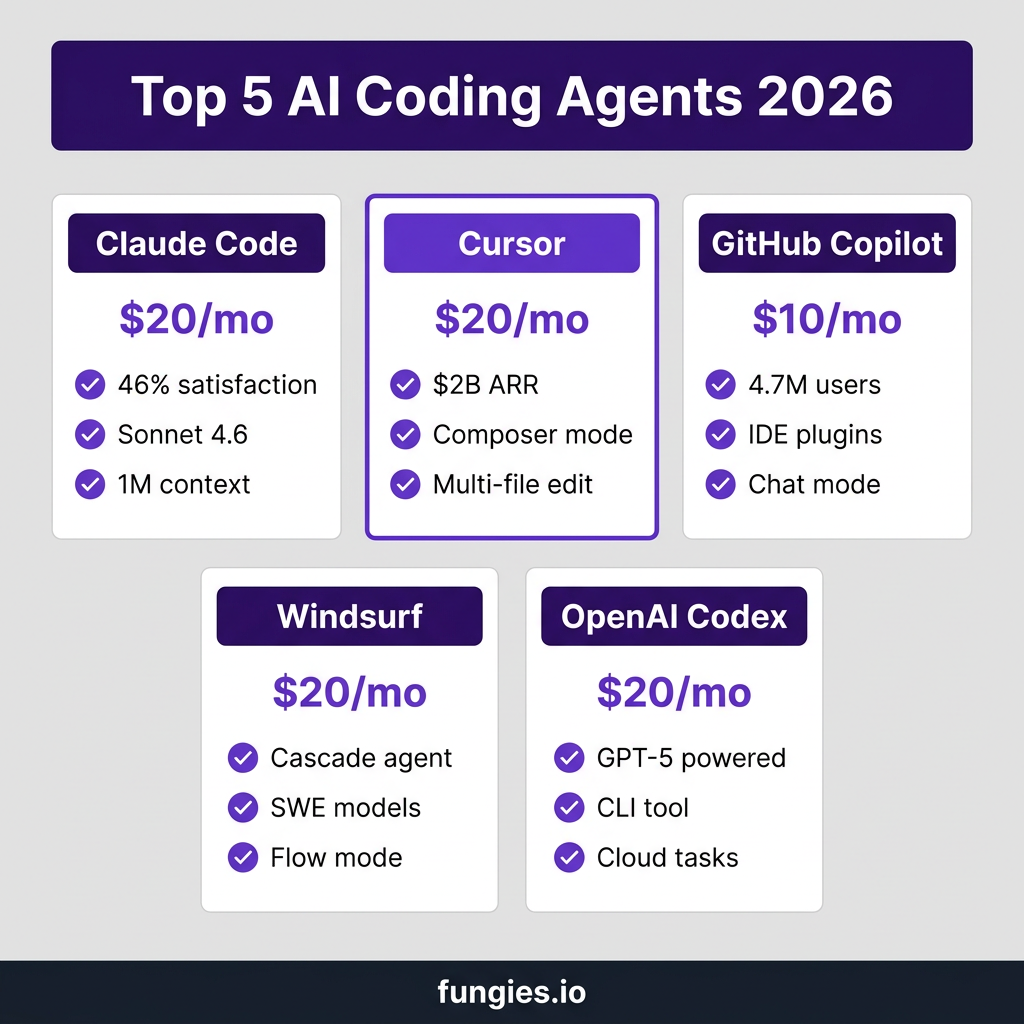
1. Claude Code — Best for Complex Reasoning
Satisfaction rating: 46% (highest in JetBrains survey)
Claude Code isn’t just winning on satisfaction—it’s dominating. At 46% “most loved” versus Cursor’s 19% and Copilot’s 9%, Anthropic’s coding agent has clearly struck a chord with developers who need serious reasoning capabilities.
Key Features
- Sonnet 4.6 and Opus 4.6 models: Best-in-class reasoning for complex architecture decisions
- 1 million token context window: Process entire codebases in a single session
- Terminal integration: Run commands, execute scripts, manage files directly
- Multi-file editing: Refactor across dozens of files simultaneously
- Available via: CLI, web interface, and desktop app
Pricing
| Plan | Price | Best For |
|---|---|---|
| Pro | $20/month | Individual developers |
| Max 5x | $100/month | Power users, 5x usage |
| Max 20x | $200/month | Agencies, heavy workloads |
| Team Premium | $100/seat/month | Development teams (5+ seats) |
Real cost at scale: $150-250 per developer per month before optimization, or roughly $13 per active day.
Pros and Cons
| Pros | Cons |
|---|---|
| Highest user satisfaction (46%) | Expensive at scale |
| Best reasoning capabilities | Terminal-only (no IDE plugin) |
| Massive context window | Learning curve for non-terminal users |
| Excellent for complex refactors | Team plans start at $100/seat |
2. Cursor — Best All-Round IDE Experience
Revenue: $2 billion ARR | Users: 1 million+ paying subscribers
Cursor has become the most valuable AI developer tool company in history. Founded by ex-OpenAI researchers at Anysphere, it’s a VS Code fork rebuilt for the AI era. At $2 billion ARR with 75% year-over-year growth, the numbers speak for themselves.
Key Features
- Composer mode: Multi-file AI editing with preview and approval workflow
- Tab autocomplete: Context-aware suggestions across your entire codebase
- Chat interface: Natural language coding assistance
- Subagents: Run up to 8 agents in parallel for complex tasks
- Model flexibility: Switch between Claude, GPT-4.1, and other models
- VS Code compatibility: Full extension ecosystem support
Pricing
| Plan | Price | Includes |
|---|---|---|
| Hobby (Free) | $0 | 2,000 completions/month, 50 slow premium requests |
| Pro | $20/month ($16 annual) | 500 fast requests, unlimited completions |
| Business | $40/user/month | Team features, admin controls, centralized billing |
Note: In June 2025, Cursor switched to a credit-based system. Your monthly credit pool equals your plan price in dollars.
Pros and Cons
| Pros | Cons |
|---|---|
| Best IDE integration | Credit system can be confusing |
| Mature multi-file editing | More expensive than Copilot |
| Fast codebase indexing | Extension compatibility issues occasionally |
| Excellent autocomplete | Learning curve for advanced features |
3. GitHub Copilot — Best for Enterprise Teams
Users: 4.7 million paid subscribers | Growth: 75% year-over-year
GitHub Copilot remains the market leader by user count. With 4.7 million paying subscribers and deep GitHub integration, it’s the default choice for enterprise teams that need compliance, security, and proven reliability.
Key Features
- IDE plugins: Works in VS Code, JetBrains, Vim, Neovim, Visual Studio
- Copilot Chat: Natural language coding assistance
- Code review: AI-powered PR summaries and suggestions
- GitHub integration: Deep native integration with your repositories
- Enterprise security: SOC 2 compliance, data residency options
Pricing
| Plan | Price | Best For |
|---|---|---|
| Copilot Individual | $10/month ($100 annual) | Solo developers |
| Copilot Business | $19/user/month | Small to medium teams |
| Copilot Enterprise | $39/user/month | Large organizations |
Pros and Cons
| Pros | Cons |
|---|---|
| Lowest price point ($10/mo) | Limited agent capabilities |
| Best enterprise security | 9% satisfaction vs 46% for Claude |
| Widest IDE support | Less powerful than Cursor/Claude |
| Proven at scale | Context window smaller than competitors |
4. Windsurf — Best for Flow-Based Coding
Windsurf (formerly Codeium) took a different approach. Instead of chat-and-paste, they built Cascade—a flow-based agent that makes changes in real-time while you approve or reject each step. It’s particularly popular among developers who want more control over the AI’s actions.
Key Features
- Cascade agent: Real-time multi-step task execution with approval workflow
- SWE-1 and SWE-1.5 models: Proprietary models optimized for software engineering
- Zero Data Retention: Privacy-focused by default
- Self-hosted options: Deploy on your own infrastructure
- Flow mode: AI-assisted continuous coding flow
Pricing
| Plan | Price | Includes |
|---|---|---|
| Free | $0 | 25 prompt credits/month, unlimited Tab |
| Pro | $20/month | Daily/weekly quota refresh, all premium models |
| Teams | $40/user/month | Team collaboration features |
| Enterprise | Custom | SSO, RBAC, SOC 2/FedRAMP |
Cost advantage: Teams using Windsurf’s proprietary SWE models can operate at zero additional cost beyond base subscription. Heavy Claude/GPT users will incur add-on charges.
Pros and Cons
| Pros | Cons |
|---|---|
| Unique flow-based approach | Newer, less mature than Cursor |
| Strong privacy defaults | Smaller community |
| Self-hosted options | Proprietary models still catching up |
| Real-time approval workflow | Learning curve for flow mode |
5. OpenAI Codex — Best for ChatGPT Users
OpenAI Codex is the multi-surface coding agent from OpenAI—available as a CLI, IDE extension, ChatGPT app, and web interface. If you’re already paying for ChatGPT Plus, you already have access.
Key Features
- GPT-5 powered: Latest OpenAI model for coding tasks
- Multi-surface: CLI, IDE extension, web, and ChatGPT app
- Cloud tasks: Run tasks in sandboxed containers
- Local or cloud execution: Choose where your code runs
- No separate subscription: Included with ChatGPT plans
Pricing
| Plan | Price | Codex Limits |
|---|---|---|
| ChatGPT Plus | $20/month | 30-150 messages per 5 hours |
| ChatGPT Pro | $200/month | 300-1,500 messages per 5 hours |
| Business/Enterprise | Custom | Higher limits, admin controls |
Real-world cost: OpenAI estimates $100-200 per developer per month on average, depending on model choice and task complexity.
Pros and Cons
| Pros | Cons |
|---|---|
| No extra cost if on ChatGPT Plus | Usage caps can be limiting |
| Multiple interfaces (CLI, IDE, web) | Less mature than Cursor |
| Cloud sandbox for experiments | Costs add up quickly at scale |
| GPT-5 model access | Fewer agent features than Claude |

Side-by-Side Comparison
| Feature | Claude Code | Cursor | Copilot | Windsurf | Codex |
|---|---|---|---|---|---|
| Starting Price | $20/mo | $20/mo | $10/mo | $20/mo | $20/mo |
| User Satisfaction | 46% | 19% | 9% | N/A | N/A |
| Context Window | 1M tokens | 200K-1M | ~8K-128K | 200K+ | 128K+ |
| Best For | Complex reasoning | IDE experience | Enterprise | Privacy | ChatGPT users |
| Agent Features | Excellent | Excellent | Limited | Good | Good |
| Free Tier | No | Yes | Trial | Yes | No |
Which AI Coding Agent Should You Choose?
The right choice depends on your specific situation:
Choose Claude Code if:
- You need the best reasoning for complex architecture decisions
- You’re comfortable with terminal-based workflows
- You want the highest user satisfaction tool
- Budget isn’t your primary constraint
Choose Cursor if:
- You want the best overall IDE experience
- You need mature multi-file editing capabilities
- You switch between different AI models
- You want a VS Code-compatible environment
Choose GitHub Copilot if:
- You need enterprise-grade security and compliance
- You want the lowest price point ($10/mo)
- You use multiple IDEs (not just VS Code)
- You need proven reliability at scale
Choose Windsurf if:
- Privacy is your top priority
- You want flow-based real-time coding
- You need self-hosted deployment options
- You prefer approving each AI action
Choose OpenAI Codex if:
- You’re already paying for ChatGPT Plus
- You want multiple interfaces (CLI, IDE, web)
- You need cloud sandbox capabilities
- You prefer GPT-5 model responses
The Tool Stacking Reality
Here’s what the data actually shows: 70% of engineers use 2-4 AI coding tools simultaneously. The most common pattern is Cursor for day-to-day editing plus Claude Code for complex refactoring tasks.
Why? Because no single tool does everything perfectly. Cursor’s IDE integration is unmatched for writing code. Claude Code’s reasoning is unbeatable for architecture decisions. The smart money isn’t on picking one—it’s on building a workflow that uses each tool for what it does best.
Key Takeaways
- 93% of developers now use AI coding tools daily—this isn’t optional anymore
- Claude Code leads on satisfaction (46%) but costs more at scale
- Cursor dominates revenue ($2B ARR) with the best IDE experience
- Copilot has the most users (4.7M) and best enterprise features
- 70% of developers stack multiple tools—consider a combo approach
- Most individual developers should budget $20-40/month for AI coding tools
Frequently Asked Questions
Which AI coding agent is best for beginners?
GitHub Copilot is the most beginner-friendly. At $10/month, it’s the cheapest entry point, and it works in familiar IDEs like VS Code. The learning curve is minimal since it integrates with your existing workflow.
Can AI coding agents replace developers?
No. The data shows AI tools augment developers, not replace them. 84% adoption doesn’t mean 84% of code is AI-written—it means developers use AI to write code faster, catch bugs earlier, and focus on higher-level problems.
How much should I budget for AI coding tools?
For individual developers: $20-40/month covers most use cases. For teams: budget $100-250 per developer per month at scale, depending on usage patterns and tool choices.
Is it worth paying for multiple AI coding agents?
For professional developers, yes. The productivity gains from using the right tool for each task typically pay for themselves within the first week. The most common stack is Cursor ($20) + Claude Code ($20) = $40/month.
What’s the best free AI coding agent?
Cursor’s free tier offers 2,000 completions and 50 slow premium requests monthly—enough for evaluation. Windsurf’s free tier provides 25 prompt credits with unlimited Tab autocomplete. Both are viable for light usage or testing.
Conclusion
The AI coding agent market in 2026 is mature, competitive, and data-driven. Claude Code wins on satisfaction. Cursor wins on revenue and IDE integration. Copilot wins on user count and enterprise trust. Windsurf offers a unique flow-based approach. Codex leverages OpenAI’s model strength.
Here’s the truth: the “best” tool depends on your workflow, budget, and coding style. Start with one. Test it for a month. If it sticks, consider adding a second tool for specialized tasks. The developers winning in 2026 aren’t the ones using the most expensive tools—they’re the ones who figured out which combination works for their specific needs.
Ready to streamline your SaaS payment infrastructure? Get started with Fungies.io and focus on building great products while we handle the payments, tax compliance, and checkout experience.
References
- JetBrains AI Pulse Survey, January 2026 — blog.jetbrains.com
- IdeaPlan AI Coding Assistant Market Share 2026 — ideaplan.io
- Claude Code Pricing Guide 2026 — ssdnodes.com
- Cursor AI Pricing 2026 — lowcode.agency
- OpenAI Codex Pricing 2026 — getaiperks.com
- Windsurf Pricing 2026 — verdent.ai
- GitHub Copilot Documentation — github.com