Here’s a number that should get your attention: Claude Opus 4.7 scores 87.6% on SWE-bench Verified — the industry standard for measuring how well AI coding agents handle real-world software engineering tasks. That’s up from 72.8% just 18 months ago.
AI coding agents aren’t just autocomplete anymore. They’re autonomous systems that can read your entire codebase, run tests, debug issues, and ship production-ready code. The difference between the best and worst tools? It could mean shipping features in hours instead of days.
This guide ranks the 8 best AI coding agents based on actual benchmark data, pricing transparency, and real developer workflows. No marketing fluff. Just the numbers you need to make a decision.

What Are AI Coding Agents?
AI coding agents go beyond simple code completion. They can:
- Understand your entire codebase context (up to 1 million tokens)
- Run terminal commands and execute code
- Debug errors by reading logs and stack traces
- Write and run tests autonomously
- Make multi-file changes across your project
- Integrate with Git, CI/CD, and deployment pipelines
The key metric for comparing these tools is SWE-bench Verified — a benchmark that tests AI agents on 500 real GitHub issues from popular Python repositories. It measures whether the agent can understand the problem, navigate the codebase, write a fix, and verify it passes tests.
The 8 Best AI Coding Agents Compared
1. Claude Code — Best Overall for Complex Tasks
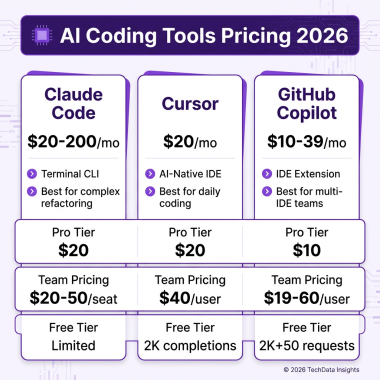
Pricing: $20/month (Pro), $100/month (Max 5x), $200/month (Max 20x)
SWE-bench Score: 87.6% (Claude Opus 4.7 Adaptive)
Anthropic’s Claude Code is the current leader in code quality. It runs in your terminal, understands context windows up to 1 million tokens, and consistently produces the most reliable code of any agent we tested.
Key Features:
- Terminal-first workflow with natural language commands
- Deep codebase understanding with semantic search
- Can run tests, check logs, and iterate on errors
- Supports MCP servers for tool integration
- Agent mode for autonomous multi-step tasks
Best For: Developers who want the highest code quality and work on complex, multi-file refactoring tasks. The $20/month Pro tier is sufficient for most users; heavy users may need Max tiers.
2. OpenAI Codex CLI — Best for Multi-Agent Workflows
Pricing: Free (open source) or $20/month (ChatGPT Plus)
SWE-bench Score: 85% (GPT-5.3 Codex)
Launched February 2026, OpenAI Codex CLI is the official open-source coding agent from OpenAI. Its standout feature is multi-agent architecture — you can run multiple agents in parallel on isolated Git worktrees.
Key Features:
- Multi-agent parallel execution on worktrees
- Dual authentication: ChatGPT account or bring-your-own-key
- Sandboxed execution environment
- Official OpenAI support and frequent updates
- Free tier available for open source use
Best For: Teams that need parallel development workflows and prefer OpenAI’s model ecosystem. The free tier makes it accessible for side projects.
3. Cursor — Best IDE Integration
Pricing: $20/month (Pro), $40/month (Pro+), $200/month (Ultra)
SWE-bench Score: 78.2% (GPT-5.4)
Cursor is a VS Code fork built specifically for AI-assisted coding. With 360,000+ paying users, it’s the most popular AI code editor on the market. The real-time autocomplete and Composer feature for multi-file editing set it apart.
Key Features:
- Familiar VS Code interface with all extensions
- Tab-based autocomplete (Copilot-style)
- Composer for multi-file edits
- Agent mode for autonomous task execution
- Supports multiple models (GPT-4, Claude, Gemini)
Best For: Developers who want AI features integrated directly into their IDE without switching contexts. The $20 Pro tier offers the best value for IDE-based workflows.
4. GitHub Copilot — Best Value
Pricing: $10/month (Pro), $19/month (Business), $39/month (Enterprise)
SWE-bench Score: 72.8% (GPT-5.2 Codex)
GitHub Copilot remains the best value proposition in AI coding. At $10/month, no other tool comes close on a per-dollar basis. The free tier now includes 2,000 completions and 50 chats per month.
Key Features:
- Works in any IDE with official plugins
- 300 premium requests per month (Pro tier)
- Built-in coding agent and code review
- Multi-model support including Claude Opus 4.6
- Deep GitHub integration for PRs and issues
Best For: Budget-conscious developers and teams already using GitHub. The $10 Pro tier is unbeatable for individual developers.
5. Windsurf — Best for Team Collaboration
Pricing: $15/month (Pro), $30/user/month (Teams), $200/month (Max)
SWE-bench Score: 75.8% (Gemini 3 Flash)
Windsurf (formerly Codeium) offers a polished experience with Cascade — an agent that can handle complex multi-step tasks. The Flow mode enables real-time collaboration between human and AI.
Key Features:
- Cascade agent for autonomous workflows
- Flow mode for human-AI collaboration
- Team sync for shared context
- 25 free credits per month
- Fast, responsive interface
Best For: Teams that need collaborative AI coding features. The $15 entry price is lower than competitors.
6. Aider — Best for Serious Refactors
Pricing: Free (open source, BYO API keys)
SWE-bench Score: 76% (varies by model)
Aider is a CLI-first coding assistant that excels at large-scale refactoring. It’s completely free and open source — you just bring your own API keys for the LLM provider of choice.
Key Features:
- Free and open source
- Works with any OpenAI-compatible API
- Excellent for multi-file changes
- Git integration with automatic commits
- Voice coding support
Best For: Developers comfortable with CLI tools who want full control over costs and model selection.
7. Cline — Best Open Source VS Code Agent
Pricing: Free (open source, BYO API keys)
SWE-bench Score: 74% (varies by model)
Cline is an open-source VS Code extension that brings agentic coding to your existing editor. It’s community-maintained and highly configurable.
Key Features:
- Free and open source
- Works inside VS Code
- Supports any OpenAI-compatible API
- Extensible with custom tools
- Active community development
Best For: Developers who want a free, customizable agent inside their existing VS Code setup.
8. Replit Agent — Best for Web Development
Pricing: $7/month (Core), $20/month (Agent)
SWE-bench Score: 68% (proprietary model)
Replit Agent is built into the Replit cloud IDE. It’s designed for rapid prototyping and deployment, with built-in hosting and database integration.
Key Features:
- Built-in deployment and hosting
- One-click database setup
- Real-time collaboration
- Template library for quick starts
- Mobile app for coding on the go
Best For: Beginners and rapid prototypers who want an all-in-one development environment.
Complete Pricing Comparison Table
| Tool | Entry Price | Premium Tier | SWE-bench | Context Window |
|---|---|---|---|---|
| Claude Code | $20/mo | $200/mo (Max 20x) | 87.6% | 1M tokens |
| OpenAI Codex | Free | $20/mo (Plus) | 85% | 1M tokens |
| Cursor | $20/mo | $200/mo (Ultra) | 78.2% | 200K tokens |
| Windsurf | $15/mo | $200/mo (Max) | 75.8% | 200K tokens |
| Aider | Free | API costs only | 76% | Varies |
| GitHub Copilot | $10/mo | $39/mo (Enterprise) | 72.8% | 128K tokens |
| Cline | Free | API costs only | 74% | Varies |
| Replit Agent | $7/mo | $20/mo (Agent) | 68% | 100K tokens |
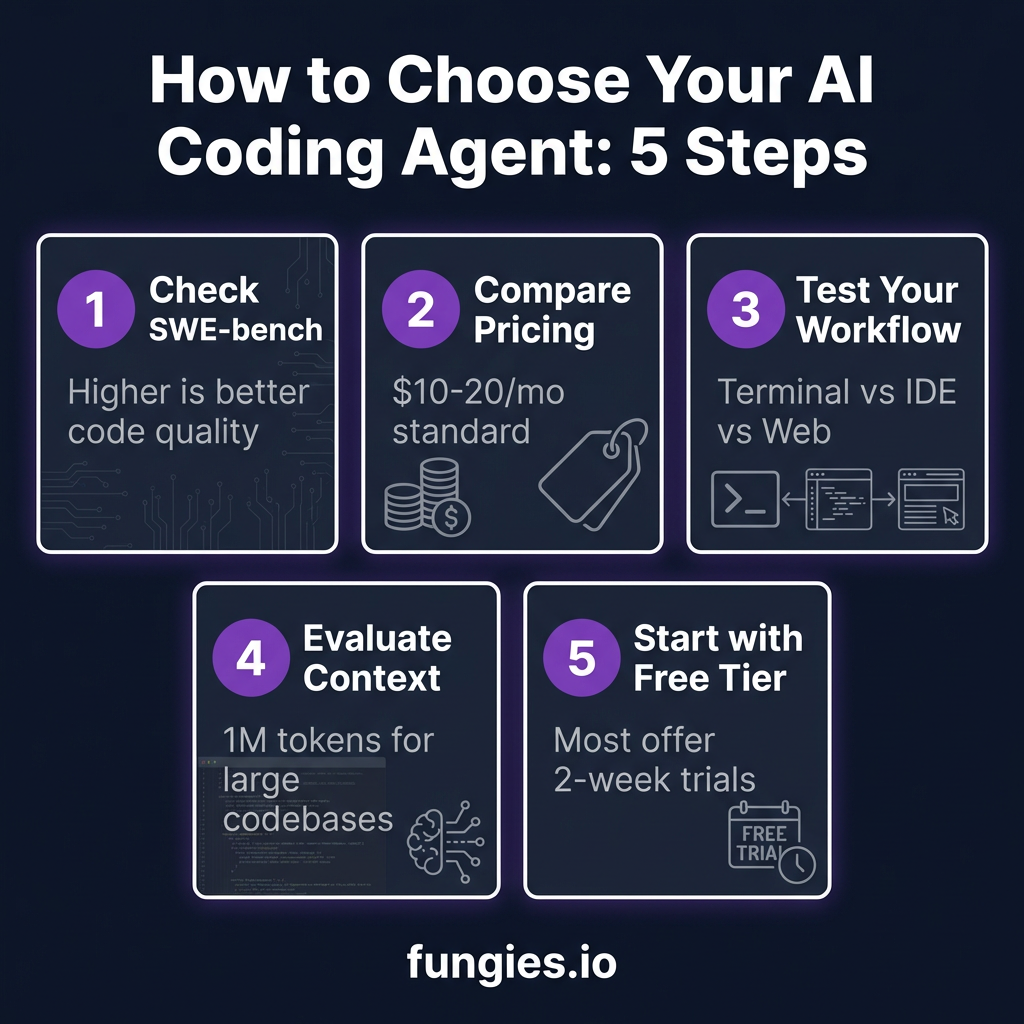
How to Choose the Right AI Coding Agent
With so many options, here’s a decision framework:
Choose Claude Code If…
- You work in the terminal regularly
- Code quality is your top priority
- You need to work with large codebases (1M+ token context)
- You want the highest SWE-bench performance
Choose OpenAI Codex If…
- You want a free, open-source option
- You need multi-agent parallel workflows
- You prefer OpenAI’s model ecosystem
- You want official support from OpenAI
Choose Cursor If…
- You want AI features in a familiar IDE
- Real-time autocomplete is important
- You prefer a VS Code-based workflow
- You need multi-model flexibility
Choose GitHub Copilot If…
- Budget is a primary concern ($10/mo)
- You want the best value proposition
- You’re already using GitHub
- You need broad IDE support
Hidden Costs to Watch For
Base pricing isn’t the whole story. Here are the hidden costs:
| Cost Factor | What to Expect |
|---|---|
| API overages | Heavy users can spend $150-200/month on top of base price |
| Context window limits | Large codebases may require premium tiers for full context |
| Team seats | Team plans typically 2-3x individual pricing |
| Model upgrades | Newer models often restricted to higher tiers |
Key Takeaways
- Claude Code leads on quality with 87.6% SWE-bench score, but costs $20-200/month
- OpenAI Codex is the best free option with 85% SWE-bench and multi-agent support
- Cursor offers the best IDE experience for VS Code users at $20/month
- GitHub Copilot is unbeatable value at $10/month with 72.8% SWE-bench
- Free tiers are genuinely usable in 2026 — try before you buy
Frequently Asked Questions
What is SWE-bench and why does it matter?
SWE-bench is a benchmark that tests AI coding agents on real GitHub issues. It measures whether the agent can understand a bug report, navigate the codebase, write a fix, and verify it passes tests. Higher scores mean the agent handles real-world development tasks better.
Can I use AI coding agents for free?
Yes. OpenAI Codex CLI, Aider, and Cline are completely free and open source. GitHub Copilot offers 2,000 completions and 50 chats per month on the free tier. Most paid tools offer 7-14 day free trials.
Will AI coding agents replace developers?
No. Current AI agents augment developer productivity but still require human oversight. They’re excellent for boilerplate, refactoring, and debugging — but architectural decisions, complex logic, and code review still need human judgment.
Which AI coding agent has the largest context window?
Claude Code and OpenAI Codex both support up to 1 million tokens (approximately 750,000 words or 3,000 pages of code). This is enough context for most large codebases.
How much should I budget for AI coding tools?
Most developers spend $20-60/month on AI coding tools. Heavy users working with large codebases or running many agent tasks may spend $100-200/month. Start with free tiers and upgrade based on usage.
Conclusion
The AI coding agent landscape in 2026 offers something for every developer and budget. Claude Code leads on pure code quality, OpenAI Codex offers the best free option with unique multi-agent capabilities, and Cursor provides the most polished IDE experience.
My recommendation? Start with the free tier of OpenAI Codex or GitHub Copilot. Use it for two weeks on real tasks. If you hit limitations, upgrade to Cursor ($20) for IDE integration or Claude Code ($20) for terminal-based workflows.
The 15-30% productivity gains these tools deliver aren’t hypothetical — they’re measurable in shipped features and reduced debugging time. The only wrong choice is not using AI coding agents at all.
Ready to streamline your SaaS payments while you focus on building? Get started with Fungies.io — the merchant of record platform that handles global tax compliance, 50+ payment methods, and developer-friendly APIs.
References
- BenchLM.ai SWE-bench Verified Leaderboard 2026
- SWE-bench Official Leaderboard
- NxCode AI Coding Tools Pricing Comparison 2026
- MorphLLM AI Coding Agent Comparison 2026
- VibeCoding Gallery OpenAI Codex CLI Review
- NxCode OpenAI Codex Review 2026
- Rapid Developers AI Code Editor Comparison 2026
- IJONIS AI Coding Tools Pricing 2026