Here’s a number that should get your attention: 85% of developers now regularly use AI tools for coding, according to JetBrains’ 2025 Developer Ecosystem Survey. But here’s what the headlines won’t tell you: 70% of engineers use 2-4 AI coding tools simultaneously—not just one. The reason? Different tools excel at different tasks.
While everyone’s talking about Cursor and GitHub Copilot, a quieter revolution is happening in your terminal. AI coding CLI tools—terminal-native agents that write, edit, and execute code—are becoming the secret weapon for developers who want serious automation without leaving their command line.
In this guide, I’ll compare the three dominant AI coding CLI tools in 2026: Claude Code, OpenAI Codex CLI, and Google Gemini CLI. No fluff, just real benchmarks, pricing, and use cases to help you choose the right tool.
What Are AI Coding CLI Tools?
AI coding CLI tools are command-line interfaces that let you interact with large language models specifically designed for code. Unlike IDE plugins, these tools run directly in your terminal, can access your entire file system, execute shell commands, and perform complex multi-file operations.
The key difference? They’re agentic. Instead of just suggesting code completions, they can plan, execute, and iterate on tasks autonomously. Need to refactor a 50-file codebase? These tools can do it. Want to debug a production issue? They’ll analyze logs, identify the problem, and propose fixes.
The 3 Best AI Coding CLI Tools in 2026
#1 Claude Code — Best for Complex Refactoring and Deep Reasoning
Claude Code is Anthropic’s terminal-native coding agent, and it’s become the go-to tool for developers who need serious multi-file reasoning capabilities.
Key Stats:
- 80.9% SWE-bench Verified score — highest among CLI tools
- 200K token context window
- 46% developer satisfaction (JetBrains April 2026 survey)
- 128K token output capacity — double what competitors offer
What makes it special: Claude Code excels at understanding complex codebases. It can analyze relationships between dozens of files, identify architectural patterns, and perform deep refactoring that maintains code integrity. The 128K output capacity means it can generate entire modules or comprehensive test suites in one shot.
Pricing: $20/month for Pro (unlimited requests)
Best for: Complex multi-file refactoring, understanding legacy codebases, architectural changes, and developers who prioritize code quality over speed.
#2 OpenAI Codex CLI — Best for Safety and CI/CD Integration
Codex CLI is OpenAI’s answer to terminal-based coding, and it takes a fundamentally different approach focused on sandboxed execution and automation.
Key Stats:
- 77.3% Terminal-Bench score
- 192K token context window
- 4x more token-efficient than Claude Code
- Cloud sandbox execution for safety
What makes it special: Codex CLI runs everything in a cloud sandbox by default. This means it can execute code, run tests, and even deploy changes without risking your local environment. The token efficiency is impressive—you get more done per dollar spent on API calls.
Pricing: $20/month for Pro (includes ChatGPT Pro)
Best for: CI/CD pipelines, automated testing, security-sensitive environments, batch operations, and teams that need consistent, reproducible results.
#3 Google Gemini CLI — Best Free Option for Budget-Conscious Developers
Gemini CLI is Google’s open-source terminal agent, released under Apache 2.0 license. It’s the only major CLI tool with a genuinely useful free tier.
Key Stats:
- 1,000 requests/day free tier
- 1 million token context window — largest of any CLI tool
- Open source (Apache 2.0)
- Gemini 3.1 Pro model available
What makes it special: That 1M token context window is a game-changer for large codebases. You can feed an entire repository into context and have Gemini understand cross-file dependencies that other tools miss. The free tier is actually usable for daily development—not just toy projects.
Pricing: Free (1,000 requests/day); paid tiers available for higher limits
Best for: Developers on a budget, large codebase analysis, Google Cloud workflows, and anyone who wants to experiment without committing to a subscription.
AI Coding CLI Tools Comparison Table
| Feature | Claude Code | Codex CLI | Gemini CLI |
|---|---|---|---|
| Price | $20/mo | $20/mo | Free (1K/day) |
| Context Window | 200K tokens | 192K tokens | 1M tokens |
| SWE-bench Score | 80.9% | 77.3% | N/A |
| Output Capacity | 128K tokens | 64K tokens | 64K tokens |
| Execution | Local | Cloud sandbox | Local |
| Best For | Complex refactoring | CI/CD automation | Budget/large codebases |
How to Choose the Right AI Coding CLI Tool
Here’s my decision framework based on real usage patterns:
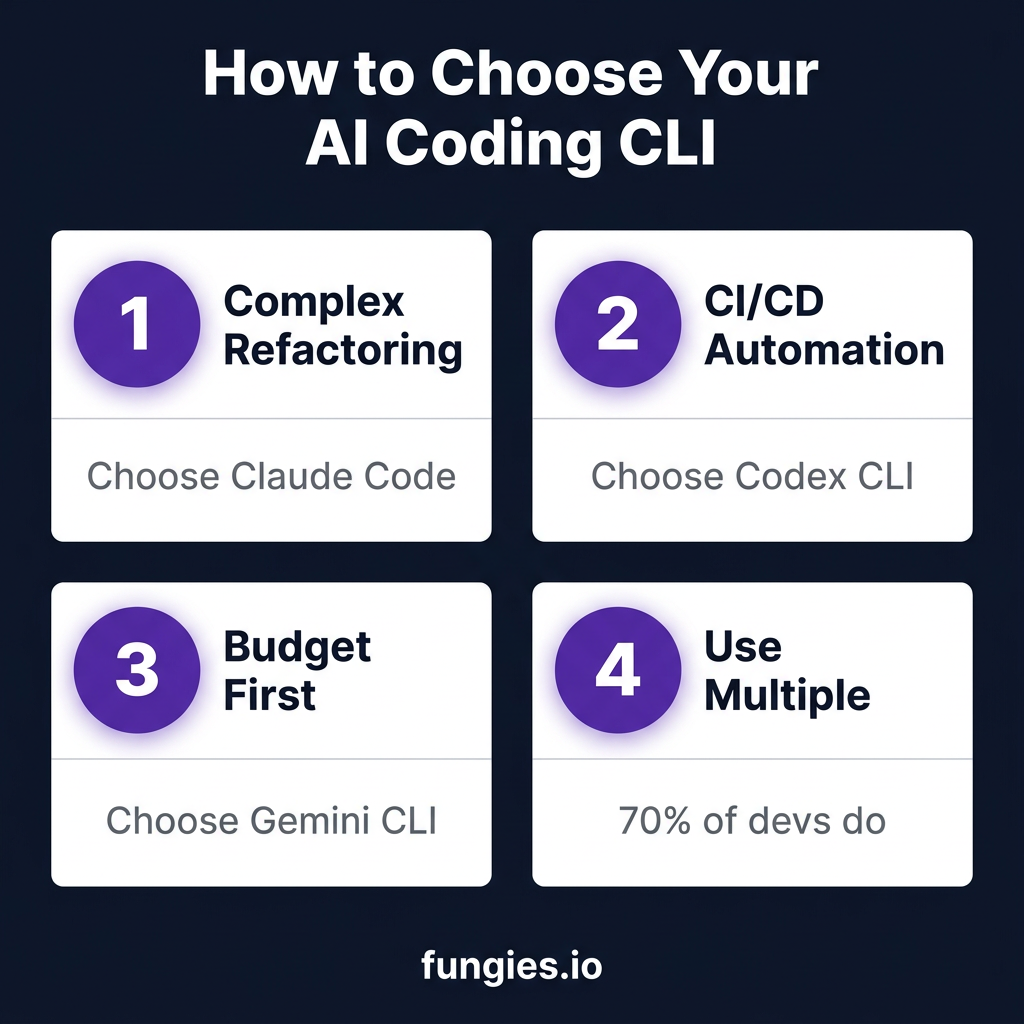
Choose Claude Code if:
- You regularly work on complex, multi-file refactoring tasks
- You need deep codebase understanding before making changes
- You prioritize code quality and correctness over speed
- You want the highest SWE-bench performance
Choose Codex CLI if:
- You need sandboxed execution for security
- You’re building CI/CD automation
- You want the most token-efficient option
- You already use ChatGPT Pro
Choose Gemini CLI if:
- You’re budget-conscious or want to try before buying
- You work with very large codebases (1M context window)
- You prefer open-source tools
- You use Google Cloud services
Use Multiple Tools (Recommended)
Remember: 70% of professional developers use multiple AI coding tools. The most common pattern I see is:
- Claude Code for complex refactoring and architecture work
- Gemini CLI for quick queries and large codebase exploration (free tier)
- Codex CLI for automated testing and CI/CD pipelines
Installation Quick Start
Getting started with each tool:
# Claude Code
npm install -g @anthropic-ai/claude-code

# Codex CLI
npm install -g @openai/codex

# Gemini CLI
npm install -g @google/gemini-cli
FAQ: AI Coding CLI Tools
Are AI coding CLI tools better than IDE plugins?
Not better—different. CLI tools excel at autonomous tasks, batch operations, and CI/CD integration. IDE plugins like Cursor or GitHub Copilot are better for daily coding with real-time suggestions. Most developers use both.
Can I use these tools for free?
Gemini CLI offers 1,000 requests per day on its free tier—enough for most individual developers. Claude Code and Codex CLI require paid subscriptions ($20/month each).
Which tool has the best code quality?
Claude Code leads on code quality with an 80.9% SWE-bench Verified score and 46% developer satisfaction rating. It’s specifically designed for complex reasoning tasks.
Do these tools work with any programming language?
Yes. All three tools support major programming languages including Python, JavaScript/TypeScript, Java, Go, Rust, C++, and more. They also understand framework-specific patterns.
Is my code secure with these tools?
Codex CLI offers the strongest security with cloud sandbox execution—your code never runs locally unless you choose. Claude Code and Gemini CLI process code on their servers but don’t store it permanently. All three offer enterprise security options.
Key Takeaways
- The AI coding CLI market is dominated by three tools: Claude Code, Codex CLI, and Gemini CLI
- Claude Code wins on code quality and complex reasoning (80.9% SWE-bench)
- Codex CLI wins on safety and automation (cloud sandbox, 4x token efficiency)
- Gemini CLI wins on value (free tier, 1M token context)
- 70% of developers use multiple tools—don’t limit yourself to one
Conclusion
AI coding CLI tools have evolved from experimental toys to essential developer infrastructure. Whether you choose Claude Code for deep reasoning, Codex CLI for automation, or Gemini CLI for budget-friendly power, the key is to start using these tools now.
The developers who thrive in 2026 won’t be those who use AI occasionally—they’ll be the ones who’ve integrated AI into every layer of their workflow. The terminal is just the beginning.
Ready to streamline your payment infrastructure while you focus on building? Sign up for Fungies.io—the Merchant of Record platform that handles payments, taxes, and compliance so you can focus on shipping code.