AI now generates 60% of new professional code in 2026. That’s not a projection—it’s happening right now. Developers aren’t just using AI to code faster; they’re managing teams of AI agents that write, review, and deploy code autonomously.
But here’s the problem: with so many AI coding tools flooding the market, choosing the right one feels overwhelming. Claude Code, Cursor, GitHub Copilot, Windsurf—they all promise to 5-8× your productivity. Which one actually delivers?
I’ve spent the last month testing these tools on real projects. This guide cuts through the marketing fluff and compares them on what actually matters: pricing, capabilities, and fit for your workflow.

What Are AI Coding Agents (And Why You Need One)
AI coding agents go beyond autocomplete. They can:
- Read and understand entire codebases
- Write multi-file changes across your project
- Run commands, tests, and deployments
- Debug errors and iterate autonomously
- Review code and suggest improvements
The shift is fundamental. As one developer put it: “We’re moving from ‘AI helps you code faster’ to ‘AI changes what good engineering looks like.’”
Modern agents behave like junior developers exploring your codebase. They don’t just complete lines—they understand context, make architectural decisions, and learn from feedback.
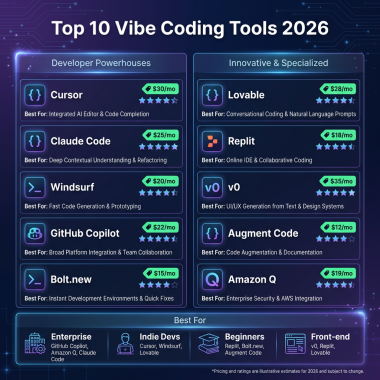
The 4 Best AI Coding Tools in 2026: Ranked and Compared
1. Claude Code — Best for Complex, Multi-File Refactoring
Price: $20/month (Pro), $150-200/month for heavy Opus usage
Best for: Terminal-native developers, complex refactoring, autonomous agent workflows
Claude Code is Anthropic’s terminal-native coding agent. It runs directly in your CLI and operates as a true autonomous agent—it reads files, writes code, runs commands, and iterates on errors in a conversation-based workflow.
Key strengths:
- Deep codebase understanding: Uses a Context Engine for semantic indexing of large codebases
- Top benchmark performance: Achieved 51.80% on SWE-bench Pro (the leading result)
- Architectural reasoning: Helps prevent cross-service production incidents
- Highly customizable: Configure through hooks and CLAUDE.md files
- Multi-agent orchestration: New “Intent” feature supports living specs with multiple agents
Drawbacks: No IDE integration (terminal only), steeper learning curve, expensive at scale with Opus models.
Verdict: If you live in the terminal and work on complex distributed systems, Claude Code is unmatched. Microsoft recognized this—they made Claude Sonnet 4 the primary model for VS Code’s AI features in September 2025, choosing Anthropic over OpenAI.
2. Cursor — Best for Daily Development and IDE Integration
Price: $20/month (Pro), $16/month when billed annually
Best for: Individual developers, IDE-first workflows, inline editing
Cursor is a VS Code fork with AI deeply integrated into every aspect of the editor. It’s not a plugin—it’s a complete IDE rebuilt around AI assistance.
Key strengths:
- Seamless VS Code transition: All your extensions and settings work out of the box
- Inline completions: Tab to accept AI suggestions as you type
- Cmd+K editing: Quick AI-powered edits without leaving your flow
- Composer mode: Multi-file changes with visual diff review
- Cursor 2.0 upgrades: Proprietary Composer model (4x faster) and up to 8 parallel agents
Drawbacks: VS Code only (no JetBrains, Vim, etc.), can feel heavy for simple edits, parallel agents require learning to manage effectively.
Verdict: Cursor is the lowest-friction path for developers who want AI deeply integrated into their daily workflow. If you’re already using VS Code, switching to Cursor takes 5 minutes.
3. GitHub Copilot — Best for Teams and Multi-IDE Support
Price: $10/month (Individual), $19/month (Business), $39/month (Enterprise)
Best for: Teams, GitHub integration, multi-IDE environments
GitHub Copilot is the most widely adopted AI coding tool, and for good reason. It works across 10+ IDEs including VS Code, JetBrains, Neovim, Visual Studio, and Xcode.
Key strengths:
- Universal IDE support: Works wherever you code
- GitHub-native integration: Issue-to-PR pipeline, code review automation
- Agent mode: Can use tools, run terminal commands, and interact with MCP servers
- Team features: Code suggestions trained on your team’s patterns
- Competitive pricing: $10/month entry point beats most competitors
Drawbacks: Less powerful than Claude Code for complex tasks, inline suggestions can be intrusive, relies on OpenAI models (though now includes Claude Sonnet).
Verdict: For teams already using GitHub Enterprise, Copilot offers the smoothest integration. It’s not the most powerful tool, but it’s the most accessible and team-friendly.
4. Windsurf (Codeium) — Best for Real-Time AI Collaboration
Price: $15/month (Pro), free tier available
Best for: Real-time collaboration, flow-state coding, Cascade agent workflows
Windsurf (formerly Codeium) takes a different approach with its Cascade agent system. Instead of waiting for you to ask for help, it actively collaborates with you in real-time.
Key strengths:
- Cascade agent system: AI that maintains context across your entire session
- Real-time collaboration: AI suggests changes as you work, not after
- Flow state preservation: Minimal interruptions to your coding rhythm
- Competitive pricing: $15/month undercuts Cursor and Claude Code
- Free tier: Generous free plan for individual developers
Drawbacks: Smaller ecosystem than Cursor, newer tool with less community support, some developers find real-time suggestions distracting.
Verdict: If you want AI that feels like a pair programmer rather than an assistant, Windsurf is worth trying. The Cascade system genuinely feels different from other tools.

Side-by-Side Comparison Table
| Feature | Claude Code | Cursor | GitHub Copilot | Windsurf |
|---|---|---|---|---|
| Starting Price | $20/mo | $16-20/mo | $10/mo | $15/mo |
| Interface | Terminal/CLI | VS Code fork | Multi-IDE plugin | AI-native IDE |
| Best For | Complex refactoring | Daily development | Team workflows | Real-time collaboration |
| SWE-bench Score | 51.8% (highest) | Not published | Not published | Not published |
| Parallel Agents | Multi-agent via Intent | Up to 8 agents | Agent mode available | Cascade system |
| Context Window | 200K tokens | 200K tokens | 128K tokens | 200K tokens |
| Free Tier | No | Limited | Trial only | Yes (generous) |
| Team Features | Limited | Yes | Excellent | Yes |
How to Choose: Decision Framework
Still unsure? Here’s my decision tree based on real-world usage:
Choose Claude Code if:
- You live in the terminal and prefer CLI workflows
- You work on complex, distributed systems with multi-file changes
- You need deep codebase understanding and architectural reasoning
- You want to build custom agent workflows
- You don’t mind paying $150-200/mo for heavy Opus usage
Choose Cursor if:
- You want the lowest-friction transition from VS Code
- Inline completions and quick edits are your primary use case
- You value visual diff reviews for multi-file changes
- You want up to 8 parallel agents working simultaneously
- You prefer an IDE-integrated experience over terminal
Choose GitHub Copilot if:
- Your team uses multiple IDEs (not just VS Code)
- You’re already invested in GitHub Enterprise
- You want the issue-to-PR pipeline automation
- You need the most affordable entry point ($10/mo)
- You want team-wide code suggestion training
Choose Windsurf if:
- You want AI that collaborates in real-time, not just on-demand
- You prefer the Cascade agent system’s flow-state approach
- You want a generous free tier to test before committing
- You find other AI tools too interruptive to your workflow
- You want to save $5/month compared to Cursor/Claude Code
My Recommendation: The Hybrid Approach
Here’s what actually works for most developers in 2026: use two tools.
Run Claude Code for complex work—architectural decisions, large refactors, debugging gnarly issues. Then use Cursor or Copilot for daily editing—inline completions, quick fixes, boilerplate generation.
This combination gives you the best of both worlds: deep agentic capabilities when you need them, and seamless IDE integration for everyday coding.
Many developers I spoke to use exactly this setup. As one put it: “Claude Code handles the heavy lifting. Cursor handles the daily grind. Together they’re unstoppable.”
Key Takeaways
- AI coding is now standard—60% of professional code is AI-assisted
- Claude Code leads on benchmarks (51.8% SWE-bench) but costs more at scale
- Cursor offers the smoothest IDE integration for VS Code users
- GitHub Copilot wins on team features and multi-IDE support
- Windsurf provides unique real-time collaboration at a lower price point
- The best setup is often hybrid—Claude Code + IDE tool
Frequently Asked Questions
Will AI coding tools replace developers?
No. AI changes what good engineering looks like—it doesn’t eliminate the need for engineers. The role shifts from writing every line to orchestrating AI agents, reviewing their output, and making architectural decisions. Deep understanding matters more than ever.
Which AI coding tool has the best free tier?
Windsurf offers the most generous free tier, followed by Cursor’s limited free plan. Claude Code has no free tier, and GitHub Copilot only offers a trial period.
Can I use multiple AI coding tools together?
Absolutely. Many developers use Claude Code for complex tasks alongside Cursor or Copilot for daily editing. They complement each other well.
What’s the difference between an AI coding assistant and an AI coding agent?
Assistants (like early Copilot) provide inline suggestions. Agents (like Claude Code, Cursor Composer) can autonomously read files, run commands, debug errors, and complete multi-step tasks with minimal supervision.
Is Claude Code worth the higher price?
For complex refactoring and architectural work, yes. The 51.8% SWE-bench score and deep codebase understanding justify the cost for senior developers working on distributed systems. For simpler projects, Cursor or Copilot may be sufficient.
Conclusion: The Future Is Agentic
The debate isn’t whether to use AI coding tools—it’s which ones to use and how to combine them effectively. In 2026, the developers who thrive are those who treat AI as a team member, not just a typing assistant.
Start with one tool. Master it. Then add a second to fill the gaps. The future of software development is collaborative, agentic, and already here.
Ready to streamline your SaaS payments and checkout? Sign up for Fungies and get your merchant account running in minutes—no code required.
References
- 8 Best AI Coding Assistants [Updated April 2026] — Augment Code
- Best AI Coding Agents in 2026: Ranked and Compared — Codegen
- AI Coding Tools 2026 | Comparison Guide — SitePoint
- Claude Code vs Cursor vs GitHub Copilot vs Windsurf — Scott Havird
- Cursor vs Claude Code vs GitHub Copilot 2026 — NxCode
- AI-Assisted Development in 2026: Best Practices — Dev.to