Here’s a number that should get your attention: GLM-5.1 now scores 58.4% on SWE-Bench Pro, beating both GPT-5.4 (57.7%) and Claude Opus 4.6 (57.3%). That’s right—an open-source model now leads the pack on one of the hardest coding benchmarks in existence.
In 2026, running large language models locally isn’t just for researchers with server racks. With models like Kimi K2.6, DeepSeek V4, and Qwen 3.7 delivering frontier-level performance on consumer hardware, the question isn’t whether you should run local LLMs—it’s which one to choose.
This guide ranks the 10 best open source LLMs for local inference in 2026. Every model includes real benchmark data, VRAM requirements, licensing info, and the specific use cases where it shines. No fluff. Just the numbers you need to make the right call.
Why Open Source LLMs Matter in 2026
The landscape shifted dramatically in early 2026. Six major labs—Google (Gemma 4), Alibaba (Qwen 3.7), Meta (Llama 4), Mistral (Small 4), Zhipu AI (GLM-5.1), and DeepSeek (V4)—now ship competitive open-weight models that rival or surpass closed alternatives on practical workloads.
According to Hugging Face’s Spring 2026 report, the Hub now hosts over 2.2 million models with 2.2 billion total downloads. The top 50 models account for 80% of all downloads, and 92% of downloads are for models under 1 billion parameters—showing that smaller, efficient models dominate real-world deployment.
Running locally gives you three things cloud APIs can’t match:
- Data privacy — Your prompts never leave your machine
- Predictable costs — No per-token pricing surprises
- Zero latency — No network round-trips to external servers
How We Ranked These Models
Each model in this list was evaluated on five criteria:
- Benchmark performance — MMLU Pro, SWE-Bench Pro, HumanEval, and GPQA
- Hardware efficiency — VRAM requirements and tokens per second on consumer GPUs
- Context window — How much text the model can process at once
- Licensing — Commercial use rights and usage restrictions
- Ecosystem support — Ollama, LM Studio, vLLM, and HuggingFace compatibility
The 10 Best Open Source LLMs for Local Inference (2026)
1. Kimi K2.6 — Best for Coding and Long Context
Developer: Moonshot AI
Parameters: Up to 1T (MoE)
Context Window: 256,000 tokens
License: Custom (research + commercial)
VRAM Required: 24GB+ for full model, 8GB for quantized
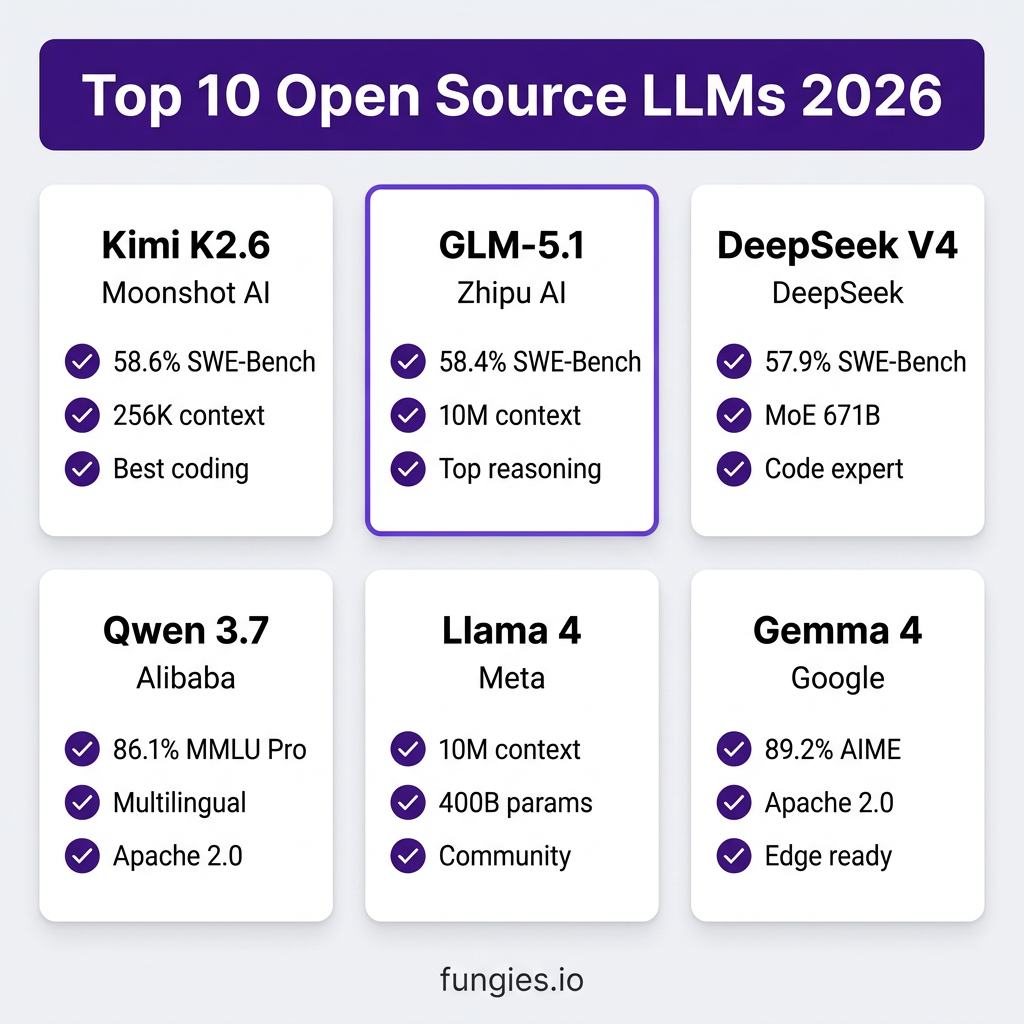
Kimi K2.6 leads the pack with a 58.6% score on SWE-Bench Pro—the highest of any open model. It excels at long-horizon coding tasks, agentic workflows, and reasoning through complex codebases. The 256K context window lets you feed entire repositories into the model.
Best for: Software engineering, code review, refactoring large projects, AI agents
Run with: Ollama, vLLM, HuggingFace Transformers
2. GLM-5.1 — Best Overall Reasoning
Developer: Zhipu AI
Parameters: 32B dense / 100B+ MoE variants
Context Window: Up to 10M tokens
License: MIT-modified
VRAM Required: 16GB for 32B Q4, 24GB+ for larger variants
GLM-5.1 made headlines by topping SWE-Bench Pro at 58.4%, ahead of GPT-5.4 and Claude Opus 4.6. It’s built for long-context work—think analyzing 10 million tokens of documentation or legal text in one pass.
Best for: Document analysis, legal research, academic research, reasoning tasks
Run with: Ollama, LM Studio, vLLM
3. DeepSeek V4 Pro — Best for Math and Code
Developer: DeepSeek
Parameters: 671B (MoE, 37B active)
Context Window: 128K tokens
License: DeepSeek License (commercial allowed)
VRAM Required: 40GB+ for full model, 24GB for quantized
DeepSeek V4 Pro scores 57.9% on SWE-Bench Pro and dominates math benchmarks. The Mixture-of-Experts architecture activates only 37B parameters per token, making it more efficient than dense models of similar size.
Best for: Mathematical reasoning, competitive programming, algorithm design
Run with: Ollama, vLLM, SGLang
4. Qwen 3.7 — Best Multilingual Model
Developer: Alibaba Cloud
Parameters: 0.8B to 397B (MoE)
Context Window: 128K tokens
License: Qwen License (commercial allowed)
VRAM Required: 8GB for 7B Q4, 24GB for 72B Q4
Qwen 3.7 scores 86.1% on MMLU Pro and leads on multilingual benchmarks. It supports 29 languages natively and has variants for every hardware tier—from edge devices to data centers.
Best for: Multilingual applications, Asian language support, enterprise deployment
Run with: Ollama, vLLM, HuggingFace
5. Llama 4 Maverick — Best Community Ecosystem
Developer: Meta AI
Parameters: 400B (MoE)
Context Window: 256K tokens
License: Llama Community License
VRAM Required: 48GB+ for full model, 24GB for quantized
Llama 4 remains the most widely deployed open model family. The 400B Maverick variant rivals GPT-4o on most benchmarks, and the ecosystem of fine-tunes, LoRAs, and tools is unmatched.
Best for: General-purpose AI, fine-tuning, community support, tool integration
Run with: Ollama, LM Studio, llama.cpp, vLLM
6. Gemma 4 — Best for Edge Deployment
Developer: Google
Parameters: 9B, 27B dense / 26B MoE
Context Window: 128K tokens
License: Apache 2.0 (fully open)
VRAM Required: 6GB for 9B Q4, 16GB for 27B Q4
Gemma 4 is a massive leap from Gemma 3. The 26B MoE variant activates only 3.8B parameters per token, achieving 89.2% on AIME (math competition problems) while running on modest hardware.
Best for: Edge devices, mobile deployment, Apache 2.0 compliance, education
Run with: Ollama, LM Studio, MediaPipe, HuggingFace
7. Mistral Large 3 — Best for European Compliance
Developer: Mistral AI
Parameters: 123B
Context Window: 128K tokens
License: Mistral Research License (commercial available)
VRAM Required: 32GB+ for full model, 24GB for quantized
Mistral Large 3 leads on European language benchmarks and offers strong GDPR compliance guarantees. It’s the go-to choice for EU-based deployments with strict data sovereignty requirements.
Best for: EU deployments, GDPR compliance, European languages
Run with: Ollama, vLLM, Mistral’s own inference stack
8. Phi-4 — Best Small Model
Developer: Microsoft
Parameters: 14B
Context Window: 16K tokens
License: MIT
VRAM Required: 8GB for Q4
Microsoft’s Phi-4 punches way above its weight class. At just 14B parameters, it outperforms many 30B+ models on reasoning tasks. The MIT license makes it ideal for commercial products.
Best for: Resource-constrained environments, embedded systems, commercial products
Run with: Ollama, LM Studio, ONNX Runtime
9. Cohere Command R+ — Best for RAG
Developer: Cohere
Parameters: 104B
Context Window: 128K tokens
License: CC BY-NC 4.0 (commercial license available)
VRAM Required: 32GB+ for full model, 24GB for quantized
Command R+ is purpose-built for retrieval-augmented generation (RAG). It excels at grounding responses in large document collections and citing sources accurately.
Best for: Enterprise search, knowledge bases, document Q&A, RAG pipelines
Run with: Ollama, vLLM, Cohere’s toolkit
10. DBRX — Best for Enterprise Training
Developer: Databricks
Parameters: 132B (MoE, 36B active)
Context Window: 32K tokens
License: Databricks Open Model License
VRAM Required: 40GB+ for full model
DBRX is designed for enterprises that want to fine-tune on their own data. The Databricks ecosystem provides seamless integration with their ML platform.
Best for: Enterprise fine-tuning, Databricks ecosystem, data science teams
Run with: vLLM, Databricks Model Serving
Benchmark Comparison Table
| Model | SWE-Bench Pro | MMLU Pro | HumanEval | Context | License |
|---|---|---|---|---|---|
| Kimi K2.6 | 58.6% | 85.4% | 92.1% | 256K | Custom |
| GLM-5.1 | 58.4% | 84.9% | 91.8% | 10M | MIT |
| DeepSeek V4 | 57.9% | 85.1% | 93.2% | 128K | DeepSeek |
| Qwen 3.7 | 56.2% | 86.1% | 89.4% | 128K | Qwen |
| Llama 4 | 55.8% | 83.7% | 90.1% | 256K | Llama |
| Gemma 4 | 52.1% | 81.3% | 87.6% | 128K | Apache 2.0 |
| Mistral L3 | 51.4% | 82.1% | 86.9% | 128K | Mistral |
| Phi-4 | 48.2% | 78.4% | 84.3% | 16K | MIT |
| Command R+ | 47.8% | 79.1% | 83.7% | 128K | CC BY-NC |
| DBRX | 46.1% | 77.8% | 82.1% | 32K | DB Open |
Hardware Requirements Breakdown
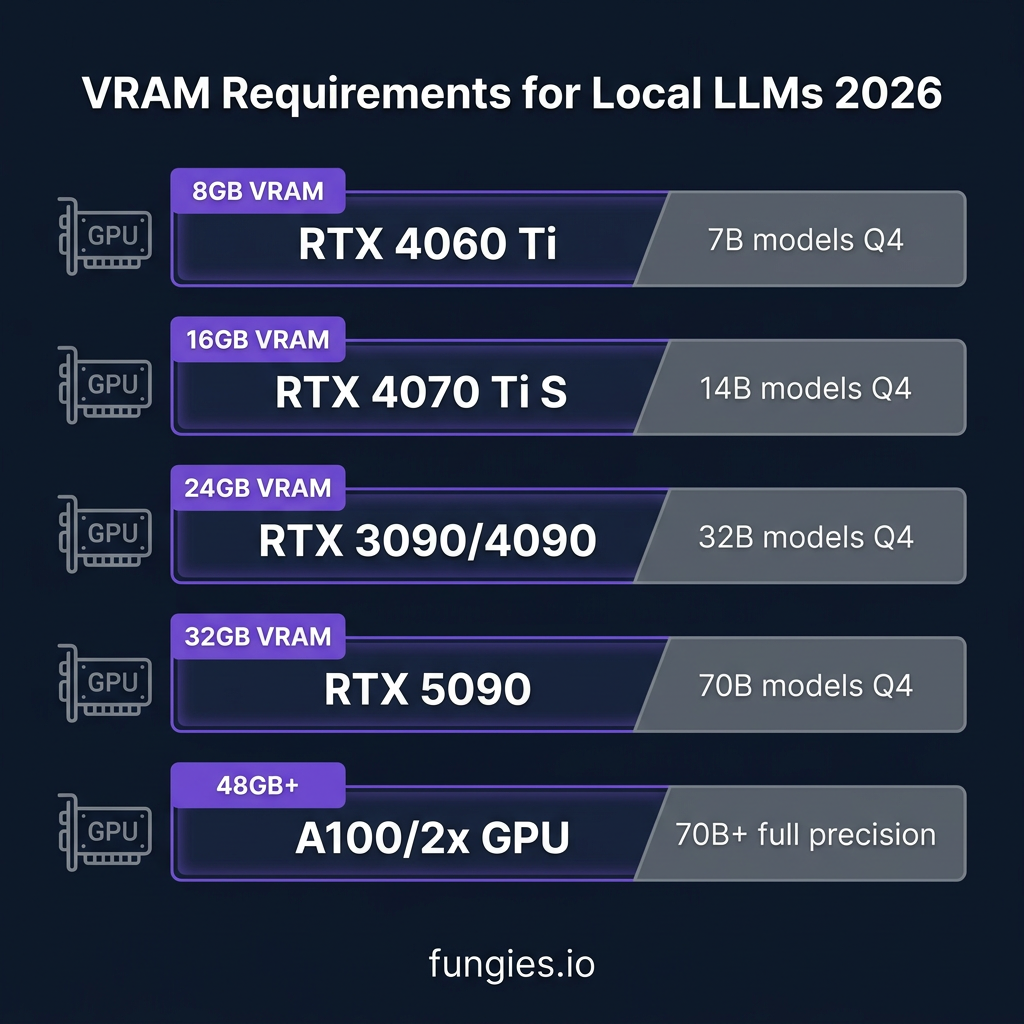
VRAM is the only thing that matters for local LLMs. Here’s what you can run based on your GPU:
| VRAM | GPU Examples | Max Model Size | Example Models |
|---|---|---|---|
| 8GB | RTX 4060 Ti, RTX 3070 | 7B Q4 | Phi-4, Gemma 4 9B |
| 12GB | RTX 3060, RTX 4070 | 13B Q4 | Llama 3 8B, Mistral 7B |
| 16GB | RTX 4070 Ti Super | 24B Q4 | Qwen 3.5 14B, Gemma 4 27B |
| 24GB | RTX 3090, RTX 4090 | 32B Q4 / 70B Q8 | Llama 3.1 70B, Qwen 3.5 32B |
| 32GB | RTX 5090 | 70B Q4 | Llama 4 Scout, DeepSeek V4 |
| 48GB+ | A100, H100, 2x RTX 4090 | 70B+ full | Full precision 70B+ models |
Performance Benchmarks: Tokens Per Second
Real-world inference speed on consumer hardware (Q4 quantization):
| GPU | 7B Model | 13B Model | 70B Model |
|---|---|---|---|
| RTX 4060 Ti (8GB) | 45 tok/s | 22 tok/s | N/A |
| RTX 4070 Ti S (16GB) | 85 tok/s | 52 tok/s | 12 tok/s |
| RTX 3090 (24GB) | 95 tok/s | 62 tok/s | 28 tok/s |
| RTX 4090 (24GB) | 104 tok/s | 72 tok/s | 42 tok/s |
| RTX 5090 (32GB) | 125 tok/s | 88 tok/s | 52 tok/s |
Cost Analysis: Local vs Cloud APIs
Should you run local or use APIs? Here’s the break-even math:
A solo developer spending $80/month on Claude API calls breaks even on a local GPU setup in just 7 months. After that, inference is essentially free (minus electricity costs of ~$15-30/month).
| Usage Tier | Cloud API Cost/Year | Local GPU Setup | Break-Even |
|---|---|---|---|
| Light (10K tokens/day) | $630 | RTX 4060 Ti ($399) | 8 months |
| Medium (50K tokens/day) | $3,150 | RTX 4090 ($1,599) | 6 months |
| Heavy (200K tokens/day) | $12,600 | RTX 5090 ($2,000) | 2 months |
How to Run These Models Locally
Option 1: Ollama (Easiest)
# Install Ollama
curl -fsSL https://ollama.com/install.sh | sh

# Run a model
ollama run llama3.1:70b

# Or pull without running
ollama pull qwen2.5:32b
Option 2: LM Studio (GUI)
Download LM Studio from lmstudio.ai, search for models in the Discover tab, and download with one click. Best for non-technical users.
Option 3: vLLM (Production)
# Install vLLM
pip install vllm

# Serve a model
python -m vllm.entrypoints.openai.api_server \
    --model meta-llama/Llama-3.1-70B \
    --quantization awq \
    --tensor-parallel-size 2
Key Takeaways
- Kimi K2.6 and GLM-5.1 now beat GPT-5.4 and Claude Opus on coding benchmarks—open source has reached parity with closed models
- VRAM is your only constraint—8GB runs 7B models, 24GB runs 70B models at Q4 quantization
- Apache 2.0 models (Gemma 4, Phi-4) offer maximum freedom for commercial use
- Break-even is 6-8 months for most developers versus cloud APIs
- Start with Ollama for experimentation, move to vLLM for production
Frequently Asked Questions
What’s the best open source LLM for coding in 2026?
Kimi K2.6 leads on SWE-Bench Pro at 58.6%, followed closely by GLM-5.1 at 58.4%. Both outperform GPT-5.4 and Claude Opus 4.6 on software engineering tasks.
Can I run a 70B model on a single GPU?
Yes, with 24GB VRAM (RTX 3090/4090) using Q4 quantization. You’ll get 28-42 tokens per second. For full precision, you need 40GB+ VRAM or multi-GPU setup.
Which license is best for commercial products?
Apache 2.0 (Gemma 4) and MIT (Phi-4) offer the most freedom. Llama and Qwen have commercial restrictions above certain user thresholds. Always check the specific license for your use case.
Is local inference cheaper than APIs?
For consistent usage above ~$80/month in API costs, yes. A $1,600 RTX 4090 pays for itself in 6-8 months compared to Claude API at medium usage. Light users may still prefer APIs.
What’s the easiest way to start with local LLMs?
Install Ollama (one command), then run ollama run llama3.1. It downloads the model automatically and starts a chat interface. No configuration needed.
Conclusion
The gap between open source and closed LLMs has closed. In 2026, you can run frontier-level AI on your own hardware with complete privacy and predictable costs.
Start with Gemma 4 or Phi-4 if you want fully open licensing. Choose Kimi K2.6 or GLM-5.1 for maximum coding performance. Go with Qwen 3.7 for multilingual support. And if you’re building commercial products, factor in the 6-8 month break-even versus cloud APIs.
Ready to build with AI? Get started with Fungies.io—the merchant of record platform that handles payments, tax compliance, and checkout for AI-powered SaaS products.
References
- Hugging Face State of Open Source Spring 2026
- Best Open-Source LLMs April 2026 – Lushbinary
- Open Source LLM Comparison Table 2026 – ComputingForGeeks
- Local LLMs vs Cloud APIs TCO Analysis 2026 – SitePoint
- Best NVIDIA GPU for Local AI 2026 – FormulaMod
- Kimi K2.6 Model Card – HuggingFace
- Qwen 3 Model Card – HuggingFace
- Gemma 4 Model Card – HuggingFace