Here’s a number that should terrify every SaaS founder: 29% of remote workers cite communication gaps as their biggest challenge, and 38% of managers say collaboration has become harder in remote settings. Yet distributed teams now send 376 billion emails daily and spend an average of 1 hour and 42 minutes per day on Slack.
The tools aren’t the problem. The problem is picking the wrong stack for how your team actually works. After managing remote marketing teams across three continents and testing dozens of platforms, I’ve learned one truth: the best remote team management tools aren’t the ones with the most features. They’re the ones that reduce context switching, support async communication, and make collaboration feel natural whether your team is in one city or twelve.
What Are Remote Team Management Tools?
Remote team management tools are the digital infrastructure that keeps distributed teams aligned, productive, and connected. They span four core categories: async communication (Slack, Discord), knowledge management (Notion, Confluence), project tracking (ClickUp, Asana), and async video (Loom, Tella).
The shift to remote work isn’t temporary. According to 2026 data, 77% of full-time remote workers report being more productive at home, and 68% accomplish more work in the same amount of time compared to office settings. But that productivity only happens with the right tooling. The wrong stack creates “digital fragmentation” where decisions live in Slack threads no one can find, project context scatters across five apps, and new hires spend two weeks just getting up to speed.
Why Remote Team Tools Matter for SaaS Companies
SaaS companies face unique remote work challenges. You’re building complex products across time zones. You’re coordinating engineering, design, marketing, and customer success without a shared physical space. And you’re competing for talent globally, which means your tools need to work for developers in Warsaw, designers in Lisbon, and sales reps in Austin.
Here’s what the data tells us about remote SaaS teams in 2026:
- 43% of synchronous communication now happens outside normal business hours
- 78% of employees feel overwhelmed by notification volume
- Teams lose an average of 2.5 hours daily to context switching between apps
- Well-managed hybrid work can offer the best engagement—but poor implementation makes it worse than fully remote
The right tool stack doesn’t just solve these problems. It becomes a competitive advantage for hiring and retention.
10 Best Remote Team Management Tools for SaaS in 2026
After testing dozens of platforms and analyzing pricing, integrations, and real-world usage, here are the 10 best remote team management tools for SaaS companies in 2026.
1. Slack — Best for Async Communication
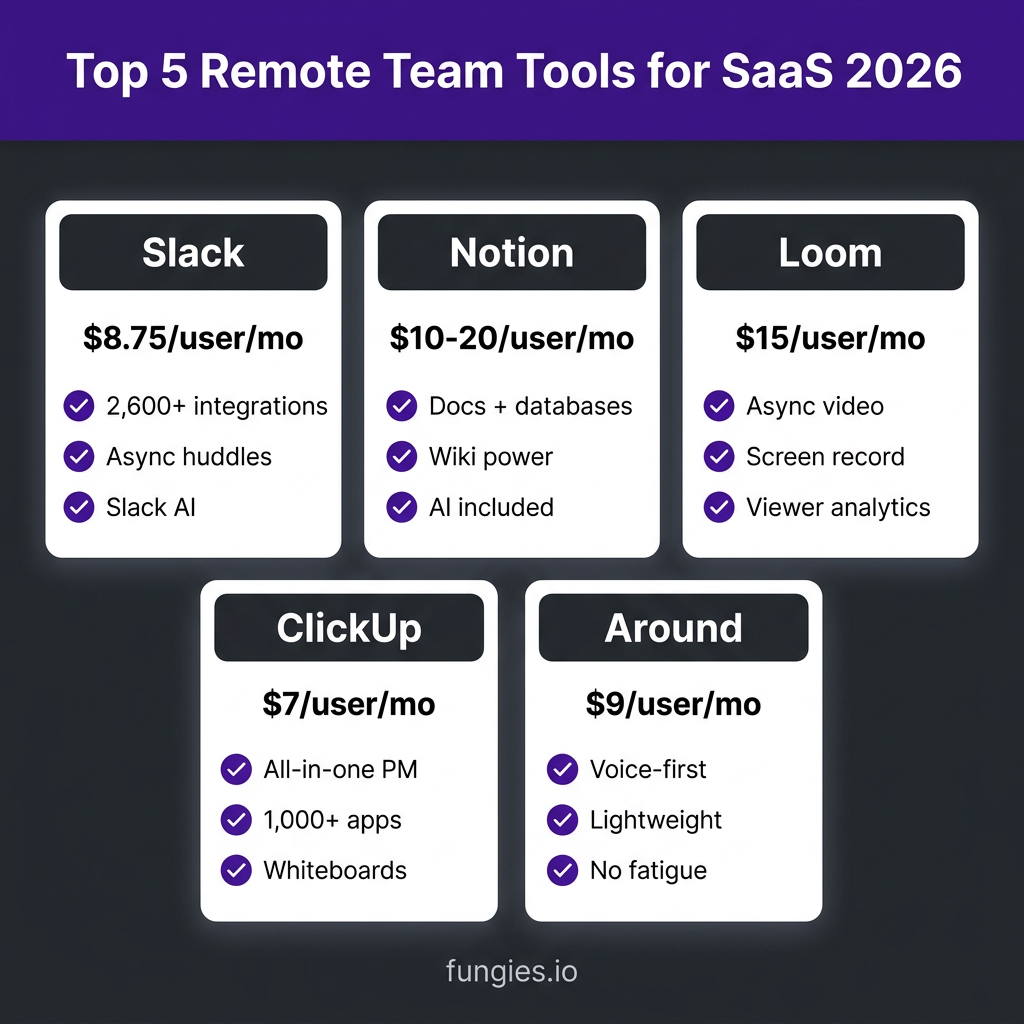
Slack remains the default communication hub for remote SaaS teams—and for good reason. With 2,600+ integrations, Slack AI for message summaries, and async huddles that replace unnecessary meetings, it’s built for how modern teams actually work.
Key features:
- Channels organized by project, team, or topic
- Slack Connect for external collaboration with clients and partners
- Workflow Builder for automating routine tasks
- Huddles for quick voice conversations without scheduling
- Canvas for collaborative documents inside Slack
Pricing: Free (90-day message history), Pro $8.75/user/month, Business+ $15/user/month, Enterprise Grid custom pricing.
Best for: SaaS teams that need deep integrations with their existing tool stack and want to reduce meeting load through async communication.
2. Notion — Best for Knowledge Management
Notion has become the operating system for thousands of SaaS companies. It combines docs, wikis, and databases into one flexible workspace. The real power? You can build custom workflows that match exactly how your team works—not force your team into someone else’s template.
Key features:
- Flexible databases that work like spreadsheets, kanban boards, or calendars
- Wiki-style documentation with infinite nesting
- Notion AI for writing, summarizing, and Q&A on your docs
- Thousands of community templates for everything from OKRs to sprint planning
- Real-time collaboration with comments and mentions
Pricing: Free (for individuals), Plus $10/user/month, Business $20/user/month (includes AI), Enterprise custom.
Best for: SaaS teams that want a single source of truth for documentation, wikis, and lightweight project management.
3. Loom — Best for Async Video Communication
Loom popularized a simple idea: instead of writing a long Slack message or scheduling a 30-minute meeting, record a quick screen video and send the link. For remote SaaS teams, this is transformative. Engineers can explain bugs visually. Product managers can share roadmap updates without disrupting deep work. Sales can send personalized demos.
Key features:
- Instant screen and camera recording
- Viewer analytics to see who watched and for how long
- AI-generated summaries and chapters
- Comments and reactions tied to specific timestamps
- Integrations with Slack, Notion, and project management tools
Pricing: Free (25 videos, 5 min limit), Business $15/user/month, Enterprise custom.
Best for: Teams that want to replace status meetings and long written updates with quick, personal video messages.
4. ClickUp — Best All-in-One Project Management
ClickUp positions itself as the “one app to replace them all”—and for many SaaS teams, it delivers. Tasks, docs, chat, whiteboards, goals, and time tracking all live in one platform. The trade-off? A steeper learning curve. But if you want to reduce your tool stack from five apps to one, ClickUp is the strongest contender.
Key features:
- Multiple views: List, Board, Gantt, Calendar, Timeline
- ClickUp Brain AI for writing, summarizing, and automation
- Whiteboards for collaborative brainstorming
- Docs with real-time editing and task embedding
- 1,000+ integrations including GitHub, Figma, and Sentry
Pricing: Free (generous), Unlimited $7/user/month, Business $12/user/month, Enterprise $19/user/month.
Best for: Tech teams and startups that want to consolidate tools and don’t mind investing time in setup.
5. Microsoft Teams — Best for Microsoft 365 Ecosystem
If your SaaS already runs on Microsoft 365, Teams is the obvious choice. It’s included with most subscriptions, integrates deeply with SharePoint and OneDrive, and offers enterprise-grade security that passes procurement at Fortune 500s. The video quality is excellent, and the new Copilot features bring AI directly into your workflow.
Key features:
- Deep integration with Word, Excel, PowerPoint, and SharePoint
- Copilot for Teams for meeting summaries and action items
- Channels organized by team or project
- Enterprise security and compliance (SOC 2, ISO 27001, HIPAA)
- Phone System add-on for full PBX replacement
Pricing: Free (limited), Microsoft 365 Business Basic $6/user/month, Business Standard $12.50/user/month, Enterprise plans available.
Best for: SaaS companies already invested in Microsoft 365 that need enterprise-grade security and governance.
6. Asana — Best for Goal-Driven Teams
Asana is the cleanest, simplest project management tool on this list. It’s opinionated about how work should flow—which means less customization than ClickUp, but also less setup time. For marketing teams and goal-driven orgs, Asana’s clarity is its superpower.
Key features:
- Task lists, kanban boards, calendar, and timeline views
- Goals and OKR tracking tied to daily work
- Portfolio view for cross-project visibility
- Workflow Builder for automations
- AI Studio for creating dynamic workflows
Pricing: Free (up to 10 teammates), Starter $10.99/user/month, Advanced $24.99/user/month, Enterprise custom.
Best for: Teams that want structured project management without the complexity of all-in-one platforms.
7. Discord — Best for Community-First Teams
Discord started as a gaming platform, but it’s become surprisingly popular among SaaS startups—especially those with developer communities or open-source projects. The voice channels are persistent (not scheduled meetings), the threading model encourages deep discussions, and the bot ecosystem is extensive.
Key features:
- Persistent voice channels for spontaneous conversations
- Thread-based conversations that don’t clutter main channels
- Stage Channels for town halls and AMAs
- Extensive bot ecosystem for automation
- Free tier that’s genuinely usable
Pricing: Free (generous), Nitro $9.99/user/month (optional perks).
Best for: Developer tools, open-source projects, and teams that want a casual, community-focused communication culture.
8. Confluence — Best for Technical Documentation
Confluence is the documentation standard for engineering teams. If you’re already using Jira, the integration is seamless. Confluence excels at structured technical documentation, API docs, and runbooks. The new Rovo AI brings intelligent search and Q&A to your entire knowledge base.
Key features:
- Deep Jira integration for linking docs to tickets
- Structured page trees for organized documentation
- Rovo AI for intelligent search and content generation
- Templates for retrospectives, planning, and technical specs
- Advanced permissions and page-level security
Pricing: Free (up to 10 users), Standard $5.16/user/month, Premium $10.50/user/month, Enterprise custom.
Best for: Engineering-heavy SaaS teams that need structured technical documentation integrated with their issue tracker.
9. Tella — Best for Polished Async Video
Tella is the Loom alternative for teams that need polished, customer-facing content. While Loom excels at quick internal updates, Tella adds editing power for demos, tutorials, and sales videos. If your async videos are going to prospects and customers—not just teammates—Tella is worth considering.
Key features:
- Multi-clip recording with easy editing
- Cinematic zoom and pan effects
- Custom branding and backgrounds
- Viewer analytics and engagement tracking
- Higher video quality than typical screen recorders
Pricing: Free (limited), Pro $19/user/month, Business custom.
Best for: Sales, marketing, and customer success teams creating polished video content for external audiences.
10. Around — Best for Voice-First Collaboration
Around (now part of Miro) pioneered “low-fatigue” video calls. The voice-first approach, echo cancellation, and lightweight interface make it perfect for remote pair programming, quick standups, and casual team hangouts. It’s the anti-Zoom: no waiting rooms, no “can you hear me?” just instant voice collaboration.
Key features:
- Voice-first design with minimal video
- Echo cancellation for working in shared spaces
- Instant rooms—no scheduling required
- Screen sharing and collaborative cursors
- Lightweight, low-CPU usage
Pricing: Free (core features), Pro $9/user/month, Team $15/user/month.
Best for: Engineering teams doing remote pair programming and teams that want spontaneous voice collaboration without meeting fatigue.
Remote Team Tools Comparison Table
| Tool | Best For | Starting Price | Free Tier | Key Strength |
|---|---|---|---|---|
| Slack | Async communication | $8.75/user/mo | Limited | 2,600+ integrations |
| Notion | Knowledge management | $10/user/mo | Yes | Flexible databases |
| Loom | Async video | $15/user/mo | Yes | Viewer analytics |
| ClickUp | All-in-one PM | $7/user/mo | Generous | 1,000+ integrations |
| Teams | Microsoft ecosystem | $6/user/mo | Yes | Enterprise security |
| Asana | Goal-driven teams | $10.99/user/mo | Yes | Clean, simple UX |
| Discord | Community-first | Free | Generous | Persistent voice |
| Confluence | Technical docs | $5.16/user/mo | Yes | Jira integration |
| Tella | Polished videos | $19/user/mo | Limited | Editing features |
| Around | Voice-first collab | $9/user/mo | Yes | Low fatigue |
How to Choose the Right Remote Team Stack
Honestly, most SaaS founders overthink this decision. You don’t need the perfect stack on day one. You need a stack that reduces friction for your specific team. Here’s my framework:
Start with your communication pattern. Does your team prefer async written updates (Slack/Notion), async video (Loom), or real-time voice (Around/Discord)? Pick one primary channel and make it the default.
Choose knowledge management based on team size. Under 20 people? Notion’s flexibility wins. Over 50 with dedicated technical writers? Confluence’s structure pays off.
Match project management to your work style. Engineering-heavy with complex dependencies? ClickUp or Jira. Marketing and creative teams? Asana or Monday.com. Simple task tracking? Trello still works.
Don’t pay for overlap. If you’re using ClickUp for project management, you might not need a separate docs tool. If you’re all-in on Microsoft 365, Teams probably replaces Slack.
The Async-First Workflow That Actually Works
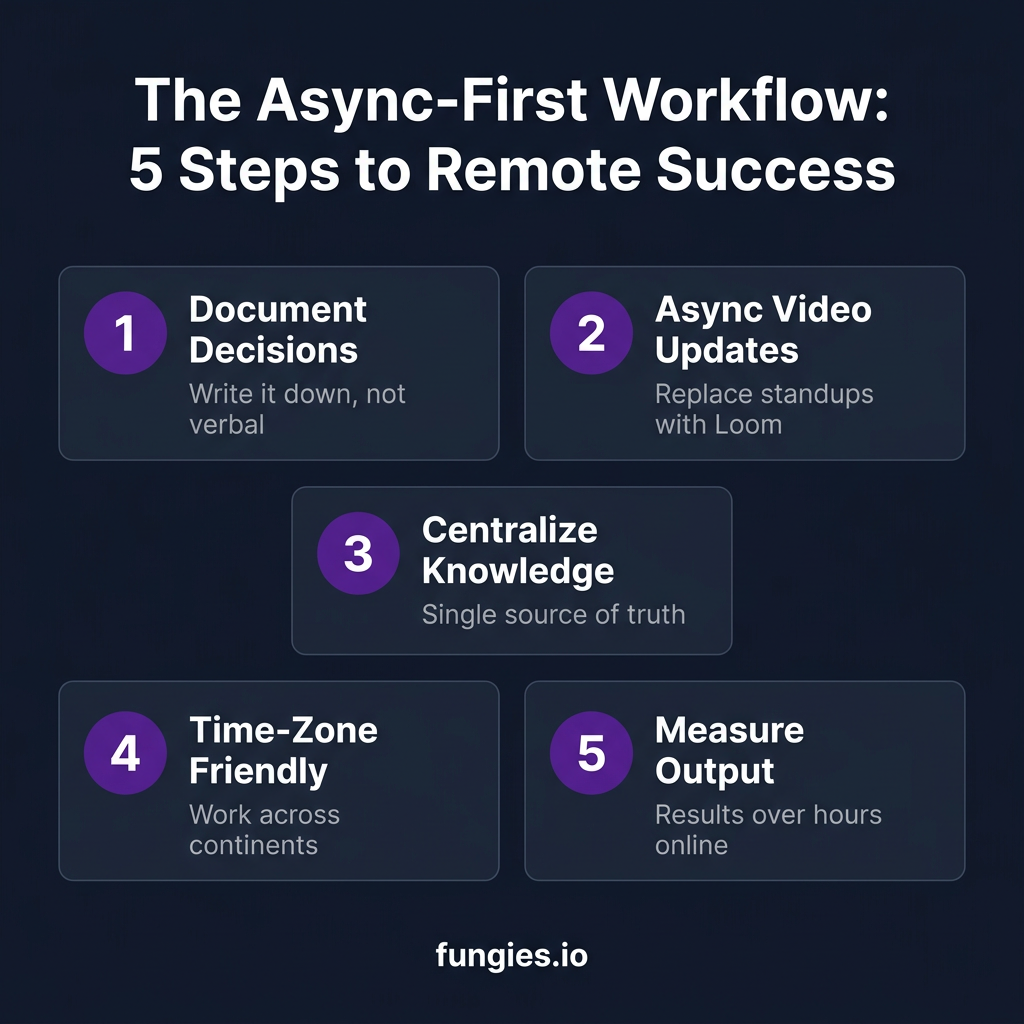
The highest-performing remote SaaS teams I’ve worked with share one trait: they’re async-first. This doesn’t mean no meetings. It means meetings are the exception, not the default.
Here’s the workflow:
- Document decisions in writing. Every significant decision lives in Notion or Confluence, with clear reasoning and next steps.
- Replace standups with Loom. 2-minute video updates beat 30-minute sync meetings.
- Use Slack for quick questions, not deep discussion. If a thread goes beyond 5 messages, move it to a doc or schedule a huddle.
- Measure output, not hours. Remote work succeeds when you focus on shipped code, closed deals, and published content—not who’s online at 9 AM.
FAQ: Remote Team Management Tools
What’s the best free remote team management tool?
For communication, Discord has the most generous free tier. For project management, ClickUp’s free plan includes features most competitors charge for. For documentation, Notion’s free tier works for small teams.
How many tools should a remote SaaS team use?
Most effective remote teams use 4-6 core tools: one for communication (Slack/Teams), one for knowledge (Notion/Confluence), one for project management (ClickUp/Asana), one for async video (Loom), and optionally one for video calls (Zoom/Around). More than that creates context-switching overhead.
Is Slack or Microsoft Teams better for SaaS?
If you’re already using Microsoft 365, Teams is the better choice for integration and pricing. If you use Google Workspace or a mix of tools, Slack’s integration ecosystem is superior. For external collaboration, Slack Connect is more mature than Teams’ guest access.
What’s the best tool for async communication?
For async text: Slack with threaded conversations. For async video: Loom for internal updates, Tella for polished external content. For async voice: Around for spontaneous conversations.
How do I reduce Zoom fatigue on my remote team?
Replace status meetings with Loom videos. Use Around for casual voice conversations instead of video calls. Implement “no-meeting Wednesdays.” Default to async written updates for anything that doesn’t require real-time discussion.
Conclusion: Build Your Remote Stack
The best remote team management tools for your SaaS company aren’t necessarily the ones on this list. They’re the ones your team actually uses. Start with one communication tool and one knowledge management tool. Add project management when tasks start falling through the cracks. Add async video when meetings consume your calendar.
Remember: tools don’t fix broken processes. But the right tools amplify good ones. Choose based on how your team works, not how you wish they worked. And don’t be afraid to switch—what works at 10 people often breaks at 50.
Ready to streamline your SaaS operations? Get started with Fungies for payments, tax compliance, and global sales—all in one platform that integrates with the tools your remote team already uses.
Sources
- Speakwise Remote Work Communication Statistics 2026: https://speakwiseapp.com/blog/remote-work-communication-statistics
- Buildin.AI Best Tools for Remote Teams 2026: https://buildin.ai/blog/best-tools-for-remote-teams
- Trackr Slack vs Teams vs Discord 2026: https://trytrackr.com/blog/slack-vs-teams-vs-discord-2026
- ValueAddVC Notion vs Confluence vs Coda 2026: https://valueaddvc.com/blog/notion-vs-confluence-vs-coda-knowledge-management-for-growing-startups
- TaskRhino Asana vs Monday vs ClickUp 2026: https://www.taskrhino.ca/blog/asana-vs-monday-vs-clickup
- ReWork Loom Alternatives 2026: https://resources.rework.com/tools/productivity/best-loom-alternatives