Here’s a sobering stat: 90% of users churn within the first week if they don’t experience clear value from your product. Not month. Week. And according to research across 500+ SaaS products, the average activation rate sits at just 36% — meaning most products lose nearly two-thirds of new users before they ever reach their “aha moment.”
I’ve spent years watching SaaS companies pour money into acquisition while ignoring the leaky bucket at the onboarding stage. It’s backwards. You wouldn’t fill a bathtub with the drain open, yet that’s exactly what happens when your onboarding experience consists of a product tour that users skip and a help center they’ll never find.
The good news? Products with interactive onboarding flows see 50% higher activation rates. And the right SaaS onboarding software can help you build those flows without pulling engineers off feature work.
In this guide, I’m breaking down the 10 best SaaS onboarding software tools for 2026. I’ve compared pricing, features, and real-world use cases so you can pick the tool that actually fits your team’s needs — not just the one with the biggest marketing budget.
What Is SaaS Onboarding Software?
SaaS onboarding software helps you guide new users to value without hand-holding every single signup. These tools create in-app experiences — product tours, tooltips, checklists, and interactive walkthroughs — that teach users how to get results from your product.
Think of it as a digital customer success manager that works 24/7. Instead of hoping users figure things out, you’re actively showing them the path to their first win.
Most onboarding tools work through a simple JavaScript snippet you add to your app. Once installed, non-technical team members can build and deploy onboarding flows using visual editors — no engineering required for updates.
Why Onboarding Software Matters More Than Ever
The data tells a clear story. According to SundaySky research, 60-70% of all SaaS churn happens in the first 90 days. And BetterCloud reports that only 34% of organizations have automated their user onboarding processes.
That’s a massive competitive advantage waiting to be claimed. Here’s what happens when you invest in proper onboarding:
- 50% higher activation rates with interactive flows vs. static documentation
- 25% increase in activation drives 34% more MRR over 12 months
- Role-based onboarding increases activation by 30-50%
- Best-in-class SaaS products deliver first value in 2-5 minutes
The math is simple. Better onboarding = higher activation = lower churn = more revenue. Every month you delay fixing onboarding is money walking out the door.
10 Best SaaS Onboarding Software Tools for 2026
I’ve evaluated these tools based on pricing transparency, ease of use, feature depth, and real customer feedback. Whether you’re a seed-stage startup or scaling toward enterprise, there’s an option here for your team.
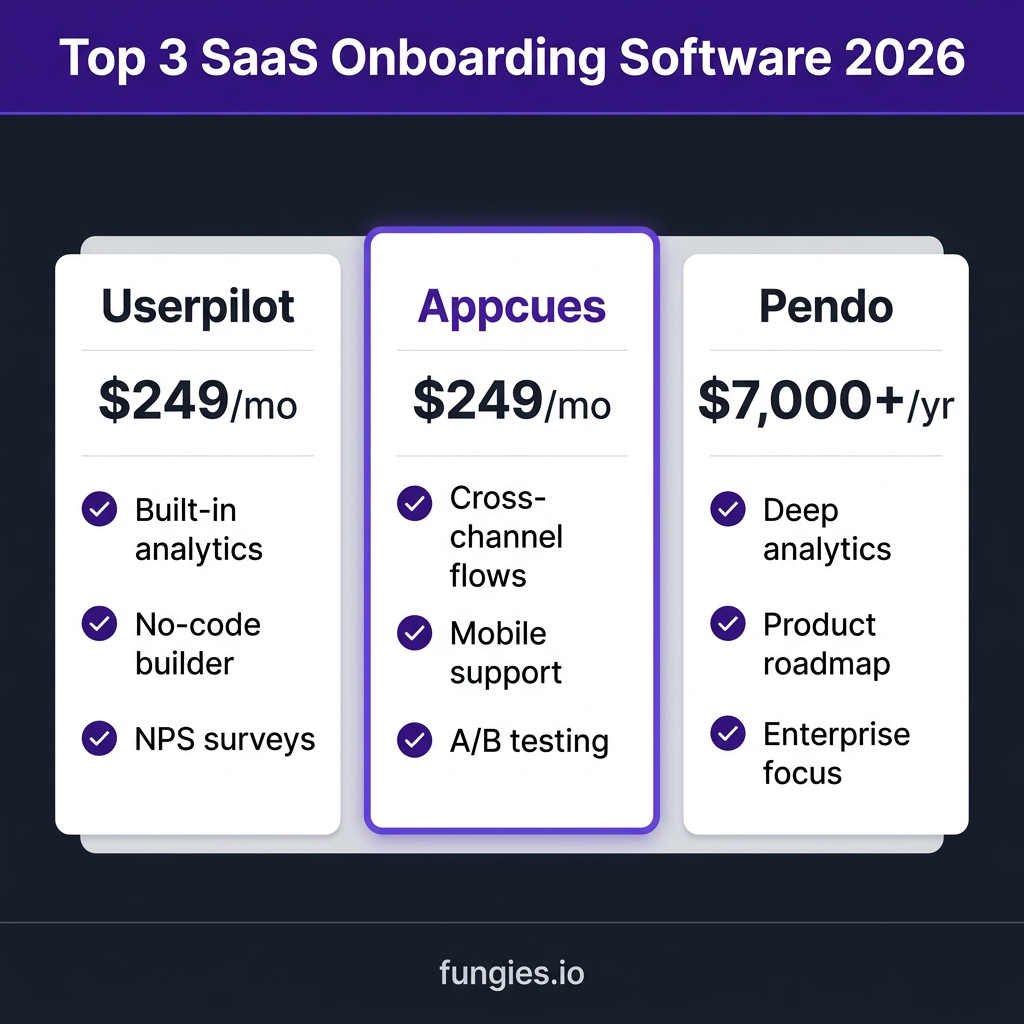
1. Userpilot — Best All-Round for Growth-Stage SaaS
Userpilot has become the go-to choice for product teams that need powerful onboarding without enterprise complexity. It combines in-app guidance, product analytics, and user feedback in one platform.
Key Features:
- No-code flow builder with 20+ UI patterns
- Built-in analytics: funnels, paths, retention, time-to-value
- Autocapture for clicks, forms, and inputs
- NPS and micro-surveys
- Resource center for self-service support
- Event-based triggers on all plans
Pricing: Starts at $249/month for up to 2,000 MAU. Growth plan at $749/month adds unlimited features and custom events. No hidden enterprise gates for core functionality.
Best for: SaaS teams from $10K to $1M ARR who want analytics and onboarding in one tool without engineering dependencies.
2. Appcues — Best for Cross-Channel Onboarding
Appcues was one of the first players in this space and remains a solid choice — especially if you need to coordinate in-app experiences with email and mobile. It’s the only tool on this list with native iOS and Android support.
Key Features:
- Cross-platform support (web, iOS, Android)
- Advanced behavioral targeting
- A/B testing for onboarding flows
- Lifecycle email integration
- Launchpads and checklists
- CSS customization for pixel-perfect styling
Pricing: Starts at $249/month billed annually. Enterprise plans with advanced targeting and mobile support typically run $750+/month. The mobile support justifies the premium if you have a native app.
Best for: Teams with mobile apps or those needing to coordinate onboarding across multiple touchpoints (in-app + email + mobile).
3. Pendo — Best for Product Analytics + Onboarding
Pendo is the heavyweight in this category. It’s built for product managers who need deep behavioral analytics alongside their onboarding tools. If you’re already using Amplitude or Mixpanel, Pendo might replace both your analytics and onboarding tools.
Key Features:
- Deep product analytics with path analysis
- In-app guides and walkthroughs
- Product roadmap and feedback management
- Session replay (on higher tiers)
- Robust segmentation and cohort analysis
- Enterprise-grade security and compliance
Pricing: Starts around $7,000/year for basic plans. Full-featured implementations typically run $20,000-$50,000+ annually. Pendo doesn’t publish pricing — you’ll need to talk to sales.
Best for: Enterprise teams or growth-stage companies that need product analytics and onboarding in one platform and have the budget to match.
4. Chameleon — Best for Design-Focused Teams
Chameleon excels when you need highly customized, on-brand onboarding experiences. It offers the most styling flexibility of any tool on this list — though that power comes with a steeper learning curve.
Key Features:
- Advanced CSS customization
- Microsurveys and NPS
- Tooltips, modals, and hotspots
- A/B testing (on higher plans)
- User segmentation
- Integrations with Segment, Amplitude, Mixpanel
Pricing: Startup plan at $279/month for 2,000 MTU. Growth plan jumps to $999/month. The pricing cliff is steep — you’ll pay $12,000-$18,000/year for advanced features.
Best for: Design-conscious teams with technical resources who need pixel-perfect control over onboarding styling.
5. UserGuiding — Best Budget Option
UserGuiding offers the core onboarding feature set at a fraction of the cost of competitors. If you’re pre-revenue or bootstrapped, this is where I’d start.
Key Features:
- Product tours and walkthroughs
- Onboarding checklists
- NPS surveys
- Resource centers
- Basic segmentation
- Multi-language support
Pricing: Starts at $89/month for 2,500 MAU. Higher tiers unlock more MAUs and features, but the entry point is significantly lower than competitors.
Best for: Early-stage startups and indie hackers who need solid onboarding without the premium price tag.
6. Whatfix — Best for Enterprise Training
Whatfix sits at the enterprise end of the spectrum. It’s designed for large organizations that need to onboard users across complex software ecosystems — think Salesforce, Workday, or SAP implementations.
Key Features:
- Enterprise-grade security (SOC 2, GDPR)
- Multi-app onboarding flows
- Task lists and guided workflows
- Content aggregation across tools
- Analytics and adoption insights
- SCORM-compliant training content
Pricing: Typically $24,000-$35,000/year. Whatfix is priced for enterprise budgets and the sales process reflects that.
Best for: Large enterprises with complex software stacks and dedicated change management teams.
7. WalkMe — Best for Digital Adoption at Scale
WalkMe pioneered the digital adoption platform category. It’s the most comprehensive solution on this list — and the most expensive. If you’re a Fortune 500 company, WalkMe is probably already on your radar.
Key Features:
- AI-powered automation
- Cross-application workflows
- Advanced analytics and insights
- Employee and customer onboarding
- Enterprise security and compliance
- Extensive integration library
Pricing: $50,000+/year. WalkMe is an enterprise investment, not a startup tool.
Best for: Large enterprises with 1,000+ employees and complex digital transformation initiatives.
8. Kompassify — Best UserGuiding Alternative
Kompassify emerged as a strong alternative to UserGuiding, offering similar features at competitive pricing. It’s particularly popular with European SaaS companies.
Key Features:
- No-code product tours
- Onboarding checklists
- NPS and surveys
- User segmentation
- Multi-language support
- Analytics dashboard
Pricing: Starts lower than UserGuiding with similar feature sets. Contact for exact pricing.
Best for: Budget-conscious teams who want UserGuiding’s feature set at a lower price point.
9. Jimo — Best for AI-Powered Onboarding
Jimo takes a different approach, using AI to provide live technical support alongside traditional onboarding flows. It’s like having a customer success agent embedded in your product.
Key Features:
- AI-powered in-app assistance
- Interactive product tours
- Live technical support integration
- Behavioral triggers
- Analytics and insights
- No-code builder
Pricing: Mid-tier pricing. Contact Jimo for current rates.
Best for: Technical products where users need hands-on guidance to get started.
10. GUIDEcx — Best for B2B Customer Onboarding
GUIDEcx focuses on a different problem: onboarding new B2B customers (not just end users). If you sell to businesses and have a formal implementation process, GUIDEcx manages those projects.
Key Features:
- Project-based onboarding workflows
- Customer collaboration tools
- Timeline and milestone tracking
- Automated reminders and notifications
- Integration with Salesforce and HubSpot
- Reporting and analytics
Pricing: Custom pricing based on project volume. Typically mid-market to enterprise.
Best for: B2B SaaS companies with formal customer implementation processes and dedicated onboarding teams.
SaaS Onboarding Software Comparison Table
| Tool | Starting Price | Best For | Mobile Support | Analytics |
|---|---|---|---|---|
| Userpilot | $249/mo | Growth-stage SaaS | No | Built-in |
| Appcues | $249/mo | Cross-channel onboarding | Yes | Good |
| Pendo | $7,000+/yr | Enterprise analytics | Yes | Advanced |
| Chameleon | $279/mo | Design customization | No | Good |
| UserGuiding | $89/mo | Budget-conscious startups | No | Basic |
| Whatfix | $24,000+/yr | Enterprise training | Yes | Advanced |
| WalkMe | $50,000+/yr | Fortune 500 | Yes | Advanced |
| Kompassify | Contact | Budget alternative | No | Basic |
| Jimo | Contact | AI-powered support | No | Good |
| GUIDEcx | Custom | B2B implementation | No | Good |
How to Choose the Right Onboarding Software
With 10 solid options, how do you pick? Here’s my decision framework:
1. Define Your Budget Reality
Be honest about what you can spend. If you’re pre-revenue, don’t look at Pendo or WalkMe. Start with UserGuiding or Kompassify and upgrade when you have revenue to justify it.
2. Assess Your Technical Resources
Some tools require CSS knowledge for full customization (Chameleon). Others are truly no-code (Userpilot, UserGuiding). If your product team doesn’t have frontend expertise, choose accordingly.
3. Consider Your User Base
All these tools price based on Monthly Active Users (MAU) or Monthly Tracked Users (MTU). Know your numbers before you evaluate. A tool that looks affordable at 1,000 users might break your budget at 10,000.
4. Match Features to Your Biggest Pain
Don’t buy features you won’t use. If you just need product tours, don’t pay for advanced analytics. If activation is your biggest problem, prioritize tools with strong analytics and A/B testing.
5. Plan for the Long Term
Onboarding software becomes deeply embedded in your product. Switching costs are high. Choose a tool that can grow with you — or be prepared to rip and replace in 12-18 months.
5 Steps to Implement Better Onboarding (Regardless of Tool)
The software is just the delivery mechanism. Here’s how to build onboarding that actually works:
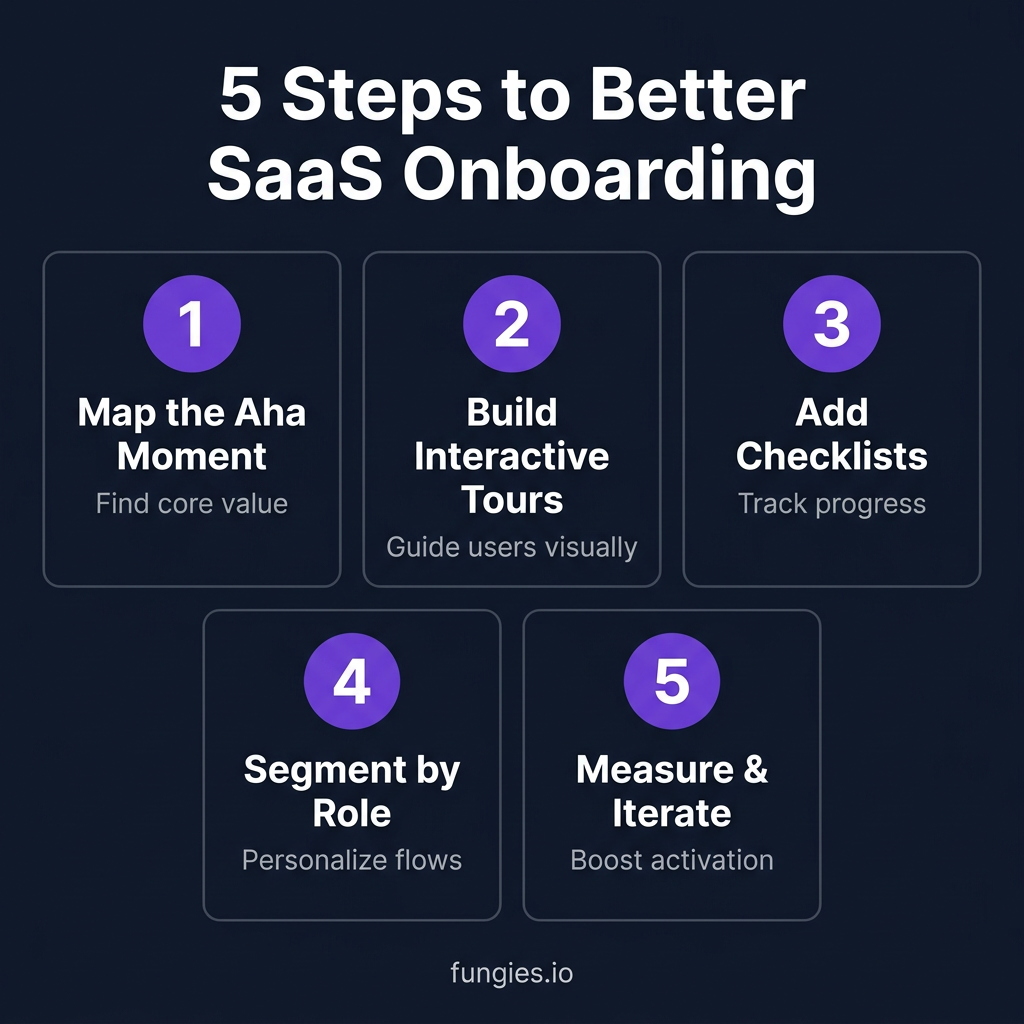
Step 1: Map the “Aha Moment”
What’s the first moment users experience real value? For Slack, it’s sending a message. For Zoom, it’s starting a meeting. Your entire onboarding flow should lead to this moment as quickly as possible.
Step 2: Build Interactive Tours
Static tooltips get ignored. Interactive walkthroughs that require users to take action see 47% higher completion rates. Make users click, not just read.
Step 3: Add Progress Checklists
People hate leaving things unfinished. Onboarding checklists leverage the Zeigarnik effect — the psychological tendency to remember uncompleted tasks better than completed ones.
Step 4: Segment by Role and Use Case
One-size-fits-all onboarding fails everyone. Role-based flows increase activation by 30-50%. Ask one question during signup and customize the experience accordingly.
Step 5: Measure and Iterate
Track activation rate, time-to-value, and onboarding completion. A/B test different flows. The best onboarding is never “done” — it’s continuously optimized.
FAQ: SaaS Onboarding Software
What’s the difference between onboarding software and a help center?
A help center is passive — users have to find it and search for answers. Onboarding software is active — it guides users through your product in real-time. Both have their place, but onboarding software addresses the 90% of users who will never visit your help center.
Can I build onboarding without dedicated software?
Technically yes — you can build custom tours with React or Vue libraries. But you’ll spend engineering time building and maintaining something that’s not your core product. For most teams, buying dedicated software is cheaper than building in-house.
How long should SaaS onboarding take?
Best-in-class products deliver first value in 2-5 minutes. The full onboarding flow should complete in 5-15 minutes. If users need longer than that to experience value, your product might be too complex or your onboarding might need restructuring.
What’s a good activation rate benchmark?
The average across SaaS is 36%, but that’s not a target — it’s a baseline. Top-quartile products see 60-70% activation rates. If you’re below 40%, onboarding should be your top priority.
Do I need onboarding software if I have a simple product?
Even simple products benefit from onboarding. The question is whether you need dedicated software or can get by with in-app tooltips and good UX. If you have more than 100 new signups per month, dedicated software usually pays for itself through reduced churn.
Conclusion: Fix Your Onboarding, Fix Your Growth
User onboarding isn’t a nice-to-have feature. It’s the difference between a product that grows through word-of-mouth and one that bleeds users as fast as it acquires them.
The tools in this guide can help you build onboarding that converts. But remember: software is just the delivery mechanism. The strategy — understanding your users’ aha moment, removing friction, and continuously optimizing — is what actually moves the needle.
Start with UserGuiding or Userpilot if you’re budget-conscious. Upgrade to Appcues if you need mobile support. Consider Pendo if you’re ready to consolidate analytics and onboarding. And if you’re selling to enterprises with complex implementations, look at GUIDEcx or Whatfix.
Whatever you choose, start now. Every day you delay is more users hitting your signup page, getting confused, and leaving forever. That’s revenue walking out the door.
Want to see what great onboarding looks like in practice? Create a free Fungies account and experience our onboarding flow firsthand. We’ve optimized it based on the same principles in this guide — and we’re always iterating.
Sources
- SundaySky SaaS Onboarding Research: sundaysky.com
- Artisan Strategies SaaS Churn Benchmarks: artisanstrategies.com
- Lenny Rachitsky & Yuriy Timen Activation Research: lennysnewsletter.com
- BetterCloud State of SaaS 2026: bettercloud.com
- Arcade Interactive Demo Research: arcade.software
- StriveCloud User Growth Experiments: strivecloud.io