92% of US developers now use AI coding tools daily. That’s not a projection—it’s the reality of software development in 2026. But here’s the paradox: while 41% of global code is AI-generated, 45% of that code contains OWASP Top-10 security vulnerabilities, and 63% of developers admit they’ve spent more time debugging AI-generated code than writing the original code themselves would have taken.
Welcome to the era of vibe coding—where natural language prompts replace manual coding, and developers “vibe” their way to working applications. The market for these tools hit $100 million in record time, but choosing the right one matters more than ever.
What Is Vibe Coding?
Vibe coding is an AI-assisted software development approach where you describe what you want in natural language, and AI generates the code. Instead of typing every line, you “vibe” with the AI—iterating through prompts until you get working software.
The approach splits into two categories:
- AI Code Editors (Cursor, Windsurf, Claude Code) — Deep IDE integration for professional developers
- AI App Builders (Bolt.new, Lovable, Replit) — Full-stack generation from conversation, often requiring zero coding knowledge
The Vibe Coding Paradox: Productivity vs. Quality
Here’s what the data reveals: 95% of developers report feeling productive while using vibe coding tools, yet measurably produce lower-quality code. AI-generated code has 1.7x more critical bugs than human-written code. The tools make you feel fast—but that speed can backfire when you’re debugging security vulnerabilities at 2 AM.
The solution isn’t avoiding vibe coding. It’s choosing the right tool for your specific use case and maintaining rigorous code review practices. Let’s break down the 10 best options available in 2026.

1. Cursor — The Developer’s Choice
Pricing: $20/mo Pro | $40/user/mo Business | $80/user/mo Enterprise
Cursor dominates the vibe coding landscape for professional developers. Released as a fork of VS Code with deep AI integration, it’s become the go-to tool for engineers who need serious codebase manipulation.
Key Features
- Composer: Multi-file editing from natural language prompts
- Codebase understanding: Indexes your entire project for context-aware suggestions
- 50+ language support: From Python to Rust to COBOL
- Git integration: AI-generated commit messages and PR descriptions
Pros & Cons
| Pros | Cons |
| Most mature IDE integration | Expensive at scale |
| Excellent for large codebases | Token limits on lower tiers |
| Fast, responsive UI | Bugbot add-on costs extra ($40/mo) |
Best for: Professional developers working on complex, production-grade applications.
2. Claude Code — The Fastest Growing
Pricing: $20/mo Pro | $100/mo Max 5x | $200/mo Max 20x | $30/user/mo Team
Claude Code went from zero to the #1 most-used AI coding tool in just eight months after its May 2025 release. That’s faster adoption than GitHub Copilot saw in its first three years. The reason? It lives in your terminal and actually understands your entire codebase.
Key Features
- Terminal-native: No IDE required—works in your existing terminal
- Agentic workflows: Plans multi-step tasks, executes them, verifies results
- Git automation: Handles commits, branches, and PRs via natural language
- Code explanation: “Explain this function” actually works
Pros & Cons
| Pros | Cons |
| Fastest-growing tool on the market | Terminal-only (no GUI IDE) |
| Excellent reasoning capabilities | Requires internet connection |
| Great for git workflows | Max plans get expensive |
Best for: Terminal-native developers who want agentic AI that can actually execute tasks.
3. Windsurf — The Best Value
Pricing: Free (25 credits/mo) | $15/mo Pro | $30/user/mo Teams | Custom Enterprise
Windsurf (formerly Codeium) offers the best bang for your buck in 2026. At $15/month—25% cheaper than Cursor—you get comparable features with a unique “Cascade” flow that chains AI actions together.
Key Features
- Cascade flow: AI plans and executes multi-step coding tasks
- Agent-based workflows: More autonomous than Copilot, less than Claude Code
- Codeium integration: Fast autocomplete powered by Codeium’s infrastructure
- Web-focused: Excellent for React, Vue, and modern frontend stacks
Best for: Frontend developers and teams on a budget who still want serious AI capabilities.
4. GitHub Copilot — The Safe Choice
Pricing: $10/mo Individual | $19/user/mo Business | $39/user/mo Enterprise
GitHub Copilot is the “nobody got fired for buying IBM” of AI coding tools. It’s not the most exciting option, but it works everywhere, integrates seamlessly with GitHub, and has the widest adoption.
Key Features
- Universal IDE support: VS Code, JetBrains, Vim, Neovim, Visual Studio
- Copilot Chat: Ask questions about your code in natural language
- PR summaries: Auto-generated pull request descriptions
- GitHub native: Deep integration with Actions, Issues, and Projects
Best for: Teams already invested in the GitHub ecosystem who want reliable, predictable AI assistance.
5. Bolt.new — The Speed Champion
Pricing: Free tier | Paid plans based on token usage
Want a working full-stack application in under 5 minutes? Bolt.new is your tool. StackBlitz’s browser-based IDE generates complete applications from prompts—including frontend, backend, database, and deployment.
Key Features
- Instant full-stack: Frontend + backend + database from one prompt
- Zero setup: Runs entirely in browser—no local installation
- One-click deploy: Push to production instantly
- Free tier: Generous free plan for experimentation
Watch out for: Token-based pricing means iterative development (rewriting files repeatedly) can get expensive fast.
Best for: Rapid prototyping, hackathons, and validating ideas before committing to full development.
6. Lovable — The Non-Developer’s Pick
Pricing: Free tier available | Paid plans vary by usage
Lovable is the vibe coding tool for people who don’t code. Describe what you want in conversation, and it builds full-stack applications—including authentication, databases, and payment processing.
Key Features
- Conversational UI: Chat-based interface—no coding knowledge required
- GitHub sync: Two-way sync with GitHub repositories
- Stripe integration: Built-in payment processing setup
- Editable code: Access to source code on all plans
Best for: Non-technical founders, marketers, and product managers who need working prototypes without engineering resources.
7. Replit — The Learning Platform
Pricing: Free | $7/mo Core | $20/mo Teams
Replit combines a browser-based IDE with AI coding assistance and instant deployment. It’s been the entry point for millions of new developers—and remains one of the best places to learn vibe coding.
Key Features
- All-in-one: Code, run, deploy, and host from one interface
- AI Ghostwriter: Built-in code generation and explanation
- Templates: Start from 50+ pre-built project templates
- Education focus: Built for learning and teaching
Best for: Beginners, students, and educators who want a complete development environment without setup friction.
8. v0 by Vercel — The UI Specialist
Pricing: Free tier | Pro with Vercel subscription
Vercel’s v0 generates React components and full UI layouts from text prompts. It’s not a full coding environment—it’s a specialized tool for frontend developers who want to move fast.
Key Features
- React/Next.js focus: Generates production-ready React components
- Tailwind integration: Uses Tailwind CSS for styling
- Vercel deployment: One-click deploy to Vercel hosting
- Component library: Save and reuse generated components
Best for: Frontend developers and designers building React applications who want to skip the boilerplate.
9. Augment Code — The Enterprise Beast
Pricing: $60/dev (with full platform)
Augment Code is built for teams working with massive codebases—think 400,000+ files. Its Context Engine maintains semantic understanding across your entire codebase, and its multi-agent orchestration coordinates multiple AI agents on complex tasks.
Key Features
- Context Engine: Understands semantics across 400K+ files
- Multi-agent orchestration: Coordinates specialized AI agents
- Enterprise security: SOC 2 compliance, on-premise options
- Code review: Built-in AI code review capabilities
Best for: Enterprise teams with massive monorepos who need AI that can handle scale.
10. Amazon Q Developer — The AWS Native
Pricing: Free tier | $19/mo Professional
Amazon Q Developer is deeply integrated with AWS services. If your infrastructure lives on AWS, Q can generate CloudFormation templates, debug Lambda functions, and optimize your cloud architecture.
Key Features
- AWS integration: Deep knowledge of AWS services and best practices
- Security scanning: Detects vulnerabilities in your code
- Infrastructure as code: Generates CloudFormation and Terraform
- Free tier: Generous free plan for individual developers
Best for: AWS-centric developers and teams building cloud-native applications.
Complete Comparison Table
| Tool | Best For | Starting Price | AI Model | Free Tier |
|---|---|---|---|---|
| Cursor | Pro Developers | $20/mo | Claude/Sonnet | Limited trial |
| Claude Code | Terminal Users | $20/mo | Sonnet 4.5 | No |
| Windsurf | Frontend Dev | $15/mo | Cascade Flow | 25 credits |
| GitHub Copilot | General Use | $10/mo | GPT-4 | 30-day trial |
| Bolt.new | Prototyping | Free | Full-stack | Yes |
| Lovable | Non-developers | Free tier | Conversational | Yes |
| Replit | Beginners | $7/mo | Ghostwriter | Yes |
| v0 by Vercel | UI/UX | Free | React focus | Yes |
| Augment Code | Enterprise | $60/dev | Context Engine | No |
| Amazon Q | AWS Users | Free | Cloud-native | Yes |
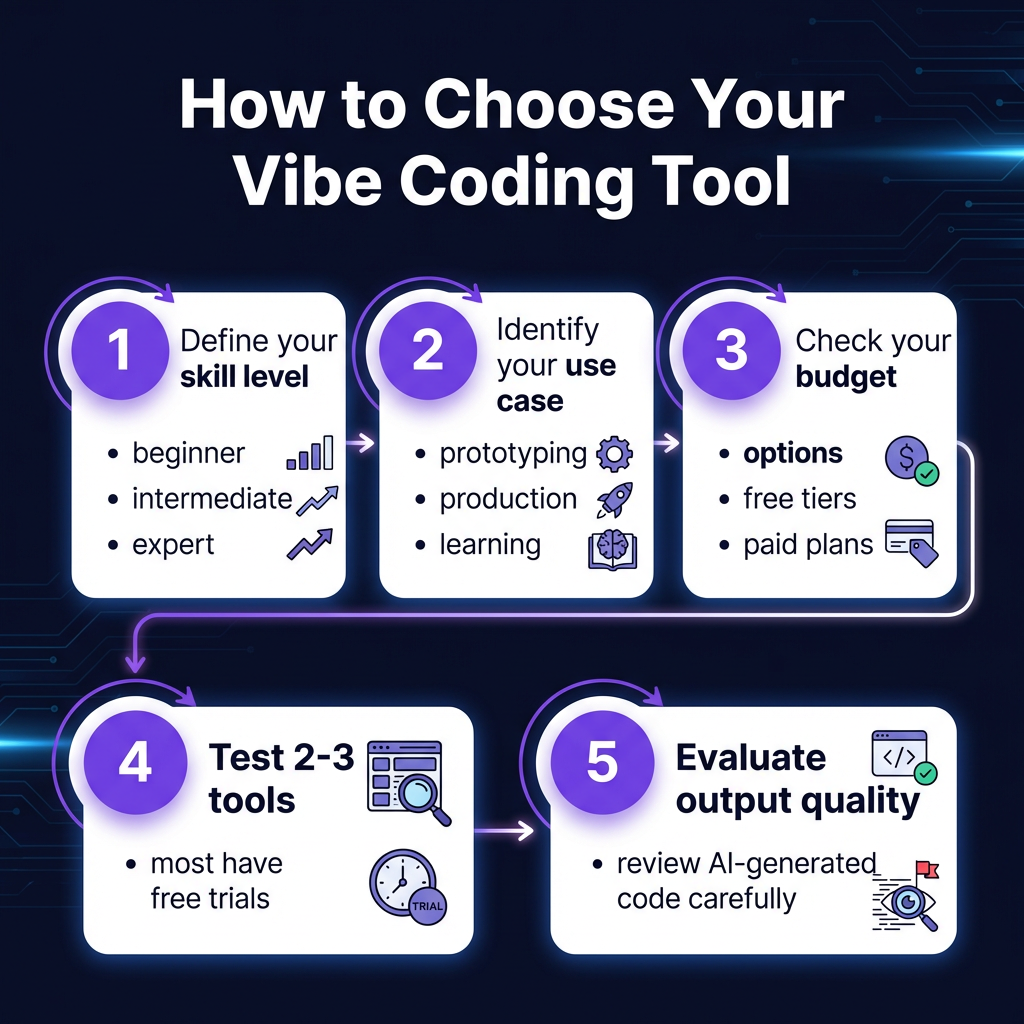
How to Choose the Right Vibe Coding Tool
With 10 solid options, how do you pick? Here’s a decision framework:
Step 1: Define Your Skill Level
- Beginner: Start with Replit or Lovable
- Intermediate: Try Windsurf or GitHub Copilot
- Expert: Go with Cursor or Claude Code
Step 2: Identify Your Use Case
- Rapid prototyping: Bolt.new or Lovable
- Production development: Cursor or Claude Code
- Learning/education: Replit
- Enterprise scale: Augment Code
Step 3: Check Your Budget
- Free: Amazon Q, Bolt.new, v0, Lovable (tiers)
- Under $20/mo: GitHub Copilot, Replit, Windsurf
- Premium ($20-60): Cursor, Claude Code, Augment Code
Step 4: Test Before Committing
Most tools offer free trials. Test 2-3 options with a real project before committing. Pay attention to:
- Code quality of AI-generated output
- Speed and responsiveness
- Integration with your existing workflow
- How often you need to correct the AI
Key Takeaways
- Cursor is the best all-around choice for professional developers
- Claude Code leads in growth and terminal-native workflows
- Windsurf offers the best value at $15/mo
- Free tiers from Amazon Q, Bolt.new, and v0 let you experiment risk-free
- Always review AI-generated code—45% contains security vulnerabilities
- The right tool depends on your skill level, use case, and budget—not just hype
FAQ
What exactly is vibe coding?
Vibe coding is an AI-assisted development approach where you describe what you want in natural language, and AI generates the code. You iterate through prompts rather than typing every line manually.
Will vibe coding replace developers?
No. While 41% of code is AI-generated, developers are shifting to architecture, debugging, and code review. AI handles syntax; humans handle strategy and quality control.
Is AI-generated code secure?
Often not. 45% of AI-generated code contains OWASP Top-10 vulnerabilities. Always review AI output, run security scans, and never deploy unchecked AI code to production.
What’s the cheapest vibe coding tool?
Amazon Q Developer, Bolt.new, v0 by Vercel, and Lovable all offer generous free tiers. For paid tools, Replit Core at $7/mo is the most affordable.
Which tool is best for beginners?
Replit is designed for learning. Lovable works well for non-coders. Both offer intuitive interfaces and don’t require deep technical knowledge to get started.
Conclusion
Vibe coding isn’t a fad—it’s how software gets built in 2026. With 92% of developers using AI tools daily, the question isn’t whether to adopt vibe coding, but which tool fits your workflow.
Choose Cursor or Claude Code for serious production work. Try Windsurf for value. Experiment with Bolt.new or Lovable for quick prototypes. And whatever you choose, remember: AI writes the code, but you’re still responsible for what ships.
Building a SaaS and need to handle payments, taxes, and compliance? Get started with Fungies.io—the merchant of record platform that lets you focus on coding while we handle the financial complexity.
References
- Daily.dev – Vibe Coding in 2026
- Hashnode – State of Vibe Coding 2026
- Pragmatic Engineer – AI Tooling for Software Engineers 2026
- Panto – Vibe Coding Statistics 2026
- Appwrite – Comparing Vibe Coding Tools
- Tech.co – Best Vibe Coding Platforms 2026
\n