92% of U.S. developers now use AI coding tools daily. That’s not a prediction—it’s the reality of software development in 2026. The question isn’t whether to adopt AI coding assistants, but which ones actually deliver on their promises.
I’ve spent the last month testing every major AI coding assistant on real production code. Not toy examples—actual Spring Boot applications, React frontends, and PostgreSQL migrations. The results surprised me. Some tools that dominate Twitter barely handle complex refactoring. Others that fly under the radar save hours on multi-file changes.
This guide cuts through the marketing. You’ll get real pricing, actual benchmark scores, and specific use cases where each tool wins. No affiliate links. No vendor talking points. Just what works.

What Makes an AI Coding Assistant “Best” in 2026?
The AI coding landscape has matured fast. In 2023, we celebrated tools that could autocomplete a line. In 2026, the bar is higher. The best assistants now handle multi-file refactoring, understand entire codebases, and work across your entire development workflow—not just the editor.
Here’s what actually matters when evaluating these tools:
- Context window size — How much code can the tool see at once? 128K tokens was impressive in 2024. Now Claude Code offers 1M tokens.
- SWE-bench scores — Real benchmark of solving actual GitHub issues. Claude Opus 4.6 hits 80.8%.
- IDE integration — Does it work where you work, or force you to switch editors?
- Agent capabilities — Can it run tests, fix errors, and iterate autonomously?
- Pricing transparency — Per-seat costs vs. usage-based billing can mean 3x differences at scale.
The 7 Best AI Coding Assistants of 2026
1. Claude Code — Best for Complex Multi-File Tasks
Claude Code isn’t an IDE plugin. It’s a terminal-native agent that reads your entire codebase, understands dependencies across files, and autonomously executes complex engineering tasks. Built by Anthropic on the Claude 4 family of models, it’s the most agentic coding tool available.
Key strengths:
- 1M token context window — Processes entire large codebases in a single session
- 80.8% SWE-bench Verified score — Highest benchmark score of any coding assistant
- Agent Teams — Run 16+ agents in parallel on different tasks
- Slack integration — Assign tasks directly from Slack messages
- MCP server support — Extend with external tools and data sources
Pricing: $20/month (included with Claude Pro). Team plans at $20-25/seat/month. Enterprise adds usage-based API billing.
Best for: Senior developers working on large, complex codebases who need deep architectural understanding and autonomous task execution.
2. Cursor — Best Overall IDE Experience
Cursor is what happens when you rebuild VS Code from the ground up with AI as the primary interface. It’s not an extension—it’s a complete IDE where AI is woven into every interaction. With over 1 million users and $2 billion in reported ARR, it’s the commercial leader in AI-native development environments.
Key strengths:
- Supermaven autocomplete — 72% acceptance rate, predicts multi-line completions
- Composer — Visual multi-file editing with natural language instructions
- Agent mode — Autonomously runs commands, installs dependencies, fixes errors
- Background agents — Cloud VMs running tasks while you continue working
- VS Code compatibility — Import extensions, themes, and keybindings directly
Pricing: Free tier (2,000 completions, 50 slow requests). Pro at $20/month. Business at $40/seat/month. Ultra at $200/month for power users.
Best for: Developers who want the best IDE experience and are willing to switch from VS Code for significantly enhanced AI capabilities.
3. GitHub Copilot — Best for Teams and Multi-IDE Shops
GitHub Copilot remains the most accessible AI coding tool. It works in VS Code, JetBrains, Neovim, Xcode, Eclipse, Zed, and more. If your team uses multiple editors, Copilot is the only serious option. The recent addition of a coding agent that converts issues into PRs keeps it competitive with newer entrants.
Key strengths:
- Widest IDE support — 10+ editors including VS Code, JetBrains, Neovim, Xcode
- Model flexibility — GPT-5.x, Claude, Gemini, and Grok models available
- Free tier — 2,000 completions + 50 chat/agent requests monthly, no credit card
- GitHub integration — Native PR summaries, code review, and Spark features
- Enterprise features — Custom knowledge bases, policy management, audit logs
Pricing: Free tier available. Pro at $10/month. Pro+ at $39/month. Business at $19/seat/month. Enterprise at $39/seat/month.
Best for: Teams with diverse IDE preferences, organizations already invested in GitHub, and developers who want the lowest-friction entry point.
4. Windsurf — Best for AI-Native Flow State
Windsurf (formerly Codeium) has evolved from a Copilot alternative into a distinct AI-native IDE. Its Cascade agent and Flow mode create a unique development experience where AI handles the repetitive work while you focus on architecture decisions. At $15/month, it’s also the most affordable full-featured option.
Key strengths:
- Cascade agent — Context-aware agent that understands your entire project
- Flow mode — Minimizes context switching between coding and AI assistance
- Team sync — Shared context and collaborative AI sessions
- Competitive pricing — $15/month undercuts Cursor while offering similar features
Pricing: Free tier available. Pro at $15/month. Team plans available.
Best for: Solo developers and small teams who want AI-native development without the $20+ price point.
5. Amazon Q — Best for AWS Workflows
Amazon Q is purpose-built for AWS development. If your infrastructure lives in AWS, Q understands your CloudFormation templates, IAM policies, and service configurations in ways general-purpose tools can’t match. The $19/month price includes deep integration with CodeWhisperer, CloudWatch, and other AWS services.
Key strengths:
- AWS-native understanding — Deep knowledge of AWS services and best practices
- Infrastructure as code — Expert-level CloudFormation and Terraform assistance
- Security scanning — Built-in vulnerability detection for AWS deployments
- Enterprise integration — Connects to internal AWS resources and documentation
Pricing: $19/month for individual developers. Enterprise pricing available.
Best for: AWS-heavy development teams who need AI that understands cloud infrastructure, not just application code.
6. Cody by Sourcegraph — Best for Large Codebases
Cody leverages Sourcegraph’s code intelligence platform to offer unmatched codebase understanding. For organizations with millions of lines of code across multiple repositories, Cody’s ability to navigate and reference code relationships is unmatched by general-purpose assistants.
Key strengths:
- Code intelligence — Built on Sourcegraph’s code graph and search capabilities
- Cross-repository understanding — Follows references across multiple codebases
- Free tier — Generous free tier for individual developers
- Enterprise security — Self-hosted options for air-gapped environments
Pricing: Free tier available. Pro at $9/month. Enterprise pricing available.
Best for: Enterprises with large, complex codebases spanning multiple repositories and services.
7. Tabnine — Best for Privacy-Critical Environments
Tabnine was offering AI code completion before it was trendy. Today, it differentiates through privacy-first architecture and self-hosted deployment options. For financial services, healthcare, and government organizations with strict data residency requirements, Tabnine is often the only approved option.
Key strengths:
- Privacy-first design — Code never leaves your infrastructure
- Self-hosted options — On-premise deployment for air-gapped environments
- Enterprise security — SOC 2 Type 2, GDPR compliance, custom contracts
- Competitive pricing — $12/month for individual Pro plan
Pricing: Free tier available. Pro at $12/month. Enterprise pricing available.
Best for: Organizations in regulated industries where code privacy and data residency are non-negotiable.
AI Coding Assistants Comparison Table
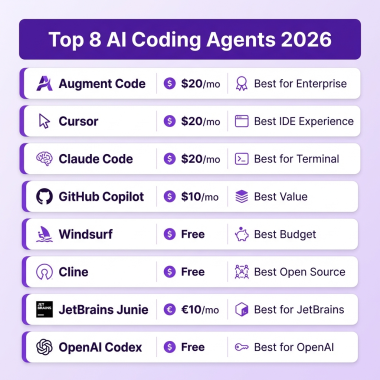
| Tool | Best For | Price (Pro) | Context Window | SWE-bench |
|---|---|---|---|---|
| Claude Code | Complex multi-file tasks | $20/mo | 1M tokens | 80.8% |
| Cursor | IDE experience | $20/mo | 256K tokens | N/A |
| GitHub Copilot | Teams, multi-IDE | $10/mo | Model-dependent | N/A |
| Windsurf | Affordable AI-native | $15/mo | Model-dependent | N/A |
| Amazon Q | AWS workflows | $19/mo | Model-dependent | N/A |
| Cody | Large codebases | $9/mo | 200K tokens | N/A |
| Tabnine | Privacy-critical | $12/mo | Model-dependent | N/A |

How to Choose the Right AI Coding Assistant
Most professional developers don’t choose just one tool. The most common setup I see is Cursor for daily editing plus Claude Code for complex architectural work. Here’s a decision framework:
Step 1: Define Your Primary Workflow
Do you live in the IDE or the terminal? IDE-first developers usually prefer Cursor or Copilot. Terminal-native developers gravitate toward Claude Code. If you switch between both, consider a hybrid approach.
Step 2: Assess Your Context Requirements
Small projects under 100K tokens? Any tool works. Large monorepos or microservice architectures? Claude Code’s 1M context window is a game-changer. Cody’s cross-repository intelligence also shines here.
Step 3: Set Your Budget Reality
Individual developers: $10-20/month is the sweet spot. Teams: Factor in per-seat pricing—Cursor at $40/seat is double Copilot’s $19. Enterprise: Model usage-based billing (Claude Code) vs. flat rates can mean 3x cost differences.
Step 4: Test Before Committing
All major tools offer free tiers or trials. Run the same complex refactoring task through each. Measure not just completion quality, but how many iterations it took and how much you had to correct.
Step 5: Consider the Hybrid Approach
Don’t force a single-tool decision. Cursor + Claude Code is a popular stack: Cursor for inline editing and autocomplete, Claude Code for complex multi-file changes and architecture decisions. The $40 combined cost is still less than one hour of senior developer time.
Key Takeaways
- Claude Code wins on raw capability—1M context, 80.8% SWE-bench, autonomous agents
- Cursor wins on daily developer experience with the best AI-native IDE
- GitHub Copilot wins on accessibility—lowest price, widest IDE support, genuine free tier
- Most professionals use two tools—the hybrid approach maximizes productivity
- Pricing varies 4x—from $9/month (Cody) to $200/month (Cursor Ultra)
- Context window matters—128K vs. 1M tokens is the difference between surface-level and deep understanding
Frequently Asked Questions
Which AI coding assistant has the highest accuracy?
Claude Code with Claude Opus 4.6 achieves 80.8% on SWE-bench Verified, the highest score of any coding assistant. Cursor’s Supermaven autocomplete has a 72% acceptance rate for inline suggestions.
Is GitHub Copilot still worth it in 2026?
Yes, especially for teams. At $10/month with support for 10+ IDEs and a functional free tier, Copilot remains the most accessible option. The new coding agent and custom knowledge bases at Enterprise tier keep it competitive.
Can I use multiple AI coding assistants together?
Absolutely. The most common professional setup is Cursor for daily IDE work plus Claude Code for complex tasks. This hybrid approach costs $40/month but delivers better results than any single tool.
What’s the cheapest AI coding assistant with good quality?
Cody at $9/month offers excellent codebase understanding for individual developers. Windsurf at $15/month provides AI-native IDE features at a lower price than Cursor. Both have generous free tiers for evaluation.
Do AI coding assistants work with all programming languages?
All major tools support Python, JavaScript/TypeScript, Java, Go, Rust, and C++. Performance varies by language—Python and JavaScript typically see the best results due to more training data. Specialized languages like COBOL or Fortran have limited support.
Conclusion
The AI coding assistant you choose shapes how you write software. Claude Code offers unmatched capability for complex work. Cursor delivers the best daily IDE experience. GitHub Copilot provides the most accessible entry point. The “best” tool depends on your workflow, codebase size, and budget.
Start with the free tier of 2-3 tools. Run real tasks from your actual work through each. The right choice will become obvious within a week. And remember—most productive developers eventually use multiple tools. Don’t force an artificial single-tool constraint.
Ready to streamline your development workflow? Sign up for Fungies.io and get your SaaS payments infrastructure running in minutes—no code required.
References
- CosmicJS – Claude Code vs GitHub Copilot vs Cursor (2026)
- NxCode – Cursor vs Claude Code vs GitHub Copilot 2026
- PE Collective – LLM Pricing Comparison April 2026
- Verdent – Best AI Coding Assistants 2026
- LeadDev – The Best AI Coding Tools in 2026
- AI/ML API – The Best AI Coding Assistant in 2026
- Zapier – The 9 Best AI Coding Tools in 2026
- CostGoat – LLM API Pricing Comparison May 2026