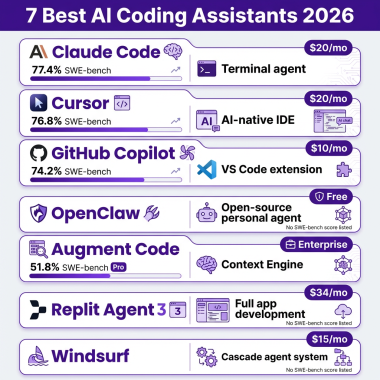
Here’s a stat that should wake you up: 85% of developers now use AI coding tools regularly, according to JetBrains’ 2025 Developer Ecosystem Survey. That’s not early adopters anymore—that’s the mainstream. And if you’re still writing every line of code manually, you’re now in the minority.
But here’s the problem: picking the wrong AI coding agent can cost you more than just money. It can slow you down, introduce bugs, and frustrate your team. With three dominant players—Claude Code, Cursor, and GitHub Copilot—each taking a fundamentally different approach, the choice isn’t obvious.
I’ve spent weeks analyzing real user data, pricing structures, and feature sets. This guide breaks down exactly how these three tools compare, who each one is best for, and what it’ll actually cost you.
What Are AI Coding Agents? (And Why They Matter in 2026)
AI coding agents have evolved past simple autocomplete. Today’s tools can:
- Write entire functions from natural language descriptions
- Refactor multi-file codebases autonomously
- Debug errors by analyzing stack traces and logs
- Generate tests and documentation
- Execute terminal commands and manage dependencies
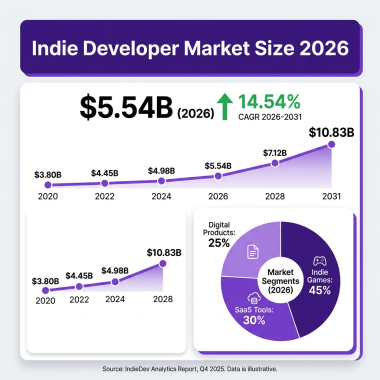
The market reflects this shift. The AI agents sector hit $10.9 billion in 2026 and is projected to reach $52.6 billion by 2030—a 46.3% compound annual growth rate.
For SaaS developers and software engineers, this isn’t about novelty. It’s about shipping faster without sacrificing code quality. The right tool becomes a force multiplier. The wrong one becomes an expensive distraction.
The Three Dominant AI Coding Agents
1. Claude Code — The Terminal-Native Powerhouse
What it is: A terminal-based AI coding agent from Anthropic that works directly in your command line.
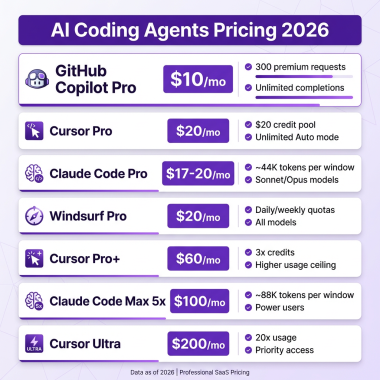
Pricing:
- Free tier: $5 credit on signup
- Pro: $20/month
- Max 5x: $100/month
- Max 20x: $200/month
- API: Pay-per-token ($3-25 per million tokens depending on model)
Key strengths:
- Exceptional multi-file reasoning across large codebases
- Deep refactoring capabilities
- Direct file system and terminal access
- Best-in-class code comprehension for complex architectures
Limitations:
- Terminal-only interface (no GUI)
- Limited to Anthropic’s Claude models
- Steeper learning curve for developers used to IDEs
- No native IDE integrations
Best for: Senior developers working on complex, multi-file refactoring tasks who prefer terminal workflows and need deep reasoning capabilities.
Real user insight: Power users report that the Max plan can save 93% compared to raw API costs for heavy usage. One developer instrumented their usage and found they saved significantly by switching from API billing to the Max subscription.
2. Cursor — The AI-Native IDE
What it is: A VS Code-compatible editor built from the ground up with AI at its core.
Pricing:
- Hobby: Free (limited)
- Pro: $20/month
- Business: $40/user/month
- Enterprise: Contact sales
Key strengths:
- Native AI integration throughout the editing experience
- Multi-model support (Claude, GPT, Gemini, DeepSeek)
- Familiar VS Code interface with PyCharm-style keybindings
- Advanced context awareness and codebase understanding
- Tab-based completions and inline suggestions
Limitations:
- Requires switching from your current IDE
- Usage-based credit pools can be confusing
- Business tier is 50-60% more expensive than GitHub Copilot Business
- Overages apply if you exceed monthly credit allowances
Best for: Developers who want the most integrated AI experience and are willing to switch to a new IDE for daily coding work.
Real user insight: Cursor’s August 2025 pricing uses a hybrid model with flat monthly fees plus usage credit pools pegged to model API pricing. This means costs can vary significantly based on which AI models you use and how heavily you use them.
3. GitHub Copilot — The Platform-Integrated Standard
What it is: An AI coding assistant that integrates as an extension across multiple IDEs, deeply connected to the GitHub ecosystem.
Pricing:
- Free: $0 (2,000 completions, 50 premium requests/month)
- Pro: $10/month
- Pro+: $39/month
- Business: $19/user/month
- Enterprise: $39/user/month
Key strengths:
- Widest IDE support (VS Code, JetBrains, Vim, Neovim)
- Deep GitHub integration (issues, PRs, Actions)
- Coding agent that turns issues into pull requests autonomously
- Largest market share (~42% among paid tools)
- Agent mode generally available on VS Code and JetBrains as of March 2026
Limitations:
- Less powerful for complex multi-file refactoring compared to Claude Code
- Premium request model can get expensive with advanced models
- Model multipliers (0.33x to 3x) complicate cost prediction
- Less flexible model selection than Cursor
Best for: Teams already using GitHub who want seamless workflow integration and developers who prefer staying in their existing IDE.
Real user insight: Copilot’s coding agent can work autonomously in the background—writing code, running tests, and opening PRs for review. This turns GitHub issues into completed pull requests with minimal human intervention.

Head-to-Head Comparison Table
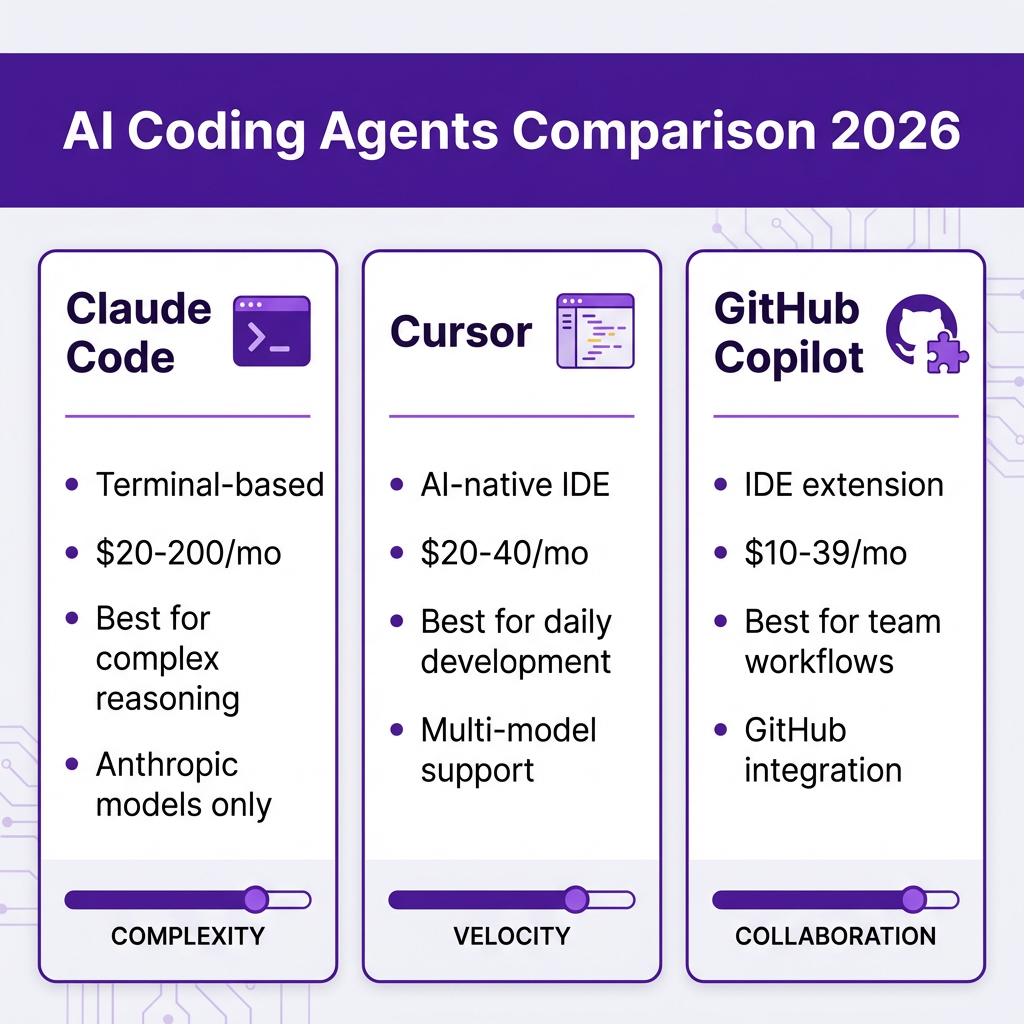
| Feature | Claude Code | Cursor | GitHub Copilot |
|---|---|---|---|
| Interface | Terminal | AI-native IDE | IDE extension |
| Starting Price | $20/month | $20/month | $10/month |
| Team Pricing | Team plans available | $40/user/month | $19/user/month |
| Model Support | Claude only | Multi-model | Limited selection |
| IDE Support | None (terminal) | Cursor only | VS Code, JetBrains, Vim |
| Best For | Complex reasoning | Daily development | Team workflows |
| GitHub Integration | Basic | Moderate | Deep native |
| Agent Mode | Full | Full | Full (March 2026) |
| Free Tier | $5 credit | Limited | 2,000 completions |
Pricing Deep Dive: What You’ll Actually Pay
Individual Developers
Light usage (hobby projects, occasional coding):
- GitHub Copilot Free: $0
- Claude Code API: ~$10-30/month
- Cursor Hobby: $0 (limited)
Regular usage (daily development):
- GitHub Copilot Pro: $10/month
- Claude Code Pro: $20/month
- Cursor Pro: $20/month
Heavy usage (professional development, complex tasks):
- Claude Code Max: $100-200/month
- Cursor Pro with overages: $30-60/month
- GitHub Copilot Pro+: $39/month
Teams (10+ developers)
Small teams (cost-conscious):
- GitHub Copilot Business: $19/user/month
- Cursor Business: $40/user/month
- Claude Code Team: Custom pricing
Enterprise (50+ developers):
- GitHub Copilot Enterprise: $39/user/month
- Cursor Enterprise: Contact sales
- Claude Code Enterprise: Contact sales
Negotiation insight: Vendr data shows that buyers evaluating both Cursor and GitHub Copilot often use Copilot’s pricing as a negotiation anchor, frequently achieving 20-30% discounts on Cursor Business tier by referencing competitive alternatives.
Real-World Performance: What Developers Report
Speed and Productivity
Developers report varying productivity gains depending on the tool and use case:
- GitHub Copilot: Best for accelerating routine coding tasks with inline suggestions
- Cursor: Fastest for context-aware multi-line completions and refactoring
- Claude Code: Most thorough for complex architectural changes across many files
Code Quality
A critical finding from 2026 research: AI coding assistants don’t automatically improve code quality. Without tests, code review discipline, and consistent patterns, AI can actually increase technical debt through subtle bugs and inconsistent implementations.
The tools that produce the best outcomes are the ones that fit your existing workflow:
- Teams with strong code review processes see better results with Copilot
- Individual developers who deeply understand their codebase get more from Claude Code
- Developers who embrace AI-native workflows thrive with Cursor
Security Considerations
All three tools raise similar security concerns:
- Code sent to cloud-based AI models
- Potential for AI-generated vulnerabilities
- Dependency on external services
Enterprise tiers of all three tools offer:
- Content exclusion policies
- Audit logs
- Custom model training on your codebase (Enterprise only)
The Hybrid Approach: What Experienced Developers Actually Do
Here’s something the marketing materials won’t tell you: the most experienced developers in 2026 aren’t choosing just one tool. They’re using a hybrid approach.
The common pattern:
- GitHub Copilot Pro ($10/month) for daily completions and routine coding
- Cursor or Claude Code for specific high-leverage tasks like complex refactoring
This gives you:
- Copilot’s seamless IDE integration for 80% of daily work
- Cursor’s AI-native power or Claude Code’s deep reasoning for the 20% that matters most
- Total cost around $30-40/month—less than many developers spend on coffee
When to use each:
- Copilot: Routine coding, boilerplate, GitHub workflow automation
- Cursor: Multi-file refactoring, architecture changes, AI-native development
- Claude Code: Complex reasoning tasks, terminal-based workflows, deep codebase analysis
Key Takeaways
- GitHub Copilot wins on value and integration. At $10/month for Pro and $19/month for Business, it’s the most affordable option with the deepest GitHub integration. Best for teams and developers who want AI assistance without changing their workflow.
- Cursor wins on AI-native experience. If you’re willing to switch IDEs, Cursor offers the most integrated AI coding experience with multi-model flexibility. The $20-40/month price point is justified for developers who prioritize AI capabilities.
- Claude Code wins on reasoning depth. For complex, multi-file tasks requiring deep understanding, Claude Code is unmatched. The $20-200/month range accommodates everyone from hobbyists to power users.
- The “best” tool depends on your workflow. Terminal users gravitate to Claude Code. IDE loyalists prefer Copilot. Developers ready to embrace AI-native workflows choose Cursor.
- Most professionals use two tools. The hybrid approach—Copilot for daily work plus Cursor or Claude Code for complex tasks—is increasingly common among experienced developers.
FAQ
Which AI coding agent is best for beginners?
GitHub Copilot is the most beginner-friendly. It integrates into familiar IDEs, has the lowest starting price ($10/month), and offers a genuinely useful free tier. The learning curve is minimal since it enhances your existing workflow rather than replacing it.
Can I use these tools for free?
Yes, all three offer free options:
- GitHub Copilot: 2,000 completions and 50 premium requests/month
- Claude Code: $5 credit on signup
- Cursor: Limited free tier with usage caps
For serious development, you’ll likely need to upgrade, but the free tiers are sufficient for evaluation.
Do these tools work with private codebases?
All three tools process code in the cloud, which raises privacy concerns. However:
- Enterprise tiers offer content exclusion policies
- Some tools allow local model deployment (limited)
- Audit logs and compliance certifications are available at higher tiers
For highly sensitive code, review each tool’s security documentation and consider enterprise plans with custom data handling.
Which tool has the best AI models?
This depends on your needs:
- Claude Code: Uses Anthropic’s Claude models exclusively—best for reasoning and analysis
- Cursor: Supports multiple models (Claude, GPT, Gemini, DeepSeek)—most flexible
- GitHub Copilot: Uses OpenAI models primarily with some Anthropic options—good balance
For coding specifically, Claude models generally score highest on reasoning benchmarks, while GPT models excel at code generation patterns.
Will AI coding agents replace developers?
No. Current data shows AI tools augment developers rather than replace them. The 85% adoption rate hasn’t reduced demand for software engineers—it’s increased productivity expectations. Developers who effectively use AI tools are more valuable, not less.
Conclusion
The AI coding agent landscape in 2026 offers three excellent but distinctly different options. GitHub Copilot provides the best value and integration for most developers. Cursor delivers the most advanced AI-native experience for those willing to switch tools. Claude Code offers unmatched reasoning capabilities for complex tasks.
The right choice isn’t about which tool is “best”—it’s about which tool fits your workflow, budget, and development style. And increasingly, the answer is: more than one.
If you’re building a SaaS product and need a payment solution that handles global tax compliance automatically, check out Fungies.io. Our Merchant of Record platform lets you focus on building great software while we handle the complexity of global payments, VAT, and sales tax.
References
- JetBrains 2025 Developer Ecosystem Survey – https://www.jetbrains.com/lp/devecosystem-2025/
- AI Coding Assistant Statistics 2026 – Uvik – https://uvik.net/blog/ai-coding-assistant-statistics/
- Claude Code Pricing 2026 – NxCode – https://www.nxcode.io/resources/news/claude-code-pricing-2026-free-api-costs-max-plan
- Cursor Pricing Guide 2026 – Vendr – https://www.vendr.com/marketplace/cursor
- GitHub Copilot Pricing 2026 – UserJot – https://userjot.com/blog/github-copilot-pricing-guide-2025
- AI Coding Tools Comparison 2026 – SitePoint – https://www.sitepoint.com/ai-coding-tools-comparison-2026/
- Claude Code vs Cursor vs Copilot – CosmicJS – https://www.cosmicjs.com/blog/claude-code-vs-github-copilot-vs-cursor-which-ai-coding-agent-should-you-use-2026
- AI Coding Agents 2026 Complete Comparison – LushBinary – https://lushbinary.com/blog/ai-coding-agents-comparison-cursor-windsurf-claude-copilot-kiro-2026/