42% of developers now use AI coding assistants daily. That’s not a projection—it’s the reality of software development in 2026. The tools that once felt like fancy autocomplete have evolved into autonomous agents that can plan, write, test, and deploy code from natural language commands.
But here’s the problem: most comparison articles treat these tools like they’re interchangeable. They’re not. Claude Code, Cursor, and GitHub Copilot represent three fundamentally different approaches to AI-assisted development. Pick the wrong one for your workflow, and you’ll waste hundreds of dollars and countless hours.
This guide breaks down exactly what each tool does, how much it actually costs, and—most importantly—which one fits your specific development needs.
What Are AI Coding Agents (And Why They Matter Now)
AI coding agents are autonomous development partners that go far beyond simple code completion. They can:
- Understand entire codebases across multiple files
- Execute terminal commands and run tests
- Debug complex issues by analyzing error logs
- Generate pull requests with detailed descriptions
- Refactor large sections of code while maintaining functionality
The shift from “AI-assisted” to “AI-agentic” coding happened fast. In February 2026, every major tool shipped multi-agent capabilities within the same two-week window. Grok Build launched with 8 parallel agents. Windsurf introduced 5-agent orchestration. Claude Code added Agent Teams. The race is on.
For SaaS developers and indie builders, this matters because your competitive advantage now depends on how effectively you leverage these tools. The developers who master agentic workflows ship faster, debug smarter, and spend more time on architecture and less on boilerplate.
Claude Code: The Terminal-Native Powerhouse
What It Is
Claude Code is Anthropic’s terminal-based AI coding agent. It lives in your command line, understands your entire codebase, and executes tasks through natural language commands. Unlike IDE plugins, Claude Code is a standalone agent that composes with Unix tools and handles complex automation workflows.
Key Features
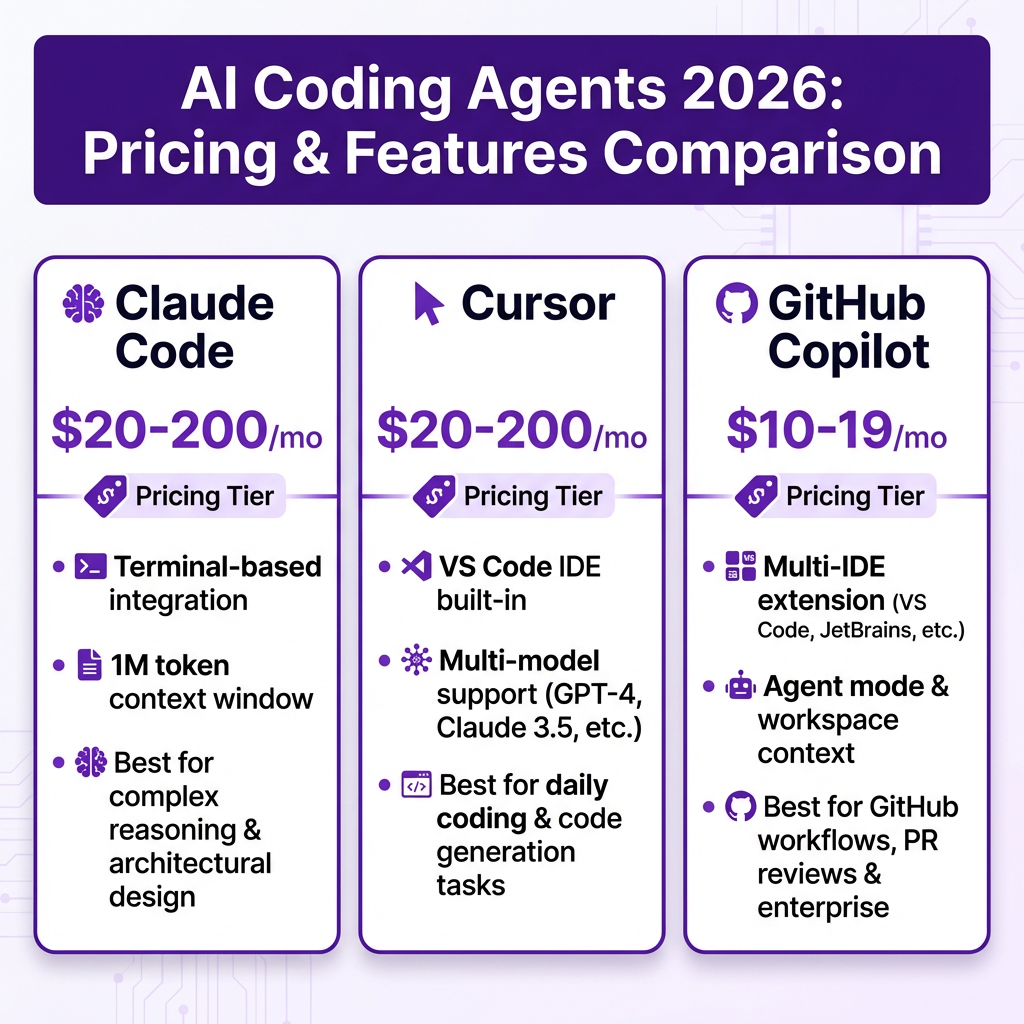
- 1M token context window—the largest available for any coding agent
- Agent Teams—multiple Claude agents working in parallel on complex tasks
- Deep codebase understanding—analyzes dependencies across entire repositories
- Git workflow integration—creates commits, branches, and pull requests
- Multi-file reasoning—excels at refactoring across dozens of files
Pricing (2026)
| Plan | Cost | Best For |
|---|---|---|
| Pro | $20/month | Individual developers, ~40-80 hours usage/week |
| Max (5x) | $100/month | Power users, 6.25x more usage than Pro |
| Max (20x) | $200/month | Teams doing heavy Opus-level reasoning |
| API | Pay-per-token | Custom integrations, automation workflows |
Real talk: Heavy Claude Code usage runs $150-200/month per developer when you’re using Opus models for complex tasks. The Pro plan is fine for light use, but serious development quickly bumps you to Max tiers.
Best Use Cases
- Complex debugging across 6-8+ files with unclear failure points
- Large-scale refactoring projects
- Codebase migration and modernization
- Architectural decisions requiring deep context understanding
- Automated CI/CD pipeline tasks
Cursor: The AI-Native IDE
What It Is
Cursor is a VS Code-compatible editor built from the ground up for AI-assisted development. It’s not a plugin—it’s a complete IDE where AI is woven into every keystroke. Cursor supports multiple LLMs including Claude, GPT-4o, Gemini, and its own proprietary Tab model trained specifically for code completion.
Key Features
- Tab model—proprietary code completion trained on millions of codebases
- Agent mode—autonomous multi-file editing with tool use
- Composer—AI pair programmer for complex tasks
- Cloud Agents—run agents in the cloud for long-running tasks
- @-mentions—reference files, documentation, and web content in prompts
Pricing (2026)
| Plan | Cost | Included Credits |
|---|---|---|
| Free | $0 | Limited completions, 2,000 chat tokens |
| Pro | $20/month | $20 credit pool for API calls |
| Ultra | $200/month | $200 credit pool, premium models |
| Teams | $40/user/month | Shared credits, admin controls |
| Enterprise | Custom | SSO, audit logs, dedicated support |
Cursor’s credit-based system means your actual cost depends on which models you use. Claude Opus requests burn through credits fast—up to $25 per million output tokens. GPT-4o is cheaper at $15 per million. The Auto model helps manage costs by selecting appropriate models automatically.
Best Use Cases
- Daily development and feature implementation
- Rapid prototyping and MVP building
- Learning new codebases with AI explanations
- Multi-file edits with real-time preview
- Teams wanting consistent IDE experience
GitHub Copilot: The Platform-Native Assistant
What It Is
GitHub Copilot is the most widely adopted AI coding tool, with approximately 42% market share among paid tools. It’s available as an extension for VS Code, JetBrains IDEs, Vim, Neovim, and Visual Studio. In 2026, Copilot evolved from autocomplete into a full agentic platform with Agent Mode, custom agents, and deep GitHub integration.
Key Features
- Agent Mode—autonomous task execution with terminal and file access
- Coding Agent—handles well-defined GitHub issues end-to-end
- Agent Skills—customizable workflows for specific tasks
- Copilot Chat—inline and sidebar conversational AI
- GitHub integration—seamless PR creation, code review, issue handling
Pricing (2026)
| Plan | Cost | Notes |
|---|---|---|
| Individual | $10/month | Full features, 1 developer |
| Business | $19/user/month | Team management, policy controls |
| Enterprise | $39/user/month | SSO, audit logs, IP indemnity |
Copilot is the budget-friendly option at roughly half the cost of Cursor or Claude Code. The trade-off? Less powerful agentic capabilities compared to Claude Code, and no native IDE like Cursor. But for teams already standardized on GitHub, the workflow integration is unmatched.
Best Use Cases
- Teams heavily invested in GitHub ecosystem
- Issue-to-PR automation
- Code review assistance
- Budget-conscious development teams
- Multi-IDE environments

Head-to-Head Comparison
| Feature | Claude Code | Cursor | GitHub Copilot |
|---|---|---|---|
| Starting Price | $20/month | $20/month | $10/month |
| Heavy Usage Cost | $150-200/month | $100-200/month | $10-39/month |
| Context Window | 1M tokens | 200K tokens | 128K tokens |
| Interface | Terminal | VS Code IDE | IDE Extension |
| Multi-file Editing | Excellent | Very Good | Good |
| Agent Capabilities | Advanced | Advanced | Intermediate |
| Model Options | Claude only | Multi-model | Multi-model |
| Best For | Complex reasoning | Daily coding | GitHub workflows |
How to Choose: The Decision Framework
Here’s the practical decision tree that most experienced developers follow:
Choose Claude Code If:
- You need to debug across 6-8+ files with unclear failure points
- You’re doing large-scale refactoring or codebase migration
- You prefer terminal-based workflows
- You need the largest context window available
- You’re comfortable with $150-200/month for heavy usage
Choose Cursor If:
- You want AI woven into every keystroke in a proper IDE
- You need multi-model flexibility (Claude, GPT, Gemini)
- You value real-time code completion (Tab model)
- You want Cloud Agents for long-running tasks
- You prefer visual interfaces over terminal
Choose GitHub Copilot If:
- Your team lives in GitHub
- You want the most cost-effective option
- You need multi-IDE support
- You want issue-to-PR automation
- You prefer gradual AI adoption
The Hybrid Approach (What Most Pros Actually Do)
Here’s a secret the comparison articles won’t tell you: most professional developers use more than one tool. The hybrid approach is becoming standard:
- GitHub Copilot Pro ($10/mo) for daily completions and quick edits
- Claude Code ($20-100/mo) for complex reasoning and multi-file tasks
- Cursor ($20/mo) for specific projects requiring deep IDE integration
This “tiered tool” strategy gives you Copilot’s ubiquity for everyday work while reserving Claude Code for the hard problems that justify its higher cost. Several large engineering organizations run exactly this setup.
Key Takeaways
- Claude Code wins for complex reasoning and large context tasks—terminal-native, most powerful agent
- Cursor wins for daily development experience—best IDE integration, multi-model support
- GitHub Copilot wins for platform integration and cost—best GitHub workflow, half the price
- Most professionals use a hybrid approach: Copilot for daily work + Claude Code for complex tasks
- Agentic AI is evolving fast—expect multi-agent collaboration to be standard by end of 2026
FAQ
Which AI coding agent is best for beginners?
GitHub Copilot is the most beginner-friendly. Its lower price point ($10/month), extensive documentation, and gradual learning curve make it ideal for developers just starting with AI assistance. Cursor is also accessible if you prefer a full IDE experience.
Can I use these tools for free?
Cursor offers a free tier with limited completions and chat tokens. Claude Code requires a paid subscription or API credits. GitHub Copilot offers free trials but no permanent free tier for individuals. Students and open-source maintainers may qualify for free access to Copilot.
Do these tools work with any programming language?
All three support major languages including Python, JavaScript/TypeScript, Java, C++, Go, and Rust. Claude Code excels with complex multi-file projects in any language. Cursor’s Tab model is particularly strong for web development. Copilot has the broadest language support due to its training data.
Is my code safe with these AI tools?
All three offer privacy controls. Cursor has a Privacy Mode that prevents code from being stored. Claude Code processes code on Anthropic’s servers with enterprise-grade security. GitHub Copilot offers enterprise features with IP indemnity and audit logs. Always review each provider’s data handling policies for sensitive codebases.
Will AI coding agents replace developers?
No. These tools augment developers, not replace them. The role is shifting from writing every line of code to orchestrating AI agents, reviewing their output, and focusing on architecture and business logic. Developers who master these tools will outperform those who don’t.
Conclusion
The AI coding agent you choose should match your workflow, not disrupt it. Claude Code is the power tool for complex tasks. Cursor is the daily driver for IDE-centric development. GitHub Copilot is the reliable workhorse for GitHub-centric teams.
Start with the tool that fits your immediate needs, but don’t be afraid to mix and match. The developers shipping the best software in 2026 aren’t locked into one tool—they’re orchestrating multiple agents to get the job done.
Ready to streamline your SaaS payments and checkout experience? Get started with Fungies.io—the merchant of record platform built for developers who ship fast.
References
- Morph LLM – We Tested 15 AI Coding Agents (2026)
- SitePoint – AI Coding Tools Comparison 2026
- SSD Nodes – Claude Code Pricing 2026
- Cursor Docs – Models & Pricing
- GitHub Copilot Features
- Cosmic JS – Claude Code vs GitHub Copilot vs Cursor
\n