Creating a professional website for your game is no longer optional—it’s essential for reaching players, building credibility, and driving sales. Whether you’re an indie developer launching your first title or an established studio expanding your digital presence, choosing the right game website maker can make or break your online success. In this comprehensive guide, we’ll explore the best tools available in 2026, compare their features and pricing, and show you exactly how to build a gaming website that converts visitors into players.
Why Every Game Developer Needs a Professional Website
According to recent industry data, 78% of gamers research a game online before making a purchase decision. Your game website serves as the central hub for your marketing efforts, providing a controlled environment where you can showcase trailers, share development updates, collect emails, and—most importantly—sell your game directly to players.
Unlike relying solely on Steam, App Store, or console marketplaces, having your own website gives you:
- Direct customer relationships: Own your player data and communication channels
- Higher profit margins: Avoid 30% platform fees by selling direct
- Marketing flexibility: Run promotions, bundle deals, and loyalty programs on your terms
- Brand control: Present your game exactly how you envision it
- Long-term asset: Build equity in your own platform, not someone else’s
Top 5 Game Website Makers Compared
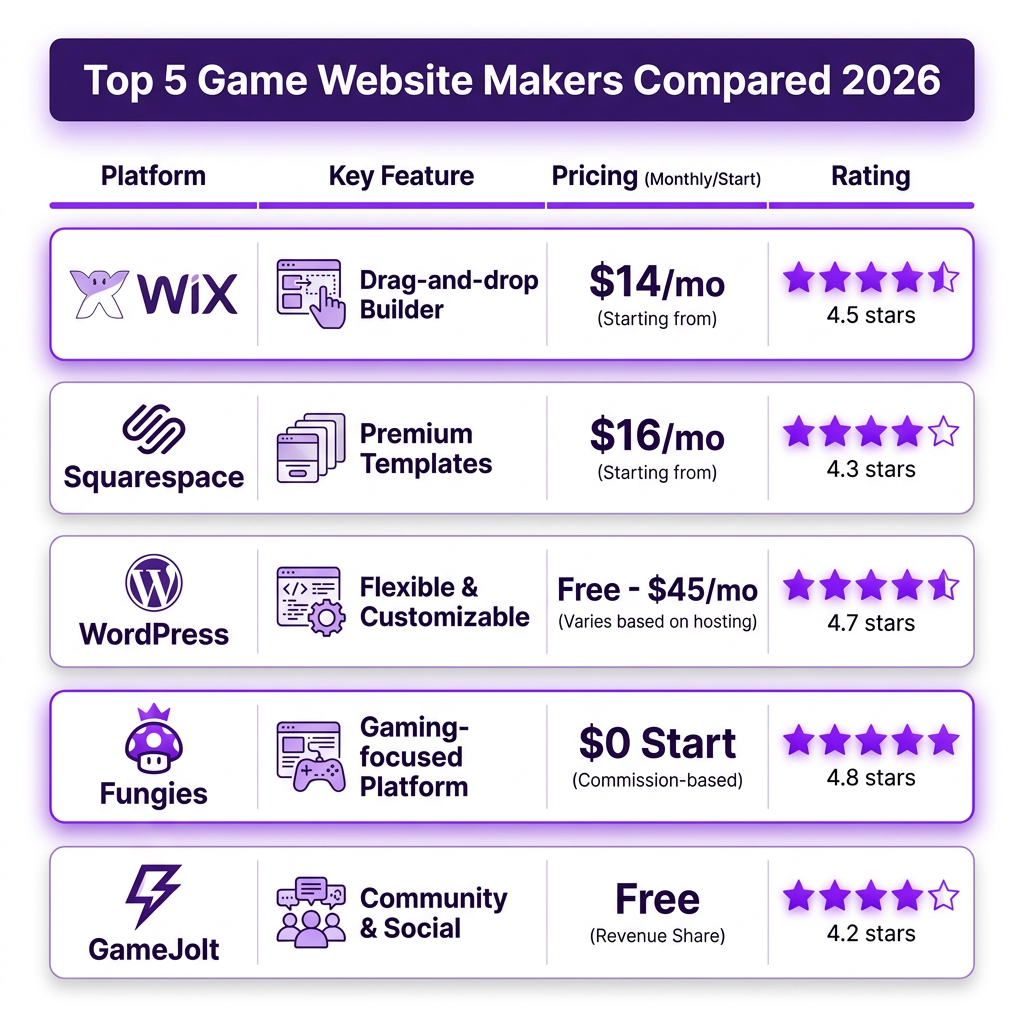
Not all website builders are created equal, especially when it comes to gaming-specific needs like screenshot galleries, video embedding, download management, and payment processing. We’ve analyzed the leading platforms to help you make an informed decision.
1. Fungies.io — Best for Indie Game Developers
Fungies stands out as the only platform built specifically for game developers. Unlike generic website builders, it comes pre-configured with gaming-specific features: automatic game key distribution, built-in payment processing with global tax compliance, webhook integrations for in-game purchases, and a no-code store builder designed for digital products.
Key Features:
- Merchant of Record handling (VAT, sales tax automatically calculated and remitted)
- 50+ payment methods including credit cards, PayPal, and regional options
- Instant game key generation and delivery
- Webhook API for integrating with game engines (Unity, Unreal, Godot)
- Built-in analytics and conversion tracking
- Zero upfront costs—pay only when you make sales
Pricing: Free to start, competitive transaction fees. No monthly subscription required.
2. WordPress + Gaming Themes — Most Flexible
WordPress powers over 40% of the web and offers unmatched flexibility through thousands of plugins and themes. For game developers, specialized gaming themes provide features like screenshot sliders, video lightboxes, and download counters. However, you’ll need to configure payment processing separately through plugins like WooCommerce or Easy Digital Downloads.
Key Features:
- Complete design control with custom themes
- SEO-friendly architecture out of the box
- Extensive plugin ecosystem for any functionality
- Self-hosted option for full data ownership
Pricing: Free software, but hosting costs $5-50/month. Premium themes $30-100. Payment processing plugins may have additional fees.
3. Wix — Easiest Drag-and-Drop Builder
Wix offers an intuitive visual editor that requires zero coding knowledge. Their gaming templates include pre-designed sections for trailers, character bios, and download buttons. The platform handles hosting, security, and basic SEO, letting you focus on content.
Key Features:
- Visual drag-and-drop editor
- Mobile-responsive templates
- Built-in video hosting and streaming
- App market for extended functionality
Pricing: $14-39/month. E-commerce features require Business plans starting at $23/month. Transaction fees apply.
4. Squarespace — Best Design Aesthetics
Squarespace is renowned for beautiful, professionally designed templates. Their gaming and entertainment templates emphasize visual storytelling—perfect for showcasing game art, cinematics, and atmospheric screenshots. The platform includes built-in blogging, email marketing, and basic e-commerce.
Key Features:
- Award-winning template designs
- Built-in image optimization and CDN
- Integrated email marketing tools
- 24/7 customer support
Pricing: $16-49/month. E-commerce features on Business plan ($23/month) and above. 3% transaction fee on Business plan.
5. GameJolt — Built-in Gaming Community
GameJolt combines website hosting with an established gaming community. Your game page appears both as a standalone site and within the GameJolt marketplace, giving you immediate access to millions of potential players. The platform supports both free and paid games with integrated analytics.
Key Features:
- Built-in gaming audience and discovery
- Devlogs and community engagement tools
- Support for browser games and downloads
- Revenue sharing model (no upfront costs)
Pricing: Free to publish. Revenue share model applies to sales.
How to Build Your Game Website: Step-by-Step
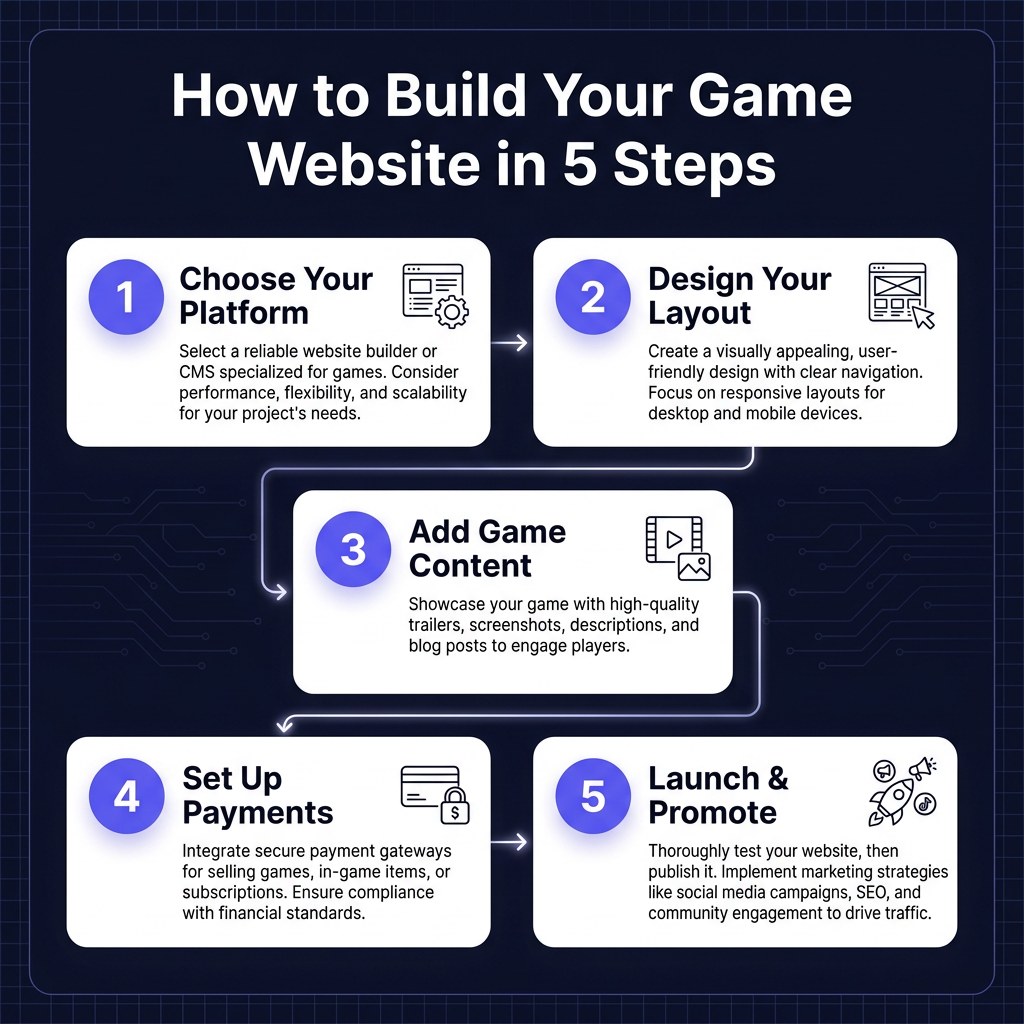
Now that you understand the options, let’s walk through the process of creating your game website from start to finish.
Step 1: Choose Your Platform
Based on your technical skills, budget, and specific needs, select the platform that best fits your situation. If you’re a solo indie developer focused on selling direct, Fungies offers the most streamlined path. If you want maximum design control and don’t mind the technical overhead, WordPress is the way to go.
Step 2: Design Your Layout
Every effective game website follows a proven structure:
- Hero Section: Eye-catching banner with your game’s key art and primary call-to-action
- Trailer/Gameplay: Prominent video showcasing your game in action
- Features: Bullet points highlighting what makes your game unique
- Screenshots: Gallery of high-quality images (aim for 6-12)
- Buy/Download: Clear, prominent purchase or download button
- Social Proof: Reviews, press quotes, or player testimonials
- Newsletter: Email signup for updates and launch notifications
Step 3: Add Your Game Content
Content is what converts visitors into players. Invest time in creating:
- A compelling game description that hooks readers in the first sentence
- High-resolution screenshots showing different aspects of gameplay
- A 60-90 second trailer that showcases your game’s best moments
- System requirements (minimum and recommended)
- Release date and platform availability
- Developer story or behind-the-scenes content
Step 4: Set Up Payments and Delivery
If you’re selling your game, configure your payment processing. This is where specialized platforms like Fungies shine—they handle the complexity of global payments, tax compliance, and automatic key delivery. For other platforms, you’ll need to integrate payment processors like Stripe or PayPal and configure digital download delivery.
Step 5: Launch and Promote
Before going live, test every element: purchase flow, download links, contact forms, and mobile responsiveness. Once live, promote your website through:
- Social media channels (Twitter, Reddit, Discord)
- Gaming forums and communities
- Influencer outreach
- Press releases to gaming media
- Email marketing to your subscriber list
Ready to Launch Your Game Website?
Fungies.io is the game website maker built specifically for indie developers. No coding required, automatic tax compliance, and global payment processing.
Start selling in minutes, no credit card required
Key Features to Look for in a Game Website Maker
When evaluating platforms, prioritize these gaming-specific features:
- Media handling: Support for high-resolution images, video embedding, and galleries
- Payment processing: Global coverage, multiple payment methods, and reasonable fees
- Tax compliance: Automatic VAT/sales tax calculation and remittance (critical for global sales)
- Download management: Secure file delivery, bandwidth handling, and version control
- Key generation: Automatic Steam/Console key delivery for hybrid distribution
- Analytics: Conversion tracking, traffic sources, and player behavior insights
- Marketing tools: Email capture, discount codes, affiliate programs
- SEO optimization: Clean URLs, meta tags, sitemaps, and fast loading speeds
FAQ: Game Website Makers
Do I need coding skills to create a game website?
No. Modern website builders like Fungies, Wix, and Squarespace offer no-code solutions where you can create a professional gaming website using visual editors and pre-built templates. However, coding knowledge (HTML/CSS) gives you more customization options on platforms like WordPress.
How much does it cost to build a game website?
Costs range from free (GameJolt, Fungies with no upfront fees) to $50+/month for premium hosting and features. Consider both upfront costs and transaction fees—platforms with monthly subscriptions may be cheaper for high-volume sellers, while revenue-share models work better for indie developers starting out.
Can I sell my game directly from my website?
Yes. Platforms like Fungies, WordPress with WooCommerce, and Squarespace enable direct sales. You’ll need payment processing (handled automatically by some platforms) and digital delivery for game files or keys. Direct sales typically yield higher margins than marketplace distribution.
What’s the best game website maker for beginners?
For absolute beginners, Wix offers the easiest learning curve with its drag-and-drop editor. For game developers specifically, Fungies provides the most streamlined experience with gaming-specific features pre-configured, eliminating the need to piece together multiple tools.
Do I still need a website if I’m selling on Steam?
Yes. Even with Steam distribution, your website serves as a marketing hub, captures emails for future games, and provides a direct sales channel (many successful indies use both). Your website also gives you control over your brand narrative and player relationships.
Conclusion: Choose the Right Tool for Your Game
The best game website maker depends on your specific situation. For indie developers prioritizing ease-of-use and gaming-specific features, Fungies offers the most targeted solution. WordPress provides unmatched flexibility for those comfortable with technical setup. Wix and Squarespace excel at general-purpose websites with gaming applications.
Whatever platform you choose, remember that your website is an investment in your game’s success. Take time to craft compelling content, optimize for conversions, and build direct relationships with your players. The effort you put into your website today will pay dividends throughout your game’s lifecycle and beyond.
Ready to build your game website? Start with a platform that understands the unique needs of game developers and handles the technical complexity so you can focus on what you do best—creating amazing games.
Ready to Launch Your Game Website?
Fungies.io is the game website maker built specifically for indie developers. No coding required, automatic tax compliance, and global payment processing.
Start selling in minutes, no credit card required