Building a gaming website in 2026 isn’t just about showing off your latest screenshots — it’s about creating a hub where players can discover, engage with, and purchase your games. Whether you’re an indie developer launching your first title or a studio looking to expand your digital presence, choosing the right gaming website builder can make or break your online success.
I’ve spent years helping game developers optimize their online presence, and I’ve seen firsthand how the wrong platform choice can lead to headaches down the road. In this guide, I’ll walk you through everything you need to know about gaming website builders — from key features to look for, to a detailed comparison of the top platforms available today.
Why Your Gaming Website Matters More Than Ever
The gaming industry is projected to reach $268 billion by 2026, with indie games capturing an increasingly larger slice of that pie. But here’s the thing: Steam, Epic Games Store, and other platforms take significant cuts from your sales. A dedicated gaming website gives you direct access to your audience, higher profit margins, and complete control over your brand.
Your website isn’t just a digital storefront — it’s your brand’s home base. It’s where you build your community, showcase your portfolio, sell merchandise, and most importantly, establish direct relationships with your players. When someone buys directly from your site, you own that customer relationship. That’s invaluable.
Key Features Every Gaming Website Builder Needs
Before diving into specific platforms, let’s talk about what separates a mediocre gaming website builder from a great one. Here are the non-negotiable features you should demand:
1. Game-Focused Templates
Generic business templates won’t cut it. You need layouts designed specifically for showcasing games — with hero sections for trailers, galleries for screenshots, and dedicated areas for system requirements and download links. The best builders offer gaming-specific themes that understand how players browse and buy.
2. E-commerce Integration
Selling games directly from your site requires robust e-commerce capabilities. Look for built-in payment processing, digital download management, and support for various pricing models (one-time purchases, subscriptions, early access). The checkout experience should be seamless — any friction means lost sales.
3. Media Handling
Gaming is a visual medium. Your builder needs to handle high-resolution screenshots, gameplay videos, and trailers without breaking a sweat. Fast loading times are crucial — players won’t wait around for a sluggish site. Look for platforms with CDN integration and automatic image optimization.
4. Community Features
The best gaming websites foster community. Comment sections, forums, Discord integration, and newsletter signup forms help you build a loyal player base. Some builders even offer membership functionality for exclusive content or beta access programs.
Top 5 Gaming Website Builders Compared
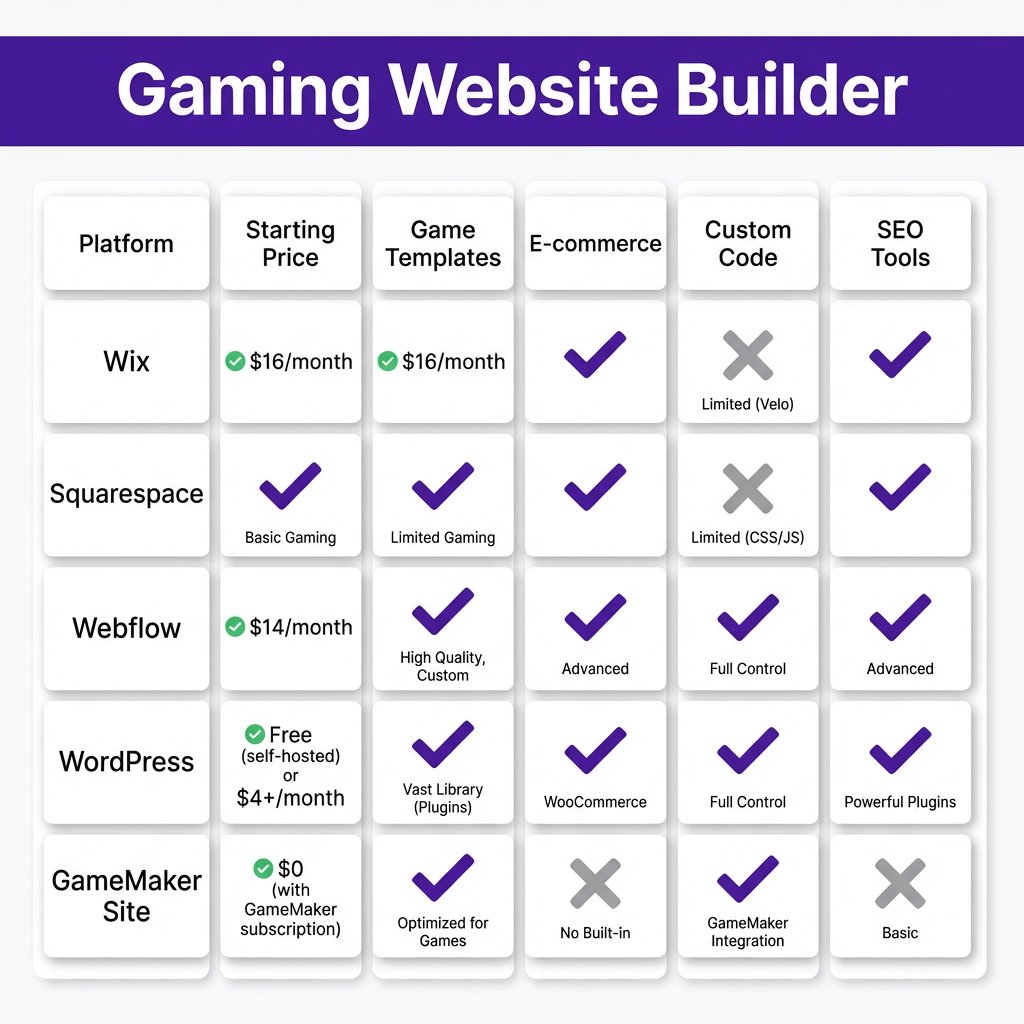
After testing dozens of platforms, these five stand out as the best options for game developers in 2026. Each has its strengths, and the right choice depends on your specific needs and technical comfort level.
Wix — Best for Beginners
Wix has come a long way from its early days as a simple drag-and-drop builder. Their gaming templates are surprisingly sophisticated, with built-in features for showcasing trailers and screenshots. The ADI (Artificial Design Intelligence) can generate a complete gaming site from a few simple questions.
Pricing starts at $14/month, but you’ll want the Business Basic plan ($23/month) for e-commerce functionality. The main drawback? You’re somewhat limited in customization compared to more advanced platforms. But if you want to get online quickly without touching code, Wix is hard to beat.
Squarespace — Best for Visual Design
Squarespace is renowned for its stunning templates, and their gaming-focused designs don’t disappoint. The platform excels at showcasing visual content — perfect for screenshot galleries and video embeds. Their e-commerce system is robust, with support for digital products out of the box.
Plans start at $16/month, with the Basic Commerce plan ($27/month) required for selling games. The learning curve is slightly steeper than Wix, but the results speak for themselves. If aesthetics are your priority, Squarespace delivers.
Webflow — Best for Customization
Webflow is the choice for developers who want pixel-perfect control without writing code. The visual editor lets you manipulate every element, and the CMS functionality is perfect for managing game portfolios. You can create truly unique gaming experiences that stand out from template-based sites.
The trade-off is complexity. Webflow has a steeper learning curve than Wix or Squarespace. Plans start at $14/month, with CMS functionality at $23/month and e-commerce at $42/month. If you’re willing to invest the time, the creative freedom is unmatched.
WordPress + Gaming Themes — Best for Flexibility
WordPress powers over 40% of the web for a reason. With gaming-specific themes like PlayerX, Youplay, or Godlike, you can create professional gaming sites with extensive functionality. The plugin ecosystem means you can add virtually any feature — from forums to complex e-commerce.
Hosting costs vary ($5-30/month), and premium themes run $30-80. The learning curve depends on your chosen theme and plugins. WordPress offers unmatched flexibility but requires more maintenance than hosted solutions. For developers comfortable with some technical management, it’s incredibly powerful.
GameMaker Site — Best for GameMaker Studio Users
If you’re already using GameMaker Studio, their Site builder offers seamless integration. You can embed playable demos directly on your pages, sync with your GameMaker account, and manage everything from one dashboard. It’s niche, but for GameMaker developers, it’s incredibly convenient.
The platform is free for basic use, with premium features available through GameMaker subscriptions. The template selection is limited compared to general-purpose builders, but the game-specific features make up for it if you’re in the GameMaker ecosystem.
How to Build Your Gaming Website: A 5-Step Process
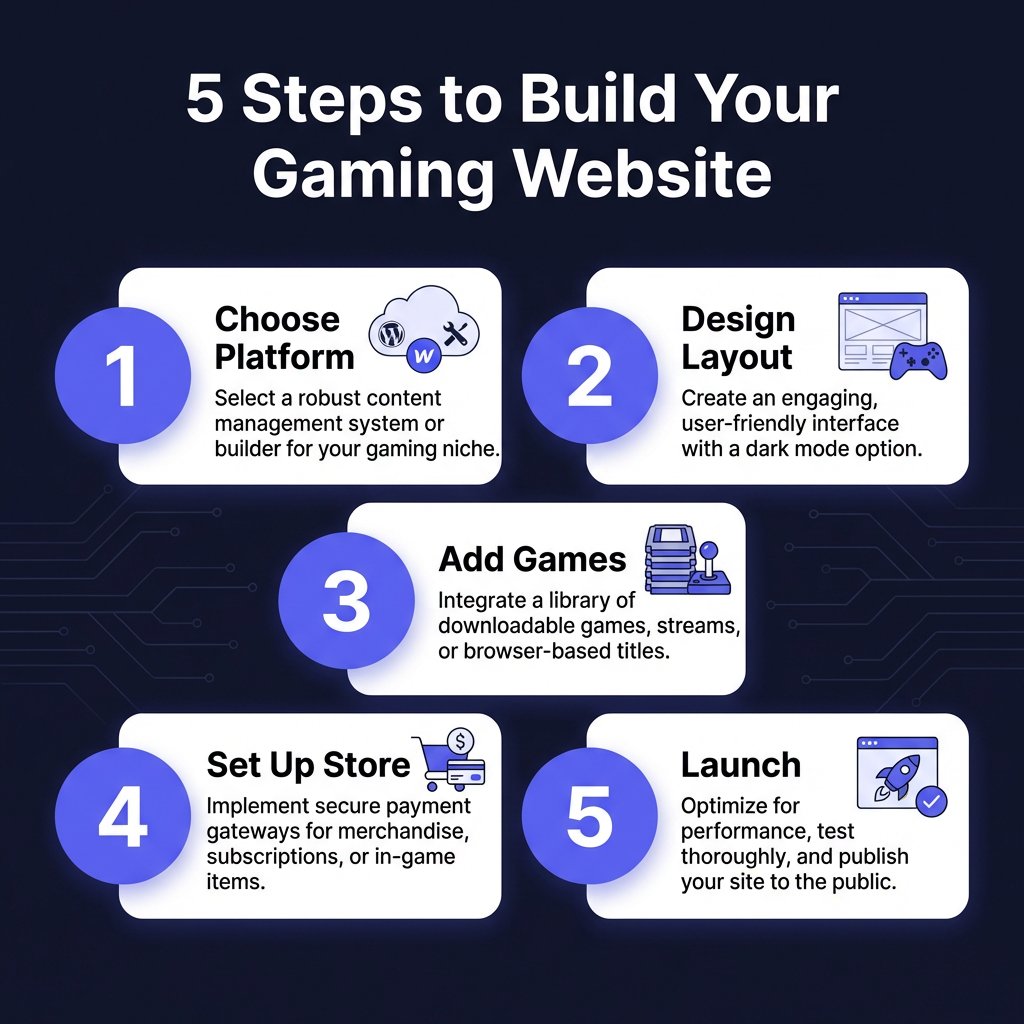
Now that you know your options, let’s walk through the actual process of building your gaming website. I’ve guided dozens of developers through this journey, and these five steps consistently lead to successful launches.
Step 1: Choose Your Platform
Based on the comparison above, select the builder that matches your technical skills and budget. Don’t overthink this — you can always migrate later if needed. The most important thing is getting started.
Step 2: Design Your Layout
Start with a template and customize it to match your brand. Focus on the user journey: visitors should immediately understand what games you offer, see compelling visuals, and find clear calls-to-action. Keep navigation simple — don’t make players hunt for information.
Step 3: Add Your Games
Create dedicated pages for each game with trailers, screenshots, descriptions, and system requirements. Use high-quality media — first impressions matter. Include player testimonials or reviews if available. Social proof significantly impacts purchase decisions.
Step 4: Set Up Your Store
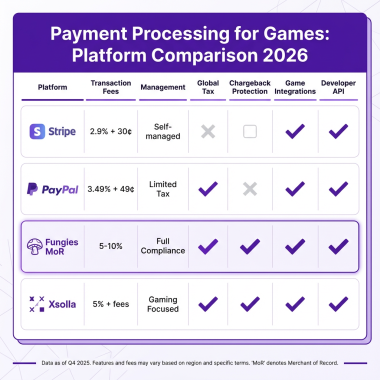
Configure your e-commerce system with proper payment processing. This is where many developers stumble — handling taxes, compliance, and payment methods across different regions is complex. Consider using a Merchant of Record service like Fungies.io to handle the heavy lifting.
Step 5: Launch and Iterate
Don’t wait for perfection. Launch with your core content and improve based on analytics and player feedback. Set up Google Analytics, monitor your conversion rates, and continuously optimize. The best gaming websites evolve with their audience.
Common Mistakes to Avoid
I’ve seen talented developers sabotage their websites with avoidable mistakes. Here are the big ones to watch out for:
Ignoring mobile optimization: Over 60% of gaming website traffic comes from mobile devices. If your site doesn’t work flawlessly on phones, you’re losing potential players.
Slow loading times: Gamers are impatient. If your site takes more than 3 seconds to load, bounce rates skyrocket. Optimize images, use a CDN, and choose a reliable host.
Complicated checkout processes: Every additional form field reduces conversions. Keep purchases simple — the fewer clicks to buy, the better.
Neglecting SEO: Your beautiful site is worthless if no one finds it. Use descriptive titles, optimize images, and create content that answers player questions.
Ready to Monetize Your Gaming Website?
Join hundreds of game developers using Fungies.io — automated tax compliance, 50+ payment methods, global Merchant of Record for your digital products.
No credit card required
Frequently Asked Questions
Do I need coding skills to build a gaming website?
No. Platforms like Wix and Squarespace let you build professional gaming websites without writing a single line of code. However, if you want advanced customization, some HTML/CSS knowledge helps.
How much does a gaming website cost?
Expect to spend $15-50 per month for a quality gaming website with e-commerce functionality. Domain registration ($10-15/year) and premium themes/plugins may add additional costs.
Can I sell games directly from my website?
Yes! All the platforms mentioned support direct game sales. You’ll need to handle payment processing and digital delivery. Services like Fungies.io can manage taxes, compliance, and payment methods globally.
What’s the best gaming website builder for beginners?
Wix is the most beginner-friendly option, with intuitive drag-and-drop editing and gaming-specific templates. Squarespace is a close second if you prioritize design aesthetics.
Should I use a free website builder for my games?
Free plans are fine for testing, but they typically don’t support custom domains or e-commerce. For a professional gaming business, invest in a paid plan. The credibility and features are worth it.
Conclusion: Your Gaming Website Awaits
Building a gaming website in 2026 is more accessible than ever. Whether you choose Wix for simplicity, Webflow for customization, or WordPress for flexibility, the tools are there. The key is taking action — your future players are waiting.
Remember, your website is an investment in your game’s success. Done right, it becomes a powerful asset that drives sales, builds community, and establishes your brand in the competitive gaming market. Start building today.