Creating a gaming website has never been more accessible. Whether you’re an indie developer showcasing your latest project, a streamer building your brand, or a gaming community leader looking for a central hub, a well-designed gaming website can be your gateway to success. In this comprehensive guide, we’ll walk you through exactly how to create a gaming website that stands out — from choosing the right platform to monetizing your content effectively.
Why Create a Gaming Website in 2026?
The gaming industry continues its explosive growth trajectory. With over 3.2 billion gamers worldwide and the global gaming market expected to exceed $200 billion by 2026, having your own gaming website puts you in control of your digital presence. Unlike relying solely on social media platforms or storefronts that can change their algorithms or policies overnight, your website is an asset you own completely.
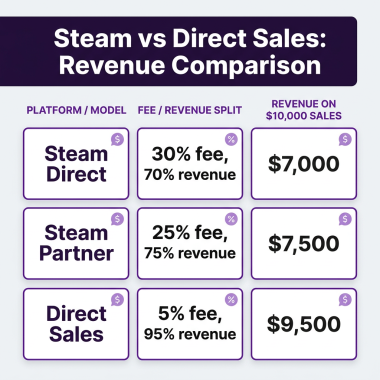
A gaming website serves multiple purposes: it’s your portfolio, your storefront, your community hub, and your brand headquarters all in one. For game developers, it’s where you can sell directly to players, bypassing the 30% cuts taken by major platforms. For content creators, it’s where you own your audience relationship. For communities, it’s where meaningful connections happen away from the noise of social feeds.
Step 1: Choose Your Gaming Website Platform
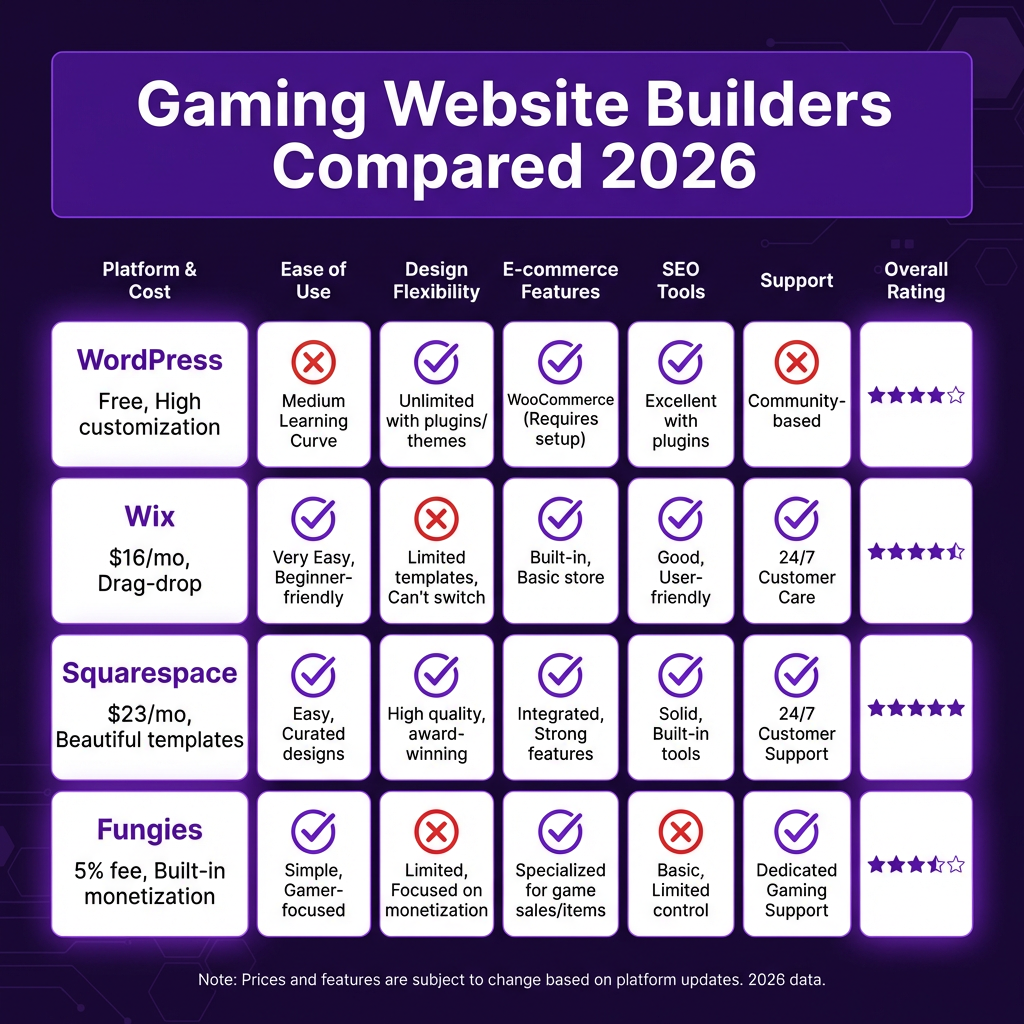
The foundation of your gaming website starts with selecting the right platform. Your choice depends on your technical skills, budget, and specific needs. Here are the top options for 2026:
WordPress (Self-Hosted)
WordPress powers over 43% of all websites for good reason. With gaming-specific themes and plugins, you can create anything from a simple portfolio to a complex multiplayer community site. The learning curve is moderate, but the flexibility is unmatched. Expect to pay $5-25/month for hosting plus domain costs. Popular gaming themes like PlayerX and Youplay provide stunning visuals out of the box.
Wix
For those who want drag-and-drop simplicity, Wix offers beautiful templates specifically designed for gaming websites. Their ADI (Artificial Design Intelligence) can build a site for you based on your answers to a few questions. Plans start at $16/month, and the platform handles all technical maintenance. The trade-off is less customization flexibility compared to WordPress.
Squarespace
Known for stunning, design-forward templates, Squarespace is perfect if aesthetics are your priority. Their gaming and entertainment templates are sleek and modern. Business plans start at $23/month and include built-in analytics, SEO tools, and e-commerce functionality. The platform is particularly strong for visual storytelling.
Fungies (Game-Focused)
For game developers specifically, Fungies offers a purpose-built solution that combines website creation with monetization. Unlike general website builders, Fungies understands the unique needs of game sellers — from handling global tax compliance to supporting multiple payment methods across 100+ countries. There’s no monthly fee; you only pay 5% per transaction.
Step 2: Design Your Gaming Website Layout
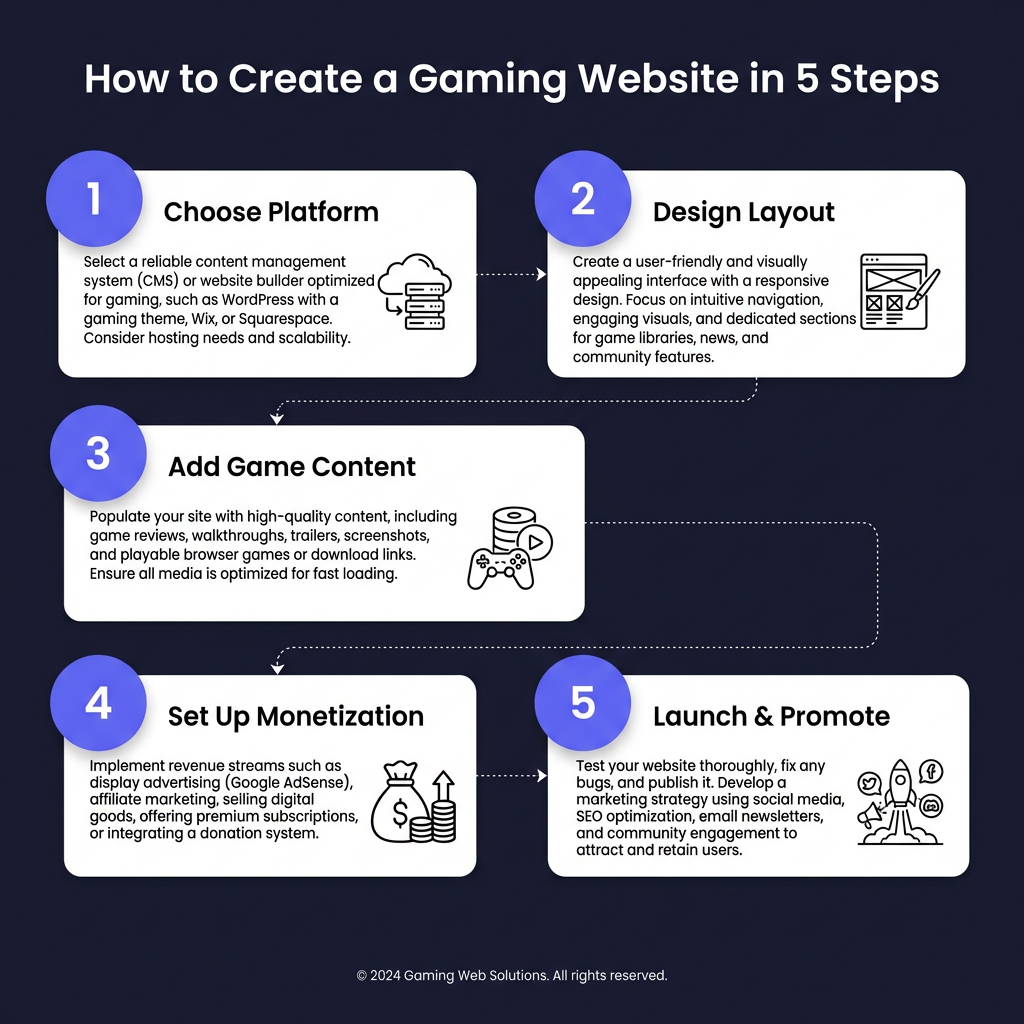
Great gaming websites share common design principles. Dark themes dominate the gaming aesthetic — they reduce eye strain during long browsing sessions and make game screenshots and videos pop. However, don’t sacrifice readability for style. Ensure sufficient contrast between text and backgrounds.
Essential pages every gaming website needs: a compelling homepage that immediately communicates your value proposition, an about page that tells your story, a games/portfolio section showcasing your work, a news or blog section for updates, and a contact page. If you’re selling games or merchandise, you’ll need a streamlined store section with clear pricing and easy checkout.
Navigation should be intuitive. Gamers are impatient — if they can’t find what they’re looking for within seconds, they’ll bounce. Use clear labels, limit top-level menu items to 5-7 options, and include a search function for larger sites. Mobile responsiveness is non-negotiable; over 60% of gaming content is consumed on mobile devices.
Step 3: Add Compelling Game Content
Content is what transforms a pretty template into an engaging gaming website. For developers, this means high-quality screenshots, gameplay trailers, and detailed game descriptions. Use GIFs to show dynamic gameplay moments. Write copy that speaks to your target audience — know whether you’re targeting casual mobile gamers or hardcore PC enthusiasts.
For streamers and content creators, embed your Twitch or YouTube streams directly on your site. Create highlight reels of your best moments. Write blog posts about your gaming experiences, strategies, and industry opinions. This content not only engages visitors but also improves your SEO, helping new fans discover you through search.
Community features can significantly increase engagement. Consider adding forums, comment sections, or Discord integration. User-generated content — like fan art or mods — can create a vibrant ecosystem around your brand. Just be sure to moderate actively to maintain a positive environment.
Step 4: Set Up Monetization
There are multiple ways to monetize a gaming website. Direct game sales offer the highest margins but require handling payments, taxes, and compliance. Platforms like Fungies simplify this by acting as your Merchant of Record — they handle VAT, sales tax, and regulatory compliance across 100+ countries while you focus on making great games.
Subscription models work well for ongoing content. Patreon integration or built-in membership systems can provide recurring revenue. Offer exclusive content, early access, or behind-the-scenes updates to subscribers. Merchandise sales — t-shirts, stickers, posters — can supplement your income while building brand loyalty.
Advertising and sponsorships are viable for high-traffic sites. Google AdSense, gaming-specific ad networks, and direct sponsorship deals with gaming brands can generate passive income. However, be selective — excessive ads hurt user experience. Affiliate marketing for gaming hardware, software, and services can also provide commission income.
Step 5: Launch and Promote Your Gaming Website
Before launch, thoroughly test every page, link, and payment flow. Check how your site performs on different devices and browsers. Use tools like Google PageSpeed Insights to optimize loading times — gamers won’t wait for slow sites. Set up Google Analytics and Search Console to track performance from day one.
Promotion strategies for gaming websites: share on relevant subreddits (r/gamedev, r/indiegaming), engage with gaming communities on Discord, collaborate with other developers and streamers, optimize for SEO with gaming-specific keywords, and maintain active social media presence. Email marketing remains highly effective — build a mailing list from day one.
Consider running targeted ads on platforms where gamers congregate. Reddit ads can be particularly effective for indie games, while Twitter and Instagram work well for visual content. YouTube pre-roll ads can reach gamers actively searching for content. Start small, measure results, and scale what works.
Frequently Asked Questions
How much does it cost to create a gaming website?
Costs range from $50-100/year for basic self-hosted WordPress sites to $300-500/year for premium platforms with advanced features. If you’re selling games, factor in payment processing fees (typically 2.9% + $0.30 per transaction) or platform fees (5-30% depending on the solution).
Do I need coding skills to create a gaming website?
No. Modern website builders like Wix, Squarespace, and Fungies allow you to create professional gaming websites without writing any code. However, basic HTML/CSS knowledge can help with customizations. WordPress offers more flexibility but has a steeper learning curve.
What’s the best platform for selling games on my website?
For indie developers, Fungies offers the best combination of low fees (5%), global tax compliance handling, and gaming-specific features. For larger studios with dedicated finance teams, self-hosted solutions with Stripe or PayPal provide more control but require handling compliance yourself.
How do I drive traffic to my new gaming website?
Focus on SEO optimization, social media engagement, community participation, and content marketing. Create valuable content that gamers want to share. Collaborate with influencers and other developers. Consider paid advertising once you have conversion tracking in place.
Conclusion
Creating a successful gaming website in 2026 is achievable for anyone willing to put in the effort. The key is choosing the right platform for your specific needs, designing with your audience in mind, creating compelling content, and implementing smart monetization strategies. Whether you’re an indie developer looking to sell your first game or a content creator building your brand, your gaming website is an investment that pays dividends for years to come.
Start simple, launch quickly, and iterate based on feedback. The perfect gaming website isn’t built overnight — it’s evolved through continuous improvement and genuine engagement with your community. Your players are waiting.
Ready to Monetize Your Gaming Website?
Join hundreds of game developers using Fungies.io — sell games globally with automatic tax compliance, 50+ payment methods, and zero monthly fees.
Only 5% per transaction — no hidden fees