Here’s a number that should get your attention: 85% of developers now use AI coding tools in their daily workflow. That’s not a projection — it’s happening right now in 2026. But here’s the kicker: most teams are barely scratching the surface of what AI agents can actually do.
I’m not talking about autocomplete suggestions or chat-style help. I mean agentic workflows — AI systems that can plan, execute, and complete multi-step development tasks with minimal human intervention. The teams that figure this out are shipping 3-4x faster than everyone else.
What Are AI Agents in Software Development?
AI agents in 2026 aren’t just enhanced autocomplete. They’re autonomous systems that can:
- Analyze your entire codebase and understand context across multiple files
- Execute terminal commands, run tests, and deploy code
- Connect to external tools via APIs and MCP (Model Context Protocol) servers
- Work continuously on tasks while you focus on higher-level decisions
According to JetBrains’ 2026 Developer Survey, developers using AI agents report 3.6 hours saved per week on routine tasks. McKinsey’s research shows a 46% reduction in time spent on repetitive coding work. These aren’t marginal gains — they’re transformative.
The Four Types of AI Agent Integration
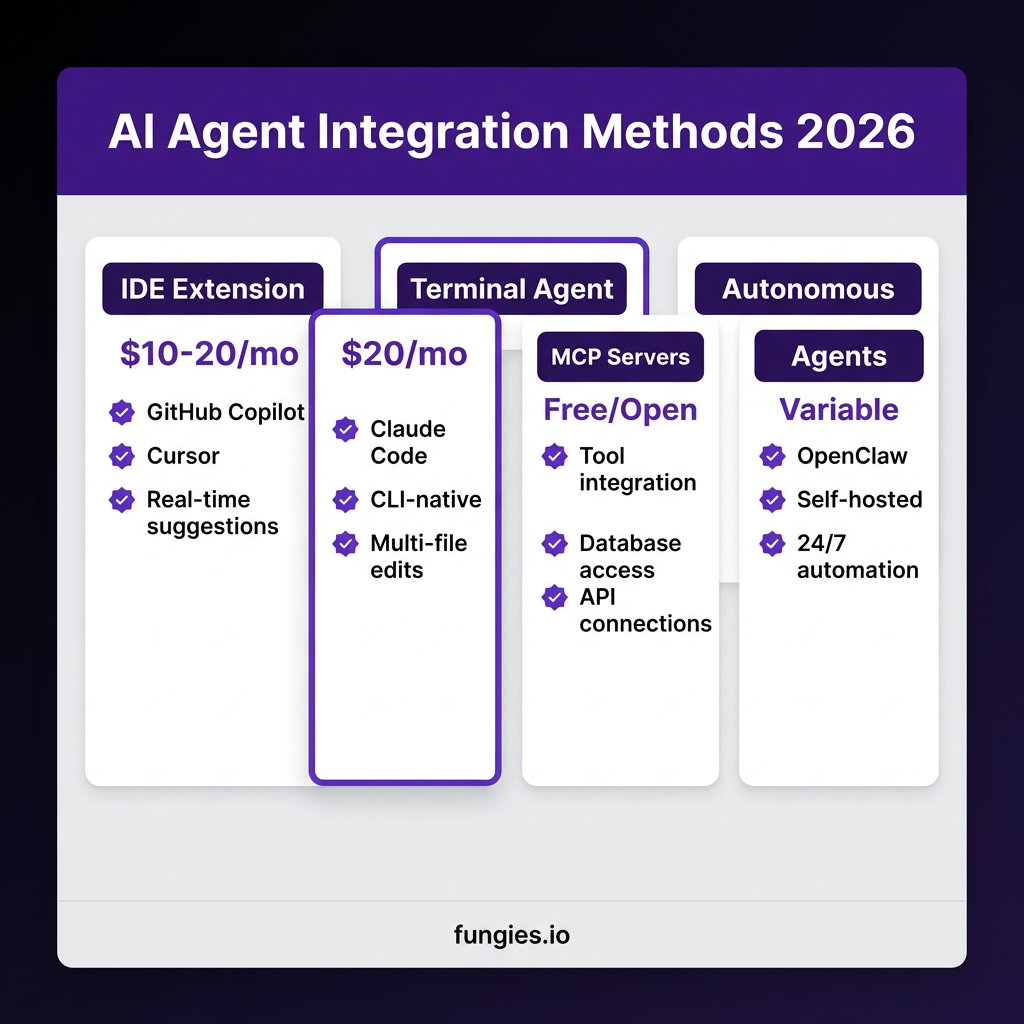
Before you start integrating AI agents, you need to understand the landscape. There are four primary integration methods, each with different trade-offs:
1. IDE Extensions (GitHub Copilot, Cursor)
The most common entry point. These tools sit inside your editor and provide real-time suggestions as you type.
| Tool | Price | Best For | Context Window |
|---|---|---|---|
| GitHub Copilot | $10/mo | General coding, broad IDE support | Standard |
| Cursor | $20/mo | Complex projects, AI-native experience | 200K tokens |
| JetBrains AI | €10/mo | JetBrains IDE users | Standard |
When to use: Start here if you want immediate productivity gains without changing your workflow. Copilot’s 20M+ users and 90% Fortune 100 penetration make it the safe default choice.
2. Terminal-Based Agents (Claude Code)
Terminal agents like Claude Code take a different approach. Instead of suggesting code as you type, they work as autonomous agents that can read files, run commands, and make edits across your entire codebase.
Claude Code boasts a 1 million token context window and scored 80.8% on SWE-bench (a benchmark for real-world software engineering tasks). It can understand entire repositories, not just the file you’re currently editing.
When to use: Choose this for complex refactoring tasks, multi-file changes, or when you need deep codebase understanding. The terminal interface means zero IDE lock-in.
3. MCP Servers (Model Context Protocol)
MCP is the dark horse of 2026. Originally developed by Anthropic and now hosted by the Linux Foundation, it’s becoming the standard way for AI agents to connect to external tools.
Think of MCP servers as “USB-C for AI agents” — a standardized way to plug your AI into databases, browsers, APIs, and development tools. The MCP Market now lists thousands of servers covering everything from PostgreSQL to GitHub to web scraping.
Popular MCP servers in 2026:
- Firecrawl MCP — Web scraping and research
- Playwright MCP — Browser automation for testing
- GitHub MCP — Repository management and PR reviews
- PostgreSQL MCP — Database queries and schema exploration
4. Autonomous Agent Platforms (OpenClaw)
For teams ready to go all-in, platforms like OpenClaw offer fully autonomous agents that can run 24/7. These aren’t just coding assistants — they’re complete AI coworkers that can manage emails, schedule meetings, monitor systems, and yes, write code.
OpenClaw connects to 50+ services including Slack, Discord, WhatsApp, and Telegram. With 1,184+ skills available on ClawHub, you can customize your agent for virtually any workflow.
Step-by-Step: Integrating AI Agents Into Your Workflow
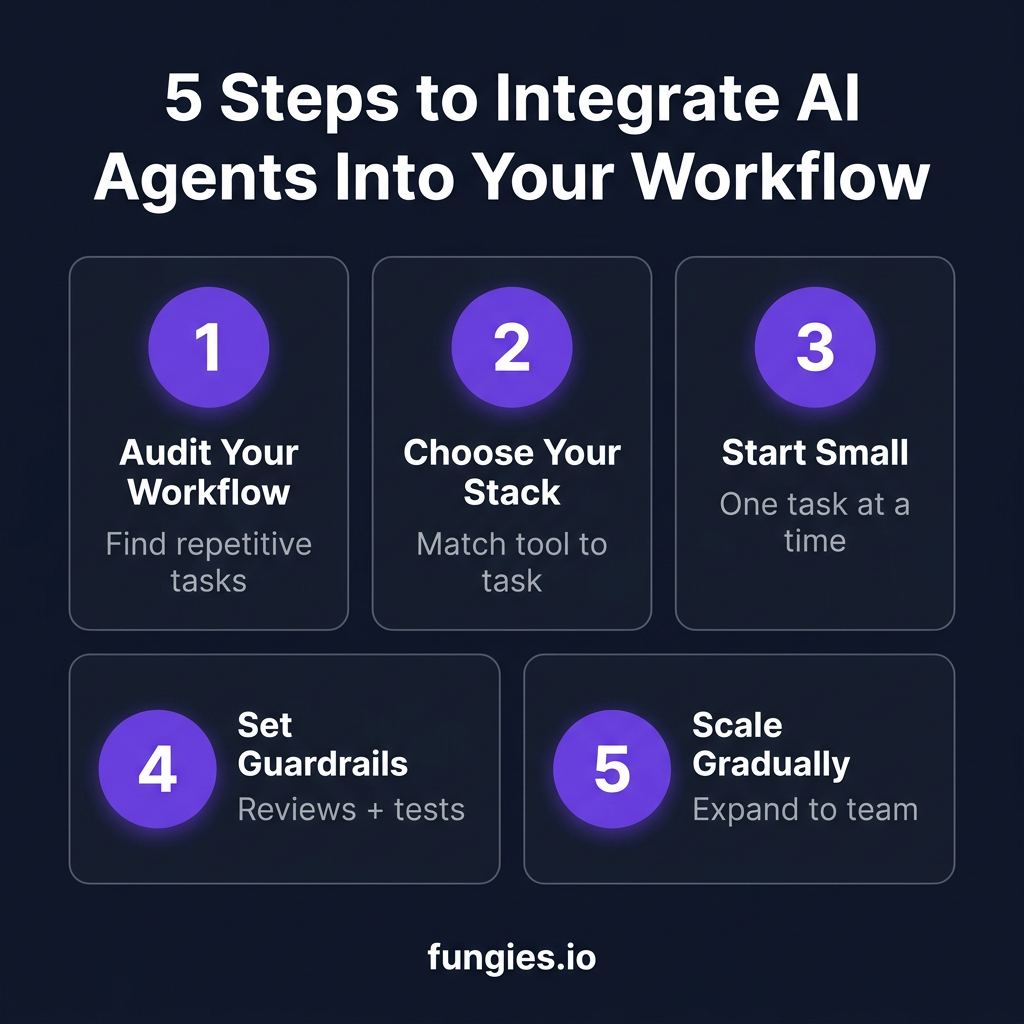
Step 1: Audit Your Current Workflow
Before adding any tool, map out where your team spends time. Look for:
- Repetitive coding patterns (boilerplate, CRUD operations)
- Code review bottlenecks
- Testing and debugging cycles
- Documentation tasks
- Deployment and DevOps procedures
According to Gartner, 40% of enterprise applications will embed task-specific AI agents by end of 2026. Start with the highest-friction, most repetitive tasks.
Step 2: Choose Your Integration Stack
Don’t try to adopt everything at once. Here’s a decision framework:
| If You Need… | Choose… | Budget |
|---|---|---|
| Real-time coding help | GitHub Copilot or Cursor | $10-20/mo |
| Complex multi-file changes | Claude Code | $20/mo |
| External tool integration | MCP servers + Claude/Cursor | Free + API costs |
| Full workflow automation | OpenClaw | Self-hosted or cloud |
Step 3: Start With a Single Use Case
Pick one specific task for your first AI agent integration. Good starting points:
- Test generation: 72% of QA teams now use AI for test generation
- Documentation: Auto-generate docstrings and README updates
- Code review: Use AI to catch common issues before human review
- Refactoring: Let agents handle renaming, extraction, and pattern updates
The key is starting small. Teams that try to automate everything at once typically see adoption rates under 20%. Teams that start with one use case and expand see 80%+ adoption.
Step 4: Set Guardrails and Review Processes
Here’s a reality check: AI-generated code has 2.74x more vulnerabilities than human-written code. This doesn’t mean don’t use AI — it means use it wisely.
Essential guardrails for 2026:
- Mandatory code review for all AI-generated changes
- Automated security scanning (Snyk, CodeQL, or similar)
- Test coverage requirements — AI code must meet the same standards as human code
- Gradual permission expansion — start with read-only, add write permissions slowly
JetBrains’ research found that teams moving from low to high AI adoption saw 9% more bugs per developer and 91% longer review times when they skipped proper guardrails. Don’t skip this step.
Step 5: Scale Gradually Across Your Team
Once you’ve proven value with one use case, expand systematically:
- Share wins internally — document time saved, bugs caught, velocity gained
- Create team standards — which tools, which use cases, which guardrails
- Train on effective prompting — context engineering is the new skill that separates productive teams from frustrated ones
- Measure and iterate — track DORA metrics (deployment frequency, lead time, change failure rate)
Real-World Integration Patterns
Here are three integration patterns that are working for teams in 2026:
Pattern 1: The “Copilot + Claude” Stack
Use GitHub Copilot for day-to-day coding assistance (autocomplete, inline suggestions), then switch to Claude Code for complex refactoring or debugging sessions. This is the most common stack among high-performing teams.
Pattern 2: MCP-Enabled Agent Workflows
Connect Claude or Cursor to your entire development stack via MCP servers:
- Database queries via PostgreSQL MCP
- GitHub operations (PRs, issues, reviews) via GitHub MCP
- Documentation updates via Notion or Confluence MCP
- Deployment triggers via custom MCP servers
This turns your AI assistant into a true DevOps partner, not just a code generator.
Pattern 3: Autonomous Monitoring and Maintenance
For teams using OpenClaw or similar platforms, set up agents for:
- Dependency update monitoring and PR creation
- Log analysis and anomaly detection
- Documentation freshness checks
- Security patch monitoring
The Economics: What AI Agent Integration Actually Costs
Let’s talk numbers. Here’s what you should budget for AI agent integration in 2026:
| Cost Category | Range | Notes |
|---|---|---|
| IDE Extensions | $10-39/mo per dev | Copilot Pro at $10, Cursor at $20, Copilot Pro+ at $39 |
| API Usage | $20-100/mo per dev | Varies by usage and model (GPT-4.1 vs Claude Opus) |
| MCP Servers | Free to $50/mo | Most are open source; some hosted versions charge |
| Self-hosted Agents | $50-200/mo | Cloud hosting for OpenClaw or similar |
| Security/Review Tools | $15-50/mo | Snyk, CodeQL, or similar scanning tools |
Total per developer: $95-439/month for a fully-equipped AI agent stack.
Now compare that to the productivity gains: 3.6 hours saved per week at an average developer salary of $75/hour equals $1,080 in monthly value per developer. Even at the high end of costs, you’re looking at 2-3x ROI.
Common Integration Pitfalls (And How to Avoid Them)
Pitfall 1: The “Generate Everything” Trap
Developers report that when they ask AI to generate huge swaths of an app, they end up with inconsistency and duplication — “like 10 devs worked on it without talking to each other.” Instead, assign bounded tasks and review incrementally.
Pitfall 2: Skipping Code Review
AI-generated code needs review more, not less. Faros AI found that teams with high AI adoption saw 154% larger average PR sizes. Larger PRs mean longer reviews and more bugs slipping through.
Pitfall 3: Ignoring Context Engineering
As Andrej Karpathy noted, “prompt engineering” trivializes what we actually do. Think of the LLM as a CPU, the context window as RAM, and your job as the operating system. Loading the right context is the skill that separates effective AI users from frustrated ones.
Key Takeaways: Your AI Agent Integration Checklist
- ✅ Start with one use case — test generation and documentation are good entry points
- ✅ Choose tools based on your workflow — IDE extensions for real-time help, terminal agents for complex tasks
- ✅ Set mandatory guardrails — code review, security scanning, and test coverage requirements
- ✅ Invest in context engineering — the quality of your prompts determines the quality of your output
- ✅ Measure DORA metrics — track deployment frequency, lead time, and change failure rate
- ✅ Expand gradually — prove value, then scale across the team
Frequently Asked Questions
Will AI agents replace developers?
No. The data shows 90% of engineers are shifting from pure coding to “AI orchestration” — designing systems, reviewing AI output, and focusing on architecture and business logic. AI handles the repetitive work; humans handle the creative and strategic work.
What’s the best AI agent tool for beginners?
GitHub Copilot is the safest starting point. It has the broadest IDE support, a genuinely useful free tier (50 requests/month), and requires zero workflow changes. Once you’re comfortable, explore Cursor or Claude Code.
How do I convince my team/manager to adopt AI agents?
Start with a pilot on a single task. Measure time saved, bugs caught, and developer satisfaction. The data is compelling: 3.6 hours saved per week, 46% reduction in routine task time, and 320% more durable code for regular AI users.
Are AI agents secure?
AI agents are as secure as the guardrails you put around them. AI-generated code has 2.74x more vulnerabilities than human-written code, but this risk is manageable with proper code review, automated security scanning, and gradual permission expansion.
What’s MCP and why should I care?
MCP (Model Context Protocol) is the emerging standard for connecting AI agents to external tools. Think of it as “USB-C for AI” — a standardized way to plug your agent into databases, browsers, APIs, and development tools. With MCP servers, your AI can actually do things rather than just suggest code.
Conclusion: The Time to Start Is Now
The teams that treat AI agents as a strategic advantage — not just a coding convenience — are pulling ahead. The data is clear: 3.6 hours saved per week, 46% faster routine tasks, 320% more durable code. But these gains don’t come from simply installing a tool. They come from thoughtful integration, proper guardrails, and a commitment to measuring what matters.
Start small. Choose one use case. Set your guardrails. Measure your results. Then scale.
The developers who master AI agent integration in 2026 will define the next decade of software engineering. The question isn’t whether to adopt AI agents — it’s whether you’ll be ahead of the curve or scrambling to catch up.
Ready to streamline your development workflow? Get started with Fungies.io — the merchant of record platform that handles payments, tax compliance, and checkout so you can focus on building great software.
References
- JetBrains Developer Survey 2026 — https://blog.jetbrains.com/ai/
- McKinsey Digital: Measuring AI Developer Productivity 2026 — https://www.mckinsey.com/
- Gartner: AI Agent Adoption in Enterprise Applications 2026
- GitClear: AI Assistant Code Quality Analysis 2025-2026 — https://www.gitclear.com/
- Faros AI: AI Productivity Paradox Report 2025 — https://www.faros.ai/
- Anthropic: Model Context Protocol Documentation — https://www.anthropic.com/news/model-context-protocol
- Prefactor: AI Agent Adoption Statistics 2026 — https://prefactor.tech/
- Modal: AI in Software Development Trends 2026 — https://modall.ca/