You’re probably still calling it “prompt engineering.” But if you’re building production AI applications in 2026, you’re actually doing something different: context engineering.
Andrej Karpathy said it plainly in June 2025: the term “prompt engineering” trivializes what we actually do. It’s not about crafting clever one-liners anymore. It’s about building persistent instruction layers, curating relevant context, and designing systems where AI agents can actually ship code without breaking production.
Here’s what changed: models got better at reading intent, but production AI applications got way more complex. The gap between “works in chat” and “works in production” is where context engineering lives.
What Is Context Engineering (And Why Prompts Alone Don’t Work)
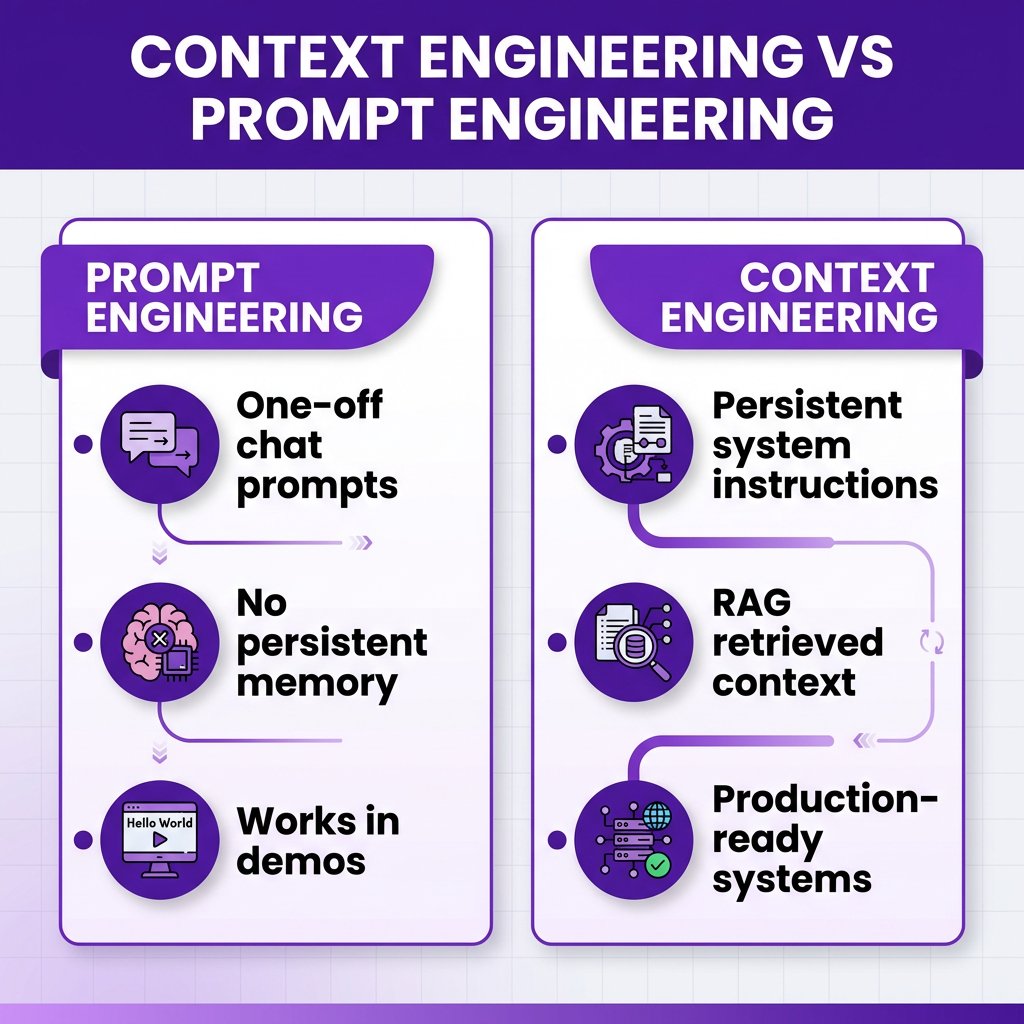
Context engineering is the discipline of designing, structuring, and maintaining the information environment that AI systems operate within. It includes:
- Persistent system instructions — the rules your AI follows on every request (your SOUL.md, your project-level prompts)
- Retrieved context — relevant docs, code snippets, or data pulled in via RAG
- Few-shot examples — curated examples that show the model what good output looks like
- Tool definitions — clear specs for what functions the AI can call and when
- Conversation state — what the model remembers from earlier in the session
Prompt engineering is what you do in a chat window. Context engineering is what you do when you’re building an AI agent that deploys to production while you sleep.
The difference matters because casual prompting gets you 60% of the value. Context engineering gets you the other 40% — the part that separates demos from deployed systems.
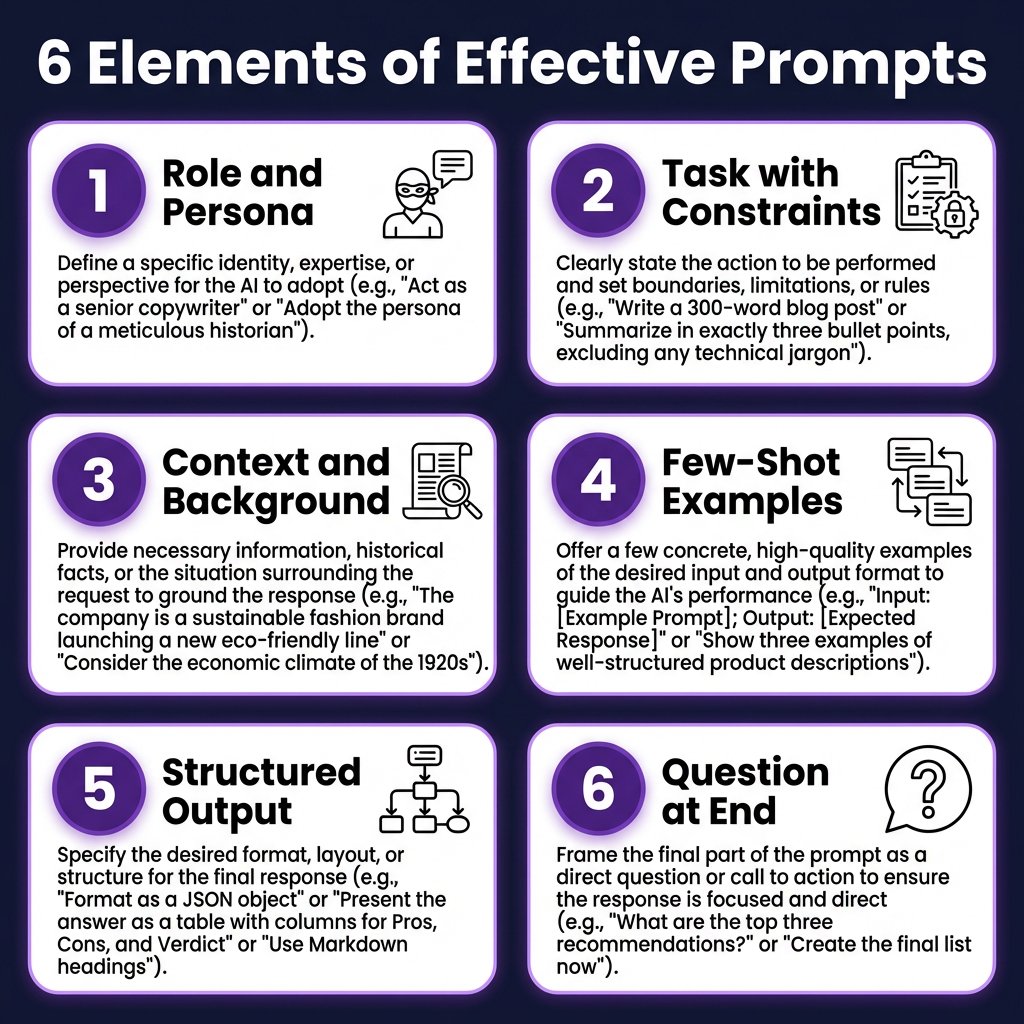
The Six Core Elements of Effective Prompts in 2026
After testing prompts across GPT-5.4, Claude Opus 4.6, Gemini 2.5 Pro, and DeepSeek V3.2, six elements consistently separate working prompts from broken ones.
1. Role and Persona Definition
Don’t skip this. Models perform measurably better when given a clear role.
Weak: “Write a function to parse JSON”
Strong: “You’re a senior backend engineer reviewing code for a payments platform. Write a production-ready JSON parser with proper error handling, input validation, and logging. Follow our team’s TypeScript style guide.”
The second prompt activates different knowledge patterns. You’re not getting generic code — you’re getting code that assumes production constraints.
2. Task Specification with Constraints
Be explicit about what you want and what you don’t want.
Include:
- Output format (JSON, markdown, code block)
- Length constraints (“under 50 lines”, “3-5 bullet points”)
- Technical constraints (“no external dependencies”, “must be async”)
- Quality bars (“include unit tests”, “add type annotations”)
Example:
“Generate a Python function that validates email addresses. Requirements: no regex libraries, handle international domains, include 3 test cases, return a tuple of (is_valid, error_message). Keep it under 40 lines.”
3. Context and Background
Models can’t read your mind. Give them the context they need.
Bad: “Fix the bug in this code”
Good: “This is a Stripe webhook handler for our SaaS billing system. The bug: duplicate webhook events are being processed, causing customers to be charged twice. The issue is in the event deduplication logic around line 47. Here’s the relevant code…”
Context turns a generic debugging task into a targeted fix.
4. Few-Shot Examples (Always Include Them)
Google’s prompt engineering whitepaper is clear: zero-shot is explicitly not preferred. Show the model what good output looks like.
Example for code review:
“Here’s an example of the feedback format I want:
Input: def calculate_total(items): return sum([i.price for i in items])
Output:
- ✅ Clear variable naming
- ⚠️ Missing type hints (add List[Item] → float)
- ⚠️ No null check (what if items is None?)
- ❌ No docstring (add Google-style docstring)
- 🔧 Suggested fix: [code block]
Now review this function using the same format: [your code]”
5. Structured Output Format
Don’t let the model guess how to format output. Specify it explicitly.
For JSON: “Return valid JSON with this schema: {“query”: “string”, “results”: [{“title”: “string”, “url”: “string”, “relevance_score”: 0-1}]}”
For code: “Output only the code block. No explanations, no markdown outside the code fence.”
For analysis: “Use this format: ## Summary (2 sentences), ## Key Findings (bullet list), ## Recommendations (numbered list)”
6. Placement Matters (Put Questions at the End)
Google’s research and Anthropic’s docs both confirm: place your actual question or task after all context, examples, and instructions.
Wrong order:
“What’s the best way to handle authentication? [500 words of context about our system]”
Right order:
“[500 words of context about our system] Given these constraints, what’s the best way to handle authentication?”
Models pay more attention to the end of the prompt. Put your ask last.
Prompt Templates That Actually Work in Production
Here are battle-tested templates I use daily. Copy, adapt, ship.
Code Review Template
You are a senior engineer conducting a code review for a production SaaS application.

## Context
- Tech stack: [TypeScript/Node.js/PostgreSQL]
- This code handles: [payments/user auth/data processing]
- Team standards: [link to style guide or paste key rules]

## Code to Review
```[language]
[paste code here]
```

## Review Format
For each issue, use this format:
- Severity: [Critical/Major/Minor/Nitpick]
- Location: [line number or function name]
- Issue: [clear description]
- Fix: [suggested code change]

## Priorities
1. Security issues first (auth, validation, injection)
2. Correctness (edge cases, error handling)
3. Performance (N+1 queries, memory leaks)
4. Readability (naming, comments, structure)

Start with a 2-sentence summary of overall code quality.
Debugging Template
You are debugging a production issue. Help me find and fix the root cause.

## System Context
- Application: [what it does]
- Environment: [production/staging/local]
- Recent changes: [what was deployed/changed]

## Symptoms
- What's happening: [describe the bug]
- Expected behavior: [what should happen]
- Error messages: [paste exact errors]
- Affected users: [how many, which segment]

## Available Data
```[language]
[relevant logs, stack traces, or code snippets]
```

## Debugging Process
1. Form 3 hypotheses about the root cause
2. For each hypothesis, suggest how to test it
3. Recommend the most likely fix
4. Suggest preventive measures to avoid recurrence

Think step-by-step. Ask clarifying questions if needed.
Architecture Decision Template
You are a staff engineer helping evaluate architecture options.

## Decision Context
- We need to: [what we're building]
- Constraints: [timeline, team size, budget, tech debt]
- Scale requirements: [users, requests/day, data volume]

## Options to Evaluate
1. [Option A] — [brief description]
2. [Option B] — [brief description]
3. [Option C] — [brief description]

## Evaluation Criteria
- Development speed (weeks to MVP)
- Operational complexity (ongoing maintenance)
- Scalability (handles 10x growth)
- Team expertise (learning curve)
- Cost (infra + licensing)

## Output Format
Create a comparison table with scores 1-5 for each criterion.
Then recommend one option with a 3-paragraph justification covering:
1. Why this option wins
2. Key trade-offs we're accepting
3. Migration path if we need to change later
Model-Specific Prompting Tips (2026 Models)
Different models respond to different prompting styles. Here’s what works for each in 2026:
| Model | Best For | Prompting Tips | Price per 1M tokens |
|---|---|---|---|
| Claude Opus 4.6 | Complex reasoning, long documents | Use XML tags for structure. Place instructions before context. Excellent at following multi-step plans. | $5 input / $25 output |
| GPT-5.4 | General purpose, tool use | Be direct and concise. Strong at function calling. Use system messages for persistent instructions. | $2.50 input / $10 output |
| Gemini 2.5 Pro | Multimodal, long context (1M+ tokens) | Include grounding sources. Works well with retrieved context. Good for RAG applications. | $1.25 input / $10 output |
| DeepSeek V3.2 | Cost-effective coding tasks | Be explicit about output format. Surprisingly strong at code generation for the price. | $0.14 input / $0.28 output |
| Claude Sonnet 4 | Daily coding, balanced performance | Best price/performance for most tasks. Use for 80% of work, save Opus for complex reasoning. | $3 input / $15 output |
Common Prompt Anti-Patterns (And How to Fix Them)
I see these mistakes constantly. Here’s what’s wrong and how to fix it:
Anti-Pattern 1: Vague Task Description
Bad: “Make this code better”
Fix: “Refactor this function to improve readability. Extract helper functions for any logic that’s 5+ lines. Add JSDoc comments. Keep the public API unchanged.”
Anti-Pattern 2: No Examples
Bad: “Write unit tests for this”
Fix: “Write unit tests using Jest. Follow this pattern: [example test]. Cover: happy path, edge cases (empty input, null values), and error cases. Aim for 90%+ coverage.”
Anti-Pattern 3: Ignoring Token Limits
Bad: Pastes entire codebase in one prompt
Fix: Use RAG or chunking. “Here’s the relevant module [paste 500 lines]. The function I’m asking about is on line 234. Related types are in types.ts — here are the relevant interfaces [paste 50 lines].”
Anti-Pattern 4: No Output Validation
Bad: Trusting AI output without verification
Fix: “Before finalizing, verify: [checklist of requirements]. If any item fails, revise the output.”
Building a Prompt Library for Your Team
Don’t let prompt knowledge live in someone’s head. Build a shared library:
- Store prompts in version control — treat them like code (they are)
- Document what each prompt does — input, output, when to use it
- Include examples — show real inputs and expected outputs
- Test prompts regularly — models change, prompts drift
- Track prompt performance — which prompts produce the best results?
Tools like Maxim AI, LangSmith, and Promptfoo help with this. But even a simple Notion page or GitHub repo works.
Key Takeaways
- Context engineering > prompt engineering — you’re building systems, not writing one-off prompts
- Always include few-shot examples — zero-shot prompting is not preferred in production
- Structure your output — tell the model exactly what format you want
- Put questions at the end — models pay more attention to the end of prompts
- Use model-specific techniques — Claude likes XML, GPT likes direct instructions
- Build a prompt library — document and version your prompts like code
- Test in production — what works in chat might not work in your app
FAQ: Prompt Engineering for Developers
What’s the difference between prompt engineering and context engineering?
Prompt engineering focuses on crafting individual prompts for chat interfaces. Context engineering is broader — it includes persistent system instructions, retrieved context (RAG), few-shot examples, tool definitions, and conversation state management. Context engineering is what you do when building production AI applications.
Which AI model is best for coding in 2026?
For daily coding: Claude Sonnet 4 ($3/1M input tokens) offers the best price/performance balance. For complex refactoring or architectural decisions: Claude Opus 4.6 ($5/1M input) excels at multi-file reasoning. For cost-sensitive workloads: DeepSeek V3.2 ($0.14/1M input) delivers surprising quality at 35x lower cost than GPT-5.
How do I know if my prompt is working?
Test with 10-20 real examples. Measure: accuracy (does output match requirements?), consistency (same input → same output?), and latency (how long does it take?). If accuracy is below 90%, revise the prompt. Track metrics over time — models update and prompts can drift.
Should I use XML tags or markdown in prompts?
For Claude models: use XML tags (
How much context should I include in prompts?
Include enough context for the model to understand the task, but no more. Rule of thumb: if you’re pasting more than 2,000 tokens of context, consider using RAG to retrieve only the most relevant sections. For coding tasks: include the relevant function, its type signatures, and any directly related code (usually 200-500 lines max).
Conclusion
Prompt engineering isn’t dead — it just grew up. The developers who thrive with AI in 2026 aren’t the ones with the cleverest one-liners. They’re the ones who treat prompts as engineering artifacts: versioned, tested, documented, and continuously improved.
Start with the templates above. Adapt them to your workflow. Build a library. Measure what works. And remember: the goal isn’t to write perfect prompts. The goal is to ship better software, faster.
Ready to automate your payment infrastructure? Get started with Fungies — the Merchant of Record platform built for developers.
References
- Andrej Karpathy on context engineering — X/Twitter, June 2025
- Anthropic — Using XML Tags in Prompts
- Google — Prompt Engineering Whitepaper
- Thomas Wiegold — Prompt Engineering Best Practices 2026
- CostGoat — LLM API Pricing Comparison (April 2026)
- Lakera — The Ultimate Guide to Prompt Engineering in 2026