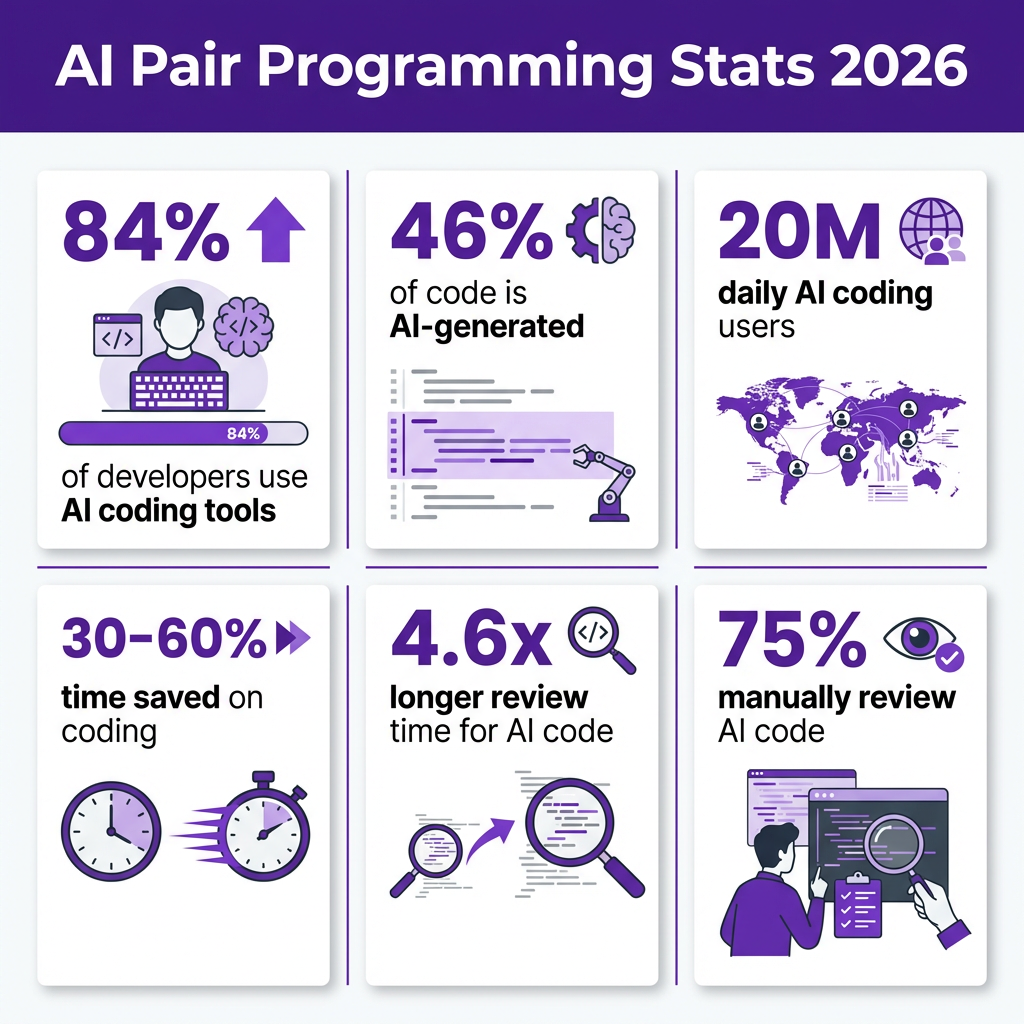
Here’s a stat that should stop you in your tracks: 46% of all code written by active developers in 2026 comes from AI. Not suggestions. Not autocomplete. Actual committed code.
With 20 million developers using AI coding assistants daily and 84% of the industry now relying on these tools, AI pair programming has moved from experimental curiosity to standard practice. But here’s the catch—adoption doesn’t automatically equal productivity.
LinearB’s analysis of 8.1 million pull requests across 4,800 teams reveals a productivity paradox: AI-generated code waits 4.6 times longer for review than human-written code. The speed of generation gets eaten by the bottleneck of verification.
What Is AI Pair Programming?
AI pair programming is the practice of collaborating with an AI coding assistant throughout the software development lifecycle. Unlike traditional pair programming with another human developer, your AI partner works 24/7, handles the tedious parts without complaint, and never needs coffee breaks.
But it’s not just about code completion anymore. In 2026, AI pair programming covers:
- Code generation — Writing functions, components, and entire features from natural language descriptions
- Code review — Identifying bugs, security issues, and style violations before human review
- Testing — Generating unit tests, integration tests, and edge case coverage
- Documentation — Writing docstrings, READMEs, and API documentation
- Debugging — Analyzing error logs and suggesting fixes
- Refactoring — Restructuring code while preserving functionality
The AI Pair Programming Landscape in 2026
The market has fragmented into distinct categories, each solving different problems. Understanding these categories is essential for building an effective workflow.
| Tool Category | Best For | Top Tools | Price Range |
|---|---|---|---|
| IDE Assistants | Daily editing, autocomplete | GitHub Copilot, Cursor | $10-20/mo |
| Agentic Tools | Complex multi-file tasks | Claude Code, Codex CLI | $20-200/mo |
| Skills Libraries | Team standards, context | BB-Skills, custom MCPs | Varies |
| AI Testing | Test generation | Cypress Cloud, Playwright | $15-50/mo |
| AI Code Review | Quality gates | GitHub Copilot Review, PR Agents | $10-30/mo |
The Productivity Paradox (And How to Avoid It)
Here’s what the data actually shows about AI pair programming productivity:
- Developers believe they’re 20% faster with AI tools
- But measurement often shows they’re slower when accounting for review time and code churn
- AI-generated code has higher turnover ratios—sometimes 1.5x the rate of human-written code
The problem isn’t the tools. It’s the workflow.
When developers generate huge swaths of code without architectural planning, they end up with what one engineer described as “like 10 devs worked on it without talking to each other”—duplicate logic, mismatched method names, no coherent structure.
The 5-Layer AI Pair Programming Workflow
Elite teams in 2026 don’t rely on a single tool. They build a stack. Here’s the proven workflow that delivers consistent results:
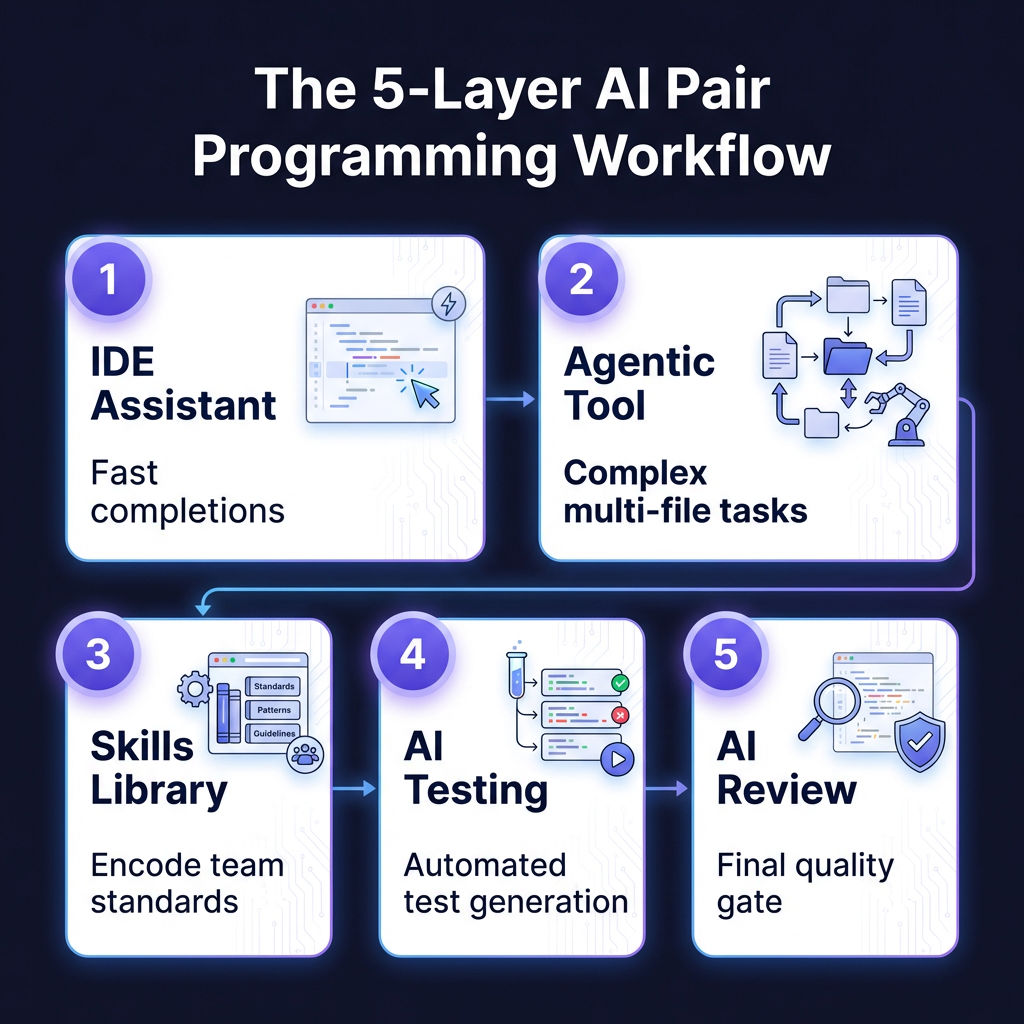
Layer 1: IDE Assistant (Fast Completions)
This is your daily driver. GitHub Copilot ($10/mo) or Cursor ($20/mo) sit inside your editor and provide inline suggestions as you type. They’re optimized for speed and context awareness.
Best practices:
- Accept suggestions with Tab, but read them first
- Use comments to guide the AI toward your intent
- Don’t accept multi-line suggestions blindly—review line by line
Layer 2: Agentic Tool (Complex Tasks)
When you need to refactor across multiple files, implement a feature from a spec, or understand a large codebase, switch to an agentic tool like Claude Code ($20/mo) or Codex CLI.
These tools can:
- Read your entire codebase (Claude Code handles 50,000+ line repos with 75% success rate)
- Execute terminal commands
- Make coordinated changes across multiple files
- Run tests and iterate based on results
Layer 3: Skills Library (Team Standards)
AI tools work better when they know your conventions. Skills libraries encode your team’s patterns, coding standards, and architectural decisions. This can be as simple as a `.cursorrules` file or as sophisticated as a custom MCP (Model Context Protocol) server.
Layer 4: AI-Powered Testing
Don’t just generate code—generate tests. Tools like Cypress Cloud and Playwright with AI features can create test suites that would take hours to write manually. This is critical because 75% of developers manually review every AI-generated code snippet before merging—automated tests make that review faster and more reliable.
Layer 5: AI Code Review
The final quality gate. GitHub Copilot’s code review feature and dedicated tools like PR Agents catch issues before human reviewers see them. This addresses the 4.6x review time problem—if AI catches the obvious issues first, human reviewers can focus on architecture and logic.
Tool Comparison: What to Use When
| Scenario | Recommended Tool | Why |
|---|---|---|
| Daily coding, autocomplete | GitHub Copilot ($10/mo) | Best IDE integration, lowest friction |
| Complex refactoring | Claude Code ($20/mo) | Best reasoning, handles large codebases |
| Full-stack web apps | Cursor ($20/mo) | AI-native IDE, multi-model support |
| Quick prototypes | Replit Agent | Browser-based, no setup |
| Budget-conscious | Continue.dev + BYO API keys | Open source, pay per use |
| Enterprise security | Amazon Q Developer | AWS integration, compliance features |
Best Practices That Actually Work
After analyzing workflows from high-performing teams, here are the practices that separate productive AI pair programmers from those stuck in the paradox:
1. Start with Specifications, Not Prompts
Don’t ask AI to “build a login system.” Write a specification first: authentication flow, password requirements, session handling, error states. The clearer your spec, the better the AI output.
2. Review Every Line (Yes, Every Line)
AI will happily produce plausible-looking code with subtle bugs. Treat AI-generated code like code from a junior developer—competent but requiring review. Run tests. Read diffs. Verify logic.
3. Keep Context Windows Clean
Claude Code’s 1M token context window is powerful, but don’t dump your entire repo into every conversation. Curate what the AI sees. Use `.cursorrules` or project-specific instructions to guide behavior without repeating yourself.
4. Measure Real Metrics
Perceived productivity and actual productivity are different. Track:
- PR cycle time (not just coding speed)
- AI vs. human code turnover ratio
- Bug rates in AI-generated vs. human code
- Time to first review
Healthy teams maintain AI code share between 60-75% and keep AI turnover ratios below 1.3x their human baseline.
5. Use the Hybrid Approach
The most common pattern among experienced developers: Copilot ($10/mo) for daily editing + Claude Code ($20/mo) for complex tasks. Total cost: $30/month for a workflow that covers 95% of use cases.
ROI Reality Check
Let’s talk numbers. The cost of AI pair programming tools has changed dramatically:
- Basic IDE assistants: $10-20/mo
- Agentic tools: $20-200/mo (depending on usage tier)
- Total per engineer: $200-600/mo on average (including token overages)
But the ROI data is compelling:
- Average ROI: 2.5-3.5x
- Top-quartile organizations: 4-6x
- Time saved: 30-60% on coding, testing, and documentation
The key is that AI doesn’t just make coding faster—it makes developers more ambitious. Teams handle larger projects, ship more features, and spend more time on architecture instead of boilerplate.
Key Takeaways
- AI pair programming is now standard — 84% of developers use these tools, and 46% of committed code is AI-generated
- The productivity paradox is real — AI-generated code waits 4.6x longer for review; fix this with better workflows
- Use a 5-layer stack — IDE assistant + agentic tool + skills library + AI testing + AI review
- Measure what matters — PR cycle time, code turnover ratio, and bug rates, not just coding speed
- The hybrid approach wins — Copilot ($10) + Claude Code ($20) covers most workflows for $30/month
FAQ
Will AI pair programming replace developers?
No. The data shows AI augments developers, not replaces them. Developers using AI handle more ambitious projects and focus on architecture rather than boilerplate. The demand for developers who can effectively collaborate with AI is increasing, not decreasing.
What’s the best AI pair programming tool for beginners?
Start with GitHub Copilot ($10/mo). It has the lowest learning curve, works inside your existing IDE, and provides gentle autocomplete suggestions rather than overwhelming you with options. Once comfortable, add Claude Code for complex tasks.
How much does AI pair programming actually cost?
Budget $200-600 per engineer per month for a complete workflow. This includes seat licenses ($10-20/mo), agentic tool subscriptions ($20-200/mo depending on tier), and token overages. The average ROI is 2.5-3.5x, with top teams seeing 4-6x returns.
Is AI-generated code less secure?
It can be. AI models trained on public code may reproduce security anti-patterns. Always review AI-generated code for security issues, use AI code review tools as a first pass, and never commit AI-generated authentication or encryption code without expert review.
Should I use one tool or multiple?
Multiple. No single tool excels at everything. The most productive developers use Copilot or Cursor for daily editing, Claude Code or Codex for complex tasks, and dedicated tools for testing and review. The $30/month hybrid approach (Copilot + Claude Code) is the sweet spot for most developers.
Conclusion
AI pair programming isn’t the future—it’s the present. With 46% of code now AI-generated and 20 million developers using these tools daily, the question isn’t whether to adopt AI pair programming, but how to do it effectively.
The productivity paradox is real, but it’s solvable. Build a 5-layer workflow. Measure actual metrics, not perceived speed. Review every line. And remember that AI rewards existing best practices—clear specs, good tests, and thorough reviews become even more powerful when an AI is involved.
Start with the hybrid approach: GitHub Copilot for daily coding ($10/mo) plus Claude Code for complex tasks ($20/mo). Total investment: $30/month. Expected ROI: 2.5-3.5x. That’s the math that explains why 84% of developers have already made the switch.
Ready to streamline your payment infrastructure while you focus on building? Get started with Fungies.io—the merchant of record platform that handles payments, tax compliance, and checkout for SaaS and game developers.
References
- Index.dev – AI Pair Programming Statistics 2026
- Byteiota – AI Coding Productivity Benchmarks 2026
- Larridin – Developer Productivity Benchmarks 2026
- Medium – How AI Is Reshaping Software Development in 2026
- Developers Digest – AI Coding Tools Pricing 2026
- NxCode – Cursor vs Claude Code vs GitHub Copilot 2026
- BuildBetter – AI Development Workflow Buyer’s Guide 2026
- Addy Osmani – My LLM Coding Workflow Going Into 2026