Claude Code went from zero to market leader in just 8 months. Released in May 2025, it’s now the most-used AI coding tool among developers—overtaking GitHub Copilot and Cursor in usage share. That’s how fast this market moves.
85% of developers now use AI coding tools daily. AI generates 46% of all new code. And 57% of organizations have deployed multi-step agent workflows in production. If you’re not using an AI coding agent yet, you’re already behind.
But here’s the problem: the landscape is chaotic. New tools launch weekly. Pricing models change monthly. And every vendor claims theirs is “the best.” I’ve spent weeks analyzing real usage data, pricing structures, and developer satisfaction scores to cut through the noise.
What Are AI Coding Agents?
AI coding agents are autonomous systems that go far beyond autocomplete. They plan multi-step tasks, edit files across entire codebases, run terminal commands, execute tests, and even submit pull requests with minimal human direction.
The shift happened fast. In early 2024, we had autocomplete. By late 2025, we had agents that could work for 23 minutes straight on complex tasks, editing 78% of sessions across multiple files. In February 2026, every major tool shipped multi-agent capabilities in the same two-week window.
There are three distinct paradigms now:
- AI-native IDEs (Cursor, Windsurf) — built from the ground up for AI assistance
- Terminal agents (Claude Code, Codex CLI) — command-line tools for autonomous coding
- IDE extensions (GitHub Copilot, Cline) — plugins that work inside your existing editor
The 7 Best AI Coding Agents of 2026
#1 Claude Code — Best Overall for Complex Tasks
Claude Code is a terminal-native AI coding agent powered by Anthropic’s Claude 4.6 models. It’s not an IDE—it’s a command-line tool that understands your entire codebase and can execute complex, multi-step development tasks autonomously.
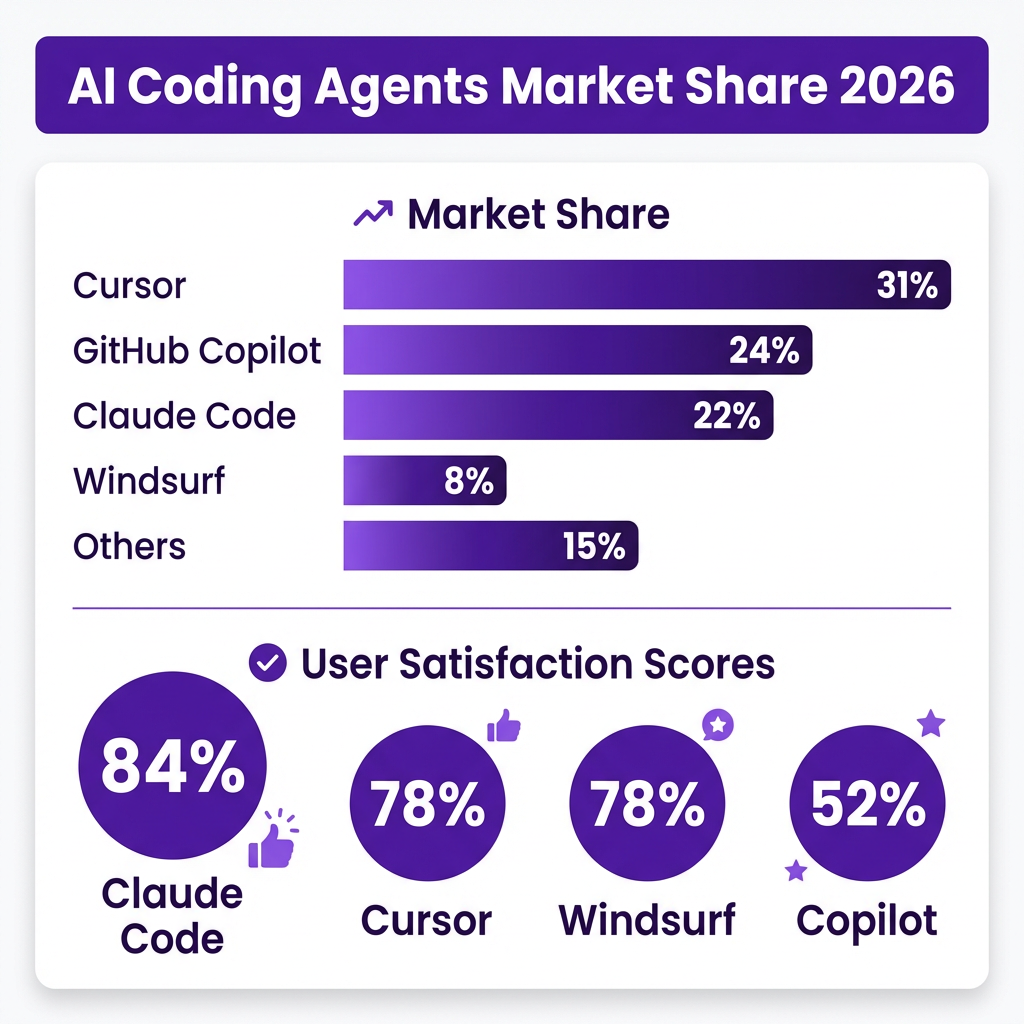
Why it ranks #1: 84% developer satisfaction—the highest of any tool. It handles deep reasoning tasks that break other agents. The 200K-1M token context window means it can understand large codebases without losing track.
Best for: Complex refactoring, debugging, architectural decisions, and tasks requiring deep codebase understanding.
Pricing:
- Pro: $20/month
- Max 5x: $100/month (5x usage limits)
- Max 20x: $200/month (20x usage limits)
- Team Premium Seat: $100-150/month per seat
- API: $3-25 per million tokens
The catch: Heavy users report $150-200/month real costs. The pricing is usage-based, and complex tasks burn through credits fast. But for professional developers, the productivity gain justifies the cost.
#2 Cursor — Best AI-Native IDE
Cursor is a fork of VS Code rebuilt specifically for AI-assisted coding. It was the first AI-native IDE to gain serious traction and remains the most polished option for developers who want a full IDE experience.
Why it ranks #2: 78% satisfaction score and the largest community. The Composer feature allows multi-file editing, and the tab-based prediction feels like the future of coding. It holds 31% market share—the largest of any single tool.
Best for: Daily development, web applications, and developers who want a complete IDE replacement.
Pricing:
- Free: $0 (2,000 completions/month)
- Pro: $20/month (unlimited)
- Business: $40/user/month
The catch: Cursor moved to usage-based credits in 2025. That $20 Pro plan includes a credit pool that can burn fast with heavy agent usage. Enterprise teams report negotiating $30-35/user/month with volume discounts.
#3 GitHub Copilot — Best for GitHub Integration
GitHub Copilot is the oldest player, launched in 2021. It’s evolved from autocomplete to a full coding agent with multi-model support and GitHub-native workflows.
Why it ranks #3: Unbeatable GitHub integration and the lowest entry price. At $10/month for Pro, it’s the cheapest way to get started with AI coding. The new agent mode can handle well-defined GitHub issues autonomously.
Best for: Teams already using GitHub, compliance-conscious enterprises, and developers who want AI assistance without switching editors.
Pricing:
- Free: $0 (2,000 completions, 50 premium requests)
- Pro: $10/month
- Pro+: $39/month
- Business: $19/user/month
- Enterprise: $39/user/month
The catch: 52% satisfaction score—the lowest among major tools. Developers report it falls behind on complex multi-file refactoring. The “premium requests” metering means heavy users outgrow the $10 plan quickly.
#4 Windsurf — Best Free Tier
Windsurf (formerly Codeium) is a VS Code fork with the most generous free tier in the industry. Its Cascade feature offers autonomous agentic coding at a price point that undercuts competitors.
Why it ranks #4: Unlimited autocomplete on the free tier—something no competitor offers. The $15/month Pro plan is $5 cheaper than Cursor. Satisfaction matches Cursor at 78%.
Best for: Budget-conscious developers, students, and anyone who wants to try AI coding without spending money.
Pricing:
- Free: $0 (unlimited autocomplete, 5 Cascade flows/month)
- Pro: $15/month (500 credits)
- Team: Custom pricing
The catch: Smaller community means fewer tutorials and plugins. The 5 free Cascade flows limit agent usage, though unlimited autocomplete is genuinely useful.
#5 OpenCode — Best Open Source Option
OpenCode is the largest open-source AI coding agent with 143K+ GitHub stars. It’s a privacy-first option where no code or context data leaves your machine unless you configure it to.
Why it ranks #5: Completely free and self-hostable. Works as a terminal CLI, desktop app, or IDE extension. Supports all major model providers (OpenAI, Anthropic, Google, AWS Bedrock, Groq, Azure).
Best for: Privacy-conscious developers, teams with compliance requirements, and anyone who wants full control over their AI coding setup.
Pricing:
- Free: $0 (open source, self-hosted)
- You pay only for API usage to your chosen provider
The catch: No managed service means you handle setup, updates, and troubleshooting yourself. The community is large but support is community-driven.
#6 JetBrains Junie — Best for IntelliJ Users
Junie is JetBrains’ official AI coding agent, deeply integrated into IntelliJ IDEA, PyCharm, WebStorm, and GoLand. It offers 30% faster task completion than generic solutions for JetBrains users.
Why it ranks #6: Native integration with the JetBrains ecosystem. Understands language-specific features that generic tools miss. 73% satisfaction score.
Best for: Developers already using JetBrains IDEs who want AI assistance without switching editors.
Pricing:
- Included with JetBrains IDE subscription
- AI Assistant subscription: $10/month
The catch: Only works with JetBrains products. If you’re not already in that ecosystem, it’s not worth switching for.
#7 Cline — Best VS Code Extension
Cline is an open-source VS Code extension that brings agentic coding to your existing editor. It’s the most flexible option for developers who want to stay in VS Code but need more power than Copilot offers.
Why it ranks #7: Free, open-source, and provider-agnostic. Bring your own API keys from any provider. Strong community with active development.
Best for: VS Code users who want agentic capabilities without switching to Cursor or Windsurf.
Pricing:
- Free: $0 (open source)
- You pay for API usage only
The catch: Less polished than Cursor. Multi-file editing is less reliable. Requires more manual configuration.
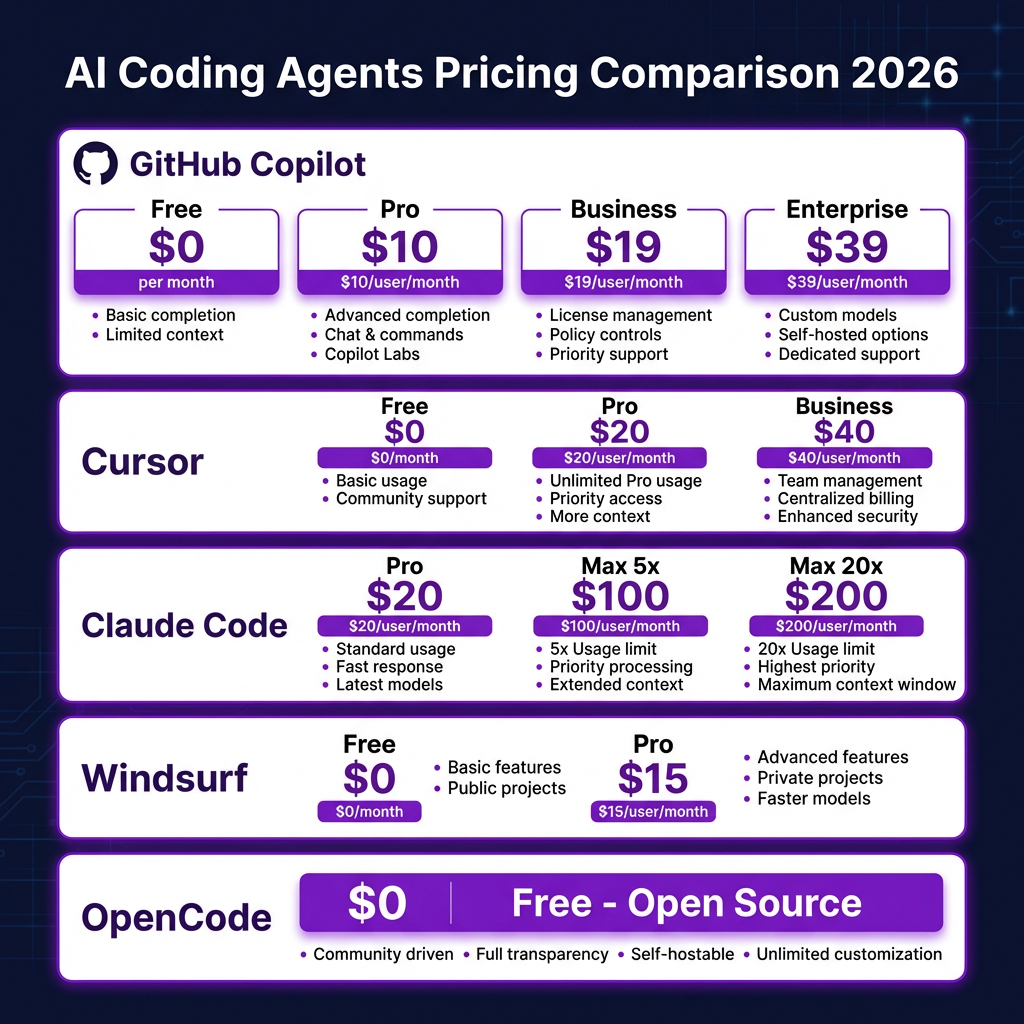
Complete Pricing Comparison
| Tool | Free Tier | Entry Paid | Business Tier | Satisfaction |
|---|---|---|---|---|
| Claude Code | No | $20/mo | $100-150/seat | 84% |
| Cursor | 2,000 completions | $20/mo | $40/user/mo | 78% |
| GitHub Copilot | 2,000 completions | $10/mo | $19/user/mo | 52% |
| Windsurf | Unlimited autocomplete | $15/mo | Custom | 78% |
| OpenCode | Full features | Free | Free | N/A |
| JetBrains Junie | Limited | $10/mo | Custom | 73% |
| Cline | Full features | Free | Free | N/A |
Which AI Coding Agent Should You Choose?
Here’s my decision framework based on real usage patterns:
Choose Claude Code if:
- You work on complex codebases requiring deep understanding
- You’re comfortable in the terminal
- You need the highest accuracy for architectural decisions
- Budget isn’t your primary constraint
Choose Cursor if:
- You want a full IDE experience
- You build web applications
- You value community and ecosystem
- You’re willing to pay $20/month for polish
Choose GitHub Copilot if:
- You’re already using GitHub
- You want the cheapest entry point ($10/mo)
- You need enterprise compliance features
- Your tasks are straightforward and well-defined
Choose Windsurf if:
- You want a genuinely useful free tier
- Budget is tight
- You want agentic features cheaper than Cursor
Choose OpenCode if:
- Privacy is paramount
- You want full control
- You don’t mind self-hosting
Key Takeaways
- The hybrid approach is winning: Most professional developers use two tools—Cursor or Copilot for daily editing, plus Claude Code for complex tasks.
- Free tiers are getting real: Windsurf’s unlimited autocomplete and OpenCode’s full feature set make it possible to start without spending money.
- Pricing is moving to usage-based: Cursor and Claude Code both charge based on actual usage. Budget $40-100/month for serious professional use.
- Multi-agent is the new standard: Every major tool shipped multi-agent capabilities in February 2026. This isn’t a differentiator anymore—it’s table stakes.
- Satisfaction doesn’t equal market share: Claude Code has 84% satisfaction but only 22% market share. GitHub Copilot has 52% satisfaction but 24% share. Sometimes the “good enough” tool with distribution wins.
Frequently Asked Questions
What’s the difference between an AI coding assistant and an AI coding agent?
An assistant provides autocomplete and answers questions. An agent plans multi-step tasks, edits multiple files, runs commands, and works toward goals with minimal direction. The shift from assistant to agent happened in 2025.
Is Claude Code worth $100-200/month?
For professional developers working on complex codebases, yes. The time saved on debugging and refactoring often pays for itself. But start with the $20 Pro plan and upgrade only if you hit limits.
Can I use multiple AI coding agents together?
Yes, and many developers do. The most common pattern is Cursor for daily coding plus Claude Code for complex architectural tasks. They complement each other well.
Is AI-generated code secure?
AI-generated code has 2.74x more vulnerabilities than human-written code according to 2026 studies. Always review AI-generated code, especially for authentication, authorization, and data handling.
What’s the best free AI coding agent?
Windsurf has the most generous free tier with unlimited autocomplete. OpenCode is completely free and open-source but requires setup. GitHub Copilot Free offers 2,000 completions monthly.
Bottom Line
The AI coding agent market has matured fast. You have real options at every price point—from completely free (OpenCode, Windsurf) to premium power (Claude Code). The question isn’t whether to use an AI coding agent. It’s which one matches your workflow, budget, and complexity needs.
My recommendation: Start with Windsurf’s free tier to learn the basics. If you hit limits, upgrade to Cursor Pro ($20) for daily work. Add Claude Code when you need to tackle complex refactoring or architectural decisions. That combination covers 90% of use cases for under $50/month.
And if you’re building a SaaS product and need to handle payments, taxes, and checkout without the engineering headache, check out Fungies.io. We handle the Merchant of Record complexity so you can focus on building.
References
- Pragmatic Engineer: AI Tooling for Software Engineers in 2026
- Dataku: AI Coding Tools 2026 Market Share Data
- Modall: AI in Software Development Statistics 2026
- NxCode: Cursor vs Claude Code vs GitHub Copilot 2026
- OpenCode GitHub Repository
- Windsurf Pricing
- Anthropic Claude Pricing
- GitHub Copilot Pricing