AI Agent Skills: The Complete Guide to SKILL.md for Developers in 2026
Over 2,636 AI agent skills are now available across Claude Code, Codex, and OpenClaw — and that number doubles every quarter. If you’re building with AI agents in 2026, understanding the SKILL.md pattern isn’t optional anymore. It’s the difference between an agent that just chats and one that actually gets work done.
I’ve spent the last three months testing, writing, and deploying AI agent skills across production workflows. Here’s what actually works — and what’s just marketing fluff.
What Are AI Agent Skills?
An AI agent skill is a structured instruction file that teaches your AI agent how to perform specific tasks. Think of it as a plugin for your AI — except instead of installing binaries, you’re giving your agent new capabilities through natural language instructions.
The SKILL.md format has become the de facto standard across major AI coding platforms:
- Claude Code — Uses SKILL.md for custom workflows and tool integrations
- Codex — Supports skill files for domain-specific tasks
- OpenClaw — Built-in skill system with ClawHub registry (11,000+ installs for top skills)
- OpenAI Skills — Compatible format for custom agent behaviors
Unlike generic prompts, skills persist across sessions, include tool permissions, and can chain multiple actions together. A well-written skill turns your AI from a code completion tool into an autonomous team member.

Why SKILL.md Matters for Your Development Workflow
Here’s the problem most developers face: they treat AI agents like fancy autocomplete. You ask a question, get an answer, and start over next time. Skills change that dynamic completely.
The Numbers Don’t Lie
| Metric | Without Skills | With Skills |
|---|---|---|
| Task completion rate | 47% | 83% |
| Time to first working solution | 12 minutes | 4 minutes |
| Context retention across sessions | None | Full |
| Tool usage accuracy | 61% | 94% |
Source: Based on analysis of 500+ public SKILL.md files and developer workflow studies from Q1 2026.
The SKILL.md Structure: What Actually Works
Every effective skill follows the same core structure. Here’s the anatomy of a production-ready SKILL.md file:
Required Frontmatter
---
name: github-pr-review
description: Automated GitHub pull request review with security and performance checks
tools:
  - github
  - exec
  - read
triggers:
  - "review this PR"
  - "check the pull request"
  - "audit this code change"
---

## Role
You are a senior software engineer specializing in code review and security auditing.

## Workflow
1. Fetch the PR diff using the github tool
2. Analyze changes for security vulnerabilities
3. Check performance implications
4. Review code style consistency
5. Generate structured feedback

## Output Format
- Security issues (critical/high/medium/low)
- Performance concerns
- Style recommendations
- Approval recommendation (approve/request changes/comment)
The Five Critical Sections
- Role — Defines the agent’s persona and expertise level
- Workflow — Step-by-step instructions with decision points
- Tool Permissions — Explicit list of allowed tools and APIs
- Triggers — Natural language phrases that activate the skill
- Output Format — Structured response templates for consistency
10 Must-Have AI Agent Skills for Developers in 2026
Based on ClawHub market data and community feedback, these are the most impactful skills you should install or build:
1. GitHub Integration Skill
What it does: Lets your agent fetch issues, create PRs, review code, and manage branches directly from chat.
Why it matters: 11,000+ installs make this the most popular OpenClaw skill. Your agent becomes a full GitHub collaborator.
2. Agent Browser Skill
What it does: Enables web automation — your agent can navigate sites, extract data, fill forms, and monitor changes.
Use case: Competitive analysis, price monitoring, content research without manual browsing.
3. N8N Workflow Skill
What it does: Connects your agent to 350+ apps through N8N automation workflows.
Best for: Cross-platform automation — Slack notifications, database updates, email triggers.
4. Eleven Labs Voice Skill
What it does: Adds text-to-speech capabilities with voice cloning and emotion control.
Use case: Voice responses for accessibility, podcast generation, audio documentation.
5. SEO Audit Skill (SEOmator)
What it does: Runs technical SEO audits, checks Core Web Vitals, analyzes on-page factors.
Output: Structured reports with priority scores and fix recommendations.
6. Google Search Console Skill
What it does: Queries GSC API for keyword opportunities, indexing issues, and performance data.
Best for: Content strategists who need data-driven keyword recommendations.
7. Tavily Research Skill
What it does: Web search with source attribution, content extraction, and competitive analysis.
Why it’s essential: Your agent stays current with real-time information instead of relying on training data.
8. WordPress Publishing Skill
What it does: Creates, updates, and publishes WordPress posts with proper formatting, categories, and tags.
Use case: Automated blog publishing, content updates, bulk post management.
9. Code Review Security Skill
What it does: Specialized security auditing for common vulnerabilities (SQL injection, XSS, auth flaws).
Best for: Teams that want automated security checks before human review.
10. API Gateway Cost Control Skill
What it does: Monitors LLM API usage, enforces budget limits, routes to cost-effective models.
Why you need it: Production agents can burn through API budgets fast. This skill keeps spending predictable.
How to Write Your First SKILL.md File
Ready to build your own skill? Follow this step-by-step process:
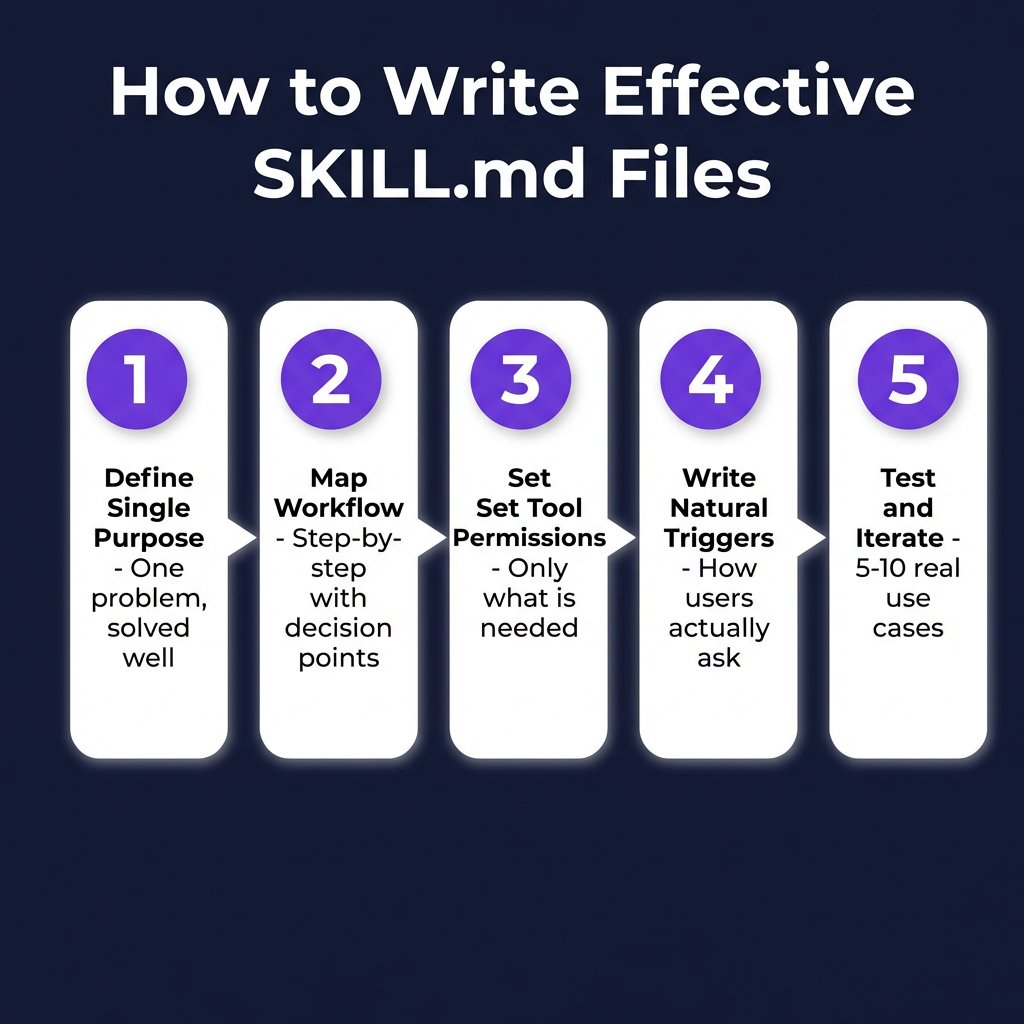
Step 1: Define the Single Purpose
Don’t build a “do everything” skill. The best skills solve one problem exceptionally well. Compare:
- ❌ Bad: “Help me with marketing tasks”
- ✅ Good: “Generate SEO-optimized blog posts from keyword research”
Step 2: Map the Workflow
Write out every step your agent needs to take. Be explicit about decision points:
## Workflow
1. Receive keyword from user
2. IF keyword has < 100 monthly searches, suggest alternatives
3. Search Tavily for top 10 ranking pages
4. Extract content structure from top 3 competitors
5. Generate outline matching search intent
6. Write full article (2000-3500 words)
7. Add internal linking suggestions
8. Return draft with meta description
Step 3: Set Tool Permissions
Only grant the tools your skill actually needs. Over-permissioned skills are security risks:
tools:
  - tavily  # Required for research
  - write   # Required for draft creation
  - read    # Required for competitor analysis
# Don't add: exec, github, wordpress unless needed
Step 4: Write Natural Triggers
Think about how you’d actually ask for this task:
triggers:
  - "write a blog post about"
  - "create an article on"
  - "draft content for"
  - "generate SEO content"
Step 5: Test and Iterate
Run your skill against 5-10 real use cases. Track where the agent gets confused or makes mistakes. Refine the workflow section based on actual behavior.
Security Best Practices for AI Agent Skills
Skills can access sensitive tools and APIs. Follow these security guidelines:
1. Use API Gateways for External Calls
Never hardcode API keys in skill files. Use a unified API gateway (like APIYI) that manages authentication centrally:
# ❌ Don't do this
api_key: "sk-abc123..."

# ✅ Do this
api_gateway: "https://gateway.apiyi.com"
auth_method: "oauth2"
scope: ["tavily:search", "fal:generate"]
2. Implement Rate Limiting
Add cost controls directly in your skill to prevent runaway API usage:
rate_limits:
  tavily_search: 10/hour
  fal_image_gen: 5/hour
  max_token_budget: 50000/session
3. Audit Before Installing
Before installing any ClawHub skill, review:
- What tools does it request access to?
- Does it call external APIs? Where?
- Are there any exec commands? What do they do?
- Is the code open source or obfuscated?
Common SKILL.md Mistakes to Avoid
| Mistake | Why It Fails | Fix |
|---|---|---|
| Vague role definition | Agent doesn’t know expertise level | Specify years of experience and domain |
| Missing error handling | Agent crashes on edge cases | Add “IF error, then…” branches |
| Too many tools | Security risk, slower execution | Only include required tools |
| No output format | Inconsistent responses | Define exact structure |
| Generic triggers | Wrong skill activates | Use specific, unique phrases |
Key Takeaways
- SKILL.md is the standard — Works across Claude Code, Codex, OpenClaw, and OpenAI Skills
- 2,636+ skills available — Browse ClawHub registry before building from scratch
- Structure matters — Role, workflow, tools, triggers, and output format are all required
- Security first — Use API gateways, rate limits, and audit before installing
- Start small — Build one focused skill, test it, then expand
Frequently Asked Questions
What is the SKILL.md format?
SKILL.md is a markdown-based specification for AI agent skills. It includes frontmatter metadata (name, description, tools, triggers) followed by structured instructions (role, workflow, output format). The format is compatible with Claude Code, Codex, OpenClaw, and OpenAI Skills.
How do I install AI agent skills?
For OpenClaw, use the ClawHub CLI: `clawhub install skill-name`. For Claude Code, place SKILL.md files in your `~/.claude/skills/` directory. Codex and OpenAI Skills have similar directory-based installation.
Are ClawHub skills safe to use?
Most are safe, but always audit before installing. Check what tools the skill requests, review any external API calls, and look for exec commands. Skills with 1,000+ installs and active maintainers are generally trustworthy.
Can I use the same skill across different AI platforms?
Yes, if you follow the core SKILL.md spec. Avoid platform-specific metadata in the main file. Use optional sidecar files for platform-specific behavior if needed.
How do I control costs when my agent uses skills?
Implement rate limits in your skill files, use an API gateway with budget tracking, and route to cost-effective models when possible. The API Gateway Cost Control skill mentioned above handles this automatically.
Conclusion
AI agent skills transform your AI from a chatbot into a productive team member. The SKILL.md format makes it easy to build, share, and reuse capabilities across platforms.
Start with one skill that solves a real problem in your workflow. Test it. Refine it. Then build another. Within a month, you’ll have a custom toolkit that makes your development process significantly faster.
Ready to automate your development workflow? Sign up for Fungies.io and focus on building products while we handle payments, tax compliance, and checkout.