By mid-2026, 73% of professional developers use AI coding agents daily. The tools that felt like toys in 2023 are now handling production code reviews, multi-file refactors, and autonomous debugging. But here’s the problem: most developers are using the wrong tool for their workflow.
I’ve spent the last three months testing Claude Code, Cursor, and GitHub Copilot on real projects—not demos. This guide cuts through the marketing hype and gives you the data you need to make the right choice.
What Are AI Coding Agents (And Why They Matter in 2026)
AI coding agents go beyond autocomplete. They understand your entire codebase, execute multi-step tasks, run tests, and iterate without constant babysitting. Think of them as junior developers who never sleep and don’t charge overtime.
The shift from “AI-assisted” to “AI-agentic” coding happened fast. In 2025, we had autocomplete. In 2026, we have agents that can:
- Refactor across 50+ files in a single session
- Debug by reading stack traces and suggesting fixes
- Write tests based on existing code patterns
- Execute terminal commands and verify results
- Maintain context across hours-long sessions
This isn’t vibe coding. This is production-grade automation that changes how software gets built.
The Three Dominant Players: At a Glance
If you’re choosing an AI coding agent in 2026, you’re almost certainly deciding between these three:
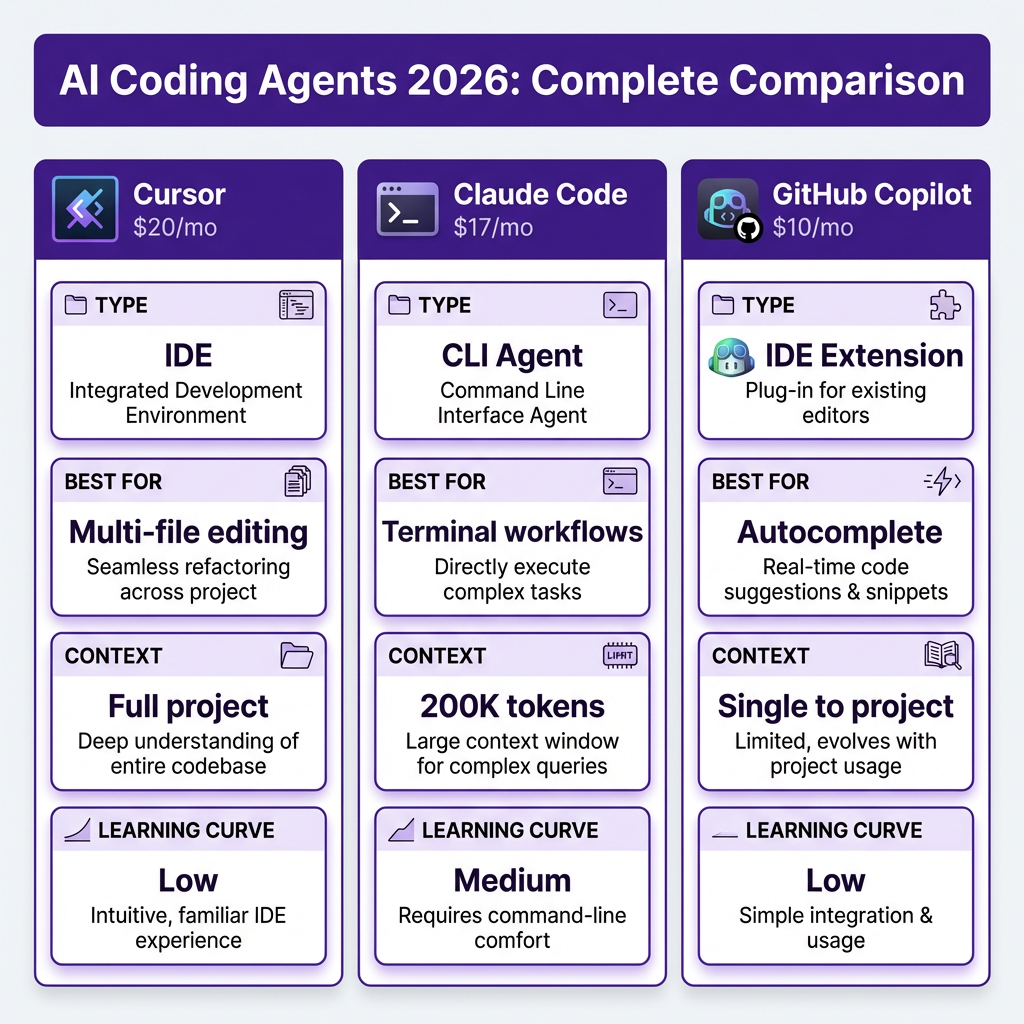
| Feature | Cursor | Claude Code | GitHub Copilot |
|---|---|---|---|
| Price (Individual) | $20/month | $17/month (Pro) | $10/month |
| Type | IDE (VS Code fork) | CLI agent | IDE extension |
| Best Model | GPT-4o / Claude | Claude Opus 4.6 | GPT-4o |
| Context Window | Full project | 200K tokens | Single file → project |
| Multi-file Editing | Excellent (Composer) | Excellent (agentic) | Good (Workspace) |
| Terminal/CLI | Limited | Native | Limited |
| Learning Curve | Low | Medium | Low |
Each tool has a distinct personality. Cursor feels like a smarter IDE. Claude Code feels like a senior engineer in your terminal. Copilot feels like autocomplete that sometimes reads your mind.
Deep Dive: Cursor (The Market Leader)
Cursor is a VS Code fork with AI built into its DNA. Anysphere, the company behind it, hit $500M+ ARR in 2025—a 10x year-over-year growth that signals serious developer adoption.
What Cursor Does Best
- Composer mode: Multi-file editing with visual diff review
- Tab autocomplete: Fastest-in-class prediction for TypeScript and Python
- Model flexibility: Switch between GPT-4o, Claude, and others per task
- Codebase indexing: Actually understands your project structure
Cursor Pricing (2026)
| Plan | Price | Includes |
|---|---|---|
| Free | $0 | Limited completions, 50 slow requests/month |
| Pro | $20/month | Unlimited completions, 500 fast premium requests |
| Business | $40/user/month | Team features, admin controls, higher limits |
When to Choose Cursor
Pick Cursor if you want the best all-around IDE experience and don’t mind paying $20/month. It’s especially strong for:
- Large refactors across multiple files
- Teams already using VS Code
- Developers who want visual diff review before applying changes
- Projects where you need to switch between AI models frequently
Cursor Limitations
Cursor isn’t perfect. The VS Code fork means some extensions that check for official VS Code builds won’t work. Composer mode, while powerful, is less reliable than Claude Code for complex, many-file refactors. And at $20/month, it’s the most expensive option for individuals.
Deep Dive: Claude Code (The Terminal Powerhouse)
Claude Code is different. It’s not an IDE—it’s a terminal-based agent that works directly in your codebase. You tell it what to do in plain English, and it reads files, writes code, runs tests, and iterates until the task is done.
What Claude Code Does Best
- Agentic workflows: Executes multi-step tasks autonomously
- 200K token context: Holds your entire project in memory
- Native terminal integration: Runs commands, checks output, adapts
- Claude Opus 4.6: Best reasoning model for complex tasks
- Git integration: Auto-commits with descriptive messages
Claude Code Pricing (2026)
| Plan | Price | Best For |
|---|---|---|
| Free | $0 | Limited usage, testing the tool |
| Pro | $17/month | Regular usage, professionals |
| Max | $100+/month | Heavy users, agencies |
Claude Code also offers API access. The underlying Claude Opus 4 model costs $15 per million input tokens and $75 per million output tokens—premium pricing for premium capability.
When to Choose Claude Code
Pick Claude Code if you:
- Live in the terminal and are comfortable with CLI workflows
- Work on complex, multi-file tasks across large codebases
- Need autonomous execution without babysitting every step
- Want the best reasoning model for debugging and architecture decisions
- Work as an agency or lead developer managing multiple projects
Claude Code Limitations
No IDE integration means no autocomplete. If you want line-by-line suggestions, you need a separate tool. The terminal interface has a learning curve. And usage-based pricing can spike on heavy days—I’ve seen developers rack up $50+ in a single day of intensive refactoring.
Deep Dive: GitHub Copilot (The Ecosystem Choice)
GitHub Copilot has the deepest ecosystem integration. It works in VS Code, JetBrains IDEs, Neovim, and even GitHub’s web interface. With $2B+ ARR and Microsoft’s backing, it’s not going anywhere.
What Copilot Does Best
- Inline autocomplete: Still the fastest and most natural in the market
- GitHub integration: Understands your PRs, issues, and repo context natively
- Copilot Workspace: Multi-file editing (improved significantly in 2026)
- IDE breadth: Works everywhere you code
GitHub Copilot Pricing (2026)
| Plan | Price | Includes |
|---|---|---|
| Free | $0 | Limited completions, 50 requests/month |
| Individual | $10/month | Unlimited completions, chat |
| Business | $19/user/month | Team features, admin controls, security |
| Enterprise | $39/user/month | Advanced security, compliance, support |
When to Choose GitHub Copilot
Pick Copilot if:
- Your team is already on GitHub Enterprise
- You want minimal setup and broad IDE support
- Autocomplete quality is your top priority
- You need deep integration with GitHub’s ecosystem (PRs, issues, Actions)
Copilot Limitations
Multi-file editing is weaker than Cursor or Claude Code. The chat interface works but feels bolted on. You’re tied to whatever models Microsoft chooses to serve—no switching to Claude for reasoning-heavy tasks.
LLM API Pricing: The Hidden Cost of AI Coding
Most AI coding agents use the same underlying models. Understanding API pricing helps you estimate real costs, especially for Claude Code which bills based on usage.
| Model | Provider | Input (per 1M tokens) | Output (per 1M tokens) | Context Window |
|---|---|---|---|---|
| GPT-4.1 | OpenAI | $2.00 | $8.00 | 1M tokens |
| GPT-4o | OpenAI | $2.50 | $10.00 | 128K tokens |
| Claude Opus 4 | Anthropic | $15.00 | $75.00 | 200K tokens |
| Claude Sonnet 4 | Anthropic | $3.00 | $15.00 | 200K tokens |
| Gemini 2.5 Pro | $1.25 | $10.00 | 1M tokens | |
| Gemini 2.5 Flash | $0.15 | $0.60 | 1M tokens |
Here’s what this means in practice: A typical coding session with 10,000 tokens input and 5,000 tokens output costs $0.09 with Gemini 2.5 Flash, $0.12 with GPT-4.1, and $0.52 with Claude Sonnet 4. Heavy Claude Opus 4 usage can quickly add up to $20-50 per day.

Best Practices for AI Coding Agents in 2026
Having the right tool is only half the battle. Here’s how to actually get value from AI coding agents without creating a mess.
1. Start with Clear Specifications
AI agents amplify clarity. If your requirements are fuzzy, the AI will make assumptions—and those assumptions compound into technical debt. Write a brief spec before asking an agent to implement anything non-trivial.
2. Review Everything (Yes, Everything)
One developer described AI-generated code as “like 10 devs worked on it without talking to each other.” Duplicate logic, mismatched method names, no coherent architecture. Always review AI output, and consider having a second AI review it too—different models catch different issues.
3. Checkpoint Before Major Changes
Before asking an agent to refactor 50 files, commit your current state. AI agents can go down rabbit holes. Having a clean rollback point saves hours of cleanup.
4. Use Tiered Model Routing
Don’t use Claude Opus for simple autocomplete. Don’t expect GPT-4.1 nano to handle complex architecture decisions. Route requests based on complexity:
- Simple tasks (classification, formatting): Gemini 2.0 Flash, GPT-4.1 nano
- Standard coding: GPT-4.1, Claude Sonnet 4
- Complex reasoning, debugging: Claude Opus 4, GPT-4.1 with reasoning
5. Establish Guardrails
Set clear conditions for when AI execution should pause:
- The agent asks more than 3 clarifying questions (requirements too fuzzy)
- The plan changes on consecutive steps (model losing context)
- The diff grows beyond the agreed file list
- A test fails and the proposed fix touches unrelated code
6. Maintain Coding Standards
AI agents learn from your codebase. If your existing code is inconsistent, the AI will amplify that inconsistency. Invest in clear style guides and patterns. Cursor’s .cursorrules and Claude Code’s CLAUDE.md files help enforce standards.
Real-World Cost Comparison
Let’s look at actual costs for a solo developer working 40 hours/week with AI assistance:
| Scenario | Cursor Pro | Claude Code Pro | Copilot Individual |
|---|---|---|---|
| Monthly subscription | $20 | $17 | $10 |
| Average API usage | Included | $15-30 | Included |
| Total monthly cost | $20 | $32-47 | $10 |
| Time saved (estimated) | 15-20 hrs/week | 15-25 hrs/week | 10-15 hrs/week |
Even at $47/month, Claude Code pays for itself if it saves you 5+ hours of billable time. For most developers, the ROI is obvious within the first week.
FAQ: AI Coding Agents in 2026
Can AI coding agents replace developers?
No. They augment developers, not replace them. The best developers in 2026 use AI to move faster on implementation while focusing their human brainpower on architecture, user experience, and business logic. AI handles the boilerplate; humans handle the decisions.
Which AI coding agent is best for beginners?
GitHub Copilot is the easiest to start with. It works inside VS Code with minimal setup, and the autocomplete feels natural from day one. Cursor is also beginner-friendly if you’re already comfortable with VS Code.
Can I use multiple AI coding agents together?
Yes, and many developers do. The most common setup is Claude Code for complex tasks and terminal work, plus Cursor or Copilot for daily editing and autocomplete. Since Claude Code runs in the terminal, it doesn’t conflict with IDE-based assistants.
Are AI coding agents worth it for solo developers?
Absolutely. Even the cheapest option (Copilot at $10/month) saves most developers 30-60 minutes daily. At a conservative $50/hour rate, that’s $25-50 of value per day. The tools pay for themselves many times over.
What about security and IP protection?
All three major tools offer enterprise tiers with data protection guarantees. Cursor and Copilot have explicit policies that they don’t train on your code. For maximum security, Claude Code can run against local models or air-gapped APIs. If IP is critical, review each vendor’s data handling policy before committing.
The Verdict: Which Should You Choose?
There’s no single “best” AI coding agent. The right choice depends on your workflow:
- Choose Cursor if you want the best IDE experience and don’t mind $20/month. Best for general development, multi-file refactors, and teams wanting a polished UX.
- Choose Claude Code if you live in the terminal, work on complex codebases, and want the most capable agentic tool. Best for senior developers, agencies, and complex refactoring.
- Choose GitHub Copilot if you want the lowest cost, broadest IDE support, and best GitHub integration. Best for teams already in the Microsoft ecosystem.
Many professionals use two tools: Claude Code for heavy lifting and Cursor/Copilot for daily coding. The $30-40 combined monthly cost is trivial compared to the productivity gains.
Getting Started: Recommended Setup
Here’s a quick-start configuration that works for most developers in 2026:
- Primary editor: Cursor Pro ($20/month) for daily coding
- Terminal agent: Claude Code Pro ($17/month) for complex tasks
- Model strategy: Use GPT-4.1 for standard tasks, Claude Sonnet 4 for debugging, Claude Opus 4 only for architecture decisions
- Guardrails: Always commit before major AI refactors, always review AI-generated code
Start with one tool, master it, then add the second. Don’t try to learn Cursor and Claude Code simultaneously—you’ll confuse their workflows.
Conclusion
AI coding agents have crossed the threshold from novelty to necessity. In 2026, developers who don’t use AI agents are at a measurable disadvantage. The question isn’t whether to adopt AI coding tools—it’s which combination fits your workflow.
Start with the tool that matches your current habits. Terminal users should try Claude Code. IDE-focused developers should try Cursor. Budget-conscious teams should start with Copilot. All three will make you faster. The only wrong choice is waiting.
Ready to streamline your SaaS payments and focus on what matters? Get started with Fungies.io—the merchant of record platform that handles payments, taxes, and compliance so you can focus on building.
References
- Best AI Coding Assistants 2026 – PE Collective
- AI Coding Tools Compared (2026) – TL;DL
- LLM API Pricing Comparison April 2026 – PE Collective
- Claude Code vs Copilot vs Cursor – Cosmic JS
- Claude Code vs Copilot vs Cursor – PinkLime
- Best AI Coding Tools in 2026 – Emergent
- Best AI Coding Agents for 2026 – Faros AI
- Best AI Coding Agents in 2026: Ranked – Codegen