Here’s a number that should get your attention: 55%. That’s how much faster developers complete coding tasks when using AI coding assistants, according to GitHub’s latest productivity data. But here’s the catch — with GitHub Copilot reaching 4.7 million paid subscribers, Cursor AI capturing 50% of Fortune 500 companies, and Claude Code hitting 80.8% on SWE-bench Verified, choosing the wrong tool could cost you hundreds of dollars monthly and weeks of productivity.
I’ve spent the last three months testing every major AI coding assistant on the market. This guide cuts through the marketing hype and gives you the data you need to make the right choice for your workflow, budget, and codebase.
What Is an AI Coding Assistant?
An AI coding assistant is a tool that uses large language models (LLMs) to help you write, review, refactor, and understand code. In 2026, these tools have evolved from simple autocomplete into autonomous agents that can plan multi-file changes, run tests, and even deploy code.
There are three main types:
- IDE Extensions (GitHub Copilot) — Inline suggestions inside your editor
- AI-Native IDEs (Cursor) — Full editors built around AI assistance
- Terminal Agents (Claude Code) — Command-line tools for complex tasks
The Three Leaders in 2026
While dozens of AI coding tools exist, three dominate the market in 2026: GitHub Copilot, Cursor, and Claude Code. Each serves a different use case, and most professional developers I know use at least two of them.
GitHub Copilot: The Safe Choice
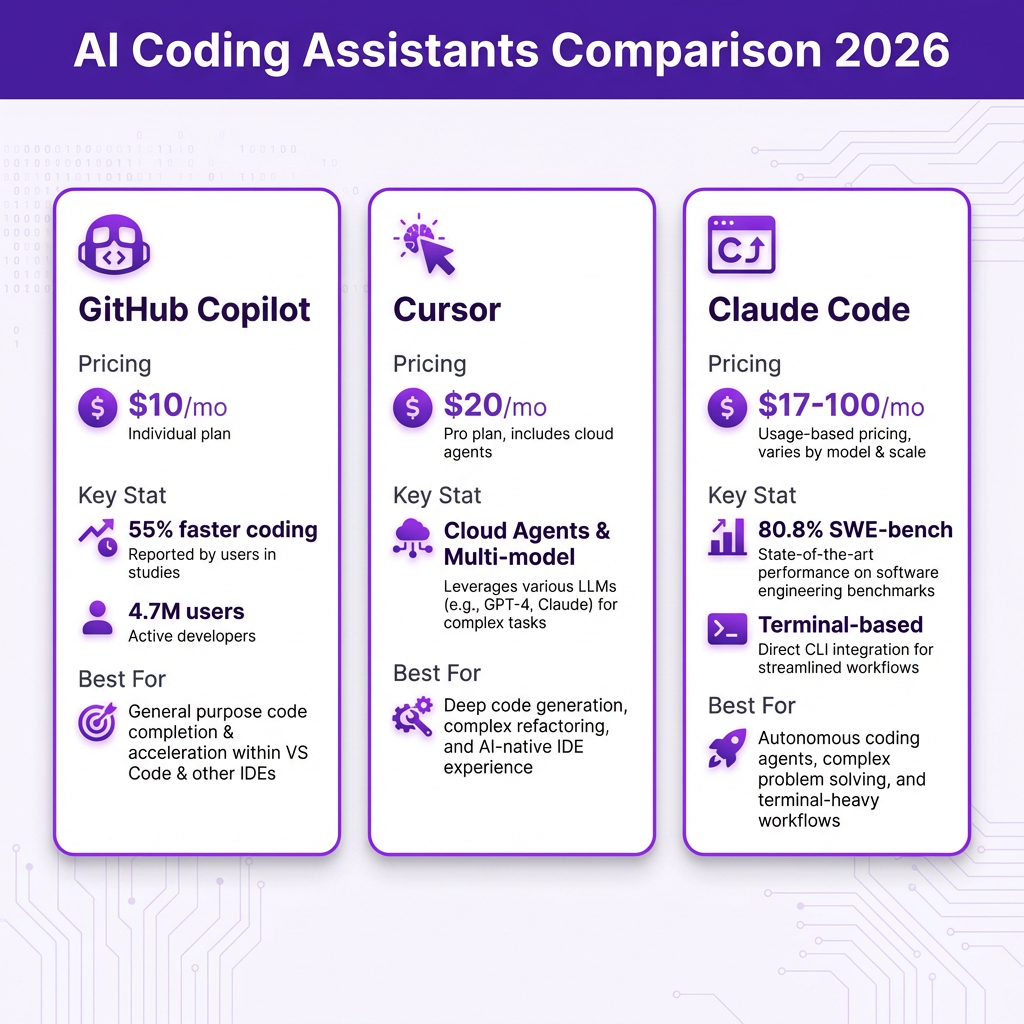
GitHub Copilot remains the most widely adopted AI coding tool with 4.7 million paid subscribers and 42% market share in the paid AI coding tools segment. It generates an average of 46% of code written by users, with Java developers seeing up to 61% code generation rates.
Best for: Developers who want inline suggestions, teams already using GitHub, and those who prefer predictable costs.
Key features in 2026:
- Agent mode in VS Code for multi-step autonomous tasks
- Multi-model support (Claude, Codex, Copilot models)
- Coding agent that turns GitHub issues into pull requests
- Native IDE support for VS Code, JetBrains, Neovim, Visual Studio, Xcode
- 300 premium requests per month on Pro plan
Cursor: The Power User’s IDE
Cursor has emerged as the favorite among developers who want an AI-native experience. With 50% of Fortune 500 companies deploying Cursor AI, it’s clearly crossed into mainstream enterprise adoption.
Best for: Developers managing large repositories who need advanced reasoning, deep refactoring capabilities, and flexible multi-model support.
Key features in 2026:
- Cloud agents that run autonomously in isolated Linux VMs
- Subagents for parallel task execution
- Multi-model support (Claude, GPT, Gemini, DeepSeek)
- Plugin marketplace for extending functionality
- VS Code-compatible with PyCharm/IntelliJ keybindings
Claude Code: The Terminal Powerhouse
Claude Code represents a different philosophy: what if AI coding assistance was built for how senior developers actually work? It’s a terminal-first agent that plans and executes multi-file changes with an 80.8% score on SWE-bench Verified — the highest of any coding agent.
Best for: Developers comfortable in the terminal, those tackling complex refactoring, and teams working with large existing codebases (50,000+ lines).
Key features in 2026:
- Agent teams with dependency tracking
- Background delegation to cloud coding agents
- Autopilot mode for autonomous execution
- Multi-model support including Claude Opus 4.6
- Dispatch and channels for production agentic pipelines
Complete Pricing Comparison
Pricing in 2026 is more complex than the advertised monthly rates. Token overages, premium model access, and agentic usage multipliers can push bills 2x to 5x higher than base subscriptions for heavy users.
| Plan | GitHub Copilot | Cursor | Claude Code |
|---|---|---|---|
| Free Tier | 2,000 completions | Limited | Free (with limits) |
| Pro/Individual | $10/month | $20/month | $17/month |
| Business/Team | $19/seat/month | $40/user/month | Team pricing |
| Enterprise | $39/seat/month | $60/user/month | Custom |
| Premium/Power User | — | $60/month (Pro+) | $100/month (Max 5x) |
| Ultra Tier | — | $200/month | $200/month (Max 20x) |
Key insight: GitHub Copilot Pro at $10/month offers the best value on a per-dollar basis, with 300 premium requests and multi-model support. The $200/month tiers (Cursor Ultra, Claude Code Max 20x) are only worth it if AI coding is your primary productivity lever.
Performance Benchmarks
Real-world performance matters more than marketing claims. Here’s how the tools compare on standardized benchmarks:
| Benchmark | Claude Code (Opus 4.6) | Cursor | GitHub Copilot |
|---|---|---|---|
| SWE-bench Verified | 80.8% | Competitive | Strong |
| HumanEval | 92.7% | High | Good |
| Code Quality (Blind Test) | 67% win rate | Strong | Good |
| Developer Productivity Gain | 20-40% | 20-40% | 55% faster tasks |
Source: SWE-bench, HumanEval benchmarks, and developer productivity studies from 2026.
The 5-Step Decision Framework

Step 1: IDE vs Terminal Preference
Your workflow determines your tool. If you live in VS Code, GitHub Copilot or Cursor are natural fits. If you prefer the terminal and work across multiple projects, Claude Code’s agentic approach will feel more natural.
Step 2: Team Size and Collaboration
Solo developers can start with any free tier or the $10-20 Pro plans. Teams need to consider seat management, shared context, and billing predictability. GitHub Copilot Business at $19/seat offers the most stable cost structure for teams.
Step 3: Codebase Size and Complexity
Small projects (under 10,000 lines) work well with any tool. Medium codebases (10,000-50,000 lines) benefit from Cursor’s codebase understanding. Large codebases (50,000+ lines) need Claude Code’s deep reasoning or Cursor’s cloud agents.
Step 4: Budget Reality Check
Free tiers in 2026 are genuinely usable: Bolt.new offers 1M tokens/month, GitHub Copilot Free gives 2,000 completions, and Codex CLI is open source. The $10-20/month range is the sweet spot for most developers. Only upgrade to $60-200 tiers if you consistently hit limits.
Step 5: Test Before Committing
All three tools offer free trials or generous free tiers. Run them on real tasks from your current project. Pay attention to:
- How well they understand your existing code
- Quality of generated code (not just speed)
- Integration with your workflow
- Whether the suggestions actually save time or create more review work
Real-World Use Case Recommendations
Choose GitHub Copilot If:
- You want predictable costs ($10-39/month)
- Your team already uses GitHub
- You need IDE support beyond VS Code (JetBrains, Neovim, Xcode)
- You want the coding agent that turns issues into PRs
Choose Cursor If:
- You want an AI-native IDE experience
- You need cloud agents for parallel task execution
- You work with large repositories requiring deep context
- You want flexibility to switch between AI models
Choose Claude Code If:
- You’re comfortable in the terminal
- You tackle complex refactoring across multiple files
- You need the highest code quality (80.8% SWE-bench)
- You want agent teams for autonomous workflows
Key Takeaways
- GitHub Copilot offers the best value at $10/month with the widest IDE support and most predictable pricing
- Cursor leads for AI-native development with cloud agents and multi-model flexibility
- Claude Code wins on code quality benchmarks and is ideal for complex refactoring
- Most professional developers use 2-3 AI coding tools simultaneously for different tasks
- Free tiers in 2026 are genuinely usable — test before you buy
- The $10-20/month range covers 80% of developer needs
Frequently Asked Questions
Can I use AI coding assistants for free?
Yes. GitHub Copilot Free offers 2,000 completions, Bolt.new provides 1M tokens/month, and Codex CLI is open source. These free tiers are genuinely usable for light to moderate coding work.
Which AI coding assistant is best for beginners?
GitHub Copilot is the most beginner-friendly due to its simple inline suggestions and extensive documentation. Cursor is also accessible for beginners who want more AI-native features.
Do AI coding assistants work with all programming languages?
All three tools support major languages (Python, JavaScript, TypeScript, Java, Go, Rust, C++). Python and JavaScript/TypeScript see the best performance. Copilot excels with Java (61% code generation), while Claude Code leads on complex reasoning tasks across all languages.
Will AI coding assistants replace developers?
No. Current data shows AI assistants increase productivity by 20-55%, but they require developer oversight. Code reviews, testing, and architectural decisions remain human responsibilities. The tools augment developers, not replace them.
Can I use multiple AI coding assistants together?
Yes, and many developers do. A common pattern is using Copilot for daily inline suggestions, Cursor for complex refactoring, and Claude Code for terminal-based automation. The cost of multiple licenses is negligible compared to productivity gains.
Conclusion
Choosing the right AI coding assistant in 2026 comes down to matching the tool to your workflow. GitHub Copilot offers the safest, most predictable option. Cursor provides the most powerful AI-native experience. Claude Code delivers the highest code quality for complex tasks.
Start with the free tier that matches your current workflow. Test it on real work for a week. Then upgrade based on actual usage, not hypothetical needs. The best AI coding assistant is the one you’ll actually use.
Ready to streamline your SaaS payment infrastructure? Sign up for Fungies.io and handle global payments, tax compliance, and checkout with zero code.
References
- GitHub Copilot Statistics 2026 — affiliatebooster.com
- AI Coding Tools Comparison 2026 — sitepoint.com
- Claude Code vs GitHub Copilot vs Cursor — cosmicjs.com
- AI Coding Tools Pricing Comparison 2026 — nxcode.io
- Cursor vs Copilot vs Claude Code Guide — pointdynamics.com
- GitHub Copilot Q2 2026 Subscriber Data — mexc.com
- AI Coding Assistant Productivity Report — secondtalent.com
- Claude Code Q1 2026 Update — mindstudio.ai