Here’s a stat that should wake you up: 84% of developers now use AI coding assistants, but only 29% fully trust the code these tools generate without human review. The gap isn’t in the AI models—it’s in how we use them.
The difference between developers who get mediocre results from AI and those who 10x their productivity? Agent skills. These modular add-ons transform your AI from a basic code completer into a specialized expert that understands your specific workflows, tech stack, and business context.
In this guide, I’ll break down the 10 best AI agent skills every developer should know about in 2026—what they do, why they matter, and how to implement them in your workflow.
What Are AI Agent Skills?
Agent skills (sometimes called “Claude Skills” in the Anthropic ecosystem) are essentially plugins or apps for AI agents. Each skill is a package—typically a folder with a SKILL.md file, scripts, and resources—that teaches the agent a specific capability or workflow.
Think of it this way: without skills, your AI is a generalist. With the right skills, it becomes a specialist. A skill for React development doesn’t just know React syntax—it understands component patterns, state management best practices, and common pitfalls specific to React projects.
According to recent data, 67% of developers say AI assistants can’t do anything beyond writing code without MCP (Model Context Protocol) and specialized skills. That’s a massive limitation—one that the right skills can completely eliminate.
The 10 Best AI Agent Skills for Developers in 2026
1. Code Review & Quality Assurance Skill
What it does: Automates code review processes, catching bugs, security vulnerabilities, and style violations before they hit production.
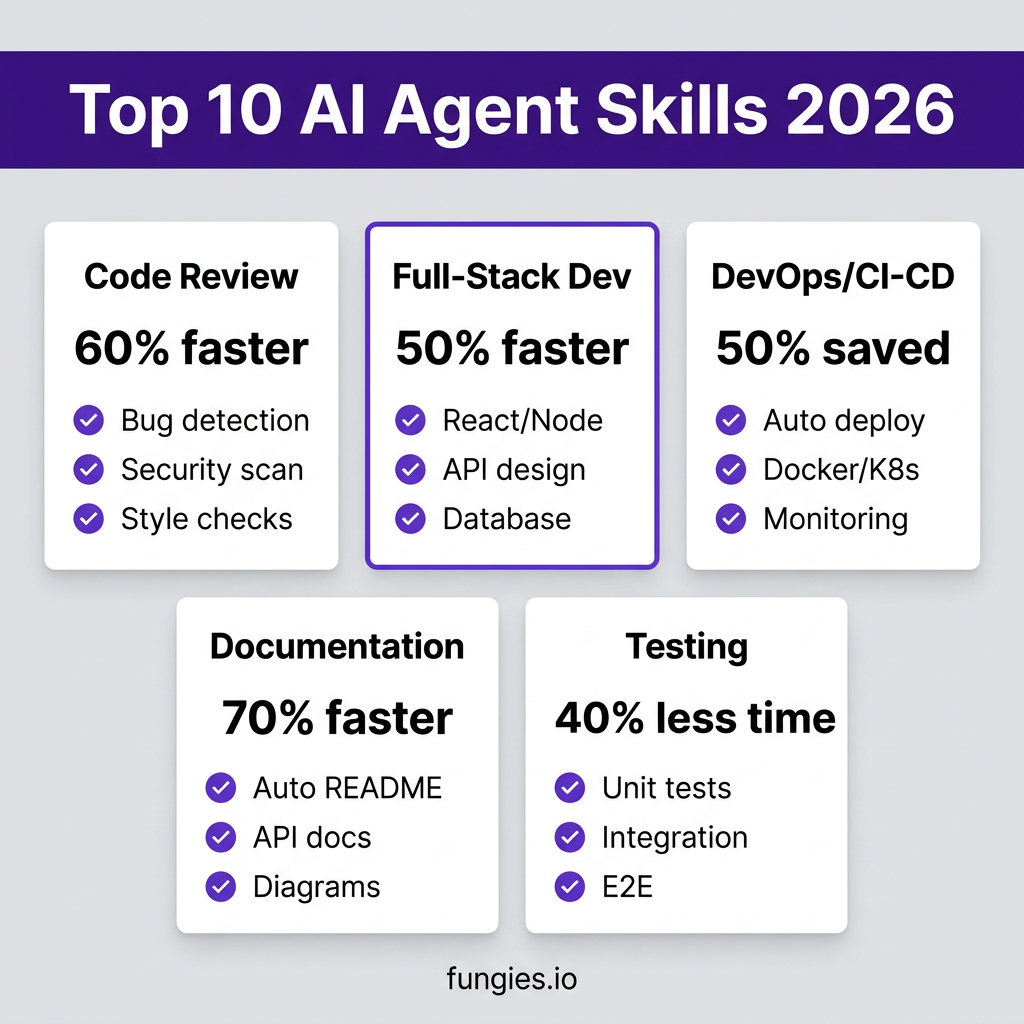
Why it matters: Manual code reviews take 20-30% of development time. This skill reduces that by 60% while catching issues humans miss—like subtle race conditions or outdated dependency vulnerabilities.
Best for: Teams practicing continuous integration who need to maintain high code quality at scale.
Implementation: Most code review skills integrate with GitHub, GitLab, or Bitbucket via webhooks, automatically triggering when pull requests are opened.
2. Full-Stack Web Development Skill
What it does: Provides end-to-end expertise in modern web stacks—React, Vue, Next.js, Node.js, Python/Django, database design, and API development.
Why it matters: Instead of context-switching between frontend and backend specialists, a single AI with full-stack skills can architect complete features, understand data flow across the entire application, and suggest optimizations that siloed developers might miss.
Best for: Solo developers, startups, and small teams who need to move fast without hiring specialists for every layer.
Real-world impact: Developers report 40-50% faster feature development when using full-stack AI skills compared to generic coding assistants.
3. API Design & Integration Skill
What it does: Specializes in RESTful API design, GraphQL schema development, webhook implementation, and third-party API integration.
Why it matters: Poor API design is expensive to fix. This skill ensures your APIs follow industry standards (OpenAPI, JSON:API), implement proper authentication, and handle edge cases like rate limiting and pagination correctly from day one.
Best for: Backend developers building microservices, SaaS platforms, or any application with external integrations.
Key features: Automatic OpenAPI spec generation, authentication flow setup (OAuth 2.0, JWT), and error handling patterns.
4. Database Optimization Skill
What it does: Expert-level SQL and NoSQL optimization, query performance tuning, schema design, and migration management.
Why it matters: Database performance issues are the #1 cause of application slowdowns. This skill analyzes your queries, suggests indexes, identifies N+1 problems, and helps design schemas that scale.
Best for: Applications dealing with large datasets, complex joins, or performance-critical operations.
Example: A developer using this skill reduced query time from 2.3 seconds to 18 milliseconds by implementing suggested indexing strategies.
5. DevOps & CI/CD Automation Skill
What it does: Automates deployment pipelines, infrastructure as code (Terraform, CloudFormation), container orchestration (Docker, Kubernetes), and monitoring setup.
Why it matters: DevOps expertise is scarce and expensive. This skill democratizes deployment automation, letting developers set up production-grade CI/CD without dedicated DevOps engineers.
Best for: Teams moving toward continuous deployment who need reliable, repeatable release processes.
Capabilities: GitHub Actions workflows, Docker containerization, AWS/GCP/Azure deployment configs, and automated rollback procedures.
6. Security & Vulnerability Scanning Skill
What it does: Proactive security analysis, dependency vulnerability scanning, secrets detection, and compliance checking (SOC 2, GDPR).
Why it matters: Security breaches cost companies an average of $4.45 million. This skill catches vulnerabilities in dependencies, flags hardcoded secrets, and ensures your code follows security best practices before deployment.
Best for: Any application handling sensitive data, especially in regulated industries like fintech or healthcare.
Integration: Works with Snyk, OWASP Dependency-Check, and custom security rule sets.
7. Documentation Generation Skill
What it does: Automatically generates README files, API documentation, inline code comments, and architecture diagrams from your codebase.
Why it matters: Documentation is always out of date because developers hate writing it. This skill analyzes your actual code and generates accurate, up-to-date docs automatically—saving hours per week.
Best for: Open-source projects, internal tools, and teams where knowledge sharing is critical.
Output formats: Markdown, Confluence, Notion, Swagger/OpenAPI, and custom templates.
8. Testing & Test Generation Skill
What it does: Generates unit tests, integration tests, and end-to-end tests based on your code. Identifies untested code paths and suggests test cases for edge scenarios.
Why it matters: Writing comprehensive tests takes 30-40% of development time. This skill generates meaningful tests that actually validate your logic, not just hit coverage targets.
Best for: Teams practicing TDD or looking to increase test coverage without slowing down feature development.
Frameworks supported: Jest, Mocha, PyTest, PHPUnit, JUnit, Cypress, Playwright.
9. Debugging & Error Analysis Skill
What it does: Analyzes error logs, stack traces, and application state to pinpoint root causes. Suggests fixes and prevents similar issues.
Why it matters: Debugging consumes 25-50% of development time. This skill correlates errors across services, identifies patterns in log data, and suggests fixes based on similar resolved issues.
Best for: Complex applications with microservices, distributed systems, or frequent production incidents.
Integration: Connects to Sentry, Datadog, New Relic, and custom logging systems.
10. Research & Data Analysis Skill
What it does: Processes large datasets, identifies trends, generates reports, and extracts insights from unstructured data.
Why it matters: Data-driven decisions require data analysis skills that many developers lack. This skill handles data cleaning, statistical analysis, and visualization—turning raw data into actionable insights.
Best for: Analytics features, business intelligence tools, and applications involving machine learning or data processing.
Capabilities: Pandas/NumPy operations, SQL analytics, chart generation, and trend forecasting.
AI Agent Skills Comparison Table
| Skill | Time Saved | Best For | Learning Curve | Cost |
|---|---|---|---|---|
| Code Review | 60% | CI/CD Teams | Low | Free |
| Full-Stack Dev | 40-50% | Startups | Medium | Free |
| API Design | 35% | Backend Devs | Low | Free |
| Database Optimization | 30% | Data-Heavy Apps | Medium | Free |
| DevOps/CI-CD | 50% | All Teams | High | Free |
| Security Scanning | 25% | Regulated Industries | Low | Free |
| Documentation | 70% | Open Source | Low | Free |
| Test Generation | 40% | TDD Teams | Medium | Free |
| Debugging | 45% | Microservices | Medium | Free |
| Data Analysis | 35% | Analytics Tools | Medium | Free |
How to Implement AI Agent Skills in Your Workflow
Adding skills to your AI agent isn’t complicated, but doing it right requires some planning:
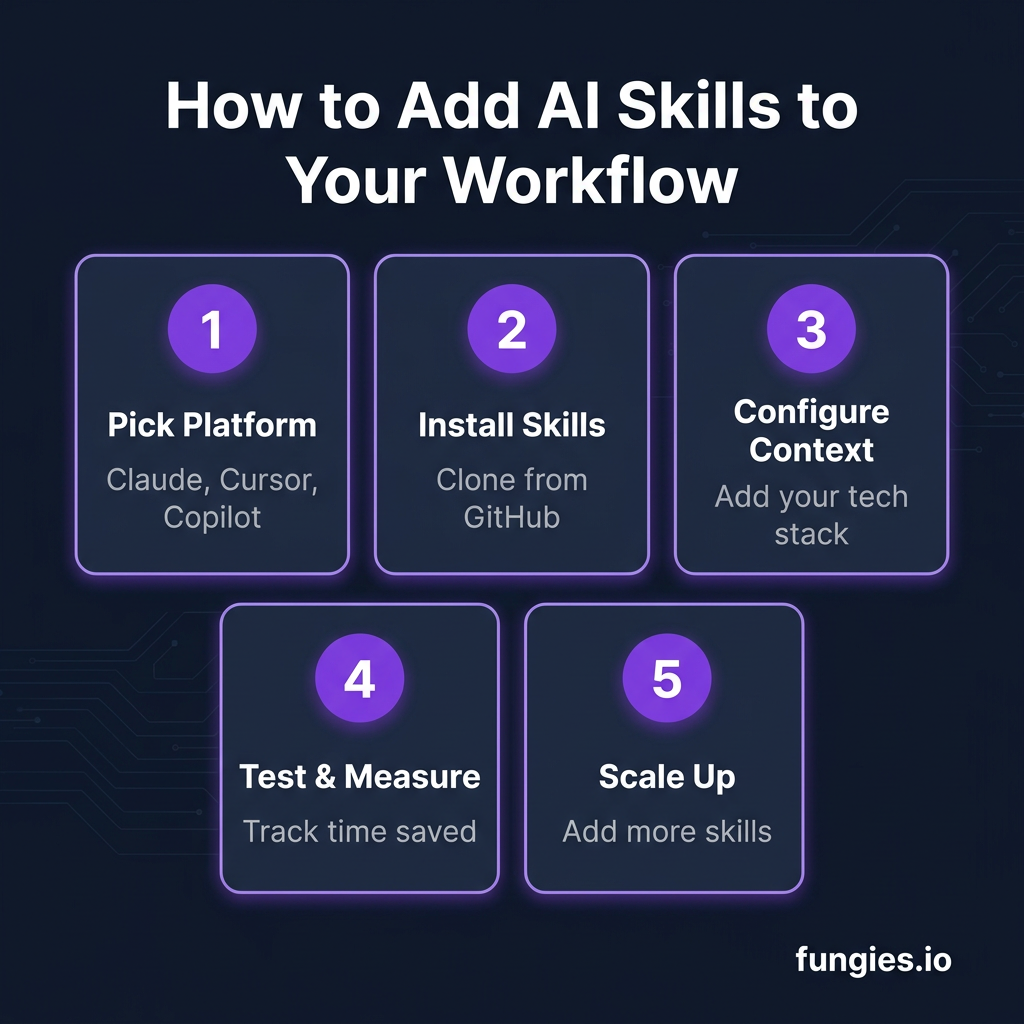
Step 1: Choose Your Agent Platform
Not all AI agents support skills equally well. Here’s how the major platforms compare:
- Claude Code: Excellent skill support via SKILL.md files, strong context management
- Cursor: Good skill integration, works with .cursorrules for context
- GitHub Copilot: Limited skill support, focused on inline completions
- OpenClaw: Native skill architecture, designed around SKILL.md files
Step 2: Install Skills
Most skills are distributed via GitHub repositories. Installation typically involves:
- Cloning the skill repository
- Placing it in your agent’s skills directory
- Configuring any required API keys or settings in the SKILL.md file
Step 3: Configure Context
Skills work best when they understand your specific context. Create configuration files that tell the skill about:
- Your tech stack and versions
- Coding standards and conventions
- Project-specific requirements
Step 4: Test and Iterate
Start with one skill and measure its impact. Track metrics like:
- Time to complete common tasks
- Error rates in generated code
- Developer satisfaction scores
Key Takeaways
AI agent skills are the difference between treating AI as a fancy autocomplete and treating it as a specialized team member. Here’s what to remember:
- Skills make AI specialists, not generalists. A skill for React development understands React patterns, not just syntax.
- Most skills are free and open-source. The community has built skills for virtually every tech stack and use case.
- Start with your biggest pain point. If code reviews are your bottleneck, start with a code review skill.
- Measure everything. Track time saved and quality improvements to justify the learning curve.
- Combine multiple skills. The real power comes from chaining skills—a full-stack skill plus a testing skill plus a documentation skill creates a complete development workflow.
FAQ
What’s the difference between an AI agent skill and a plugin?
Skills are more comprehensive than traditional plugins. While plugins typically add a single feature, skills provide deep domain expertise, context awareness, and workflow integration. A skill doesn’t just add a button—it transforms how the AI approaches entire categories of tasks.
Do I need to pay for AI agent skills?
Most agent skills are free and open-source, distributed via GitHub. You pay for the underlying AI service (Claude, GPT-4, etc.), but the skills themselves are typically community-built and free to use.
Can I create my own AI agent skills?
Yes. Creating a skill involves writing a SKILL.md file that defines the skill’s purpose, capabilities, and usage patterns, plus any supporting scripts or resources. Organizations often create internal skills for proprietary frameworks or business logic.
Which AI agent platform has the best skill support?
Claude Code and OpenClaw currently lead in skill architecture, with native support for SKILL.md files and robust context management. Cursor has good skill integration, while GitHub Copilot has limited skill capabilities focused primarily on code completion.
How long does it take to see productivity gains from AI agent skills?
Most developers report immediate improvements in task completion speed—often 20-30% faster within the first week. The full productivity gains (40-70% for some skills) typically come after 2-4 weeks of learning to work effectively with the skill.
Conclusion
AI coding assistants are table stakes in 2026. The developers and teams that pull ahead won’t be the ones with access to better models—they’ll be the ones who know how to specialize those models with the right skills.
The 10 skills I’ve covered here represent the highest-impact specializations available today. Start with the one that addresses your biggest bottleneck, measure the results, and expand from there.
The future of development isn’t AI replacing developers. It’s developers who use AI skills replacing developers who don’t.
Ready to streamline your SaaS billing and payments while you focus on building? Get started with Fungies.io—the merchant of record platform that handles global tax compliance, payment processing, and subscription management so you can ship faster.
References
- Top 10 AI Agent Skills for 2026 – O-Mega AI
- Top 10 AI Agent Development Tools for Enterprise (2026) – Nexus
- Skills Required for Building AI Agents in 2026 – DEV Community
- Claude Code vs GitHub Copilot vs Cursor (2026) – Cosmic JS
- Best AI Coding Agents for Developers in 2026 – Faros AI
- AI Coding Assistant Statistics 2026 – Uvik