84% of developers now use AI coding tools regularly. That’s not a future prediction—it’s happening right now. In 2026, the question isn’t whether you should use an AI coding agent. It’s which one actually delivers value for your specific workflow.
I’ve spent weeks testing the leading AI coding agents on real projects. The gap between the best and worst tools is wider than ever. Some agents write code you’ll happily ship to production. Others generate boilerplate that wastes more time than it saves.
This guide ranks the 7 best AI coding agents in 2026 based on real performance data, pricing transparency, and actual developer feedback. No hype. Just numbers.
What Is an AI Coding Agent?
An AI coding agent goes beyond simple autocomplete. These tools can:
- Understand your entire codebase context
- Plan and execute multi-file changes
- Run terminal commands and tests
- Iterate based on error feedback
- Work autonomously on defined tasks
The key difference from early AI coding assistants? Agency. These tools don’t just suggest code—they execute workflows.
According to recent data, AI coding assistants now write 20-30% of code at Microsoft and 75% of new code at Google after their April 2026 update. The market is projected to hit $14.6 billion by 2033.
How We Evaluated These AI Coding Agents
Every agent on this list was tested against the same criteria:
| Criteria | Weight | What We Measured |
|---|---|---|
| Code Quality | 25% | Acceptance rate, bug reduction, refactoring quality |
| Autonomy Level | 20% | Multi-file editing, task planning, error recovery |
| Context Handling | 20% | Large codebase support, context window, memory |
| Pricing Value | 15% | Cost per feature, hidden fees, free tier quality |
| Developer Experience | 10% | IDE integration, speed, reliability |
| Enterprise Readiness | 10% | Security, compliance, team features |
1. Claude Code — Best for Complex Reasoning
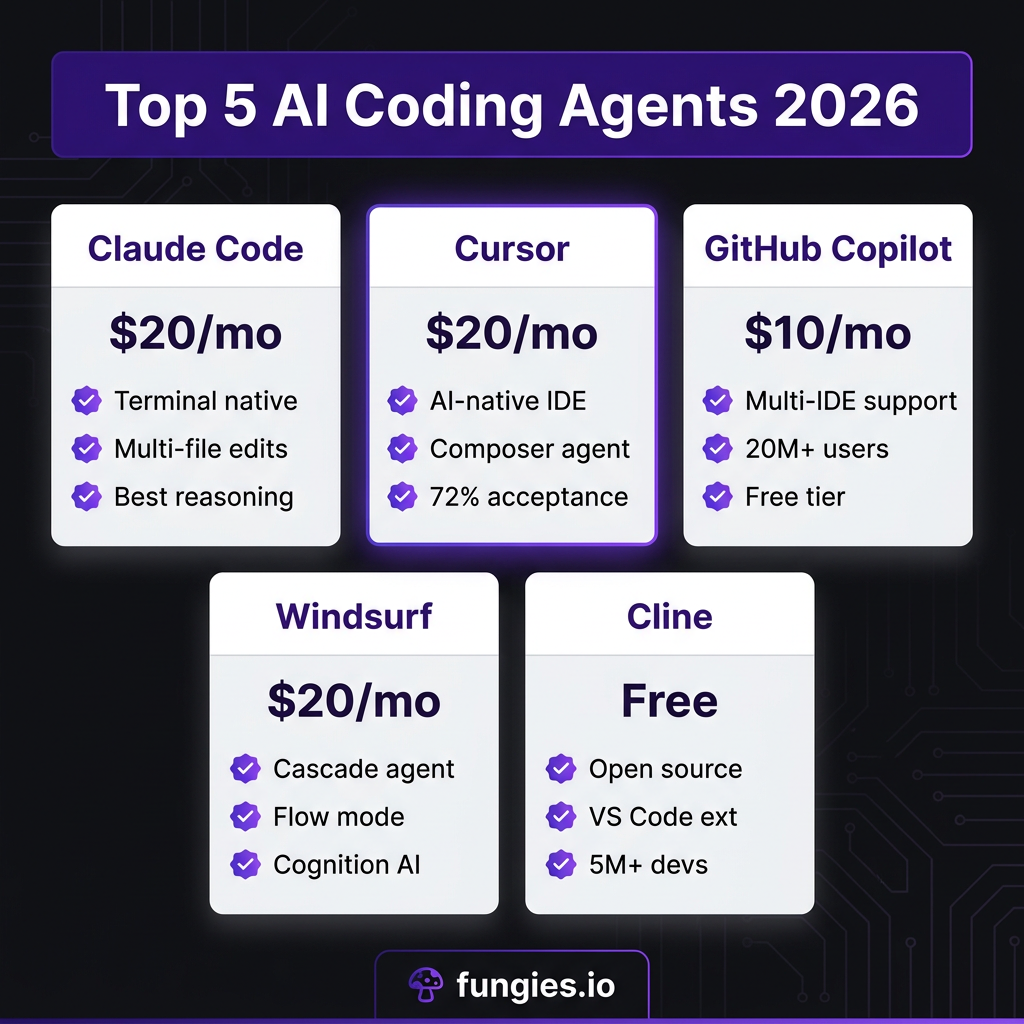
Price: $20/month (Pro) | Heavy usage: $150-200/month
Claude Code is Anthropic’s terminal-native AI coding agent. It’s not an IDE plugin—it’s a command-line tool that works alongside your existing setup.
What Makes Claude Code Stand Out
- Best-in-class reasoning: Claude’s Opus model handles complex architectural decisions better than any competitor
- Terminal-native workflow: Runs commands, reads files, and edits code without leaving your terminal
- Multi-file mastery: Excels at large refactors across dozens of files
- Transparent thinking: Shows its reasoning process before acting
Claude Code Limitations
- No IDE integration—you’re in the terminal
- Heavy Opus usage gets expensive fast
- Learning curve for non-terminal users
Best for: Senior developers, complex refactors, terminal-first workflows
2. Cursor — Best AI-Native IDE Experience
Price: $20/month (Pro) | $40/month (Teams) | $200/month (Max)
Cursor isn’t a plugin. It’s a complete VS Code fork rebuilt around AI. Every feature—from autocomplete to multi-file editing—is designed for agentic workflows.
Cursor Key Features
- Supermaven autocomplete: 72% acceptance rate—industry-leading
- Composer: Visual multi-file editing with full codebase context
- Background agents: Run tasks while you work on other things
- Custom models: Bring your own API keys for cost control
- .cursorrules: Define coding standards that persist across sessions
Cursor Limitations
- Requires switching from your current IDE
- Proprietary—no open-source option
- Max tier gets expensive for teams
Best for: Developers ready to commit to an AI-first IDE, teams wanting polished UX
3. GitHub Copilot — Best for Teams and Beginners
Price: $10/month (Pro) | $39/month (Pro+) | Free tier: 50 requests/month
With 20+ million users, GitHub Copilot is the most widely adopted AI coding tool. It works in VS Code, JetBrains, Neovim—virtually any IDE.
GitHub Copilot Strengths
- Universal IDE support: Use your existing editor
- Best free tier: 50 requests/month actually usable
- GitHub integration: Coding agent converts issues to PRs
- Enterprise trust: SOC 2, ISO 27001 compliance
- Lowest price: $10/month beats most competitors
GitHub Copilot Weaknesses
- Less autonomous than Claude Code or Cursor
- Context window smaller than dedicated agents
- Basic compared to newer AI-native tools
Best for: Teams needing compliance, beginners, developers who don’t want to switch editors
4. Windsurf — Best for Flow State Development
Price: $20/month (Pro) | $40/month (Teams) | $200/month (Max)
Windsurf (formerly Codeium) was acquired by Cognition AI for ~$250 million in December 2025. Its standout feature is Cascade—an agentic AI that maintains persistent context about your work.
Windsurf Unique Features
- Cascade agent: Maintains context across your entire session
- Flow mode: AI gets better the more you work with it
- 5 parallel agents: Multi-tasking capability (added Feb 2026)
- Proprietary SWE models: Zero additional cost on base subscription
Windsurf Considerations
- Recently raised prices to match Cursor
- External models (Claude, GPT-4) cost extra
- Newer to the market than established players
Best for: Developers who want AI that learns their patterns, Cognition AI fans

5. Cline — Best Free Open-Source Option
Price: Free (open source) | API costs: ~$100-120/month for heavy use
Cline is a VS Code extension with 5+ million developers. It’s completely free and open source, making it the go-to choice for developers who want control without subscription fees.
Cline Advantages
- 100% free: No subscription, ever
- Open source: Full transparency, community-driven
- Plan/Act architecture: Plans approach before acting
- Model flexibility: Use Claude, GPT, Gemini, or local models
- Human in the loop: Full control over every action
Cline Trade-offs
- You pay for API usage directly
- Less polished than commercial alternatives
- No enterprise support
Best for: Budget-conscious developers, open-source advocates, tinkerers
6. OpenAI Codex CLI — Best for OpenAI Ecosystem
Price: Usage-based | ~$20-50/month typical
OpenAI’s Codex CLI brings GPT-5.5’s coding capabilities to your terminal. It’s the official OpenAI coding agent, designed for developers already invested in the OpenAI ecosystem.
Codex CLI Highlights
- GPT-5.5 powered: Latest OpenAI model for coding
- Agents SDK: Build custom agent workflows
- Terminal-native: Similar workflow to Claude Code
- Multi-agent support: Parallel sessions (added Feb 2026)
Best for: OpenAI subscribers, developers wanting GPT-5.5 specifically
7. Aider — Best for Git-Native Workflows
Price: Free (open source) | API costs vary
Aider is a CLI-first coding agent designed for serious refactoring. It integrates deeply with Git, making it perfect for developers who want AI assistance without leaving their version control workflow.
Aider Specialties
- Git-native: Every change is a commit
- Multi-file editing: Excellent for large refactors
- Pair programming mode: Works alongside you
- Supports many models: Claude, GPT-4, local LLMs
Best for: Git power users, developers doing large-scale refactoring
Complete Pricing Comparison
| Tool | Starting Price | Power User Cost | Free Tier |
|---|---|---|---|
| Claude Code | $20/mo | $150-200/mo | No |
| Cursor | $20/mo | $200/mo | Limited |
| GitHub Copilot | $10/mo | $39/mo | 50 requests/mo |
| Windsurf | $20/mo | $200/mo | 25 credits/mo |
| Cline | Free | $100-120/mo (API) | Full (pay API only) |
| Codex CLI | Usage-based | $20-50/mo | No |
| Aider | Free | API costs only | Full (pay API only) |
Feature Comparison Matrix
| Feature | Claude Code | Cursor | Copilot | Windsurf | Cline |
|---|---|---|---|---|---|
| Multi-file editing | ✓ Excellent | ✓ Excellent | ✓ Good | ✓ Excellent | ✓ Good |
| Terminal commands | ✓ Native | ✓ Yes | ✗ No | ✓ Yes | ✓ Yes |
| IDE integration | ✗ Terminal only | ✓ Built-in | ✓ All IDEs | ✓ VS Code | ✓ VS Code |
| Autonomous mode | ✓ Yes | ✓ Background agents | ✓ Limited | ✓ Yes | ✓ Plan/Act |
| Open source | ✗ No | ✗ No | ✗ No | ✗ No | ✓ Yes |
| Custom models | ✗ Anthropic only | ✓ Yes | ✗ OpenAI only | ✓ Yes | ✓ Yes |
Which AI Coding Agent Should You Choose?
The right tool depends on your workflow:
- Choose Claude Code if you’re a senior developer who lives in the terminal and needs the best reasoning for complex tasks
- Choose Cursor if you want the most polished AI-native IDE experience and don’t mind switching editors
- Choose GitHub Copilot if you need enterprise compliance, use multiple IDEs, or want the lowest price
- Choose Windsurf if you want AI that learns your patterns and improves over time
- Choose Cline if you’re budget-conscious and prefer open-source tools
- Choose Codex CLI if you’re already invested in the OpenAI ecosystem
- Choose Aider if you’re doing large refactors and want Git-native workflows
The Most Common Stack in 2026
Here’s what professional developers are actually using:
- Cursor + Claude Code: Cursor for daily editing, Claude Code for complex terminal tasks
- Copilot + Claude Code: Copilot for inline suggestions in your existing IDE, Claude Code for heavy lifting
- Cline + Local LLMs: Free coding with privacy—running models locally
The data is clear: 84% of developers use AI tools, but the best results come from combining tools strategically rather than relying on a single agent.
Key Takeaways
- AI coding agents now write 41% of all code in some organizations
- The market has fragmented—no single tool wins every category
- Claude Code leads on reasoning, Cursor on IDE experience, Copilot on accessibility
- Free options like Cline and Aider are surprisingly capable
- Most professionals use 2+ tools in combination
Frequently Asked Questions
Which AI coding agent is best for beginners?
GitHub Copilot is the best choice for beginners. It has the lowest price ($10/month), works in any IDE, and requires no workflow changes. The free tier (50 requests/month) is enough to evaluate before committing.
Is Claude Code worth $20/month?
For senior developers working on complex codebases, yes. Claude Code’s reasoning capabilities exceed every competitor for multi-file refactoring and architectural decisions. Heavy Opus usage can push costs to $150-200/month, but the productivity gains often justify it.
Can I use AI coding agents for free?
Yes. Cline and Aider are completely free open-source options. You only pay for API usage (typically $100-120/month for heavy use). GitHub Copilot also offers a genuinely useful free tier with 50 requests per month.
Will AI coding agents replace developers?
No. AI coding agents are productivity multipliers, not replacements. The most productive developers in 2026 use AI to handle boilerplate and routine tasks while focusing their expertise on architecture, user experience, and complex problem-solving.
What’s the difference between an AI coding assistant and an agent?
Assistants suggest code as you type. Agents plan, execute, and iterate on multi-step tasks autonomously. Agents can edit multiple files, run tests, and recover from errors without constant human input.
Final Thoughts
The AI coding agent landscape in 2026 is mature, competitive, and full of excellent options. The “best” tool depends entirely on your workflow, budget, and technical requirements.
My recommendation? Start with GitHub Copilot if you’re new to AI coding tools. It’s cheap, works everywhere, and has a real free tier. Once you understand what AI can do for your workflow, evaluate Claude Code or Cursor for more advanced use cases.
And remember—the developers seeing the biggest productivity gains aren’t using one tool. They’re combining agents strategically: Copilot for quick suggestions, Claude Code for complex refactors, and open-source tools when budget matters.
Ready to streamline your SaaS payments and checkout experience? Get started with Fungies.io—the Merchant of Record platform that handles tax compliance, global payments, and developer-friendly APIs so you can focus on building great products.
References
- AI Coding Statistics 2026 — Panto
- The Impact of AI Coding in 2026 — Trigi Digital
- AI in Software Development: 25+ Trends & Statistics — Modall
- Best AI Coding Agents 2026: 15 Tested — Morph
- Cursor vs Claude Code vs GitHub Copilot 2026 — NxCode
- Claude Code vs Cursor vs Copilot: 2026 Comparison — SitePoint
- Windsurf vs Cursor 2026 — Verdent
- Windsurf Review 2026 — Taskade
- Cline Review 2026 — Comparateur-IA
- 10 Best AI Coding Assistants in 2026 — Build MVP Fast