By April 2026, 73% of professional developers are using AI coding tools daily — up from 44% a year ago. But here’s the problem: the market has exploded from three options to over a dozen serious contenders, and most comparison articles are either affiliate link bait or written by people who haven’t actually shipped code with these tools.
I tested the top AI coding agents for six weeks — real refactoring tasks, multi-file features, bug fixes, and automation scripts. I tracked which tools actually saved time versus which ones just felt cool during a demo. This listicle covers nine AI coding agents in 2026, ranked with real benchmark scores, actual pricing data, and honest recommendations for different developer profiles.
If you’re building SaaS products, indie games, or any software and want to know which AI coding agent to put your money behind — this is the article for you.

How We Ranked AI Coding Agents in 2026
Every tool below was evaluated across five dimensions that actually matter when you’re shipping code:
- SWE-bench Verified score — the gold standard benchmark for measuring an agent’s ability to solve real GitHub issues. Higher is better.
- Multi-file editing — can the tool understand and modify code across your entire codebase, not just the file you’re viewing?
- Pricing and value — what you get per dollar, including free tier usability and hidden API costs
- IDE and workflow integration — does it fit into how you actually work, or does it force you into a new workflow?
- Autonomy level — from autocomplete assistance to fully autonomous PR generation
1. Claude Code (Anthropic) — Best Overall AI Coding Agent
Why Claude Code is #1
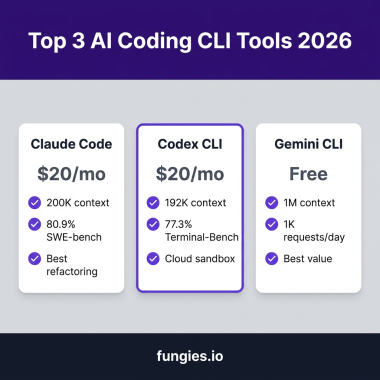
Claude Code dominates the SWE-bench Verified leaderboard at 80.9% — significantly ahead of competitors. That’s not a marginal win; it means Claude Code successfully solves roughly 4 out of 5 real-world GitHub issues autonomously. The underlying model, Claude Opus 4.6, also leads with an 80.8% success rate on raw SWE-bench benchmarks.
Claude Code runs as a terminal-native agent, which means it composes naturally with your existing Unix tooling — grep, sed, git, make. It can navigate entire repositories, make coherent multi-file changes, and run test suites before proposing fixes. The 1 million token context window lets it hold massive codebases in memory without losing context.
Claude Code Pricing (2026)
| Plan | Price | What You Get |
|---|---|---|
| Pro | $20/mo | Sonnet default, ~5x Free limits, extended thinking, unlimited projects |
| Max 5x | $100/mo | 5x Pro limits, Opus access, agent teams for complex tasks |
| Max 20x | $200/mo | 20x Pro limits, heavy Opus usage, concurrent sessions |
| API (pay-per-token) | Sonnet: $3/$15 per MTok | Opus: $15/$75 per MTok, billed on top of seat fees for teams |
Best for: Developers who want the highest-quality code output, complex refactoring across large codebases, and terminal-first workflows. Heavy users should budget $100-200/month for Opus-level performance.
2. Cursor — Best AI-Native IDE Experience
Cursor is a VS Code fork rebuilt from the ground up around AI. It’s not a plugin or extension — the entire editor is designed for AI-assisted development. Cursor’s Agent Mode can handle repo-level edits, and its deep codebase integration means it understands your project structure better than most standalone tools.
Where Cursor shines is daily development velocity. The inline completions feel faster than any extension-based tool, the tab autocomplete is genuinely predictive (not just reactive), and the Composer feature lets you describe a feature and watch Cursor implement it across multiple files. According to multiple developer surveys, Cursor users report 30-40% faster coding compared to traditional IDEs.
| Plan | Price | Limits |
|---|---|---|
| Free | $0 | 2,000 completions + 50 slow premium requests/month |
| Pro | $20/mo | Unlimited slow requests, 500 premium requests |
| Pro+ | $40/user/mo | 2,000 premium requests, multi-model access (GPT-5, Claude 4.6) |
| Ultra | $200/mo | Unlimited premium requests, priority access |
Best for: Developers who want a seamless, integrated AI coding experience and are willing to switch IDEs. Cursor Pro at $20/month hits the sweet spot for most solo developers.
3. GitHub Copilot — Best Value for Teams
At $10/month for Copilot Pro, nothing beats GitHub Copilot on value per dollar. You get 300 premium requests, a coding agent, code review, and multi-model support including Claude Opus 4.6. No other paid plan comes close on a cost-effectiveness basis.
Copilot’s Agent Mode in VS Code supports terminal commands, file editing, and MCP (Model Context Protocol) servers for multi-step tasks. Its real killer advantage is the GitHub platform integration — Copilot can handle well-defined GitHub issues, automate code review on pull requests, and suggest pipeline configurations for CI/CD.
| Plan | Price | Best For |
|---|---|---|
| Free | $0 | 2,000 completions + 50 chats/month |
| Pro | $10/mo | Best value: 300 premium requests, coding agent, code review |
| Enterprise | $39/user/mo | Full enterprise features, policy controls, audit logs |
Best for: Teams already on GitHub who need a low-friction AI tool that works across VS Code, JetBrains, and Neovim. Give every developer Copilot Pro ($10/mo) and reserve Cursor/Windsurf licenses for senior devs doing complex architecture work.

4. OpenAI Codex CLI — Best for OpenAI Ecosystem Users
OpenAI Codex CLI is the terminal agent powered by GPT-5.4, OpenAI’s most capable model. GPT-5.4 scores 76.9% on SWE-bench Verified (high setting) and leads on SWE-bench Pro at 57.7%. It also hit 75.1% on Terminal-Bench 2.0, which measures agentic execution — essentially how well the AI can run commands, interpret results, and adapt.
What makes Codex CLI unique is that it’s open-source and free. The Codex Agents SDK lets you build custom multi-agent workflows, and in February 2026, OpenAI shipped parallel agent sessions alongside every other major tool. GPT-5.4 Mini runs at ~$0.40/$1.60 per MTok with 94% of Standard’s coding performance — making it the most cost-efficient option for high-volume, low-complexity tasks.
GPT-5.4 API pricing: Standard at $2.50/$15 per MTok, Pro at $30/$180 per MTok. GPT-5.4 Mini at ~$0.40/$1.60 per MTok for budget-conscious workflows.
Best for: Developers already in the OpenAI ecosystem who want the power of GPT-5.4 in a terminal agent. The free, open-source CLI is a no-brainer starting point.
5. Windsurf — Best for Agentic Workflow Automation
Windsurf is the agentic workflow champion. Its Cascade engine breaks down complex tasks into multi-step plans that execute autonomously. In February 2026, Windsurf shipped 5 parallel agents — meaning you can have one agent writing code, another running tests, and a third reviewing output, all simultaneously.
Windsurf feels like a VS Code environment but with structured agent runs instead of ad-hoc prompting. This makes it ideal for teams that want reproducible, auditable AI coding sessions where you can see exactly what each agent did and why.
| Plan | Price | Details |
|---|---|---|
| Free | $0 | Basic completions and limited agent requests |
| Pro | $15/mo | Full agent access, Cascade multi-step plans |
| Business | $30/user/mo | Team features, parallel agents, admin controls |
| Max | $200/mo | Unlimited premium, priority access |
Best for: Teams that want structured, multi-agent workflows with clear audit trails. Windsurf Pro at $15/month is the cheapest paid agentic coding tool on the market.
6. Cline — Best Open-Source AI Coding Agent
Cline is a VS Code extension that’s completely free and open-source. You bring your own API keys — meaning you can connect Claude, GPT, Gemini, or any OpenAI-compatible model. The transparency is Cline’s biggest selling point: your code stays local, telemetry is minimal, and you control exactly which model handles which task.
Cline supports MCP servers for extended tool use, can run terminal commands, read/write files, and browse the web for context. It’s the tool of choice for developers who want privacy-critical AI coding — especially at companies that block cloud-based assistants over IP or compliance concerns.
Pricing: Free (open-source). You pay only for the LLM API you connect — typically $3-15/month in API costs for moderate usage with Claude Sonnet or GPT-5.4 Mini.
Best for: Privacy-conscious developers, companies with compliance requirements, and anyone who wants full control over their AI tooling stack.
7. Gemini CLI — Best Free AI Coding Agent
Google’s Gemini CLI is the strongest zero-cost terminal agent available in 2026. You get 60 requests per minute and a 1,048,576-token context window — the same context size as Claude Code — completely free. It uses a blend of Gemini Pro and Flash models with intelligent routing, so simpler tasks hit the faster/cheaper Flash model while complex reasoning uses Gemini Pro.
Gemini CLI also ships with built-in Google Search grounding — the agent can search the web mid-task to verify documentation, check API references, or confirm current best practices. That’s a capability no other free coding agent offers.
Best for: Developers who want a free, powerful terminal agent and are already in the Google Cloud ecosystem. The 1M token context window makes it viable for large codebases even on the free tier.
8. Aider — Best for Terminal Purists and Git Workflows
Aider is the original terminal coding agent — and it predates Claude Code, Codex CLI, and Gemini CLI by years. It’s Python-based, open-source, and designed specifically for developers who live in the terminal and think in Git.
Aider’s superpower is its automatic Git integration — every change it makes is a commit, and it can review its own diffs, amend commits, and handle merge conflicts. It supports dozens of LLM backends through LiteLLM, so you can switch between Claude, GPT, Gemini, or local models with a single config change.
Pricing: Free (open-source). LLM API costs are separate — works with Claude, GPT, Gemini, local models via Ollama.
Best for: Terminal-first developers who want tight Git integration and the flexibility to swap models on the fly. Aider pairs perfectly with Claude Sonnet for quality or GPT-5.4 Mini for cost-efficiency.
9. Devin — Best Autonomous Coding Agent
Devin by Cognition is the most ambitious AI coding agent on this list — it’s designed to work fully autonomously. Give Devin a task description, and it plans, codes, tests, debugs, and deploys with minimal human intervention. In February 2026, Devin added parallel sessions, allowing multiple independent Devin agents to work on different parts of a project simultaneously.
Devin is less of a “coding assistant” and more of a virtual engineer. It can browse documentation, run commands, and even learn from its own mistakes across sessions. The trade-off is that it’s less interactive than tools like Cursor or Claude Code — you describe what you want, then review the results.
Pricing: Devin starts around $50/month for individual developers, with team tiers for collaborative autonomous work. Pricing is less transparent than competitors and varies based on usage tiers.
Best for: Teams that want autonomous coding agents to handle well-defined tasks (bug fixes, feature implementations, migrations) with minimal oversight. Devin is ideal for backfill work, test writing, and documentation generation.
AI Coding Agents Comparison Table (2026)
| Agent | Type | Starting Price | SWE-bench | Context Window | Best For |
|---|---|---|---|---|---|
| Claude Code | CLI Agent | $20/mo | 80.9% | 1M tokens | Best code quality |
| Cursor | AI-Native IDE | $0 / $20/mo | ~68% | Full repo | Best IDE experience |
| GitHub Copilot | IDE Extension | $0 / $10/mo | ~60% | Full repo | Best team value |
| Codex CLI | CLI Agent | Free | 76.9% (GPT-5.4) | 1M tokens | OpenAI ecosystem |
| Windsurf | AI-Native IDE | $0 / $15/mo | ~65% | Full repo | Agentic workflows |
| Cline | VS Code Extension | Free | Varies by model | Varies by model | Open-source / privacy |
| Gemini CLI | CLI Agent | Free | ~55% | 1M tokens | Best free tier |
| Aider | CLI Agent | Free | Varies by model | Varies by model | Git-first workflows |
| Devin | Cloud Agent | ~$50/mo | ~62% | Full project | Autonomous coding |
How to Choose the Right AI Coding Agent for Your Workflow
The best AI coding agent depends on what you value most. Here’s the decision framework I use:
- Best code quality above all else? → Claude Code. 80.9% SWE-bench is unmatched. Budget $20-200/month depending on usage.
- Want the smoothest daily coding experience? → Cursor. The AI-native IDE is years ahead of plugin-based tools in terms of UX.
- Equipping a whole team on a budget? → GitHub Copilot Pro at $10/month per developer. Best value, period.
- Already invested in OpenAI’s ecosystem? → Codex CLI. Free, open-source, powered by GPT-5.4.
- Want structured, auditable agent workflows? → Windsurf. Parallel agents with clear execution traces.
- Privacy and compliance are non-negotiable? → Cline. Open-source, local-first, bring your own model.
- Need a free tool that actually works? → Gemini CLI. 1M token context, 60 RPM, zero cost.
- Live in the terminal and think in Git? → Aider. Automatic commits, model-agnostic, battle-tested.
- Want an agent that works while you sleep? → Devin. Fully autonomous task execution.
Pro tip from real-world usage: most developers in 2026 use 2-3 tools simultaneously. The most common stack is GitHub Copilot Pro ($10/mo) for daily autocomplete + Claude Code ($20/mo) for complex refactoring. That’s $30/month total and covers 95% of development scenarios.
Key Takeaways for Developers
- Claude Code leads in code quality with 80.9% SWE-bench — use it for hard problems that need deep reasoning
- GitHub Copilot Pro is the best value at $10/month — equip your entire team for less than a Netflix subscription
- Free tiers are genuinely usable in 2026 — Gemini CLI, Codex CLI, and Copilot Free mean you can start with zero spend
- Multi-tool setups are the norm — developers using 2-3 tools report the highest productivity gains
- Multi-agent collaboration is the next frontier — every major tool shipped parallel agents in February 2026
- Terminal agents beat IDE plugins for automation — Claude Code, Codex CLI, and Aider compose with Unix tools
Frequently Asked Questions
What is the best AI coding agent in 2026?
Claude Code is the best overall AI coding agent in 2026, with an 80.9% SWE-bench Verified score. For developers who prioritize code quality and complex reasoning, nothing else comes close. However, GitHub Copilot Pro at $10/month offers the best value for teams.
Is GitHub Copilot still worth it in 2026?
Absolutely. At $10/month for Copilot Pro, you get 300 premium requests, a coding agent, code review, and multi-model support including Claude Opus 4.6. It’s the best value in AI coding tools and works across VS Code, JetBrains, and Neovim.
Should I use multiple AI coding tools at the same time?
Yes — most developers in 2026 use 2-3 AI coding tools simultaneously. The most common combination is GitHub Copilot for inline completions (fast, cheap) paired with Claude Code or Cursor for complex multi-file tasks. Each tool has strengths: Copilot excels at rapid completions, while Claude Code dominates deep reasoning and refactoring.
What are the best free AI coding tools in 2026?
The best free options are Gemini CLI (1M token context window, 60 RPM, completely free), OpenAI Codex CLI (open-source, uses GPT-5.4), and GitHub Copilot Free (2,000 completions + 50 chats/month). For open-source enthusiasts, Cline and Aider are both free — you only pay for the LLM API you connect.
How much do AI coding agents cost in 2026?
AI coding agent pricing ranges from free (Gemini CLI, Codex CLI, Cline, Aider) to $200/month (Claude Code Max 20x, Cursor Ultra). Most developers find the sweet spot at $10-40/month — typically GitHub Copilot Pro ($10/mo) or Cursor Pro ($20/mo). Heavy users doing complex agentic work should budget $100-200/month for Claude Code Max plans.
Final Thoughts: The AI Coding Agent Landscape Has Matured
Two years ago, AI coding tools were novelty autocomplete plugins. Today, they’re autonomous agents that plan, code, test, and deploy. The competition between Claude Code, Cursor, Copilot, and the rest is driving rapid innovation — and developer productivity is the clear winner.
If you’re building software in 2026 — whether it’s a SaaS product, indie game, or internal tool — you’re leaving money on the table without an AI coding agent. Start with a free tier. Scale to what works. And remember: the best tool is the one you actually use every day.
For developers and SaaS companies looking to monetize their products, Fungies.io handles payments, tax compliance, and checkout — so you can focus on building, not billing.
References
- We Tested 15 AI Coding Agents (2026) — Morph
- Cursor vs Claude Code vs GitHub Copilot 2026 — NxCode
- AI Coding Tools Pricing Comparison 2026 — NxCode
- Best LLM for Coding in 2026 — BenchLM
- AI Model Benchmarks April 2026 — LM Council
- Best AI Coding Assistants 2026 — Price Per Token
- Claude Code Pricing Guide — How Do I Use AI
- GPT 5.4 Complete Guide 2026 — NxCode
- AI Dev Tool Power Rankings — LogRocket
- Best AI Coding Assistants 2026: Top 10 Tools Tested — Verdant AI
- AI Coding Tools Comparison 2026 — SitePoint
- AI Coding Benchmarks 2026 — AF.net