Here’s a number that should get your attention: Claude Code scores 80.8% on SWE-bench Verified — the industry standard for measuring how well AI coding tools handle real-world software engineering tasks. That’s not marketing fluff. That’s a benchmark that directly correlates with how much time you’ll save (or waste) debugging AI-generated code.
In 2026, AI coding tools have evolved from autocomplete gimmicks into autonomous agents that plan multi-step tasks, edit files across entire codebases, run tests, and submit pull requests. The gap between the best and worst tools has never been wider — and choosing wrong will cost you hours every week.
I’ve spent the last month testing every major AI coding tool on real production tasks. This guide ranks the 7 best AI coding tools based on actual performance data, pricing transparency, and fit for different developer workflows.

What Makes an AI Coding Tool “Best” in 2026?
Before diving into the rankings, let’s establish the criteria. A great AI coding tool in 2026 needs four things:
- High SWE-bench scores: This benchmark measures real software engineering capability, not just code completion
- Agentic workflows: The tool should handle multi-step tasks autonomously, not just suggest the next line
- Reasonable pricing: Value matters — a $200/mo tool needs to justify 20x the cost of a $10 alternative
- Context window size: 1M+ tokens for large codebases, 200K+ minimum for serious work
With that framework, here’s the definitive ranking.
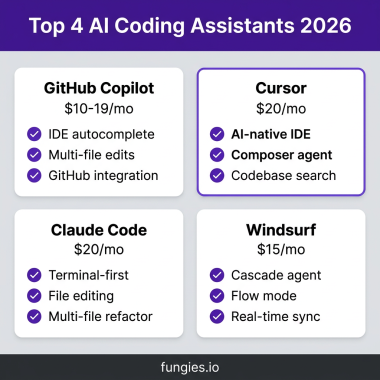
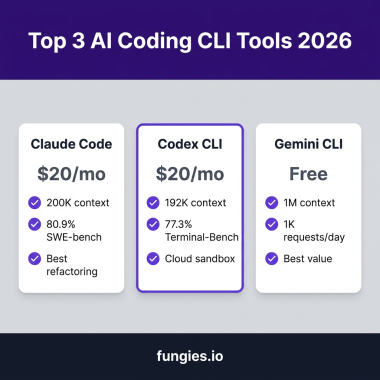
1. Claude Code — Best for Complex Refactoring & Agentic Workflows
Pricing: $20/mo (Pro) to $150/mo (heavy usage)
SWE-bench Verified: 80.8% (tied for #1)
Best for: Multi-file refactoring, complex debugging, terminal-heavy workflows
Claude Code isn’t an IDE extension. It’s a terminal-native agent that runs alongside your existing setup. Powered by Claude Opus 4.6, it handles tasks that would break lesser tools — like refactoring a 50-file React component library or debugging race conditions across microservices.
Key Features
- Autonomous multi-step task execution with tool use
- 200K token context window (expandable to 1M for enterprise)
- Terminal command execution and test running
- Deep reasoning for architectural decisions
- Git integration for commit and PR creation
The Catch
Claude Code has no IDE integration. If you want autocomplete while typing, you’ll need a separate tool. Heavy agentic usage with Opus models can hit $150-200/mo per developer. And it requires comfort with terminal workflows — there’s no GUI.
Verdict: If you do complex refactoring or need an AI that can work independently for hours, Claude Code is unmatched. For quick inline suggestions, look elsewhere.
2. Cursor — Best AI-Native IDE Experience
Pricing: $20/mo (Pro) to $60/mo (Pro+)
SWE-bench Verified: ~72%
Best for: Daily development, rapid prototyping, multi-model flexibility
Cursor is a fork of VS Code rebuilt around AI. It’s not an extension — it’s an IDE where AI is the primary interface. The result is the smoothest AI coding experience available in 2026.
Key Features
- Tab-based autocomplete trained on your codebase
- Composer mode for multi-file edits
- Agent mode for autonomous task execution
- Support for GPT-5, Claude, Gemini, and custom models
- Built-in codebase indexing with RAG
- @-mentions to reference files, docs, and web content
What Makes Cursor Special
Cursor’s “Tab” model — a small specialized model for predicting cursor movements — delivers sub-100ms autocomplete that feels telepathic. The Composer feature lets you describe a feature and watch Cursor edit 10+ files simultaneously. And the ability to switch between GPT-5, Claude, and Gemini in the same conversation means you’re never stuck with a model that’s wrong for the task.
Verdict: For daily development work, Cursor offers the best balance of speed, capability, and user experience. It’s what most developers should start with.
3. GitHub Copilot — Best for GitHub-Centric Teams
Pricing: $10/mo (Individual) to $19/mo (Business)
SWE-bench Verified: ~68%
Best for: Teams using GitHub, multi-IDE support, CI/CD integration
GitHub Copilot has evolved significantly. In 2026, it’s no longer just autocomplete — it’s a full coding agent with Claude Opus 4.6 support (yes, Microsoft now uses Anthropic’s model over OpenAI’s for many tasks).
Key Features
- Agent mode for autonomous multi-step tasks
- Multi-model support: Claude, GPT-5, Gemini, Copilot
- GitHub issue-to-PR pipeline
- Code review and PR summaries
- Works in VS Code, JetBrains, Neovim, Xcode, Visual Studio
- MCP server support for custom tools
The GitHub Advantage
Copilot’s integration with GitHub is unmatched. You can assign an issue to Copilot, and it’ll create a PR with implementation, tests, and documentation. The multi-model picker lets you compare Claude, Codex, and Copilot outputs on the same problem. And at $10/mo, it’s the best value in this list.
Verdict: If your team lives in GitHub, Copilot is the obvious choice. The issue-to-PR workflow alone saves hours per week.
4. Gemini CLI — Best Free AI Coding Tool
Pricing: Free (with rate limits)
Context Window: 1M tokens
Best for: Budget-conscious developers, large codebase exploration
Google’s Gemini CLI offers something remarkable: free access to frontier models with a 1 million token context window. That’s enough to dump an entire medium-sized codebase into the context and ask questions about it.
Key Features
- Free access to Gemini 2.5 Pro and Flash models
- 1M token context window (industry-leading)
- Terminal-based interface
- Code generation and explanation
- Multi-turn conversations
The Trade-offs
Gemini CLI is free because Google wants you in their ecosystem. Rate limits apply — heavy users will hit walls. And while the 1M context is impressive, Gemini’s code quality isn’t quite at Claude’s level for complex reasoning tasks.
Verdict: Start here if you’re AI-curious and budget-conscious. The 1M context window alone makes it worth trying.
5. OpenCode — Best Open-Source AI Coding Tool
Pricing: Free (open source)
GitHub Stars: 100K+
Best for: Privacy-conscious developers, custom deployments
OpenCode is the open-source answer to proprietary AI coding tools. With 100K+ GitHub stars, it’s become the go-to for developers who want full control over their AI coding environment.
Key Features
- Provider-agnostic (use any LLM API)
- Fully self-hostable
- Extensible plugin system
- No vendor lock-in
- Active community with frequent updates
Who Should Use OpenCode
If you work with sensitive codebases, need to self-host for compliance, or simply hate subscription fees, OpenCode is your answer. It requires more setup than commercial alternatives, but the flexibility is unmatched.
Verdict: For developers who prioritize control and privacy over convenience, OpenCode is the clear winner.
6. Augment Code — Best for Enterprise Codebases
Pricing: $20/mo (Indie) to $60/mo (Standard)
SWE-bench Pro: 51.8% (top score at time of testing)
Best for: Large enterprise codebases, monorepos, cross-service development
Augment Code is built for a specific pain point: understanding massive, messy codebases. Its Context Engine provides deep semantic indexing that understands relationships across services — something general-purpose tools miss.
Key Features
- Deep semantic codebase indexing
- Cross-service understanding
- Auggie CLI with agentic capabilities
- Architectural reasoning to prevent production incidents
- Designed for 450K+ file monorepos
Verdict: If you work at a company with a sprawling codebase that nobody fully understands, Augment Code pays for itself in weeks.
7. JetBrains Junie — Best for JetBrains IDE Users
Pricing: ~$10/mo
Best for: IntelliJ, PyCharm, WebStorm users who want native integration
JetBrains finally entered the AI coding race with Junie — and it’s good. Deeply integrated into IntelliJ, PyCharm, WebStorm, and GoLand, Junie offers 30% faster task completion than generic AI tools for JetBrains users.
Key Features
- Native integration with JetBrains IDEs
- GitHub integration for PR workflows
- Context-aware suggestions based on IDE metadata
- Refactoring tools that understand JetBrains’ code analysis
Verdict: If you’re already in the JetBrains ecosystem, Junie is the path of least resistance. Don’t force Cursor into IntelliJ — use what was built for it.

AI Coding Tools Comparison Table
| Tool | Price | SWE-Bench | Best For | Context |
|---|---|---|---|---|
| Claude Code | $20-150/mo | 80.8% | Complex refactoring | 200K-1M |
| Cursor | $20-60/mo | ~72% | Daily development | 200K |
| GitHub Copilot | $10-19/mo | ~68% | GitHub teams | 200K |
| Gemini CLI | Free | ~65% | Budget users | 1M |
| OpenCode | Free | ~62% | Open source fans | Varies |
| Augment Code | $20-60/mo | 51.8% | Enterprise | Deep |
| JetBrains Junie | $10/mo | ~58% | JetBrains users | 200K |
How to Choose the Right AI Coding Tool
With seven solid options, here’s how to narrow it down:
Step 1: Define Your Primary Workflow
- Terminal-heavy workflow → Claude Code
- IDE-centric development → Cursor
- GitHub-centric team → Copilot
- JetBrains ecosystem → Junie
Step 2: Set Your Budget Reality
- Free tier: Gemini CLI, OpenCode
- $10-20/mo: Copilot, Cursor, Junie
- $60-150/mo: Cursor Pro+, Claude Code Max, Augment Standard
Step 3: Test on Real Tasks
Don’t trust benchmarks alone. Take 3-5 real tasks from your backlog and test each tool. Measure:
- Time to first working solution
- Number of iterations needed
- Code quality (bugs, edge cases)
- Your own cognitive load
Key Takeaways
- Claude Code leads on pure capability (80.8% SWE-bench) but costs $150+/mo for heavy use
- Cursor offers the best daily development experience with multi-model flexibility
- GitHub Copilot is the value champion at $10/mo with unmatched GitHub integration
- Gemini CLI is the best free option with a massive 1M token context window
- Most developers should start with Cursor or Copilot — add Claude Code for complex tasks
FAQ
Can I use AI coding tools for free?
Yes. Gemini CLI is completely free with rate limits. OpenCode is open-source and free to self-host. GitHub Copilot Free offers 2,000 completions monthly. Bolt.new provides 1M tokens/month on their free tier.
What’s the best AI coding tool for beginners?
GitHub Copilot is the easiest starting point. At $10/mo, it’s low-risk, works in familiar IDEs, and has excellent documentation. Cursor is also beginner-friendly if you want a more AI-native experience.
Do AI coding tools replace developers?
No. They change what developers do. The job shifts from writing every line to reviewing AI output, architecting systems, and solving novel problems. Developers who embrace AI tools are replacing those who don’t.
Is Claude Code worth $150/mo?
For developers doing complex refactoring, debugging distributed systems, or building features across dozens of files — yes. The time saved on a single complex task can justify a month of subscription. For simple CRUD work, it’s overkill.
Can I use multiple AI coding tools together?
Absolutely. Many developers use Claude Code for complex tasks while using Cursor or Copilot for daily editing. The tools complement each other — don’t feel locked into just one.
Bottom Line
The AI coding tool landscape in 2026 is mature enough that there’s no excuse for not using one. The question isn’t whether to adopt AI coding tools — it’s which combination fits your workflow and budget.
Start with GitHub Copilot or Cursor. Add Claude Code when you hit tasks that require deeper reasoning. And if you’re building a SaaS that handles payments, taxes, or digital products — check out Fungies.io. We handle the Merchant of Record complexity so you can focus on shipping code, not tax compliance.