Here’s a number that should get your attention: Ollama just crossed 174,000 GitHub stars in mid-2026, making it one of the fastest-growing developer tools of the year. Local LLM inference has gone from a niche hobby to mainstream infrastructure—and the tools have evolved just as fast.
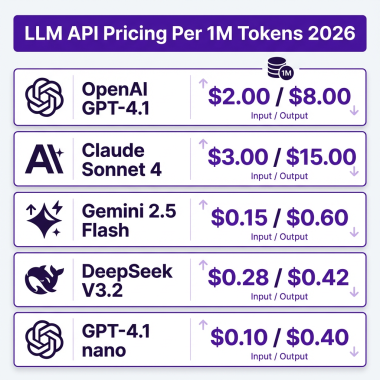
If you’re still paying per-token for cloud APIs, you’re bleeding money. A heavy user running a 70B parameter model in the cloud can burn through $300 to $800 per month. Run that same model locally, and your only cost is the hardware you already own.
But here’s the problem: not all local LLM tools are created equal. Some are built for developers who live in the terminal. Others target beginners who want a polished GUI. A few are designed for production API deployments. Pick the wrong one, and you’ll waste hours fighting configuration instead of building.
This guide ranks the 7 best local LLM tools for developers in 2026. I’ve tested each one, compared their features, and mapped them to real use cases. Whether you’re a solo developer, a privacy-focused researcher, or running AI in production, there’s a tool here for you.
What Makes a Great Local LLM Tool?
Before diving into the rankings, let’s establish the criteria. A great local LLM tool needs to nail four things:
- Model compatibility: Can it run Llama, Mistral, Qwen, Gemma, and the latest open-weight models?
- Ease of setup: Are you up and running in 5 minutes or fighting dependencies for an hour?
- Performance: Does it leverage your GPU properly, or leave cycles on the table?
- Integration: Can you connect it to your existing tools via API, or is it a walled garden?
The tools below are ranked by how well they deliver across these dimensions for their target audience.
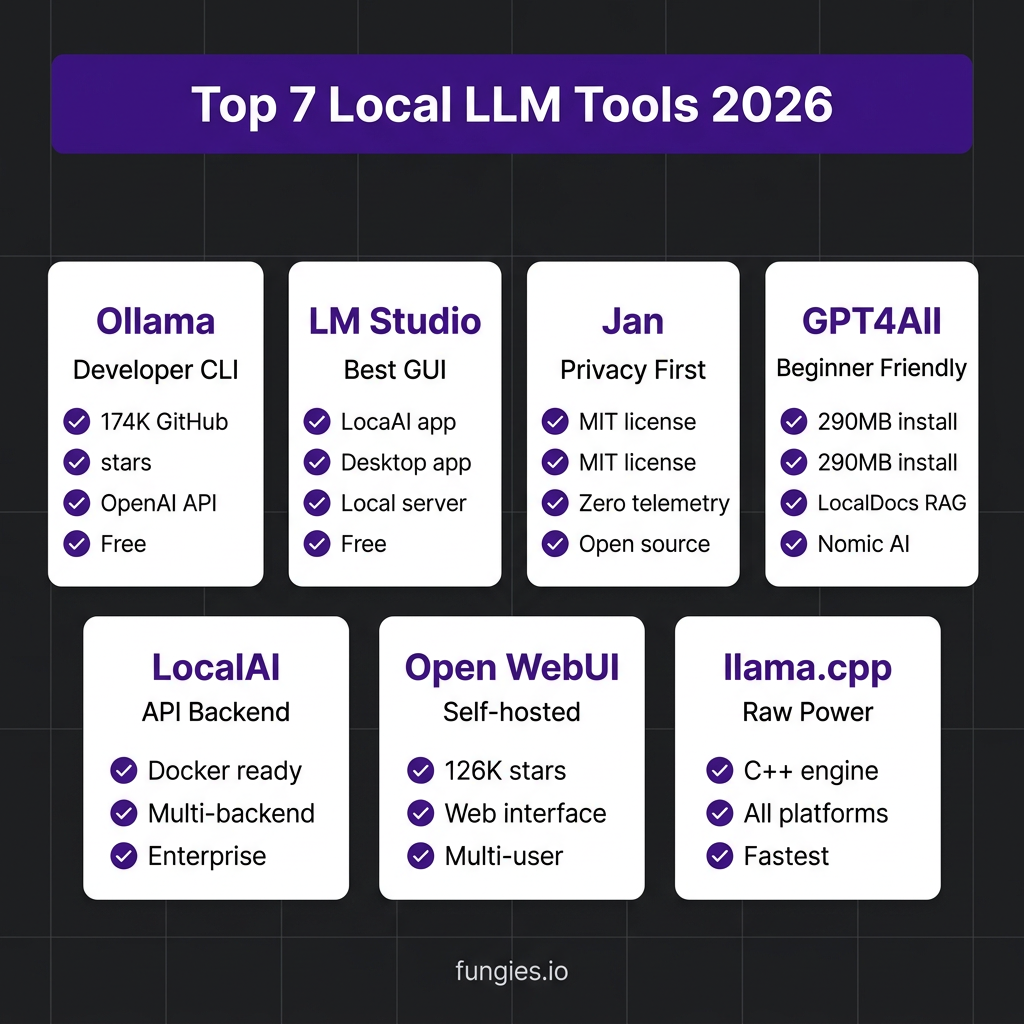
1. Ollama — Best for Developers and API-First Workflows
Ollama has become the default runtime for local LLMs, and for good reason. It’s a headless CLI tool that wraps llama.cpp with a dead-simple interface. One command—ollama run llama3—and you’re chatting with a model.
What makes Ollama special is its OpenAI-compatible REST API. Exposed on localhost:11434, it lets you drop Ollama into any application that speaks OpenAI. Claude Code, Continue, OpenClaw, custom apps—everything just works.
Key Features
- 200+ models in the official library, including Llama 3, Mistral, Qwen, Gemma, and DeepSeek
- Native GPU acceleration on NVIDIA, AMD, and Apple Silicon
- Model management with simple pull/run/push commands
- Docker support for containerized deployments
- Modelfile system for customizing prompts and parameters
Best For
Developers who want a headless, scriptable runtime. If you’re building AI-powered applications or integrating LLMs into your dev workflow, Ollama is the obvious choice.
Limitations
No built-in GUI—though you can pair it with Open WebUI or Jan for a visual interface. Some users report memory leaks requiring periodic restarts on long-running instances.
Price: Free and open source
2. LM Studio — Best GUI for Beginners and Power Users
LM Studio is what happens when an ex-Apple engineer builds a local LLM tool. The interface is polished, intuitive, and genuinely pleasant to use. It’s the tool I recommend to anyone who wants to run local LLMs without touching a terminal.
Under the hood, LM Studio uses llama.cpp on Windows/Linux and Apple’s MLX engine on macOS. This dual-engine approach means optimal performance on every platform. On an M5 MacBook, LM Studio hits 38 tok/s with Mistral 7B. On an RTX 4070, it pushes 74 tok/s.
Key Features
- Built-in model browser with one-click downloads from Hugging Face
- Chat interface with conversation history and prompt templates
- Local server mode on port 1234 with OpenAI-compatible API
- GPU offloading controls and context window management
- Headless deployment option for servers (no GUI)
- iPhone app for running models on mobile
Best For
Users who want a polished desktop experience. Researchers, writers, and non-technical users love LM Studio. But developers appreciate it too—the local server mode is production-ready.
Limitations
Proprietary license—free for personal use, but commercial teams need to pay. No Intel Mac support. Version 0.3.5 had a performance regression that dropped speeds 96%, though this has been fixed.
Price: Free for personal use; paid enterprise plans
3. Jan — Best for Privacy and Open Source Purists
Jan is the only tool on this list that’s fully MIT-licensed and auditable. No telemetry. No cloud dependencies. No proprietary code. If privacy is non-negotiable, Jan is your tool.
Built by a bootstrapped team in Ho Chi Minh City, Jan has grown to 30,000+ GitHub stars. It offers a clean desktop interface for macOS, Windows, and Linux, plus an OpenAI-compatible API on port 1337.
Key Features
- 100% open source under MIT license
- Zero telemetry—everything stays on your machine
- Local chat history storage
- MCP extension ecosystem for tool integration
- Hybrid local + cloud mode (optional)
- Built-in model manager
Best For
Privacy-maximalists, open-source advocates, and developers who need an auditable codebase they can fork or modify. Jan is also great for users who want a native GUI without Docker complexity.
Limitations
Smaller model library than Ollama. The team warns users to “expect the entire thing to break”—it’s honest about being beta software. Fewer enterprise features than LM Studio.
Price: Free and open source
4. GPT4All — Best for Beginners and Document Chat
GPT4All from Nomic AI is the gateway drug for local LLMs. With a 290MB installer and a 4GB RAM minimum, it runs on hardware that other tools would laugh at. This is the tool you recommend to your non-technical friend who wants to try local AI.
The standout feature is LocalDocs—a built-in RAG system that lets you chat with your documents. Drop in PDFs, Word files, or text documents, and GPT4All builds a local vector index for question-answering.
Key Features
- Smallest footprint: 290MB install, 4GB RAM minimum
- LocalDocs RAG for document Q&A
- Curated model library—no overwhelming choices
- Cross-platform: Windows, macOS, Linux
- Easy installer—no dependencies to manage
Best For
Beginners, non-technical users, and anyone who wants document chat without setting up a vector database. GPT4All is also great for older hardware.
Limitations
The documentation warns that LocalDocs “will crash the app” with large document collections. Smaller team (4 people) means slower updates. Less flexible than Ollama for advanced use cases.
Price: Free; backed by $17M Series A
5. LocalAI — Best for Production API Deployments
LocalAI is the tool you deploy when you need an OpenAI-compatible API server in production. It’s designed for developers who want to self-host LLMs as a service, complete with multi-backend support and Docker deployment.
Unlike the other tools on this list, LocalAI isn’t primarily a chat interface. It’s an inference server that happens to have a web UI for management. Think of it as your own private OpenAI endpoint.
Key Features
- Multi-backend support: llama.cpp, vLLM, transformers, and more
- Docker-first deployment
- OpenAI-compatible API with streaming support
- Model gallery with one-click installs
- GPU acceleration and distributed inference
- Enterprise features: authentication, rate limiting, metrics
Best For
DevOps engineers and teams building AI-powered applications. If you need to serve LLMs to multiple applications or users, LocalAI is the production-ready choice.
Limitations
Steeper learning curve than GUI tools. Requires Docker knowledge for optimal deployment. Not designed for casual chat use.
Price: Free and open source
6. Open WebUI — Best Self-Hosted Web Interface
Open WebUI (formerly Ollama WebUI) has exploded to 126,000+ GitHub stars by delivering exactly what developers want: a self-hosted ChatGPT alternative that connects to Ollama or any OpenAI-compatible backend.
Deploy it with one Docker command, and you get a full-featured web interface with RAG, voice input, multi-user support, and plugin extensibility. It’s the tool that turns Ollama from a CLI utility into a team-ready platform.
Key Features
- One-command Docker deployment
- RAG with document upload (PDFs, text, code)
- Voice input and text-to-speech
- Multi-user support with authentication
- Plugin system for custom tools
- Mobile-responsive design
Best For
Teams who want a shared LLM interface, or developers who prefer web UIs over desktop apps. Also great for accessing local LLMs from mobile devices.
Limitations
Requires Docker—adds complexity for non-technical users. Depends on a backend (Ollama or similar) for model inference.
Price: Free and open source
7. llama.cpp — Best for Raw Performance and Custom Builds
llama.cpp is the engine that powers most of the tools on this list. If you want maximum performance and don’t mind getting your hands dirty with C++ compilation flags, this is where you start.
Created by Georgi Gerganov, llama.cpp pioneered efficient LLM inference on consumer hardware. It runs on everything—NVIDIA GPUs, AMD cards, Apple Silicon, Raspberry Pi, even your browser via WebAssembly.
Key Features
- Fastest inference on consumer hardware
- Supports every quantization format: GGUF, Q4_K_M, Q5_K_M, Q8_0
- Multi-platform: Linux, macOS, Windows, BSD, Android
- GPU acceleration: CUDA, Metal, Vulkan, OpenCL
- Minimal dependencies—single binary
Best For
Performance hackers, embedded systems developers, and anyone building custom LLM solutions. If you’re shipping LLMs to edge devices or optimizing for specific hardware, llama.cpp is essential.
Limitations
No GUI—purely a command-line tool. Requires manual model downloading and configuration. Not beginner-friendly.
Price: Free and open source (MIT license)
Local LLM Tools Comparison Table
| Tool | Interface | API | License | Best For | Setup Time |
|---|---|---|---|---|---|
| Ollama | CLI | OpenAI-compatible | Open source | Developers | 2 min |
| LM Studio | GUI | OpenAI-compatible | Proprietary | Beginners | 5 min |
| Jan | GUI | OpenAI-compatible | MIT | Privacy | 5 min |
| GPT4All | GUI | Limited | Open source | Non-technical | 3 min |
| LocalAI | Web + API | OpenAI-compatible | Open source | Production | 10 min |
| Open WebUI | Web | Via backend | Open source | Teams | 5 min |
| llama.cpp | CLI | Custom | MIT | Performance | 15 min |
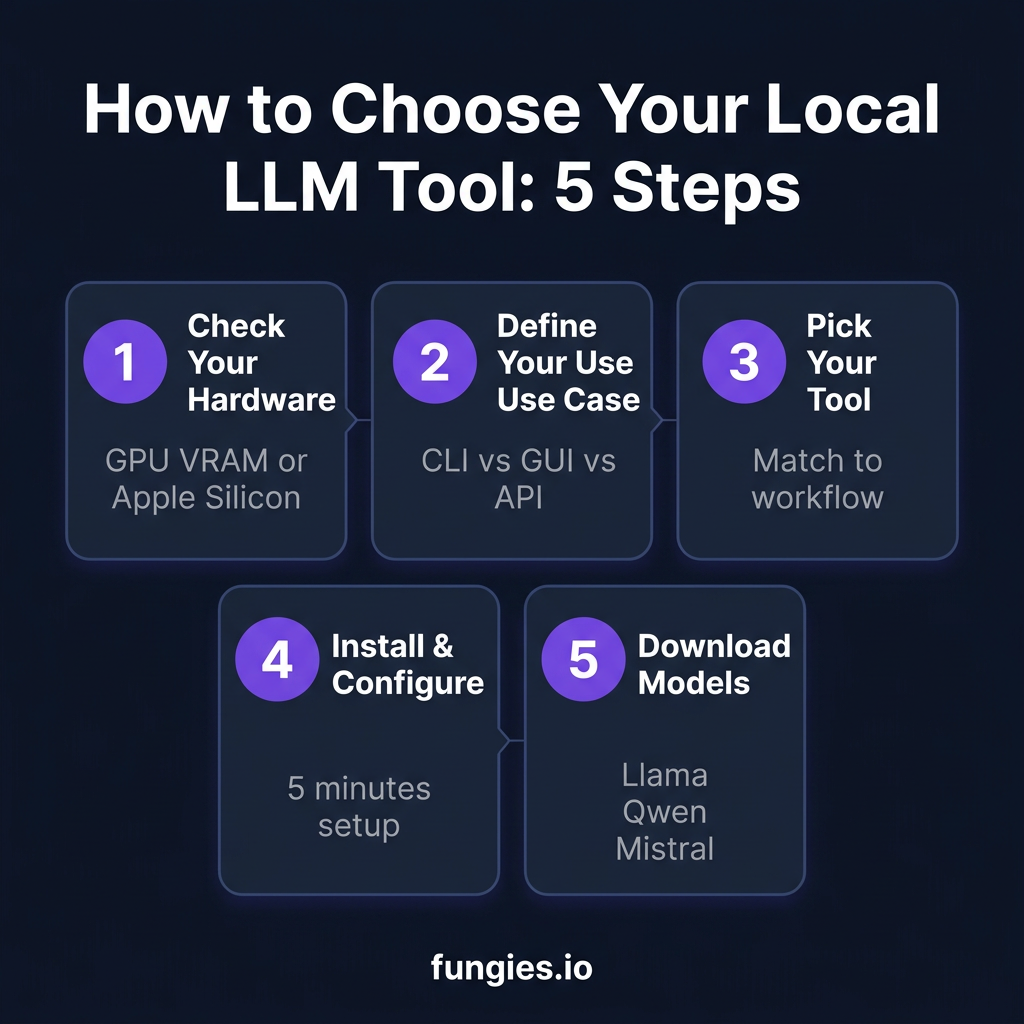
How to Choose the Right Tool for Your Workflow
With seven solid options, how do you pick? Here’s my decision framework:
If You’re a Developer Building AI-Powered Apps
Start with Ollama. Its API compatibility means you can prototype with OpenAI and deploy with Ollama without changing code. For production deployments, add LocalAI to the mix.
If You Want a ChatGPT Replacement
LM Studio offers the most polished experience. If you’re privacy-focused, Jan gives you similar functionality with full open-source transparency.
If You’re Non-Technical
GPT4All is designed for you. The installer is small, the interface is simple, and LocalDocs lets you chat with documents without understanding embeddings.
If You’re Running a Team or Business
Open WebUI gives you multi-user support and RAG in a self-hosted package. Pair it with Ollama on a server, and your team has a private ChatGPT.
If You’re Optimizing for Performance
Go straight to llama.cpp. Compile with the right flags for your hardware, and you’ll squeeze out every last token per second.
Key Takeaways
- Ollama dominates for developers with its CLI-first approach and OpenAI-compatible API
- LM Studio offers the best GUI experience for beginners and power users alike
- Jan is the privacy-first choice with full MIT licensing and zero telemetry
- GPT4All is the most accessible entry point for non-technical users
- LocalAI is built for production API deployments and enterprise use
- Open WebUI turns any backend into a team-ready ChatGPT alternative
- llama.cpp remains the performance king for custom builds and edge deployments
The local LLM ecosystem in 2026 is mature enough that you can ditch cloud APIs for most use cases. The tools above cover every workflow—from casual chatting to production inference. Pick one, download a model, and start saving those API dollars.
FAQ
What’s the easiest local LLM tool for beginners?
LM Studio and GPT4All are the most beginner-friendly. Both offer graphical installers, one-click model downloads, and intuitive chat interfaces. GPT4All has a smaller footprint (290MB vs ~500MB), making it ideal for older hardware.
Can I use these tools for commercial projects?
Ollama, Jan, GPT4All, LocalAI, Open WebUI, and llama.cpp are all open source and free for commercial use. LM Studio requires a paid license for commercial teams, though it’s free for personal use.
Do I need a GPU to run local LLMs?
No, but it helps. All these tools support CPU inference, though speeds are 4-10x slower. For usable performance with 7B models, you’ll want at least 8GB RAM. For GPU acceleration, 8GB+ VRAM opens up 7B-13B models; 16GB+ VRAM handles most models up to 24B parameters.
Which models work with these tools?
All tools support GGUF format models from Hugging Face, including Llama 3, Mistral, Qwen, Gemma, DeepSeek, and Phi. Ollama has the largest curated library with 200+ models. LM Studio can download any GGUF model directly from Hugging Face.
Can I switch between cloud and local LLMs?
Yes. Jan offers a hybrid mode that lets you use local models by default and fall back to cloud APIs when needed. Most tools with OpenAI-compatible APIs make it easy to switch endpoints between local and cloud providers.
Conclusion
The local LLM revolution isn’t coming—it’s here. With tools like Ollama, LM Studio, and Jan, you can run frontier-level AI on your own hardware without sending data to third-party servers. Whether you’re optimizing for privacy, cost, or performance, there’s a tool in this list that fits your workflow.
Start with Ollama if you’re a developer. Try LM Studio if you want the best GUI. Go with Jan if privacy is paramount. And if you’re building AI-powered applications for users, check out Fungies.io—the merchant of record platform that handles payments, tax compliance, and global checkout for SaaS and digital products.
References
- Ollama GitHub: https://github.com/ollama/ollama (174,000+ stars)
- LM Studio: https://lmstudio.ai
- Jan AI: https://jan.ai
- GPT4All: https://www.nomic.ai/gpt4all
- LocalAI: https://localai.io
- Open WebUI: https://github.com/open-webui/open-webui (126,000+ stars)
- llama.cpp: https://github.com/ggerganov/llama.cpp
- Kunal Ganglani Blog: Local LLM Hardware Guide 2026
- PromptQuorum: Local LLM One-Click Installers Comparison
- SitePoint: Run Local LLMs 2026 Complete Guide
- Contabo: Ollama vs LM Studio 2026 Comparison